
Add your description here

Project description
Raggie: Latent Space Trainer, Retriever, and Visualizer









Raggie is a Python-based project for training, retrieving, and visualizing sentence embeddings. It provides tools to train a model on paired text data, retrieve relevant documents based on queries, evaluate retrieval performance, and visualize embeddings using t-SNE.
Features
- Latent Space Trainer: Train a Sentence Transformer model with positive and negative pairs of text data.
- Negative Sampling: Automatically generate negative samples to improve training.
- Latent Retriever: Retrieve the most relevant documents for a given query using FAISS for efficient similarity search.
- Evaluation: Evaluate retrieval performance using rank-based metrics.
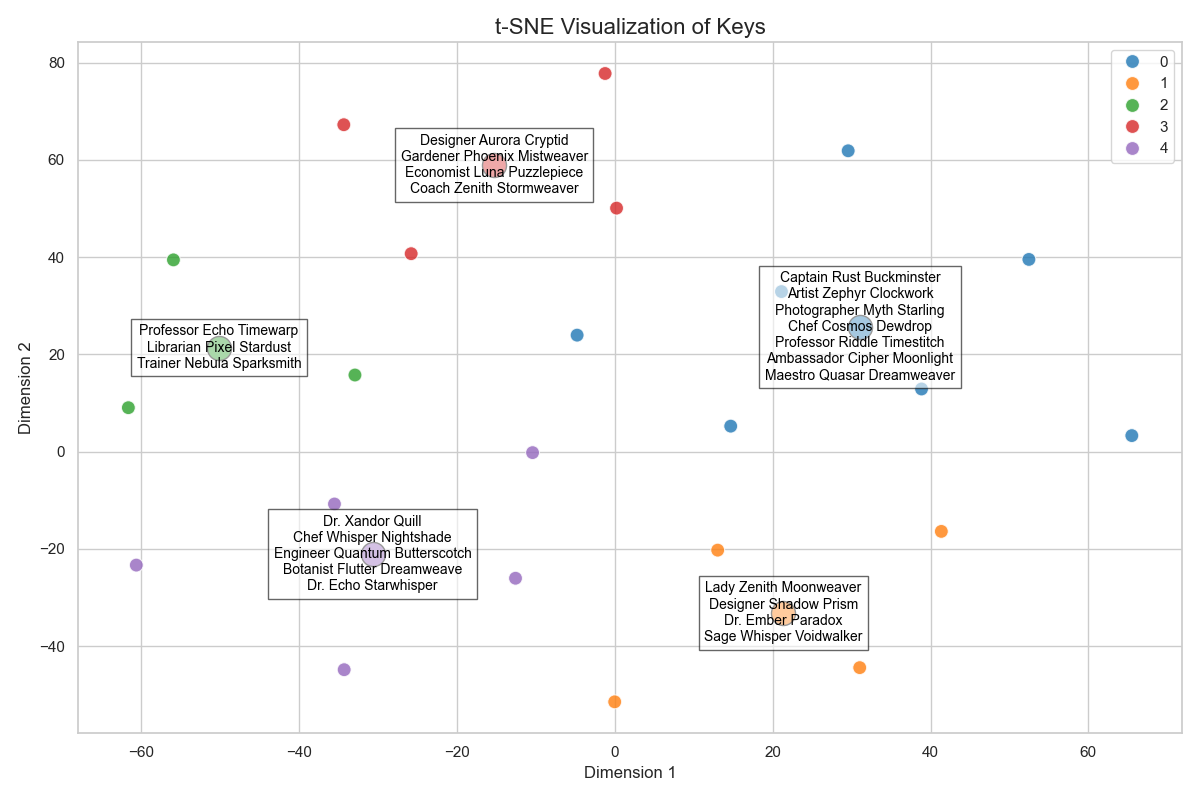
- t-SNE Visualization: Visualize embeddings in 2D space with clustering and annotation support.
- Abstract Data Handling: Extend or customize data handling by implementing the
AbstractRaggieDatainterface.
Visit the Raggie API Documentation for more detailed information.
Project Structure
├── raggie/
│   ├── data.py              # Abstract and default data handling
│   ├── model.py             # Model training logic
│   ├── main.py              # Retrieval and evaluation logic
│   ├── utils.py             # Plotting capabilities and t-SNE visualization
│   ├── __init__.py          # High-level API
├── examples/
│   ├── user.py              # Example usage of Raggie
├── data/
│   ├── user_train.jsonl     # Training data in JSONL format
│   ├── user_test.jsonl      # Evaluation data in JSONL format
├── output/                  # Directory for saving trained models and configurations
├── requirements.txt         # Python dependencies
├── pyproject.toml           # Project metadata
├── uv.lock                  # Dependency lock file
├── README.md                # Project documentation
Installation
-
Clone the repository:
git clone https://github.com/yamaceay/raggie.git
cd raggie
-
Install
uvpackage manager:# On Unix-like systems (Linux, macOS) curl -LsSf https://astral.sh/uv/install.sh | sh # On Windows PowerShell powershell -c "irm https://astral.sh/uv/install.ps1 | iex"
For other installation methods, visit uv documentation.
-
Sync the dependencies using
uv:uv syncThis will ensure all dependencies are installed and locked to the versions specified in
uv.lock.
Usage
Training the Model
-
Prepare your training and evaluation data in JSONL format. Each line should be a JSON object with
keyandvaluefields. Currently, only uniquekeyvalues are supported.Example format:
{"key": "topic1", "value": "This is the text for topic 1."}
{"key": "topic2", "value": "This is the text for topic 2."}
Basic Tutorial
Here's a step-by-step guide to using Raggie for training, retrieving, and visualizing embeddings:
-
First, initialize the core components: You can use the
RaggieDataclass to load your data and theRaggieModelclass to work with the model.from raggie import Raggie, RaggieModel, RaggieData # Set up data and model paths data = RaggieData(data_dir="data/user") model = RaggieModel(output_dir="output/user")
-
Train the model: Raggie requires training data in the form of paired topics and texts. You can use the
RaggieDataclass to load your data and theRaggieModelclass to train the model.model.train(data) raggie = Raggie(model, data)
-
Perform retrievals in different ways: Raggie supports various retrieval methods, including using queries, keys, and content. Here are some examples.
Given the following arguments:`
key = "Dr. Xandor Quill"
query = "I am looking for a librarian who has specialized in underwater chess mostly played by dolphins"
You can also retrieve entities based on a query:
    # Retrieve documents based on a query
    results = raggie.retrieve([query], return_all_scores=True)

    # [('Dr. Xandor Quill', np.float32(0.29358667)), ('Coach Zenith Stormweaver', np.float32(1.3610729)), ('Librarian Pixel Stardust', np.float32(1.4311827)), ('Maestro Quasar Dreamweaver', np.float32(1.5779625)), ('Designer Shadow Prism', np.float32(1.6315038))]
In a similar way, you can retrieve entitis based on one entity key:
    # Find similar documents using a key
    similar_keys = raggie.most_similar(keys=[key], return_all_scores=True)

    # [('Dr. Xandor Quill', np.float32(7.7822574e-13)), ('Dr. Echo Starwhisper', np.float32(1.3583667)), ('Artist Zephyr Clockwork', np.float32(1.3616264)), ('Maestro Quasar Dreamweaver', np.float32(1.5282866)), ('Trainer Nebula Sparksmith', np.float32(1.5660846))]
You can also retrieve documents based on a query:
    # Find similar documents using content
    similar_docs = raggie.most_similar(queries=[query], return_all_scores=True)

    # [('A deep-sea librarian who invented underwater chess which is now played by dolphins', np.float32(0.29358667)), ('Trains butterflies for underwater marathon racing', np.float32(1.3610729)), ('Catalogs books that write themselves when no one is looking', np.float32(1.4311827)), ('Conducts orchestras of wind-up toys and raindrops', np.float32(1.5779625)), ('Creates video games that can only be played while sleeping', np.float32(1.6315038))]
All these methods are set
return_all_scores=Falseby default, which means they return keys instead of key - similarity score pairs. -
Evaluate and visualize: Use the
RaggiePlotterclass to visualize embeddings in 2D space using t-SNE. You can also cluster embeddings and annotate centroids with group names.# Import for visualization from raggie.utils import RaggiePlotter # Check retrieval performance rank = raggie.evaluate_rank(query, key) # Rank of document 'I am looking for a librarian who has specialized in underwater chess mostly played by dolphins' for key 'Dr. Xandor Quill': 1 # Visualize embeddings plotter = RaggiePlotter(model) plotter.plot(keys, n_clusters=5)
For a complete working example, check examples/user.py in the project directory.
Extending Data Handling
The current implementation uses abstract classes for allowing custom functionality in data handling, model training and visualization. You can extend the functionality by implementing your own logic by respecting the interfaces provided in each file.
The types can be imported as follows:
from raggie.types import RaggieDataClass, RaggieModelClass, RaggiePlotterClass
Example Data
The project includes example training and evaluation data in the data directory:
data/user_train.jsonl: Training data with paired topics and texts.data/user_test.jsonl: Evaluation data for testing retrieval performance.
Dependencies
The project requires the following Python libraries:
faiss_cpunumpysentence_transformerstorchdatasetsacceleratematplotlibseabornscikit-learn
All dependencies are managed using uv and listed in requirements.txt and uv.lock.
Python Version
This project requires Python 3.12. Ensure you have the correct version installed.
Output
The trained model and related configurations are saved per default in the output directory. This includes:
- Model weights (
model.safetensors) - Tokenizer configuration (
tokenizer.json,vocab.txt) - Additional metadata files.
Contributing
Contributions are welcome! Feel free to open issues or submit pull requests.
License
This project is licensed under the MIT License. See the LICENSE file for details.
Acknowledgments
This project uses the Sentence Transformers library for training and embedding generation, and FAISS for efficient similarity search.
Release history Release notifications | RSS feed


Download files
Download the file for your platform. If you're not sure which to choose, learn more about installing packages.
Source Distribution
Built Distribution
Filter files by name, interpreter, ABI, and platform.
If you're not sure about the file name format, learn more about wheel file names.
Copy a direct link to the current filters
File details
Details for the file raggie-0.1.4.tar.gz.
File metadata
- Download URL: raggie-0.1.4.tar.gz
- Upload date:
- Size: 15.3 kB
- Tags: Source
- Uploaded using Trusted Publishing? No
- Uploaded via: twine/6.1.0 CPython/3.12.7
File hashes
| Algorithm | Hash digest | |
|---|---|---|
| SHA256 |
c63f068330fbcc6982fb3bdb65b88fa0a7b889ec68247f31297a8cedb58a2d31
|
|
| MD5 |
fe7227b22da8db684b613b654efde1c3
|
|
| BLAKE2b-256 |
4dfc66391b91640b125de1b7aa83cc65fbc09d6b40d00d4b15ae1c4421059825
|
File details
Details for the file raggie-0.1.4-py3-none-any.whl.
File metadata
- Download URL: raggie-0.1.4-py3-none-any.whl
- Upload date:
- Size: 13.4 kB
- Tags: Python 3
- Uploaded using Trusted Publishing? No
- Uploaded via: twine/6.1.0 CPython/3.12.7
File hashes
| Algorithm | Hash digest | |
|---|---|---|
| SHA256 |
6a7db22765bc7a2057c452bc79038571d1a075bb4779eba9837eff2885f0c39b
|
|
| MD5 |
a16127ebd121ae2eec0b447446c33250
|
|
| BLAKE2b-256 |
b3bffc03dda90f90501d079b556cbc10bd393892dfb2f096bbf33166bcb1a160
|






