
RAGWire — Production-grade RAG toolkit for document ingestion and retrieval with hybrid search support
Verified details
These details have been verified by PyPIProject links
GitHub Statistics
Maintainers

Project description

RAGWire
Production-grade RAG toolkit for document ingestion and retrieval



Features
- Document Loading — PDF, DOCX, XLSX, PPTX and more via MarkItDown
- LLM Metadata Extraction — extracts company, doc type, fiscal period using your LLM; fully customisable via YAML
- Smart Text Splitting — markdown-aware and recursive chunking strategies
- Multiple Embedding Providers — Ollama, OpenAI, HuggingFace, Google, FastEmbed
- Qdrant Vector Store — dense, sparse, and hybrid search
- Advanced Retrieval — similarity, MMR, and hybrid search with metadata filtering
- SHA256 Deduplication — at both file and chunk level
- Directory Ingestion — ingest an entire folder with one call, with optional recursive scan
- Env Var Substitution — use
${VAR}inconfig.yamlfor secrets
Architecture
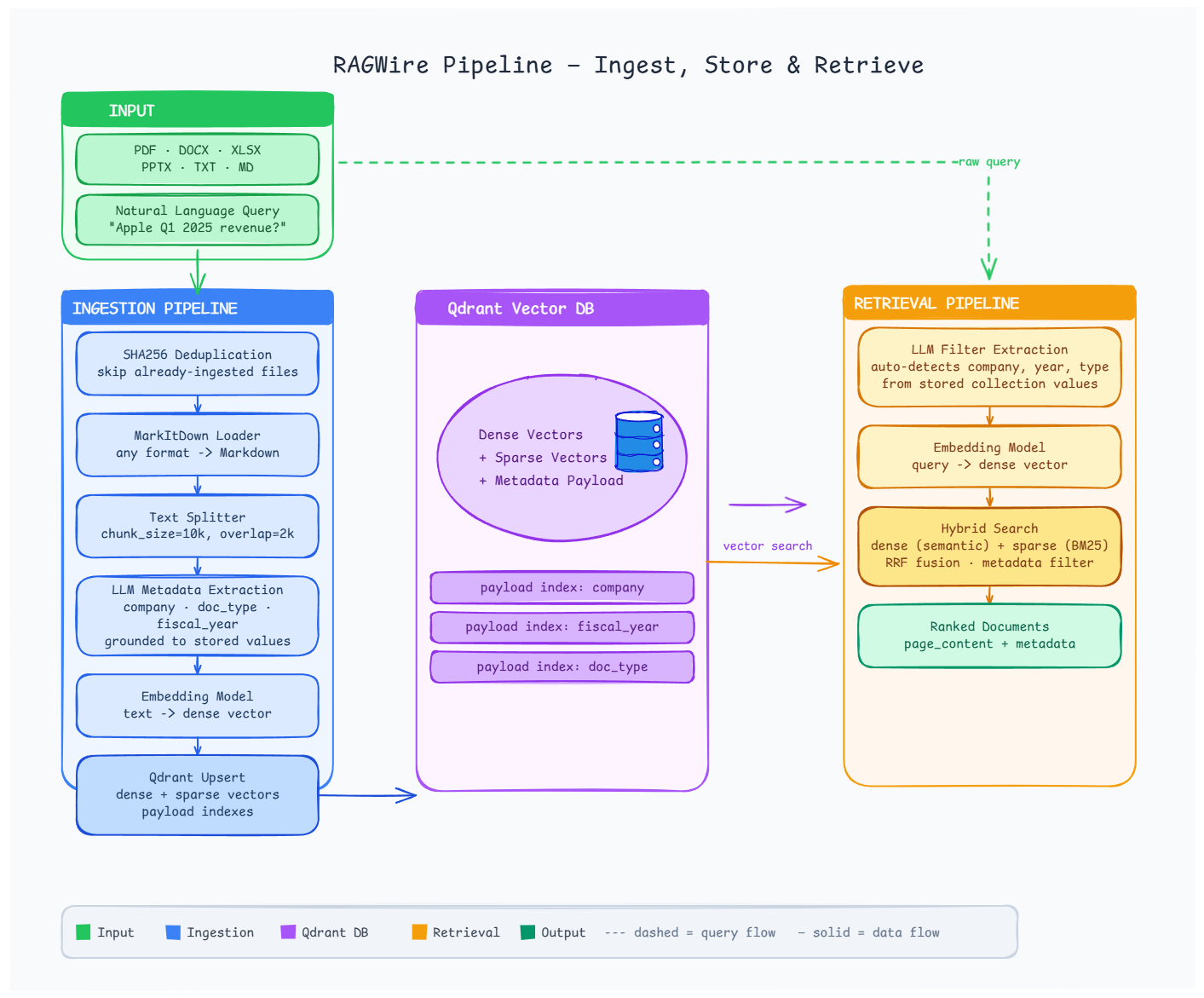
Installation
pip install ragwire

# With Ollama support (local, no API key)
pip install "ragwire[ollama]"

# With all providers
pip install "ragwire[all]"
Quick Start
from ragwire import RAGWire

rag = RAGWire("config.yaml")

# Ingest a list of files (shows tqdm progress bar)
stats = rag.ingest_documents(["data/Apple_10k_2025.pdf"])
print(f"Chunks created: {stats['chunks_created']}")

# Or ingest an entire directory
stats = rag.ingest_directory("data/", recursive=True)

# Retrieve
results = rag.retrieve("What is Apple's total revenue?", top_k=5)
for doc in results:
    print(doc.metadata.get("company_name"), doc.page_content[:200])
Configuration
Copy config.example.yaml to config.yaml and edit. Secrets can be injected via environment variables:
vectorstore:
  url: "https://your-cluster.qdrant.io"
  api_key: "${QDRANT_API_KEY}"

llm:
  provider: "openai"
  model: "gpt-5.4-nano"
  api_key: "${OPENAI_API_KEY}"
Full example:
embeddings:
  provider: "ollama"
  model: "qwen3-embedding:0.6b"
  base_url: "http://localhost:11434"

llm:
  provider: "ollama"
  model: "qwen3.5:9b"
  num_ctx: 16384

vectorstore:
  url: "http://localhost:6333"
  collection_name: "my_docs"
  use_sparse: true

retriever:
  search_type: "hybrid"
  top_k: 5
Embedding Providers
# Ollama (local)
embeddings:
  provider: "ollama"
  model: "qwen3-embedding:0.6b"

# OpenAI
embeddings:
  provider: "openai"
  model: "text-embedding-3-small"

# HuggingFace (local)
embeddings:
  provider: "huggingface"
  model_name: "sentence-transformers/all-MiniLM-L6-v2"

# Google
embeddings:
  provider: "google"
  model: "models/embedding-001"
Component Usage
from ragwire import (
    MarkItDownLoader,
    get_splitter,
    get_markdown_splitter,
    get_embedding,
    QdrantStore,
    MetadataExtractor,
    hybrid_search,
    mmr_search,
)

# Load a document
loader = MarkItDownLoader()
result = loader.load("document.pdf")

# Split text
splitter = get_markdown_splitter(chunk_size=10000, chunk_overlap=2000)
chunks = splitter.split_text(result["text_content"])

# Embeddings
embedding = get_embedding({"provider": "ollama", "model": "qwen3-embedding:0.6b"})

# Vector store
store = QdrantStore(config={"url": "http://localhost:6333"}, embedding=embedding)
store.set_collection("my_collection")
vectorstore = store.get_store()
Architecture
ragwire/
├── core/          # Config loader + RAGWire orchestrator
├── loaders/       # MarkItDown document converter
├── processing/    # Text splitters + SHA256 hashing
├── metadata/      # Pydantic schema + LLM extractor
├── embeddings/    # Multi-provider embedding factory
├── vectorstores/  # Qdrant wrapper with hybrid search
├── retriever/     # Similarity, MMR, hybrid retrieval
└── utils/         # Logging
Troubleshooting
| Error | Fix |
|---|---|
| Qdrant connection refused | docker run -p 6333:6333 qdrant/qdrant |
markitdown[pdf] missing |
pip install "markitdown[pdf]" |
| Ollama model not found | ollama pull <model-name> |
fastembed missing |
pip install fastembed (needed for hybrid search) |
| Embedding dimension mismatch | Set force_recreate: true in config once, then back to false |
License
MIT © 2026 KGP Talkie Private Limited
Links
- Website: kgptalkie.com
- YouTube: youtube.com/kgptalkie
- GitHub: github.com/laxmimerit/ragwire
- Email: udemy@kgptalkie.com
Project details
Verified details
These details have been verified by PyPIProject links
GitHub Statistics
Maintainers
Release history Release notifications | RSS feed


Download files
Download the file for your platform. If you're not sure which to choose, learn more about installing packages.
Source Distribution
Built Distribution
Filter files by name, interpreter, ABI, and platform.
If you're not sure about the file name format, learn more about wheel file names.
Copy a direct link to the current filters
File details
Details for the file ragwire-1.2.0.tar.gz.
File metadata
- Download URL: ragwire-1.2.0.tar.gz
- Upload date:
- Size: 3.6 MB
- Tags: Source
- Uploaded using Trusted Publishing? Yes
- Uploaded via: twine/6.1.0 CPython/3.13.7
File hashes
| Algorithm | Hash digest | |
|---|---|---|
| SHA256 |
9641e1597a8bc3ccc8eb844001d79aa7b57f32450ffa59024c1434755a078111
|
|
| MD5 |
80790e70cb5f48e8870de3dc20003dc6
|
|
| BLAKE2b-256 |
3ac236838a3306a2c2173c1e9f90b2abc6c4b04c6cae108bf2da57c6d445a71d
|
Provenance
The following attestation bundles were made for ragwire-1.2.0.tar.gz:
Publisher:
publish.yml on laxmimerit/RAGWire
-
Statement:
-
Statement type:
https://in-toto.io/Statement/v1 -
Predicate type:
https://docs.pypi.org/attestations/publish/v1 -
Subject name:
ragwire-1.2.0.tar.gz -
Subject digest:
9641e1597a8bc3ccc8eb844001d79aa7b57f32450ffa59024c1434755a078111 - Sigstore transparency entry: 1172480271
- Sigstore integration time:
-
Permalink:
laxmimerit/RAGWire@3c920677e3345a9dcd8e41fe598934d8e612cc2a -
Branch / Tag:
refs/tags/v1.2.0 - Owner: https://github.com/laxmimerit
-
Access:
public
-
Token Issuer:
https://token.actions.githubusercontent.com -
Runner Environment:
github-hosted -
Publication workflow:
publish.yml@3c920677e3345a9dcd8e41fe598934d8e612cc2a -
Trigger Event:
release
-
Statement type:
File details
Details for the file ragwire-1.2.0-py3-none-any.whl.
File metadata
- Download URL: ragwire-1.2.0-py3-none-any.whl
- Upload date:
- Size: 3.6 MB
- Tags: Python 3
- Uploaded using Trusted Publishing? Yes
- Uploaded via: twine/6.1.0 CPython/3.13.7
File hashes
| Algorithm | Hash digest | |
|---|---|---|
| SHA256 |
cb4638b2889909abbbbb3a228c8bbcf091d132f549725207c76cf7d3d88f21b2
|
|
| MD5 |
4d0ff129c159b734b66ca0ccf6eca679
|
|
| BLAKE2b-256 |
acce09c18df9066a4ab16075a4e9d6a1b4e3dc94757ce1140620754d80e65973
|
Provenance
The following attestation bundles were made for ragwire-1.2.0-py3-none-any.whl:
Publisher:
publish.yml on laxmimerit/RAGWire
-
Statement:
-
Statement type:
https://in-toto.io/Statement/v1 -
Predicate type:
https://docs.pypi.org/attestations/publish/v1 -
Subject name:
ragwire-1.2.0-py3-none-any.whl -
Subject digest:
cb4638b2889909abbbbb3a228c8bbcf091d132f549725207c76cf7d3d88f21b2 - Sigstore transparency entry: 1172480349
- Sigstore integration time:
-
Permalink:
laxmimerit/RAGWire@3c920677e3345a9dcd8e41fe598934d8e612cc2a -
Branch / Tag:
refs/tags/v1.2.0 - Owner: https://github.com/laxmimerit
-
Access:
public
-
Token Issuer:
https://token.actions.githubusercontent.com -
Runner Environment:
github-hosted -
Publication workflow:
publish.yml@3c920677e3345a9dcd8e41fe598934d8e612cc2a -
Trigger Event:
release
-
Statement type:






