

RainfallQC - Quality control for rainfall data



Provides methods for running rainfall quality control.
Features
33 rainfall QC methods (25 from IntenseQC, 6 from SubHourlyQC and 2 from pyPWSQC)
polars DataFrame support for fast data processing
modular structure so you can pick and choose which checks to run
support for single rain gauges or networks of rain gauges
editable parameters so you can tweak thresholds, streak or accumulation lengths, and distances to neighbouring gauges
Installation
RainfallQC can be installed from PyPi:
pip install rainfallqcExamples
Example 1. - Running individual checks on a single rain gauge
Let’s say you have data for a single rain gauge stored in “hourly_rain_gauge_data.csv” which looks like this:
time |
rain_mm |
|---|---|
2020-01-01 00:00 |
0.0 |
2020-01-01 01:00 |
0.1 |
2020-01-01 02:00 |
0.0 |
2020-01-01 03:00 |
105.0 |
2020-01-01 04:00 |
0.6 |
… |
… |
For the majority of the checks in RainfallQC, you can load in your data using polars and run the checks directly. Below, we run 2 example QC checks:
check_intermittency - to flag years where there are periods of non-zero bounded by 0 (see Figure 1.),
daily_accumulations - to flag accumulations of hourly values into daily.
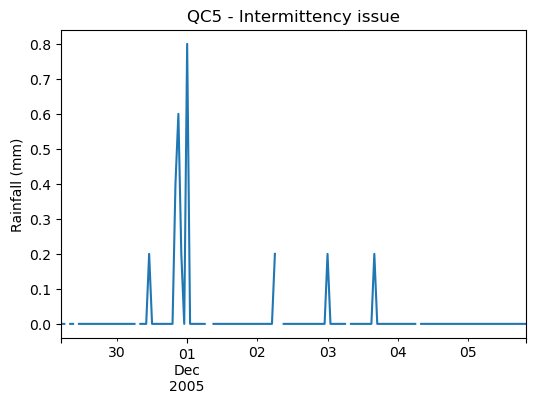
Figure 1. Example of an intermittency issue within the rainfall record
import polars as pl
from rainfallqc import gauge_checks, timeseries_checks

data = pl.read_csv("hourly_rain_gauge_data.csv")

intermittent_years = gauge_checks.check_intermittency(data, target_gauge_col="rain_mm")

daily_accumulation_flags = timeseries_checks.check_daily_accumulations(
    data,
    target_gauge_col="rain_mm",
    gauge_lat=52.0,
    gauge_lon=2.0,
    smallest_measurable_rainfall_amount=0.1,
)
Please note that some checks may require additional metadata, such as gauge location (latitude and longitude) or smallest measurable rainfall amount (e.g. 0.1 mm). This could look like:
station_id |
latitude |
longitude |
start_datetime |
end_datetime |
path |
|---|---|---|---|---|---|
rain_mm_gauge_1 |
53.0 |
2.0 |
2020-01-01 00:00 |
2024-01-01 00:00 |
path/to/gauge_1.csv |
rain_mm_gauge_2 |
54.1 |
-0.5 |
2018-01-01 00:00 |
2023-01-01 00:00 |
path/to/gauge_2.csv |
rain_mm_gauge_3 |
56.9 |
1.9 |
2015-01-01 00:00 |
2025-01-01 00:00 |
path/to/gauge_3.csv |
… |
… |
… |
… |
You could then run checks that require metadata i.e. the check_hourly_exceedance_etccdi_rx1day QC check which flags rainfall values exceeding the hourly day rainfall 1-day record at a given location (see Figure 2):
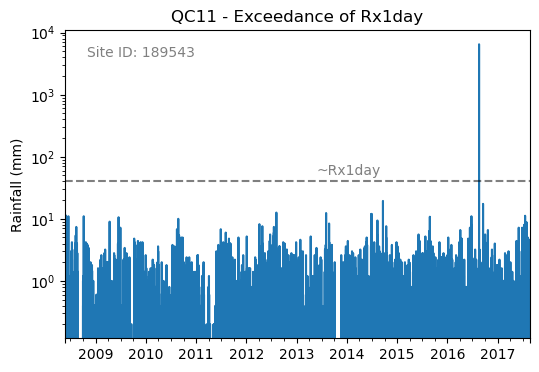
Figure 2. Example of an Rx1day check from the IntenseQC framework
The code for that check looks like:
import polars as pl
from rainfallqc import comparison_checks

data = pl.read_csv("hourly_rain_gauge_data_gauge_1.csv")
metadata = pl.read_csv("rain_gauge_metadata.csv")

target_gauge_id = "rain_mm_gauge_1"
target_metadata = metadata.filter(pl.col("station_id") == target_gauge_id)

rx1day_check = comparison_checks.check_hourly_exceedance_etccdi_rx1day(
     data,
     target_gauge_col=target_gauge_col,
     gauge_lat=target_metadata["latitude"],
     gauge_lon=target_metadata["longitude"]
)
Output flags will then look like:
time |
rx1day_check |
|---|---|
2020-01-01 00:00 |
0 |
2020-01-01 01:00 |
0 |
2020-01-01 02:00 |
0 |
2020-01-01 03:00 |
1 |
2020-01-01 04:00 |
0 |
… |
… |
Example 2. - Running multiple QC checks on a single target gauge
To run multiple QC checks, you can use the apply_qc_framework() method to run QC methods from a given framework (e.g. IntenseQC).
For more information about how to run multiple checks in a framework see Example 4 in the docs
Other examples
Of course, your data may not be tabular, or may not be stored in a single file. Therefore, please see our other Tutorials.
QC checks in RainfallQC
Long name |
Sub-module |
QC Framework |
<15-min |
15-min |
hourly |
daily |
monthly |
|---|---|---|---|---|---|---|---|
Percentiles |
Gauge checks |
✓ |
✓ |
✓ |
✓ |
✓ |
|
K-largest |
Gauge checks |
✓ |
✓ |
✓ |
✓ |
✓ |
|
Days of week |
Gauge checks |
✓ |
✓ |
✓ |
✓ |
☓ |
|
Hours of day |
Gauge checks |
✓ |
✓ |
✓ |
☓ |
☓ |
|
Intermittency |
Gauge checks |
✓ |
✓ |
✓ |
✓ |
✓ |
|
Breakpoints |
Gauge checks |
✓ |
✓ |
✓ |
✓ |
☓ |
|
Minimum value change |
Gauge checks |
✓ |
✓ |
✓ |
✓ |
✓ |
|
R99p |
Comparison checks |
✓ |
✓ |
✓ |
✓ |
☓ |
|
PRCPTOT |
Comparison checks |
✓ |
✓ |
✓ |
✓ |
☓ |
|
World Record |
Comparison checks |
✓ |
✓ |
✓ |
✓ |
☓ |
|
Rx1day |
Comparison checks |
✓ |
✓ |
✓ |
☓ |
☓ |
|
CDD (Dry spells) |
Timeseries checks |
✓ |
✓ |
✓ |
✓ |
☓ |
|
Daily accumulations |
Timeseries checks |
agg |
agg |
✓ |
✓ |
☓ |
|
Monthly accumulations |
Timeseries checks |
✓ |
✓ |
✓ |
✓ |
☓ |
|
Streaks |
Timeseries checks |
agg |
agg |
✓ |
✓ |
☓ |
|
Daily neighbours (wet) |
Neighbourhood checks |
✓ |
✓ |
✓ |
✓ |
☓ |
|
Hourly neighbours (wet) |
Neighbourhood checks |
✓ |
✓ |
✓ |
☓ |
☓ |
|
Daily neighbours (dry) |
Neighbourhood checks |
✓ |
✓ |
✓ |
✓ |
☓ |
|
Hourly neighbours (dry) |
Neighbourhood checks |
✓ |
✓ |
✓ |
☓ |
☓ |
|
Monthly neighbours |
Neighbourhood checks |
agg |
agg |
agg |
agg |
✓ |
|
Timing offset |
Neighbourhood checks |
✓ |
✓ |
✓ |
✓ |
☓ |
|
Pre-QC affinity index |
Neighbourhood checks |
✓ |
✓ |
✓ |
✓ |
✓ |
|
Pre-QC pearson correlation |
Neighbourhood checks |
✓ |
✓ |
✓ |
✓ |
✓ |
|
Daily factor |
Neighbourhood checks |
agg |
agg |
agg |
✓ |
☓ |
|
Monthly factor |
Neighbourhood checks |
agg |
agg |
agg |
agg |
✓ |
|
Check exceedance of UK 1h record |
Sub-hourly thresholds |
✓ |
✓ |
☓ |
☓ |
☓ |
|
Check exceedance of UK 24h record |
Sub-hourly thresholds |
✓ |
✓ |
☓ |
☓ |
☓ |
|
Check 24h-sum exceedance of UK 24h record |
Sub-hourly thresholds |
✓ |
✓ |
☓ |
☓ |
☓ |
|
Check streaks (20 mm min) |
Sub-hourly thresholds |
✓ |
✓ |
☓ |
☓ |
☓ |
|
Check data has sub-hourly frequency |
Sub-hourly thresholds |
✓ |
✓ |
☓ |
☓ |
☓ |
|
Check sub-hourly rainfall thresholds |
Sub-hourly thresholds |
✓ |
✓ |
☓ |
☓ |
☓ |
|
Faulty Zeros |
pyPWSQC filters |
✓ |
✓ |
✓ |
✓ |
☓ |
|
Station Outliers |
pyPWSQC filters |
✓ |
✓ |
✓ |
☓ |
☓ |
Documentation and License
RainfallQC is developed and maintained by UKCEH.
Free software: GNU General Public License v3
Documentation: https://nerc-ceh.github.io/RainfallQC/
Note on time aggregation
Hourly data is aggregated with ‘label=right’, so 07:00:01 to 08:00 is labelled 08:00. For daily and monthly aggregation, label is left, so n-hour on D to n-hour on D+1 is D.
How to cite this package
To cite a specific version of RainfallQC, please see Zenodo DOI. For v1.0.2: https://doi.org/10.5281/zenodo.21030756
Credits
Builds upon IntenseQC, SubHourlyQC and (is compatible with) pyPWSQC:
Please email tomkee@ceh.ac.uk if you have any questions.
This package was created with Cookiecutter and the audreyr/cookiecutter-pypackage project template.
1 maintainer

Metadata
1 maintainer
Release files for rainfallqc 1.1.0
For a detailed explanation of source distributions (sdists) and built distributions (wheels), please see the package formats documentation.
Source distribution (sdist)
| File | Size | Uploaded | |
|---|---|---|---|
| rainfallqc-1.1.0.tar.gz | 1.3 MB | Details |
Built distribution (wheel)
| File | Interpreter | ABI | Platform | Reset |
|---|---|---|---|---|
| rainfallqc-1.1.0-py3-none-any.whl | Python 3 | none | any | Details |
Total release size: 2.7 MB
Release files / rainfallqc-1.1.0.tar.gz
| Download URL | rainfallqc-1.1.0.tar.gz |
|---|---|
| Size | 1.3 MB |
| Tags | Source |
|
SHA-256 checksum How to use checksums |
ba28462ab13762829053cfb3484bfa7b75aa7798042f4b464a5cb8e66ec8bce6
|
|
BLAKE2b-256 checksum How to use checksums |
2e316cc74769747765c11d81bec7482ae0036a3f44be92ad3b1665bd0ed5dfed
|
| Upload date | |
|
Uploaded using Trusted Publishing? What is trusted publishing? |
Yes |
| Uploaded via |
twine/7.0.0 CPython/3.13.14
|
Provenance
Provenance describes where a file came from. On PyPI, provenance is shared via attestations, which provide a verifiable record of the build or publishing details. View details, limitations and caveats.


PyPI Publish Attestation
PyPI verified that this artifact, at this checksum, originated from the publisher listed below.
Signed by GitHub Actions, verified by PyPI on Aug 24, 2026.
Transparency logRelease files / rainfallqc-1.1.0-py3-none-any.whl
| Download URL | rainfallqc-1.1.0-py3-none-any.whl |
|---|---|
| Size | 1.4 MB |
| Tags | Python 3 |
|
SHA-256 checksum How to use checksums |
a8e15f7304d3b649ba1cac570ac991750ec2479172ffcb7cf9247506859cce1f
|
|
BLAKE2b-256 checksum How to use checksums |
65ed13c651d7b90acb6c59f02c0e56f4842691920700a1c06b1ef307c0d7338a
|
| Upload date | |
|
Uploaded using Trusted Publishing? What is trusted publishing? |
Yes |
| Uploaded via |
twine/7.0.0 CPython/3.13.14
|
Provenance
Provenance describes where a file came from. On PyPI, provenance is shared via attestations, which provide a verifiable record of the build or publishing details. View details, limitations and caveats.
PyPI Publish Attestation
PyPI verified that this artifact, at this checksum, originated from the publisher listed below.
Signed by GitHub Actions, verified by PyPI on Aug 24, 2026.
Transparency log













