
ramify
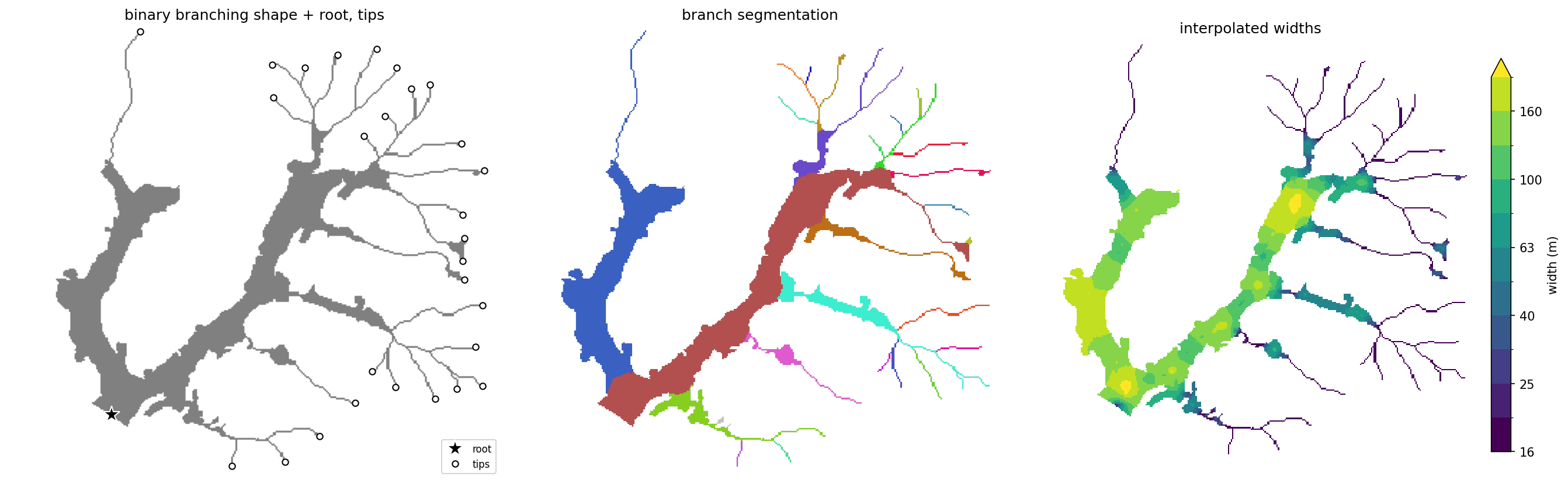
Characterize binary branching shapes (e.g. rivers, floodplains, glaciers,
roots, veins...). Given a shape mask, a root point, and (optionally) branch
tips, ramify extracts a topology-aware centerline network, decomposes it into
hierarchically ordered paths, allocates every pixel of the shape to its path,
and estimates local width everywhere.
Install
pip install ramify
Development (clone, then sync with dev extras):
git clone https://github.com/avkoehl/ramify.git
cd ramify
uv sync --extra dev
Usage
import ramify
from ramify.data import load

mask, root, tips = load()                       # bundled toy dataset

net = ramify.extract(mask, root, tips=tips)     # centerline network of ordered paths
regions = ramify.allocate(mask, net.rasterize(by="path"))
widths = ramify.region_widths(mask, net.rasterize(), regions)

net.segments                                    # DataFrame: segment_id, path_id, strahler,
                                                #   length, weight, downstream_segment_id
regions                                         # labeled raster: each pixel -> its path
widths                                          # float raster: local width everywhere
Inputs are np.ndarray (with pixel_size=) or georeferenced xr.DataArray;
outputs match the input type. root and tips are (row, col) pixel coordinates.
Components
Each individual component is presented below.
Centerlines
net = ramify.extract(mask, root, tips=tips)
Skeletonizes the mask, routes from each tip to the root (pruning everything else),
and decomposes the network into ordered paths — path_id == 1 is the mainstem.

net = ramify.extract(mask, root)
Without tips, every skeleton endpoint becomes a tip.

Tips and root can often be derived automatically — glacier branch tips Kienholz et al., 2014, channel initiation points, or the lowest point on the boundary as the root — or simply digitized in GIS software.
Partitioning
regions = ramify.allocate(mask, net.rasterize(by="path"))
Assigns every pixel to a path: paths claim territory in priority order, each limited by the local shape radius, so wide branches claim proportionally more space at junctions.

regions = ramify.voronoi(mask, net.rasterize(by="path"))
Nearest-centerline partition — no ordering, no radius limits.

seg_regions = ramify.subdivide(regions, net)
Subdivides each path's territory further: within a territory, every pixel goes to its nearest centerline segment of that same path.

Widths
Exact widths (twice the distance to the boundary) are taken at the centerline and interpolated across the shape. That interpolation runs either over the whole shape or independently within each region, which keeps junction-zone pixels from averaging between a branch and its mainstem:
w = ramify.widths(mask, net.rasterize())
w = ramify.region_widths(mask, net.rasterize(), regions)

Either call also takes method="nearest", which gives each pixel the width of its
nearest centerline pixel instead of diffusing smoothly from it — piecewise
constant, and much faster:
w = ramify.widths(mask, net.rasterize(), method="nearest")

Open boundaries
Everything above measures local half-width as the distance from each pixel to the shape's boundary, and that half-width drives three things: which branch is the mainstem, how far each path claims territory, and the width field. By default every boundary pixel is treated as a wall. Sometimes part of the boundary is not a real wall — the shape is truncated by open water, the data extent, or another medium — and treating it as one makes the half-width collapse to zero there.
Pass open_boundary: a binary mask, on the same grid as the shape, marking the
non-wall (void) pixels. Distances are then measured only to the remaining real
walls. It is optional — omitted, every boundary is a wall (the behaviour above) —
and accepted by extract, allocate, widths, and region_widths. Give it to
every step, so all three stages measure against the same walls:
net = ramify.extract(mask, root, tips=tips, open_boundary=open_boundary)
regions = ramify.allocate(mask, net.rasterize(by="path"), open_boundary=open_boundary)
widths = ramify.region_widths(mask, net.rasterize(), regions,
                              open_boundary=open_boundary)
Below, the same mask, root, and tips are reused, but the void past the outlet is
marked open (shaded red), and the outlet widths no longer taper to the cut edge.
Mark a region with depth rather than a thin skin along the boundary: distances are
measured through the open void, so a one-pixel rind would only push the wall out
by one pixel.
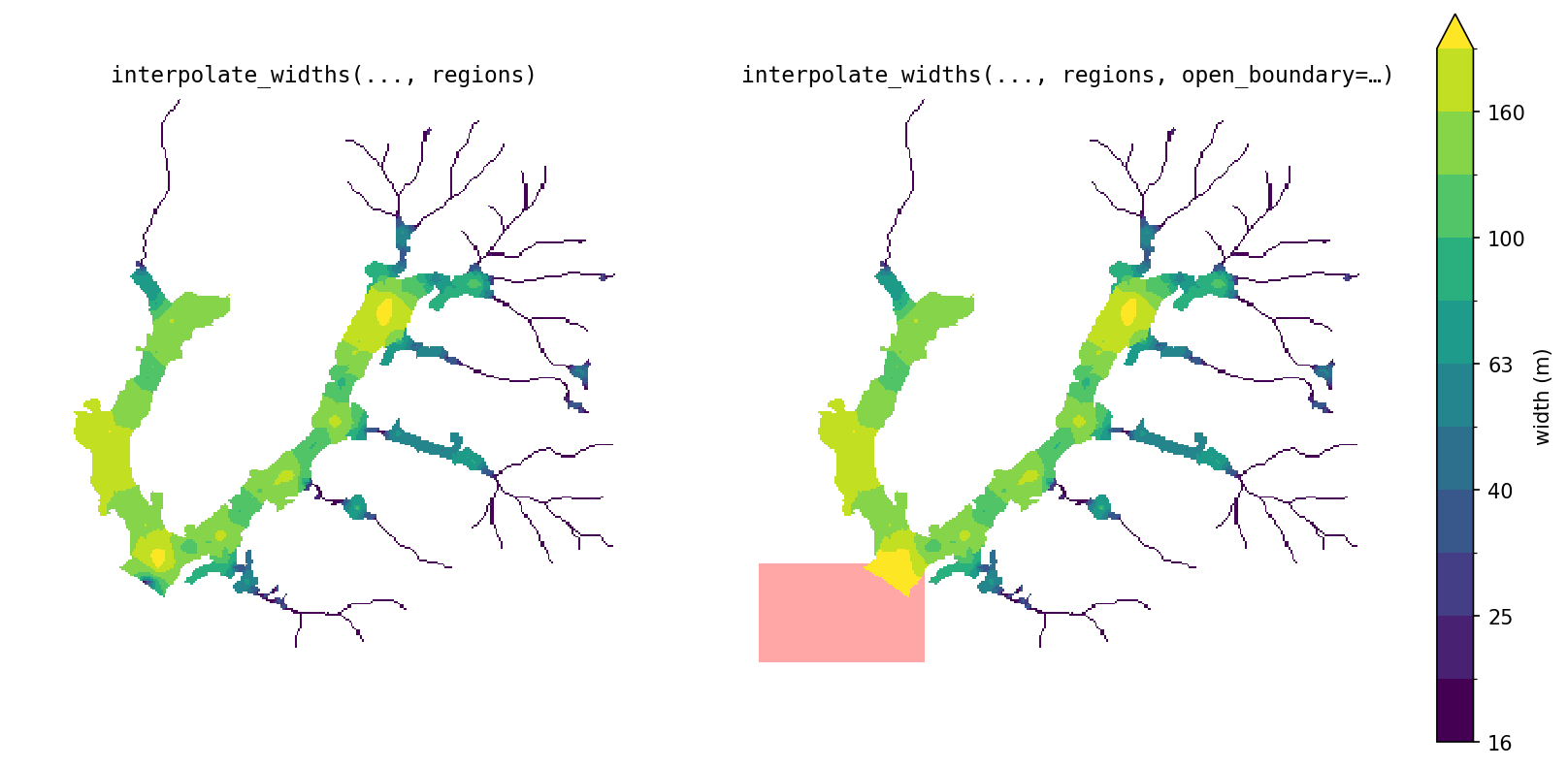
Only the widths are shown because on this shape the partitioning didn't change.
1 maintainer

Release files for ramify 1.1.0
For a detailed explanation of source distributions (sdists) and built distributions (wheels), please see the package formats documentation.
Source distribution (sdist)
| File | Size | Uploaded | |
|---|---|---|---|
| ramify-1.1.0.tar.gz | 477.0 kB | Details |
Built distribution (wheel)
| File | Interpreter | ABI | Platform | Reset |
|---|---|---|---|---|
| ramify-1.1.0-py3-none-any.whl | Python 3 | none | any | Details |
Total release size: 495.0 kB
Release files / ramify-1.1.0.tar.gz
| Download URL | ramify-1.1.0.tar.gz |
|---|---|
| Size | 477.0 kB |
| Tags | Source |
|
SHA-256 checksum How to use checksums |
e209f7b679f308c0d1033b2573484df1e27f6815409b56efa3962469619ea1a6
|
|
BLAKE2b-256 checksum How to use checksums |
0db46219d97566edf49684c59c8b5070a1c0e604e9d35255cac235b5e29a0480
|
| Upload date | |
|
Uploaded using Trusted Publishing? What is trusted publishing? |
Yes |
| Uploaded via |
uv/0.12.1 {"installer":{"name":"uv","version":"0.12.1","subcommand":["publish"]},"python":null,"implementation":{"name":null,"version":null},"distro":{"name":"Ubuntu","version":"24.04","id":"noble","libc":null},"system":{"name":null,"release":null},"cpu":null,"openssl_version":null,"setuptools_version":null,"rustc_version":null,"ci":true}
|
Release files / ramify-1.1.0-py3-none-any.whl
| Download URL | ramify-1.1.0-py3-none-any.whl |
|---|---|
| Size | 18.0 kB |
| Tags | Python 3 |
|
SHA-256 checksum How to use checksums |
207ca88b791ea388bbb67312776ad8062de8f5e69cfd6cc71d91a186d7b830e5
|
|
BLAKE2b-256 checksum How to use checksums |
53907e41cc703c6dc6d5525c305258f24df193fee27a7800cac6c659404ae34b
|
| Upload date | |
|
Uploaded using Trusted Publishing? What is trusted publishing? |
Yes |
| Uploaded via |
uv/0.12.1 {"installer":{"name":"uv","version":"0.12.1","subcommand":["publish"]},"python":null,"implementation":{"name":null,"version":null},"distro":{"name":"Ubuntu","version":"24.04","id":"noble","libc":null},"system":{"name":null,"release":null},"cpu":null,"openssl_version":null,"setuptools_version":null,"rustc_version":null,"ci":true}
|














