
This release is a pre-release and may not be stable for production use.
Petkit API Client


















Enjoying this library?


ℹ️ Overview
PetKit Client is a Python library for interacting with the PetKit API. It allows you to manage your PetKit devices, retrieve account data, and control devices through the API.
🚀 Features
- Login and session management
- Fetch account and device data
- Control PetKit devices (Feeder, Litter Box, Water Fountain, Purifiers)
- Fetch images & videos produced by devices
Pictures are available with or without Care+ subscription, Videos are only available with Care+ subscription
⬇️ Installation
Install the library using pip:
pip install rankjie-pypetkitapi
💡 Usage Example:
Here is a simple example of how to use the library to interact with the PetKit API
This example is not an exhaustive list of all the features available in the library.
import asyncio
import logging
import aiohttp
from pypetkitapi.client import PetKitClient
from pypetkitapi.command import DeviceCommand, FeederCommand, LBCommand, DeviceAction, LitterCommand

logging.basicConfig(level=logging.DEBUG)

async def main():
    async with aiohttp.ClientSession() as session:
        client = PetKitClient(
            username="username",  # Your PetKit account username or id
            password="password",  # Your PetKit account password
            region="FR",  # Your region or country code (e.g. FR, US,CN etc.)
            timezone="Europe/Paris",  # Your timezone(e.g. "Asia/Shanghai")
            session=session,
        )

        await client.get_devices_data()

        # Lists all devices and pet from account

        for key, value in client.petkit_entities.items():
            print(f"{key}: {type(value).__name__} - {value.name}")

        # Select a device
        device_id = key
        # Read devices or pet information
        print(client.petkit_entities[device_id])

        # Send command to the devices
        ### Example 1 : Turn on the indicator light
        ### Device_ID, Command, Payload
        await client.send_api_request(device_id, DeviceCommand.UPDATE_SETTING, {"lightMode": 1})

        ### Example 2 : Feed the pet
        ### Device_ID, Command, Payload
        # simple hopper :
        await client.send_api_request(device_id, FeederCommand.MANUAL_FEED, {"amount": 1})
        # dual hopper :
        await client.send_api_request(device_id, FeederCommand.MANUAL_FEED, {"amount1": 2})
        # or
        await client.send_api_request(device_id, FeederCommand.MANUAL_FEED, {"amount2": 2})

        ### Example 3 : Start the cleaning process
        ### Device_ID, Command, Payload
        await client.send_api_request(device_id, LitterCommand.CONTROL_DEVICE, {DeviceAction.START: LBCommand.CLEANING})


if __name__ == "__main__":
    asyncio.run(main())
💡 More example usage
Check at the usage in the Home Assistant integration : here
☑️ Supported Devices
| Category | Name | Device |
|---|---|---|
| 🍗 Feeders | ✅ Fresh Element |  |
| ✅ Fresh Element Mini Pro |  |
|
| ✅ Fresh Element Infinity |  |
|
| ✅ Fresh Element Solo |  |
|
| ✅ Fresh Element Gemini |  |
|
| ✅ YumShare Solo |  |
|
| ✅ YumShare Dual-hopper |  |
|
| 🚽 Litters | ✅ PuraX |  |
| ✅ PuraMax |  |
|
| ✅ PuraMax 2 |  |
|
| ✅ Purobot Max Pro |  |
|
| ✅ Purobot Ultra |  |
|
| ⛲ Fountains | ✅ Eversweet Solo 2 | 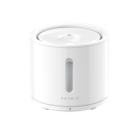 |
| ✅ Eversweet 3 Pro |  |
|
| ✅ Eversweet 3 Pro UVC |  |
|
| ✅ Eversweet 5 Mini |  |
|
| ✅ Eversweet Max |  |
|
| 🧴 Purifiers | ✅ Air Magicube |  |
| ✅ Air Smart Spray |  |
🛟 Help and Support
Developers? Want to help? Join us on our Discord channel dedicated to developers and contributors.

👨💻 Contributing
Contributions are welcome!
Please open an issue or submit a pull request.
License
This project is licensed under the MIT License. See the LICENSE file for details.
1 maintainer

Metadata
1 maintainer
Release files for rankjie-pypetkitapi 1.3.0.dev9
For a detailed explanation of source distributions (sdists) and built distributions (wheels), please see the package formats documentation.
Source distribution (sdist)
| File | Size | Uploaded | Provenance | Actions |
|---|---|---|---|---|
| rankjie_pypetkitapi-1.3.0.dev9.tar.gz | 44.0 kB | Without provenance | Details for rankjie_pypetkitapi-1.3.0.dev9.tar.gz |
Built distribution (wheel)
| File | Interpreter | ABI | Platform | Actions Reset |
|---|---|---|---|---|
| rankjie_pypetkitapi-1.3.0.dev9-py3-none-any.whl | Python 3 | none | any | Details for rankjie_pypetkitapi-1.3.0.dev9-py3-none-any.whl |
Total release size: 89.4 kB
Release files / rankjie_pypetkitapi-1.3.0.dev9.tar.gz
| Download URL | rankjie_pypetkitapi-1.3.0.dev9.tar.gz |
|---|---|
| Size | 44.0 kB |
| Tags | Source |
|
SHA-256 checksum How to use checksums |
bc301863dd92158d521739d76ddf6716ab886bce3888a8011ca9273af26ab7b2
|
|
BLAKE2b-256 checksum How to use checksums |
e4984959300129b674ad95fca0632cfc484d73d31c85ad28d4d58774c990a504
|
| Upload date | |
|
Uploaded using Trusted Publishing? What is trusted publishing? |
No |
| Uploaded via |
twine/6.1.0 CPython/3.13.0
|
Release files / rankjie_pypetkitapi-1.3.0.dev9-py3-none-any.whl
| Download URL | rankjie_pypetkitapi-1.3.0.dev9-py3-none-any.whl |
|---|---|
| Size | 45.4 kB |
| Tags | Python 3 |
|
SHA-256 checksum How to use checksums |
b4584635ac8c5710bc016821ec0dde6a5af55207cc641fefd54fddd6473699ab
|
|
BLAKE2b-256 checksum How to use checksums |
509dc106dfc26b5379441050774d0a3016430a9f8c8221c0f73c06aba22aae26
|
| Upload date | |
|
Uploaded using Trusted Publishing? What is trusted publishing? |
No |
| Uploaded via |
twine/6.1.0 CPython/3.13.0
|
Security for rankjie-pypetkitapi 1.3.0.dev9
Provenance
Provenance describes where a file came from. On PyPI, provenance is shared via attestations, which provide a verifiable record of the build or publishing details. View details, limitations and caveats.
No provenance found
None of the files in this release were uploaded with provenance metadata.
A note on package security
PyPI is a repository for distributing packages, not a service for auditing them. While third-party security researchers and our staff do their best to detect and remove malicious packages, PyPI cannot guarantee the quality, security or suitability of any given package.
To learn more about protecting yourself from malicious actors, visit our package security documentation.














