
Rapid-MLX — AI inference for Apple Silicon. Drop-in OpenAI API, 2-4x faster than Ollama.
Verified details
These details have been verified by PyPIProject links
GitHub Statistics
Maintainers

Project description
Rapid-MLX
Run AI on your Mac. Faster than anything else.





Run local AI models on your Mac — no cloud, no API costs. Works with Cursor, Claude Code, and any OpenAI-compatible app.
rapidmlx.com · Desktop app · Community benchmarks · Model mirror
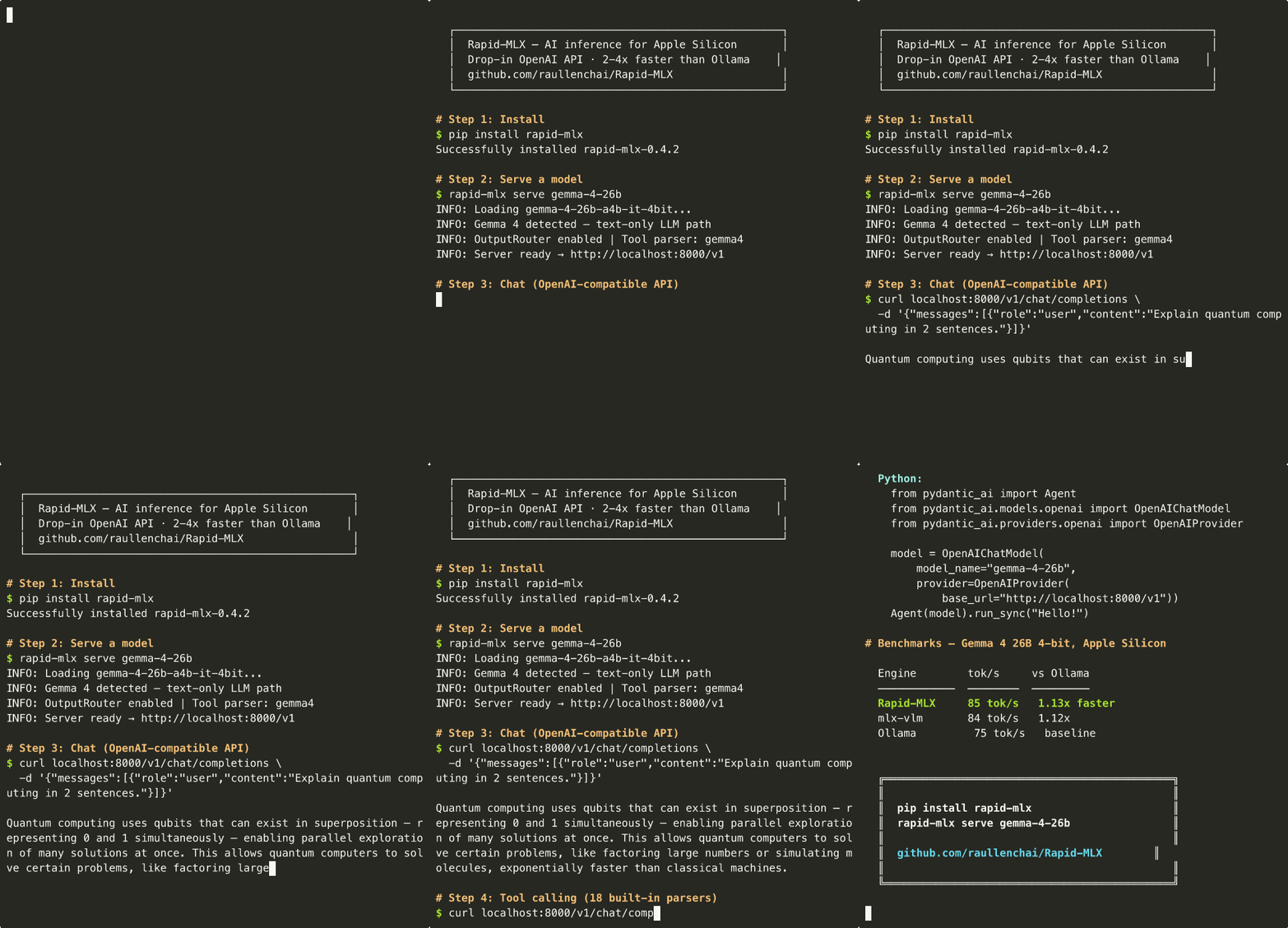
pip install → serve Gemma 4 26B → chat + tool calling → works with PydanticAI, LangChain, Aider, and more.
| Your Mac | Model | Speed (tok/s) | What works | |
|---|---|---|---|---|
| 16 GB MacBook Air | Qwen3.5-4B | 147 tok/s | Chat, coding, tools | |
| 24 GB MacBook Pro | Qwen3.5-9B | 101 tok/s | Great all-rounder | |
| 32+ GB Mac Mini / Studio | 🆕 Gemma 4 12B | 64 tok/s | Vision-capable + tools | |
| 32+ GB Mac Mini / Studio | GPT-OSS 20B | 119 tok/s | Harmony-native, 100% tools | |
| 32+ GB Mac Mini / Studio | Qwen3.6-35B-A3B | 93 tok/s | 256 MoE experts, 262K context | |
| 48+ GB Mac Mini / Studio | Qwen3.5-35B-A3B 8bit | 80 tok/s | Best balance of smart + fast | |
| 96+ GB Mac Studio / Pro | Qwen3.5-122B | 57 tok/s¹ | Frontier-level intelligence | |
| 128+ GB Mac Studio Ultra | DeepSeek V4 Flash 158B-A13B | 31-56 tok/s¹ | Day-0 frontier MoE, 1M context |
Single-user end-to-end throughput (B=1: one request at a time, 256 max output tokens, output_tokens / wall-clock incl. first-token latency), median of 3 rounds. chat_template_kwargs.enable_thinking=False passed where the engine honours it. Tested on M3 Ultra 256 GB / rapid-mlx v0.6.83 (fused top-p sampler). ¹ carried over from 2026-04 bench — disk-constrained on this refresh.
New to local AI? Quick glossary
- tok/s (tokens per second) — roughly how many words the AI generates per second. Higher = faster.
- 4bit / 8bit — compression levels for models. 4bit uses less memory (recommended); 8bit is higher quality.
- TTFT (Time To First Token) — how long before the AI starts responding.
- Tool calling — the AI can call functions in your code. Used by Cursor, Claude Code, and coding assistants.
- OpenAI API compatible — Rapid-MLX speaks the same language as ChatGPT's API, so any app that works with ChatGPT can work with Rapid-MLX by just changing the server address.
- Ollama / llama.cpp — other popular tools for running local AI. The only apples-to-apples row in our table is GPT-OSS 20B (identical weights both sides) — Rapid-MLX runs it 2.3x faster than Ollama under B=4 concurrent load. On the Qwen3 closest-tag rows (Qwen3.5/3.6 DeltaNet isn't on llama.cpp yet, so we compare against
qwen3:Nb) Rapid-MLX leads 1.7–2.4x. The Gemma 4 row is tied at parity with Ollama's Gemma 3 (different architectures, 1.0x). Againstmlx-lm serve(same MLX weights) Rapid-MLX is 1.2–1.5x faster. Full caveats in Benchmarks.
Quick Start
Step 1 — Install (pick one):
# uv (recommended — one command, isolated env, auto-manages Python)
uv tool install rapid-mlx@latest
# Don't have uv yet? Install it first: curl -LsSf https://astral.sh/uv/install.sh | sh

# Or one-liner with auto-setup (installs Python if needed)
curl -fsSL https://raullenchai.github.io/Rapid-MLX/install.sh | bash

# Homebrew (Mac-native — needs tap + trust before install on Homebrew 4.x)
brew tap raullenchai/rapid-mlx
brew trust raullenchai/rapid-mlx
brew install rapid-mlx

# pip (requires Python 3.10+ — macOS ships 3.9, so install Python first if needed)
pip install rapid-mlx
Upgrade later: uv tool upgrade rapid-mlx / brew upgrade rapid-mlx / pip install -U rapid-mlx.
Vision/multimodal models (Gemma 4, Qwen-VL, etc.) need extras:
pip install 'rapid-mlx[vision]'. Text-only install is ~460 MB; vision adds ~322 MB. See Optional Extras for the full list.
"No matching distribution" error? Your Python is too old. Run
python3 --version— if it says 3.9, install a newer Python:brew install python@3.12thenpython3.12 -m pip install rapid-mlx
Refusing to load formula ... from untrusted tap? Homebrew 4.x requires third-party taps to be explicitly trusted before install. Thebrew trust raullenchai/rapid-mlxline above is what marks the tap as trusted — without it, even afterbrew tap, the install is refused. Trust is per-machine and persists across upgrades.
Tapping homebrew/core/Operation not permittedduringbrew install? Brew 5.x's install sandbox can't auto-taphomebrew/coremid-install. Pre-tap it once, then retry:brew tap homebrew/core --force # ~1.3 GB, one-time brew tap raullenchai/rapid-mlx brew trust raullenchai/rapid-mlx brew install rapid-mlx
Step 2 — Talk to a model right now (one command, no second terminal):
rapid-mlx chat
Defaults to qwen3.5-4b-4bit. First run downloads the model (~2.5 GB) — you'll see a progress bar. Drops you into a REPL when it's ready. Type /help for slash commands, /exit to quit. Pass --think to surface chain-of-thought.
Step 2b — Or serve a model for use from other apps:
rapid-mlx serve qwen3.5-4b-4bit
Same model, same download — but this starts an OpenAI-compatible HTTP server instead of a REPL. Wait for Ready: http://localhost:8000/v1.
Want vision?
pip install 'rapid-mlx[vision]'thenrapid-mlx serve gemma-4-26b-4bit(~14 GB).
Step 3 — Hit the API (from a second terminal tab):
curl http://localhost:8000/v1/chat/completions \
  -H "Content-Type: application/json" \
  -d '{"model":"default","messages":[{"role":"user","content":"Say hello"}]}'
That's it — you now have an OpenAI-compatible AI server on localhost:8000. Point any app at http://localhost:8000/v1 and it just works.
Step 4 — Share it publicly (optional — get a https:// URL anyone can hit):
rapid-mlx share qwen3.6-27b-8bit
This spawns the same local serve and tunnels it through rapidserver.quicksilverpro.io over a WebSocket. Your terminal prints a public OpenAI-compatible endpoint plus a bearer key — point any chat UI or OpenAI SDK at it. Bearer auth, a locked-down CORS allowlist, and a default 120 RPM rate-limit are wired on the spawned child; closing the terminal tears the tunnel down.
The default chat surface is our hosted Big-AGI fork (tool calling, personas, voice — no signup); any OpenAI-compatible client also works, e.g. OPENAI_API_BASE_URL=<share-url>/v1 OPENAI_API_KEY=<bearer> open-webui serve.
Pick a 27B-class model or larger for a usable share experience — 4B is fine for local dev but too small for live chat (
rapid-mlx modelslists all aliases).
Want a Claude Code-like TUI? Rapid-MLX is the backend — pair it with an open-source agent CLI like OpenCode or codex for the full slash-commands / tool-use / multi-turn experience. Run
rapid-mlx agents opencode --setup(orcodex --setup) to wire it up automatically.
Tip: Run
rapid-mlx modelsto see all available model aliases. For a smaller/faster model, tryrapid-mlx serve qwen3.5-9b-4bit(~5 GB).
More install options
From source (for development):
git clone https://github.com/raullenchai/Rapid-MLX.git
cd Rapid-MLX && pip install -e .
Vision models (adds mlx-vlm + opencv + torch, ~322 MB extra):
pip install 'rapid-mlx[vision]'
Audio (TTS/STT via mlx-audio):
pip install 'rapid-mlx[audio]'
Not into the terminal? Rapid-MLX Desktop is a Mac app that bundles the same
rapid-mlxengine inside a one-click GUI — drag to Applications, pick a model, chat. No Python, nopip, nobrew. The CLI here is still the source of truth for serving and scripting; the desktop app is the friendlier on-ramp.
Try it with Python (make sure the server is running, then pip install openai):
from openai import OpenAI
client = OpenAI(base_url="http://localhost:8000/v1", api_key="not-needed")  # any value works, no real key needed

response = client.chat.completions.create(
    model="default",
    messages=[{"role": "user", "content": "Say hello"}],
)
print(response.choices[0].message.content)
Works With
Agent Harnesses (MHI-tested)
| Harness | Type | Notes |
|---|---|---|
| Hermes Agent | Agent | 62 tools, multi-turn (test) |
| PydanticAI | Framework | Typed agents, structured output (test) |
| LangChain | Framework | ChatOpenAI, tools, streaming (test) |
| smolagents | Framework | CodeAgent + ToolCallingAgent (test) |
| OpenClaude (Anthropic SDK) | Agent | CLAUDE_CODE_USE_OPENAI=1 (test) |
| Aider | Agent | CLI edit-and-commit, architect mode (test) |
| Goose | Agent | Ollama provider via OLLAMA_HOST |
| OpenCode | TUI Agent | Claude Code-like terminal UX, OpenAI-compat provider |
| Codex CLI | Agent | OpenAI's official Rust agent — /v1/responses shim, verified end-to-end against codex 0.136.0 on Qwen3.5-9B / Qwen3.6-27B (chat + file read/write + shell + multi-step + source analysis); release gauntlet G7b probes the codex-shape SSE on every tag (guide, release gate) |
| Claude Code | Agent | Anthropic SDK via /v1/messages — ANTHROPIC_BASE_URL=http://localhost:8000 |
| Claw Code | Agent | OpenAI & Anthropic endpoints |
UI / IDE Clients
| Client | Status | Setup |
|---|---|---|
| Cursor | Compatible | Settings → OpenAI Base URL |
| Claude Code | Tested | One command (see below) |
| Continue.dev | Compatible | VS Code / JetBrains extension |
| LibreChat | Tested | Docker (test) |
| Open WebUI | Tested | Docker (test) |
| Any OpenAI-compatible app | Compatible | Point at http://localhost:8000/v1 |
Claude Code
Claude Code (Anthropic's web-based code editor) works with Rapid-MLX via the Anthropic Messages API endpoint (/v1/messages).
Terminal 1 — Start the Rapid-MLX server:
rapid-mlx serve qwen3.5-9b-4bit
Wait for: Ready: http://localhost:8000/v1
Terminal 2 — Launch Claude Code pointing to your local server:
export ANTHROPIC_BASE_URL="http://localhost:8000"
export ANTHROPIC_API_KEY="not-needed"
claude --model claude-opus-4-5
The server accepts any claude-* or gpt-* model name in requests and routes them to the loaded engine (configured on the server). The response always reflects the actual loaded model, not the client-requested name. This means:
- Claude Code can use
--model claude-opus-4-5or any other alias - The server runs whatever model you specified with
rapid-mlx serve <model> - Tool calling and streaming work out of the box with Qwen3.5 / Qwen3.6 models
Tip: For the best Claude Code experience on a 24 GB MacBook Pro, use qwen3.5-9b-4bit — it's smart enough for coding tasks while staying responsive.
Model-Harness Index (MHI)
MHI measures how well a model works with a specific agent harness. It combines three dimensions:
| Dimension | Weight | What it measures | Source |
|---|---|---|---|
| Tool Calling | 50% | Can the model+harness execute function calls correctly? | rapid-mlx agents --test |
| HumanEval | 30% | Can the model generate correct code? | HumanEval (10 tasks) |
| MMLU | 20% | Does the harness degrade base knowledge? | tinyMMLU (10 tasks) |
MHI = 0.50 × ToolCalling + 0.30 × HumanEval + 0.20 × MMLU (scale 0-100)
| Model | Best MHI | Best Harness | Tool Calling |
|---|---|---|---|
| Qwopus 27B | 92 | All (Hermes, PydanticAI, LangChain, smolagents) | 100% |
| Qwen3.5 27B | 82 | Hermes / PydanticAI / LangChain | 100% |
| Llama 3.3 70B | 83 | smolagents (text-based) | 100% |
| Nemotron Nano 30B | 59 | PydanticAI / LangChain | 91-93% |
| Gemma 4 26B | 62 | Hermes / smolagents | 100% |
Full MHI table (25 model-harness combinations) + methodology
MHI = 0.50 × ToolCalling + 0.30 × HumanEval + 0.20 × MMLU (scale 0-100)
Run rapid-mlx agents to see all supported agents and python3 scripts/mhi_eval.py to compute MHI on your own setup.
| Model + Harness | Tool Calling | HumanEval | MMLU | MHI |
|---|---|---|---|---|
| Qwopus 27B + Hermes | 100% | 80% | 90% | 92 |
| Qwopus 27B + PydanticAI | 100% | 80% | 90% | 92 |
| Qwen3.5 27B + Hermes | 100% | 40% | 100% | 82 |
| Llama 3.3 70B + smolagents | 100% | 50% | 90% | 83 |
| DeepSeek-R1 32B + smolagents | 100% | 30% | 100% | 79 |
| Gemma 4 26B + Hermes | 100% | 0% | 60% | 62 |
| Nemotron Nano 30B + PydanticAI | 93% | 0% | 60% | 59 |
Quick setup for popular apps:
Cursor: Settings → Models → Add Model:
OpenAI API Base:  http://localhost:8000/v1
API Key:          not-needed
Model name:       default          (or qwen3.5-9b-4bit — either works)
Cursor's agent/composer mode uses tool calls automatically — Rapid-MLX handles them natively with Qwen3.5 models, no extra flags needed.
Claw Code:
export OPENAI_BASE_URL=http://localhost:8000/v1
export OPENAI_API_KEY=not-needed
claw --model "openai/default" prompt "summarize this repo"
OpenClaude:
CLAUDE_CODE_USE_OPENAI=1 OPENAI_BASE_URL=http://localhost:8000/v1 \
OPENAI_API_KEY=not-needed OPENAI_MODEL=default openclaude -p "hello"
Hermes Agent (~/.hermes/config.yaml):
model:
  provider: "custom"
  default: "default"
  base_url: "http://localhost:8000/v1"
  context_length: 32768
Goose:
GOOSE_PROVIDER=ollama OLLAMA_HOST=http://localhost:8000 \
GOOSE_MODEL=default goose run --text "hello"
Claude Code:
OPENAI_BASE_URL=http://localhost:8000/v1 claude
More client setup instructions
Continue.dev (~/.continue/config.yaml):
models:
  - name: rapid-mlx
    provider: openai
    model: default
    apiBase: http://localhost:8000/v1
    apiKey: not-needed
Aider:
aider --openai-api-base http://localhost:8000/v1 --openai-api-key not-needed
Swival (~/.swival/config.toml):
[profiles.rapidmlx]
provider = "generic"
base_url = "http://127.0.0.1:8000"
model = "default"
Run with:
swival --profile rapidmlx "summarize this repo"
Open WebUI (Docker one-liner):
docker run -d -p 3000:8080 \
  --add-host=host.docker.internal:host-gateway \
  -e ENABLE_OLLAMA_API=False \
  -e OPENAI_API_BASE_URL=http://host.docker.internal:8000/v1 \
  -e OPENAI_API_KEY=not-needed \
  -v open-webui:/app/backend/data \
  --name open-webui \
  ghcr.io/open-webui/open-webui:main
OpenCode (opencode.json in your project root):
{
  "provider": {
    "openai": {
      "api": "http://localhost:8000/v1",
      "models": {
        "default": {
          "name": "rapid-mlx local",
          "limit": { "context": 32768, "output": 8192 }
        }
      },
      "options": { "apiKey": "not-needed" }
    }
  }
}
Codex CLI (~/.codex/config.toml — or run rapid-mlx agents codex --setup to write this for you):
model = "default"
model_provider = "rapid-mlx"

[model_providers.rapid-mlx]
name = "Rapid-MLX (local)"
base_url = "http://localhost:8000/v1"
# If rapid-mlx was started with --api-key, add env_key = "RAPID_MLX_API_KEY"
# and `export RAPID_MLX_API_KEY=...`. Don't use api_key = "..." — Codex
# CLI's --strict-config rejects inline literals.
Then codex (or codex exec '<query>') talks to the local model via /v1/responses. See the Codex CLI guide for the full setup.
PydanticAI (pip install pydantic-ai):
from pydantic_ai import Agent
from pydantic_ai.models.openai import OpenAIChatModel
from pydantic_ai.providers.openai import OpenAIProvider

model = OpenAIChatModel(
    model_name="default",
    provider=OpenAIProvider(
        base_url="http://localhost:8000/v1",
        api_key="not-needed",
    ),
)
agent = Agent(model)
print(agent.run_sync("What is 2+2?").output)
smolagents (pip install smolagents):
from smolagents import CodeAgent, OpenAIServerModel

model = OpenAIServerModel(
    model_id="default",
    api_base="http://localhost:8000/v1",
    api_key="not-needed",
)
agent = CodeAgent(tools=[], model=model)
agent.run("What is 5 multiplied by 7?")
LibreChat (librechat.yaml, under endpoints.custom):
- name: "Rapid-MLX"
  apiKey: "rapid-mlx"
  baseURL: "http://localhost:8000/v1/"
  models:
    default: ["default"]
    fetch: true
  titleConvo: true
  titleModel: "current_model"
  modelDisplayLabel: "Rapid-MLX"
Anthropic SDK (pip install anthropic):
from anthropic import Anthropic
client = Anthropic(base_url="http://localhost:8000", api_key="not-needed")

message = client.messages.create(
    model="default",
    max_tokens=1024,
    messages=[{"role": "user", "content": "Say hello"}],
)
print(message.content[0].text)
Choose Your Model
What fits my Mac?
The model has to fit in your Mac's RAM. If your Mac slows down or Activity Monitor shows red memory pressure, pick a smaller model from the table below.
Browse the full catalog at models.rapidmlx.com — 80+ MLX-quantised models on a free R2 mirror with resumable downloads, no HuggingFace rate limits.
rapid-mlx pull <alias>fetches from there automatically.
| Your Mac | Best Model | RAM Used | Speed (B=1) | Quality |
|---|---|---|---|---|
| 16 GB MacBook Air/Pro | Qwen3.5-4B 4bit | 2.4 GB | 147 tok/s | Good for chat and simple tasks |
| 24 GB MacBook Pro | Qwen3.5-9B 4bit | 5.1 GB | 101 tok/s | Great all-rounder |
| 32 GB Mac Mini / Studio | Qwen3.5-27B 4bit | 15.3 GB | 37 tok/s | Solid coding model |
| 32 GB Mac Mini / Studio | 🆕 Gemma 4 12B 4bit | 7 GB | 64 tok/s | Vision-capable + tool calling |
| 32 GB Mac Mini / Studio | GPT-OSS 20B MXFP4 | 11 GB | 119 tok/s | Harmony-native, 100% tools |
| 32 GB Mac Mini / Studio | Qwen3.6-35B-A3B 4bit | 20 GB | 93 tok/s | 256 MoE experts, 262K context |
| 36 GB MacBook Pro M3/M4 Pro | Qwen3.5-27B 4bit | 15.3 GB | 37 tok/s | Same as 32 GB — extra headroom for long contexts |
| 48 GB Mac Mini / Studio | Qwen3.5-35B-A3B 8bit | 37 GB | 80 tok/s | Sweet spot — smart + fast |
| 64 GB Mac Mini / Studio | Qwen3.5-35B-A3B 8bit | 37 GB | 80 tok/s | Same model, more room for KV cache |
| 96 GB Mac Studio / Pro | Qwen3.5-122B mxfp4 | 65 GB | 57 tok/s¹ | Best model, fits comfortably |
| 128 GB Mac Studio / Pro | 🆕 DeepSeek V4 Flash 2-bit DQ | 91 GB | 56 tok/s¹ | 158B-A13B frontier MoE, day-0 (chat only) |
| 192 GB Mac Studio / Pro | Qwen3.5-122B 8bit | 130 GB | 44 tok/s¹ | Maximum quality |
| 256 GB Mac Studio Ultra | 🆕 DeepSeek V4 Flash 8-bit | 136 GB | 31 tok/s¹ | 158B-A13B frontier MoE, 1M context (chat only) |
Speed = single-user end-to-end throughput (B=1: one request, 256 max output tokens, output_tokens / wall-clock including first-token latency), median of 3 rounds. rapid-mlx v0.6.83 (fused top-p sampler) on M3 Ultra 256 GB, 2026-06-09. ¹ Carried over from prior bench (disk-constrained on this refresh).
4bit vs 8bit: 4bit models are compressed to use less memory (recommended for most users). 8bit models are higher quality but need more RAM. "mxfp4" is a high-quality 4bit format.
Naming convention
Every alias follows the same template so you can read off the model family, parameter count, training technique, and quantization at a glance:
<family>-<version>-<params>-<modality?>-<technique?>-<quant>
| Segment | Meaning | Examples |
|---|---|---|
| family | Model family | gemma, qwen, llama, mistral, deepseek, phi |
| version | Major version | -4, 3.5, 3.6, -r1, -v4-flash |
| params | Parameter count (MoE includes the active count) | 12b, 27b, 35b-a3b (35B total / 3B active) |
| modality (optional) | Non-text variants | -vl (vision), -coder (code) |
| technique (optional) | Training-time modifier | -qat (Quantization-Aware Training), -distill, -thinking |
| quant (mandatory) | Quantization tier (see below) | -4bit, -8bit, -mxfp4, -qat-8bit, … |
The quantization suffix is mandatory on every alias — qwen3.5-4b-4bit not qwen3.5-4b, gemma-4-12b-qat-8bit not gemma-4-12b-qat. This mirrors LM Studio's …-MLX-4bit / …-MLX-8bit HuggingFace convention so you never have to guess the bit width.
| Suffix | Meaning |
|---|---|
-4bit |
Standard MLX 4-bit (most common) |
-8bit |
Standard MLX 8-bit (higher quality, ~2× RAM) |
-2bit, -3bit, -6bit |
Other bit widths |
-mxfp4 |
Microscaling FP4 (high-quality 4-bit) |
-mxfp4-q8 |
MXFP4 weights + Q8 head (GPT-OSS style) |
-dwq |
Dynamic Weight Quantization (mlx-community) |
-ud |
Unsloth Dynamic (mixed-precision per-layer) |
-unpacked |
Original FP16 / BF16 weights, no quantization |
-qat is a technique suffix, not a quant — it stacks before the quant. So a QAT-trained Gemma 4 12B in 4-bit is gemma-4-12b-qat-4bit, and the 8-bit variant is gemma-4-12b-qat-8bit.
Decoded examples:
gemma-4-12b-qat-4bit= Gemma 4 · 12B params · QAT-trained · 4-bit quantqwen3.5-35b-8bit= Qwen 3.5 · 35B params (3B active MoE) · 8-bit quantgpt-oss-20b-mxfp4-q8= GPT-OSS · 20B params · MXFP4 weights + Q8 headbonsai-1.7b-unpacked= Bonsai · 1.7B params · no quantization
Full model lineup
81 explicit aliases across 13 families ship today. Run rapid-mlx models for the live list with parser, hybrid / MoE flags, and DFlash eligibility.
Show all 81 aliases by family
| Family | Aliases | Notable |
|---|---|---|
| Qwen3.5 | qwen3.5-4b-4bit, -4b-8bit, -9b-4bit, -9b-8bit, -27b-4bit, -27b-8bit ✨, -35b-4bit, -35b-8bit, -122b-mxfp4, -122b-8bit |
DeltaNet hybrid; 27b-8bit DFlash-eligible |
| Qwen3.6 | qwen3.6-27b-4bit, -27b-8bit ✨, -27b-ud, -35b-4bit, -35b-6bit, -35b-8bit, -35b-dwq, -35b-ud |
262K ctx, 256 MoE experts; 27b-8bit DFlash-eligible |
| Qwen3 | qwen3-0.6b-8bit, -4b-8bit, -8b-8bit, qwen3-coder-4bit, qwen3-coder-30b-4bit, qwen3-vl-4b-4bit, -8b-4bit, -30b-4bit |
Coding + vision |
| Qwopus | qwopus-9b-4bit, qwopus-27b-4bit, qwopus-27b-8bit |
92 MHI on tool calling |
| DeepSeek | deepseek-r1-8b-4bit, -32b-4bit, deepseek-v4-flash-2bit, -4bit, -8bit |
R1 reasoning + V4 Flash 158B-A13B day-0 |
| Gemma | gemma-3n-e4b-4bit, gemma-4-12b-4bit, -12b-qat-4bit, -12b-qat-8bit, -26b-4bit, -26b-qat-4bit, -31b-4bit, -31b-8bit, -31b-qat-4bit, -31b-qat-8bit, gemma3-1b-4bit, -12b-4bit, -27b-4bit |
Vision-capable; QAT variants |
| Llama / Hermes | llama3-1b-4bit, -3b-4bit, llama-3.1-8b-8bit, hermes3-8b-4bit, hermes4-70b-4bit |
|
| GLM | glm4.5-air-4bit, glm4.7-9b-4bit |
|
| GPT-OSS | gpt-oss-20b-mxfp4-q8 |
Harmony native |
| MiniMax | minimax-m2.5-4bit, minimax-m2.7-mxfp4 |
|
| Mistral / Devstral | mistral-24b-4bit, devstral-24b-4bit, devstral-v2-24b-4bit, ministral-3b-4bit |
|
| Other | phi-4-14b-4bit, phi-4-mini-4bit, smollm3-3b-4bit, nemotron-30b-4bit, bonsai-1.7b-unpacked, -4b-unpacked, -8b-unpacked, granite4-tiny-4bit |
|
| 🆕 Text-Diffusion | diffusion-gemma-26b-4bit, diffusion-gemma-26b-8bit |
Non-autoregressive (block denoising); same /v1/chat/completions API |
✨ = DFlash speculative decoding supported (opt in with --enable-dflash). rapid-mlx info <alias> shows per-alias capabilities.
Copy-paste commands
Pick the one that matches your Mac. Run rapid-mlx models to see all available aliases.
# 16 GB — lightweight, fast
rapid-mlx serve qwen3.5-4b-4bit --port 8000

# 24 GB — best small model
rapid-mlx serve qwen3.5-9b-4bit --port 8000

# 32 GB — solid coding model
rapid-mlx serve qwen3.5-27b-4bit --port 8000

# 32 GB — Gemma 4 12B (vision-capable, 64 tok/s)
rapid-mlx serve gemma-4-12b-4bit --port 8000

# 32 GB — GPT-OSS 20B (harmony-native, 100% tool calling, 119 tok/s)
rapid-mlx serve gpt-oss-20b-mxfp4-q8 --port 8000

# 32+ GB — Qwen 3.6 35B-A3B (256 experts, 262K context, 93 tok/s)
rapid-mlx serve qwen3.6-35b-4bit --port 8000

# 48+ GB — sweet spot (Qwen3.5-35B-A3B 8bit, 80 tok/s)
rapid-mlx serve qwen3.5-35b-8bit --prefill-step-size 8192 --port 8000  # faster first response

# 96+ GB — frontier (Qwen3.5-122B mxfp4)
rapid-mlx serve qwen3.5-122b-mxfp4 --prefill-step-size 8192 --port 8000

# Coding agent — fast MoE, great for Claude Code / Cursor
rapid-mlx serve qwen3-coder-4bit --prefill-step-size 8192 --port 8000  # MoE = only uses part of the model, so it's fast

# Vision — image understanding (see note below)
rapid-mlx serve qwen3-vl-4b-4bit --mllm --port 8000

# 🆕 Text-diffusion — DiffusionGemma 26B-A4B (block denoising, not autoregressive)
rapid-mlx serve diffusion-gemma-26b-4bit --port 8000  # needs [vision] extras for mlx-vlm 0.6.3+
Vision deps: Install into the same environment where rapid-mlx lives:
install.shusers:~/.rapid-mlx/bin/pip install 'rapid-mlx[vision]'pipusers:pip install 'rapid-mlx[vision]'(in the same venv)brewusers:$(brew --prefix)/opt/rapid-mlx/libexec/bin/pip install 'rapid-mlx[vision]'
🆕 Text-Diffusion (DiffusionGemma 26B-A4B)
DiffusionGemma is a non-autoregressive language model — instead of emitting one token at a time, it denoises whole blocks of tokens in parallel via a diffusion process. Rapid-MLX wraps it behind the standard OpenAI Chat Completions API, so any client (chat UIs, agent harnesses, your own scripts) talks to it the same way it talks to Qwen / Gemma / GPT-OSS.
pip install 'rapid-mlx[vision]'       # mlx-vlm 0.6.3+ provides the diffusion runtime
rapid-mlx serve diffusion-gemma-26b-4bit --port 8000
B=1 single-user benchmark (M3 Ultra 256 GB, mlx-community/diffusiongemma-26B-A4B-it-4bit, median of 3 runs + 1 warmup):
max_tokens |
TTFT | E2E | Aggregate tok/s |
|---|---|---|---|
| 64 | 1.47s | 1.47s | 43 |
| 256 | 6.00s | 6.00s | 43 |
| 1024 | 5.71s | 19.58s | 37 |
Diffusion models emit tokens in whole denoising blocks, so the conventional
decode_tok/s = tokens / (e2e − ttft)metric isn't meaningful here (ttft ≈ e2e for short outputs). The table reports aggregate throughput —tokens / total_wall_time— i.e. how many tokens actually land in the chat window per second. Throughput climbs with output length because the per-step denoising cost amortizes across more emitted tokens.
Reproduce the table: python3.12 scripts/bench_diffusion_gemma.py --port 8000.
Parser auto-detection & manual overrides
Parsers are auto-detected from the model name — you don't need to specify --tool-call-parser or --reasoning-parser for supported families. Explicit flags always override auto-detection.
| Model Family | Auto-detected --tool-call-parser |
Auto-detected --reasoning-parser |
Notes |
|---|---|---|---|
| Qwen3.5 (all sizes) | hermes |
qwen3 |
Recommended — 100% tool calling |
| 🆕 Qwen3.6 | qwen3_coder_xml |
qwen3 |
XML tool format, 262K context |
| Qwen3-Coder-Next | hermes |
(none) | Fast coding, non-thinking mode |
| DeepSeek R1-0528 / V3.1 | deepseek_v31 |
deepseek_r1 |
Dedicated V3.1 parser |
| DeepSeek R1 (older) | deepseek |
deepseek_r1 |
With reasoning |
| DeepSeek V3 / V2.5 | deepseek |
(none) | No reasoning parser |
| GLM-4.7 | glm47 |
(none) | 100% tool calling |
| MiniMax-M2.5 | minimax |
minimax |
XML tool format |
| GPT-OSS | harmony |
harmony |
Native format |
| Kimi-Linear | kimi |
(none) | Kimi tool format |
| Llama 3.x | llama |
(none) | JSON tool format |
| Mistral / Devstral | hermes |
(none) | Hermes-compatible |
| Gemma | hermes |
(none) | Hermes-compatible |
| Phi-3/4 | hermes |
(none) | Hermes-compatible |
All 17 parsers include automatic recovery — if a quantized model outputs broken tool calls as text, they're auto-converted back to structured format.
Benchmarks
Tested on Mac Studio M3 Ultra (256 GB), 2026-06-06. Workload is B=4 sustained concurrent streaming (four parallel chat requests, 256 max output tokens each), median of 3 measured rounds after one warmup discard. Engines were swapped sequentially with an 8 s Metal cooldown so contention never crossed engine boundaries.
chat_template_kwargs.enable_thinking=False is passed to all engines that honour it (rapid-mlx, mlx-lm, mlx-vlm). Ollama 0.24 ignores that hook for Qwen3 and keeps streaming reasoning chunks — those decode at the same model rate as content tokens, so we count them, and the Qwen3 Ollama numbers reflect chain-of-thought-on throughput in practice. Token counts come from the streaming usage chunk (authoritative), not from counting SSE frames.
Versions: rapid-mlx v0.6.80, mlx-lm 0.31.3, Ollama 0.24.0 (latest stable).
Aggregate throughput = sum of output tokens across all four streams ÷ wall-clock seconds — the metric that matters for a server fronting multiple users or a TUI firing parallel sub-agents. Per-user decode is roughly aggregate ÷ 4 on a true batching engine; on Ollama 0.24 (no in-flight batching) the four streams effectively serialize, so the per-stream decode-only rate (output_tokens / (e2e − ttft), recorded as median_per_stream_tps in the raw JSON) sits at or slightly above the aggregate. That is expected and not a metric mismatch — decode-only excludes prefill while aggregate spans the entire wall-clock window. The Ollama daemon also caches the previously loaded model in memory across rows; OllamaEngine.stop() only unloads the row's own tag, so cross-row Metal residency effects are possible — ollama ps between rows shows what's actually resident.
| Model (rapid-mlx alias) | rapid-mlx (B=4) | mlx-lm serve | Ollama tag (closest) | Ollama (B=4) | vs mlx-lm | vs Ollama |
|---|---|---|---|---|---|---|
| Qwen3.5-4B | 261 tok/s | 173 | qwen3:4b¹ |
120 | 1.51x | 2.18x |
| Qwen3.5-9B | 180 tok/s | 136 | qwen3:8b¹ |
84 | 1.32x | 2.14x |
| Qwen3.5-27B | 66 tok/s | 55 | qwen3:32b² |
27 | 1.20x | 2.43x |
| Gemma 4 12B | 55 tok/s | crash³ | gemma3:12b⁴ |
56 | — | 1.00x |
| GPT-OSS 20B | 221 tok/s | 162 | gpt-oss:20b ✅ |
97 | 1.36x | 2.29x |
| Qwen3.6-35B-A3B (4-bit) | 176 tok/s | 129 | qwen3:30b-a3b⁵ |
87 | 1.37x | 2.02x |
| Qwen3.5-35B-A3B (8-bit) | 151 tok/s | 112 | qwen3:30b-a3b⁵ |
87 | 1.35x | 1.74x |
✅ Direct apples-to-apples: identical weights both sides.
¹ Ollama Qwen3 base, not Qwen3.5 — DeltaNet hybrid arch isn't on llama.cpp yet. ² Closest dense Qwen3; Unsloth Qwen3.6-27B GGUF fails to load on Ollama 0.24. ³ mlx-lm 0.31.3 has no Gemma 4 loader (it lives in mlx-vlm). ⁴ Gemma 4 not yet on llama.cpp — Gemma 3 is the closest. ⁵ Closest MoE A3B available; Qwen3.5/3.6-35B-A3B don't have a llama.cpp build yet.
Different Mac? Numbers above are one M3 Ultra. See community-submitted runs across M1/M2/M3/M4 Apple Silicon at rapidmlx.com/performance — sortable by chip × model × version. Submit your own with
rapid-mlx bench <alias> --submit.
Full benchmark data with all models, TTFT tables, DeltaNet snapshots, and engine comparison below.
Reproduce the throughput table:
python3.12 scripts/bench_readme_refresh.py \
  --models qwen3.5-4b-4bit,qwen3.5-9b-4bit,qwen3.5-27b-4bit,gemma-4-12b-4bit,gpt-oss-20b-mxfp4-q8,qwen3.6-35b-4bit,qwen3.5-35b-8bit \
  --engines rapid-mlx,mlx-lm,ollama
Raw JSON per round + per-stream tok/s land in reports/benchmarks/readme-refresh/.
TTFT — Prompt Cache Advantage
Prompt cache keeps multi-turn conversations fast. For standard transformers, KV cache trimming gives sub-100ms TTFT. For hybrid RNN models (Qwen3.5 DeltaNet), we use state snapshots — the first technique to bring prompt cache to non-trimmable architectures on MLX.
Numbers below were last verified 2026-04 — the prefix-cache code path has not changed since. The 2026-06 throughput refresh focused on decode tok/s under concurrent load; a TTFT refresh is tracked separately.
Pure KV cache (transformers):
| Model | Rapid-MLX (cached) | mlx-lm serve | Speedup |
|---|---|---|---|
| Kimi-Linear-48B | 0.08s | — | — |
| Llama 3.2 3B | 0.10s | — | — |
| Hermes-3-Llama 8B | 0.10s | 0.18s | 1.8x |
| Phi-4 Mini 14B | 0.13s | 0.15s | 1.2x |
| Devstral-Small-2 24B | 0.13s | 0.38s | 2.9x |
| Mistral Small 24B | 0.13s | 0.38s | 2.9x |
| GLM-4.7-Flash 9B | 0.13s | 0.23s | 1.8x |
| GLM-4.5-Air | 0.14s | 0.47s | 3.4x |
| Qwen3-Coder-Next 80B | 0.16s | 0.27s | 1.7x |
| GPT-OSS 20B | 0.16s | 0.27s | 1.7x |
| Qwen3.5-9B | 0.22s | 0.26s | 1.2x |
| Gemma 4 E4B | 0.25s | — (day-0) | — |
| Gemma 4 26B-A4B | 0.25s | — (day-0) | — |
| Gemma 4 31B | 0.34s | 0.57s (mlx-vlm bf16) | 1.7x |
DeltaNet state snapshots (hybrid RNN + attention):
Qwen3.5 uses Gated DeltaNet (75% RNN) + full attention (25% KV). Other engines recreate the entire cache from scratch every request — we snapshot the RNN state at the system prompt boundary, restoring in ~0.1ms instead of re-running hundreds of tokens through the recurrent layers.
| Model | Cold TTFT | Snapshot TTFT | Speedup |
|---|---|---|---|
| Qwen3-Coder-Next 6bit (48L) | 0.66s | 0.16s | 4.3x |
| Qwen3.5-35B-A3B 8bit (40L) | 0.49s | 0.19s | 2.6x |
| Qwen3.5-27B 4bit (40L) | 0.58s | 0.27s | 2.1x |
| Qwen3.5-9B 4bit (40L) | 0.27s | 0.22s | 1.2x |
| Qwen3.5-4B 4bit (32L) | 0.24s | 0.16s | 1.5x |
Capability Comparison
| Feature | Rapid-MLX | oMLX | Ollama | llama.cpp | mlx-lm serve |
|---|---|---|---|---|---|
| Tool calling | 100% (Qwen/GLM/GPT-OSS/Kimi) | N/A | 100% (Qwen) | 80% (Phi-4) | N/A |
| Tool call recovery | 100% | N/A | 100% | 100% | N/A |
| Tool injection fallback | Yes | No | No | No | No |
| Think-tag leak | 0% | N/A | 0% | 0% | N/A |
| Prompt cache | KV + DeltaNet | No | No | No | No |
| Vision | Yes | Yes | Yes | No | No |
| Audio (STT/TTS) | Yes | No | No | No | No |
| 17 tool parsers | Yes | No | No | No | No |
| Cloud routing | Yes | No | No | No | No |
| Streaming | Yes | Yes | Yes | Yes | Yes |
| OpenAI API | Yes | Yes | Yes | Yes | Yes |
Optimization Techniques Per Model
| Technique | What it does | Models |
|---|---|---|
| KV prompt cache | Trim KV cache to common prefix, skip re-prefill | All transformer models |
| DeltaNet state snapshots | Deep-copy RNN state at prefix boundary, restore in ~0.1ms | Qwen3.5 (4B, 9B, 27B, 35B, 122B), Qwen3-Coder-Next |
| Hybrid cache sync | Keep trimmable KV + non-trimmable RNN layers in sync | Qwen3.5 (Gated DeltaNet + attention) |
| Tool logits bias | Jump-forward decoding — bias logits toward structured tokens | All models with --enable-tool-logits-bias |
| Auto tool recovery | Detect broken text-format tool calls, convert to structured | All 17 parser formats (incl. Gemma 4) |
| TurboQuant V-cache | Rotate + Lloyd-Max compress V cache (86% savings on dense models) | All models with --kv-cache-turboquant |
| KV cache quantization | Quantize prefix cache entries to reduce memory | All models with --kv-cache-quantization |
| DFlash speculative decoding | Block-diffusion drafter, parallel draft + verify | qwen3.5-27b-8bit, qwen3.6-27b-8bit (single-user) |
| SuffixDecoding | Drafter-free, statistical n-gram lookup speculative decoding | All BatchedEngine models with --suffix-decoding |
| Prefill chunking | Configurable step size for large-prompt throughput | All models |
| Cloud routing | Offload high-token requests to cloud LLM when local is slow | All models with --cloud-model |
Eval benchmarks (20 models, 4 suites)
Tool calling (30 scenarios), coding (HumanEval+), reasoning (MATH-500), general knowledge (MMLU-Pro). Top models:
| Model | Decode (B=1) | Tools | Code | Reason | General | Avg |
|---|---|---|---|---|---|---|
| Qwen3.5-122B 8bit | 44 t/s¹ | 87% | 90% | 90% | 90% | 89% |
| Qwen3.5-35B 8bit | 59 t/s | 90% | 90% | 80% | 80% | 85% |
| Qwen3-Coder-Next 4bit | 74 t/s¹ | 90% | 90% | 70% | 70% | 80% |
| Qwen3.5-27B 4bit | 33 t/s | 83% | 90% | 50% | 80% | 76% |
| Qwen3.5-9B 4bit | 100 t/s | 83% | 70% | 60% | 70% | 71% |
Decode = single-user end-to-end throughput refreshed 2026-06-06 against rapid-mlx v0.6.80. ¹ Carried over from the 2026-04 bench (not re-measured this round).
Run your own: bash evals/run_all_models.sh runs the full quality suite (tool calling, coding, reasoning, general) across every alias and emits a fresh evals/SCORECARD.md. The Decode column above is the throughput rapid-mlx achieves on each row — see the Benchmarks section for the cross-engine throughput reproduction command.
Features
Tool Calling
Full OpenAI-compatible tool calling with 17 parser formats and automatic recovery when quantized models break. Models at 4-bit degrade after multiple tool rounds — Rapid-MLX auto-detects broken output and converts it back to structured tool_calls.
Reasoning Separation
Models with chain-of-thought (Qwen3, DeepSeek-R1) output reasoning in a separate reasoning_content field — cleanly separated from content in streaming mode. Works with Qwen3, DeepSeek-R1, MiniMax, and GPT-OSS reasoning formats.
Prompt Cache
Persistent cache across requests — only new tokens are prefilled on each turn. For standard transformers, KV cache trimming. For hybrid models (Qwen3.5 DeltaNet), RNN state snapshots restore non-trimmable layers from memory instead of re-computing. 2-5x faster TTFT on all architectures. Always on, no flags needed.
Smart Cloud Routing
Large-context requests auto-route to a cloud LLM (GPT-5, Claude, etc.) when local prefill would be slow. Routing based on new tokens after cache hit. --cloud-model openai/gpt-5 --cloud-threshold 20000
Multimodal
Vision, audio (STT/TTS), video understanding, and text embeddings — all through the same OpenAI-compatible API.
PFlash Prefill Acceleration
Long prompts are slow to start — the first token waits on the whole context to prefill, and on Apple Silicon that prefill is the bottleneck. PFlash scores a long prompt and prefills only the tokens that matter (the attention sink, the recent tail, and the query-relevant middle), cutting cold-start TTFT by 3.87–8.5× on 32K+ prompts with full needle-in-a-haystack recall. Pure-Python, no extra dependencies, and on by default for verified models.
rapid-mlx serve qwen3.5-9b-4bit          # PFlash auto-on for verified aliases
rapid-mlx serve <model> --pflash always  # force it on for any model
PFlash speeds up the prompt going in; DFlash speeds up the tokens coming out.
DFlash Speculative Decoding (single-user)
z-lab's block-diffusion drafter (via mlx-vlm) accelerates single-stream generation on validated Qwen3.5/3.6 27B aliases. Opt in with --enable-dflash:
| Alias | Drafter | Avg speedup | Min / Max |
|---|---|---|---|
qwen3.6-27b-8bit |
z-lab/Qwen3.6-27B-DFlash |
1.49× | 1.06× / 2.07× |
qwen3.5-27b-8bit |
z-lab/Qwen3.5-27B-DFlash |
1.31× | 0.59× / 2.15× |
pip install 'rapid-mlx[dflash]'
rapid-mlx info qwen3.5-27b-8bit       # check per-gate eligibility
rapid-mlx serve qwen3.5-27b-8bit --enable-dflash
Best on coding, math, and summarization (typically 1.5–2.7×); open-ended creative writing can dip below 1×, so DFlash is gated to the aliases where it reliably wins.
v1 limitations: DFlash mode runs a dedicated single-user server (mlx-vlm doesn't expose a batched DFlash kernel yet). Tool calling, MCP, and embeddings aren't available in DFlash mode — restart without --enable-dflash for those.
Also: a fused single-kernel sampler (faster than mlx-vlm's, identical sampling math), logprobs API, structured JSON output (response_format), continuous batching, KV cache quantization (--kv-cache-quantization), and 3300+ tests.
Server Flags Reference
You don't need any flags to get started — the defaults work for most setups. These are for advanced tuning.
Core
| Flag | Description | Default |
|---|---|---|
<model> |
HuggingFace model name, local path, or alias (positional arg) | (required) |
--host |
Host to bind to | 0.0.0.0 |
--port |
Port to bind to | 8000 |
--max-tokens |
Default max tokens for generation | 32768 |
Tool Calling & Reasoning
| Flag | Description | Default |
|---|---|---|
--tool-call-parser |
Parser: hermes, minimax, qwen, llama, deepseek, etc. |
(auto-detected) |
--reasoning-parser |
Parser: qwen3, deepseek_r1, minimax, gpt_oss, harmony, glm4, gemma4 |
(auto-detected) |
--enable-tool-logits-bias |
Jump-forward decoding for faster tool calls | off |
Performance
| Flag | Description | Default |
|---|---|---|
--prefill-step-size |
Tokens per prefill chunk | 2048 |
--kv-cache-turboquant |
TurboQuant V-cache compression (3-4 bit, 86% savings on dense models) | off |
--kv-cache-quantization |
Quantize prefix cache entries for memory savings | off |
--enable-prefix-cache / --disable-prefix-cache |
Cache common prefixes across requests | on |
--enable-dflash |
DFlash speculative decoding (single-user; qwen3.5-27b-8bit / qwen3.6-27b-8bit) |
off |
--suffix-decoding |
Drafter-free n-gram speculative decoding (BatchedEngine path) | off |
--enable-mtp |
MTP head speculative decoding (requires MTP-trained model) | off |
--gpu-memory-utilization |
Fraction of device memory to use (0.0-1.0) | 0.90 |
Cloud Routing
| Flag | Description | Default |
|---|---|---|
--cloud-model |
litellm model string (e.g. openai/gpt-5) |
(disabled) |
--cloud-threshold |
New token threshold to trigger cloud routing | 20000 |
Security & Other
| Flag | Description | Default |
|---|---|---|
--api-key |
API key for authentication | (no auth) |
--rate-limit |
Requests per minute per client | (unlimited) |
--timeout |
Request timeout in seconds | 1800 |
--mllm / --no-mllm |
Force / disable multimodal (vision) mode | auto-detect |
--force-openai-harmony-streaming |
Force the openai-harmony streaming router on (escape hatch — debug-only, raises on non-harmony tokenizers) | auto-detect |
--no-openai-harmony-streaming |
Disable the openai-harmony streaming router; fall back to the legacy state machine | auto-detect |
--mcp-config |
MCP configuration file for tool integration | (none) |
--embedding-model |
Pre-load embedding model at startup | (none) |
Common Issues
"parameters not found in model" warnings at startup — Normal for VLMs. Vision weights are auto-skipped.
Out of memory / very slow (<5 tok/s) — Model too big. Check What fits my Mac? Try a smaller quantization (4bit) or smaller model.
Empty responses — Remove --reasoning-parser for non-thinking models.
Tool calls as plain text — Set the correct --tool-call-parser for your model. Even without it, Rapid-MLX auto-recovers most cases.
Other issues? Run rapid-mlx doctor for self-diagnostics.
Slow first response — Two different causes: (1) Qwen3.5 models reason before answering — add --no-thinking to skip reasoning for faster responses, or (2) cold start on long prompts — add --prefill-step-size 8192 to speed up processing. Subsequent turns hit prompt cache and are 10-30x faster.
Optional Extras
The base pip install rapid-mlx is ~460 MB and covers all text-only models. Vision, audio, and other features ship as opt-in extras:
| Extra | Install | Adds | What it unlocks |
|---|---|---|---|
vision |
pip install 'rapid-mlx[vision]' |
~322 MB | Gemma 4, Qwen-VL, video understanding (mlx-vlm + opencv + torch) |
audio |
pip install 'rapid-mlx[audio]' |
~600 MB | TTS / STT (mlx-audio + spacy + scipy) |
embeddings |
pip install 'rapid-mlx[embeddings]' |
~50 MB | /v1/embeddings endpoint (mlx-embeddings) |
chat |
pip install 'rapid-mlx[chat]' |
~150 MB | Built-in Gradio chat UI |
guided |
pip install 'rapid-mlx[guided]' |
~80 MB | Schema-constrained JSON generation (outlines) |
all |
pip install 'rapid-mlx[all]' |
~1.1 GB | Vision + audio + chat + embeddings |
If you installed via Homebrew and want vision/audio support, use pip install 'rapid-mlx[vision]' (or [audio]) inside your own Python 3.10+ venv — that gives you the full feature set without rebuilding the brew formula.
Troubleshooting
Run the built-in environment-health probe (works from pip install, no dev tools needed, no model load, ≤5 s):
rapid-mlx doctor
┌─────────────────────────────────────────────────────────┐
│                  🩺 Rapid-MLX Doctor                    │
└─────────────────────────────────────────────────────────┘

◆ System
  ✓ Apple Silicon (Apple M3 Pro, 36 GB)
  ✓ macOS 14.3 (Darwin 23.3.0)
  ✓ Free disk: 162 GB
◆ Python
  ✓ Python 3.12.13
◆ Required Packages
  ✓ mlx 0.29.x
  ✓ mlx-lm 0.31.x
  ✓ transformers 5.x
  ✓ fastapi 0.x
  ✓ uvicorn 0.x
  ✓ rapid-mlx 0.7.22
◆ HuggingFace Cache / Network / Shell Integration / Optional Tools
  ...
────────────────────────────────────────
Summary: 18 ok, 4 warnings, 0 issues
Use rapid-mlx doctor --verbose to see the underlying probe detail (exact path, version, response code) for each check.
Want to validate model inference instead? That lives at rapid-mlx bench <model> --tier {smoke,check,full,benchmark} — doctor is purely env-health now.
Telemetry
Rapid-MLX can send anonymous usage data to help us prioritise the right models and catch regressions. It is off by default and never starts collecting without your explicit opt-in.
What we collect (only if you opt in)
- Subcommand names (
serve/chat/agents/bench/doctor) - Model alias names (
qwen3.5-9b-4bit) or canonical HF repo IDs (mlx-community/...) — local paths are redacted to<local> - Bucketed counts: prompt/completion tokens, TTFT, tokens/sec — never exact values
- Error categories + a hash fingerprint of the failure site (exception class name + per-frame
file:function:linenoonly — never the message text or absolute paths) - OS, arch, Apple chip name, RAM (rounded to GB), Python major.minor
What we never collect
- Prompts, completions, tool-call arguments, file contents, or any user-generated text
- Local file paths, working directory, or model paths beyond their HF repo ID
- IPs or hostnames (Phase 2 will route through a Cloudflare Worker that strips IPs before forwarding to the aggregator; Phase 1 ships no transport at all)
- API keys, environment variable values, auth headers
- Stack trace messages or argument values
Manage it
rapid-mlx telemetry status     # show current state and why
rapid-mlx telemetry preview    # print the exact JSON payload that would be sent
rapid-mlx telemetry enable     # opt in
rapid-mlx telemetry disable    # opt out
rapid-mlx telemetry reset      # delete consent + client-id files (re-prompts on next run)
Force-disable in scripts / CI
Either of these always wins, regardless of stored consent:
RAPID_MLX_TELEMETRY=0 rapid-mlx serve qwen3.5-9b-4bit
rapid-mlx --no-telemetry serve qwen3.5-9b-4bit
There is intentionally no env-var equivalent for force-on — opting in must be an explicit one-time rapid-mlx telemetry enable. CI agents will never silently contribute.
Where the code lives
Everything is in vllm_mlx/telemetry/ — read it. Phase 1 (this release) ships the consent mechanism and CLI surface; no network code is in the codebase yet. Phase 2 will add the transport behind the same opt-in gate; the schema is documented in vllm_mlx/telemetry/schema.py. Tracking issue: #236.
Development
Quick start
git clone https://github.com/raullenchai/Rapid-MLX.git
cd Rapid-MLX
pip install -e ".[dev]"
Testing
Two layers: user-facing doctor (ships with pip) and dev test suite (source checkout only).
Dev test commands
| Command | What | Time | Needs server? |
|---|---|---|---|
make lint |
ruff lint | ~10s | No |
make test |
pytest unit suite (3300+ tests) | ~30s | No |
make smoke |
lint + unit | ~1 min | No |
make stress |
8-scenario stress test | ~5 min | Yes |
make soak |
10-min agent soak test | 10 min | Yes |
For stress/soak, start a server first:
rapid-mlx serve mlx-community/Qwen3.5-4B-MLX-4bit --enable-auto-tool-choice --tool-call-parser hermes
# In another terminal:
make stress
Or use the script directly for more options:
python scripts/dev_test.py smoke              # lint + unit
python scripts/dev_test.py stress --port 8000 # custom port
python scripts/dev_test.py full               # everything
Regression harness (multi-model)
make check              # 1 model (~10 min, auto starts server)
make full               # 3 models + 12 agent profiles (~1 hr)
make benchmark          # all local models (overnight)
Architecture
vllm_mlx/
  server.py              # App factory + model loading + CLI entry
  config/                # ServerConfig singleton
  service/
    helpers.py           # Shared request helpers
    postprocessor.py     # Streaming pipeline (100% test coverage)
  routes/
    chat.py              # /v1/chat/completions
    completions.py       # /v1/completions
    anthropic.py         # /v1/messages (Anthropic API)
    health.py, models.py, embeddings.py, audio.py, mcp_routes.py
  engine/                # BatchedEngine (continuous batching)
  reasoning/             # 7 reasoning parsers (Qwen3, DeepSeek, MiniMax, ...)
  tool_parsers/          # 17 tool call parsers
  speculative/           # DFlash, SuffixDecoding, MTP drafters
  agents/                # 12 agent profiles (YAML)
  runtime/               # Model registry, cache persistence
  doctor/                # Environment-health probe (rapid-mlx doctor)
  bench/                 # Model-validation tier runner (rapid-mlx bench --tier ...)
scripts/                 # Dev-only (NOT shipped with pip)
  dev_test.py            # Unified test entry point
  stress_test.py         # 8-scenario stress test
  agent_soak_test.py     # 10-min agent soak test
  mhi_eval.py            # Compute MHI scores against a running server
tests/                   # pytest unit tests (3300+)
harness/                 # Regression baselines + thresholds
Roadmap
| Technique | Expected Gain | Status |
|---|---|---|
| DFlash — block-diffusion drafter, single-user | 1.3-2× decode | Shipping (qwen3.5-27b-8bit, qwen3.6-27b-8bit) |
| SuffixDecoding — drafter-free n-gram speculative | 1.1-1.5× decode | Shipping (--suffix-decoding, per-model tier sweep ongoing) |
| MTP — Multi-Token Prediction head | 1.4-1.7× decode | Experimental (requires MTP-trained checkpoint) |
| EAGLE-3 — feature-level draft on Metal | 3-6.5× decode | Not started |
| ReDrafter — Apple's RNN draft head | 1.4-1.5× decode | Not started |
Contributing
We welcome contributions of all sizes! See CONTRIBUTING.md for setup and guidelines.
Easy first contributions (no model download needed):
- Add a model alias — map a short name to a HuggingFace model ID
- Request model support — tell us which model you want
Testing contributions (needs a Mac with Apple Silicon):
- Share your hardware's benchmark numbers — one command:
rapid-mlx bench qwen3.5-9b-4bit --submit
Runs the standardized B=1 bench (greedy, 128 + 512 token buckets, 5 rounds each), shows you the JSON payload, asks for consent, and opens the PR for you viagh. If you don't havegh, it prints the JSON path + a deep-link to GitHub's compare page so you can open the PR in your browser. Submitted rows land in community-benchmarks/submissions/ and show up on https://rapidmlx.com once merged. - Test with your favorite AI client (Cursor, Aider, LangChain, etc.)
- Report a bug
Contributors

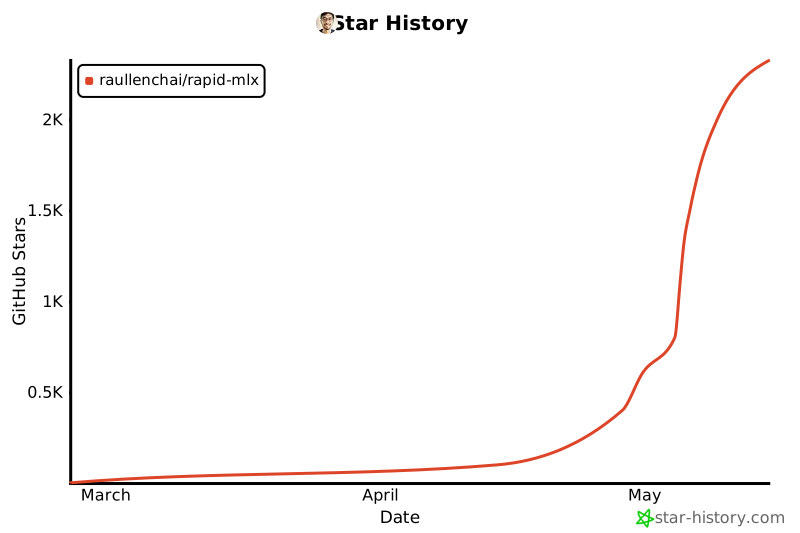
Star History
License
Apache 2.0 — see LICENSE.
Project details
Verified details
These details have been verified by PyPIProject links
GitHub Statistics
Maintainers
Release history Release notifications | RSS feed


Download files
Download the file for your platform. If you're not sure which to choose, learn more about installing packages.
Source Distribution
Built Distribution
Filter files by name, interpreter, ABI, and platform.
If you're not sure about the file name format, learn more about wheel file names.
Copy a direct link to the current filters
File details
Details for the file rapid_mlx-0.7.32.tar.gz.
File metadata
- Download URL: rapid_mlx-0.7.32.tar.gz
- Upload date:
- Size: 1.8 MB
- Tags: Source
- Uploaded using Trusted Publishing? Yes
- Uploaded via: twine/6.1.0 CPython/3.13.12
File hashes
| Algorithm | Hash digest | |
|---|---|---|
| SHA256 |
fd09270696f3e0f9b92367527537a58268fa4ba292a12b1bac833a34e817f09a
|
|
| MD5 |
bda982df9aecf2778f664156b668a02f
|
|
| BLAKE2b-256 |
523a0c723b2d3416fa338e9df9affd2d43b321a14de08bff3c8f169d203e1781
|
Provenance
The following attestation bundles were made for rapid_mlx-0.7.32.tar.gz:
Publisher:
publish.yml on raullenchai/Rapid-MLX
-
Statement:
-
Statement type:
https://in-toto.io/Statement/v1 -
Predicate type:
https://docs.pypi.org/attestations/publish/v1 -
Subject name:
rapid_mlx-0.7.32.tar.gz -
Subject digest:
fd09270696f3e0f9b92367527537a58268fa4ba292a12b1bac833a34e817f09a - Sigstore transparency entry: 1864899424
- Sigstore integration time:
-
Permalink:
raullenchai/Rapid-MLX@0156295dffbb31325f45b15b3602f85f6e28ceab -
Branch / Tag:
refs/tags/v0.7.32 - Owner: https://github.com/raullenchai
-
Access:
public
-
Token Issuer:
https://token.actions.githubusercontent.com -
Runner Environment:
github-hosted -
Publication workflow:
publish.yml@0156295dffbb31325f45b15b3602f85f6e28ceab -
Trigger Event:
release
-
Statement type:
File details
Details for the file rapid_mlx-0.7.32-py3-none-any.whl.
File metadata
- Download URL: rapid_mlx-0.7.32-py3-none-any.whl
- Upload date:
- Size: 1.0 MB
- Tags: Python 3
- Uploaded using Trusted Publishing? Yes
- Uploaded via: twine/6.1.0 CPython/3.13.12
File hashes
| Algorithm | Hash digest | |
|---|---|---|
| SHA256 |
e575f935ae62e5f21a9ed44260214def05379969a725d09a362d09acd2f0f89c
|
|
| MD5 |
acd119c46b1fe0892d01ca25b1389e61
|
|
| BLAKE2b-256 |
76e5779a4225b5c876a2956932e67711af2b44b726cf5d9caf3e4e1058eddf40
|
Provenance
The following attestation bundles were made for rapid_mlx-0.7.32-py3-none-any.whl:
Publisher:
publish.yml on raullenchai/Rapid-MLX
-
Statement:
-
Statement type:
https://in-toto.io/Statement/v1 -
Predicate type:
https://docs.pypi.org/attestations/publish/v1 -
Subject name:
rapid_mlx-0.7.32-py3-none-any.whl -
Subject digest:
e575f935ae62e5f21a9ed44260214def05379969a725d09a362d09acd2f0f89c - Sigstore transparency entry: 1864899555
- Sigstore integration time:
-
Permalink:
raullenchai/Rapid-MLX@0156295dffbb31325f45b15b3602f85f6e28ceab -
Branch / Tag:
refs/tags/v0.7.32 - Owner: https://github.com/raullenchai
-
Access:
public
-
Token Issuer:
https://token.actions.githubusercontent.com -
Runner Environment:
github-hosted -
Publication workflow:
publish.yml@0156295dffbb31325f45b15b3602f85f6e28ceab -
Trigger Event:
release
-
Statement type:






