
Trains CNN classifiers from raw speech using Keras and tests them.
Verified details
These details have been verified by PyPIProject links
Owner
GitHub Statistics
Maintainers

Project description
Raw Speech Classification

Trains CNN (or any neural network based) classifiers from raw speech using Keras and tests them. The inputs are lists of wav files, where each file is labelled. It then creates fixed length signals and processes them. During testing, it computes scores at the utterance or speaker levels by averaging the corresponding frame-level scores from the fixed length signals.
Installation
Installing from PyPI
If you want to install the last release of this package in your current environment (we recommend using Conda to manage virtual environments, e.g. to have a specific version of Python), you can run either of the following commands, depending on your desired framework:
pip install raw-speech-classification[torch]
or
pip install raw-speech-classification[tensorflow]
or
pip install raw-speech-classification[jax]
If you already have an environment with PyTorch, TensorFlow, or Jax installed, you can simply run:
pip install raw-speech-classification
Installing from source in a virtual environment
To install the following repository from source, clone this repository, then run (according to the Keras backend you desire):
pip install -e .[torch]
or
pip install -e .[tensorflow]
or
pip install -e .[jax]
You will also need to set the KERAS_BACKEND environment variable to
the correct backend before running rsclf-train or rsclf-test (see
below), or globally for the current bash session with:
export KERAS_BACKEND=torch
Replace torch by tensorflow or jax accordingly.
Using the code
-
Create lists for training, cross-validation and testing. Each line in a list must contain the path to a wav file (relative to the
-Ror--rootoption), followed by its integer label indexed from 0, separated by a space. E.g. if your data files are in/home/bob/data/my_dataset/part*/file*.wav, therootoption could be/home/bob/data/my_datasetand the content of the files would then be like:part1/file1.wav 1 part1/file2.wav 0
Full list files for IEMOCAP are available in the repository as example in
datasets/IEMOCAP/F1_lists. -
You can now run the following commands (use the
--helpoption of each command to get more details):rsclf-wav2feat --wav-list-file list_files/cv.list --feature-dir output/cv_feat --mode train --root path/to/dataset/basedir rsclf-wav2feat --wav-list-file list_files/train.list --feature-dir output/train_feat --mode train --root path/to/dataset/basedir rsclf-wav2feat --wav-list-file list_files/test.list --feature-dir output/test_feat --mode test --root path/to/dataset/basedir KERAS_BACKEND=torch rsclf-train --train-feature-dir output/train_feat --validation-feature-dir output/cv_feat --output-dir output/cnn_subseg --arch subseg --splice-size 25 --verbose 2 KERAS_BACKEND=torch rsclf-test --feature-dir output/test_feat --model-filename output/cnn_subseg/cnn.keras --output-dir output/cnn_subseg --splice-size 25 --verbose 0 rsclf-plot --output-dir output/ output/cnn_subseg
Using run.sh (only with Conda)
run.sh allows to run all these steps in one command when using Conda as virtual
environment manager. This examples shows how to use the IEMOCAP lists shipped in the
repository:
bash run.sh -C ~/miniforge3 -n rscl -D datasets/IEMOCAP/F1_lists -a seg -o results/seg-f1 -R <IEMOCAP_DATA_ROOT>
Replace <IEMOCAP_DATA_ROOT> by the path to the IEMOCAP data directory containing
IEMOCAP_full_release/Session*.
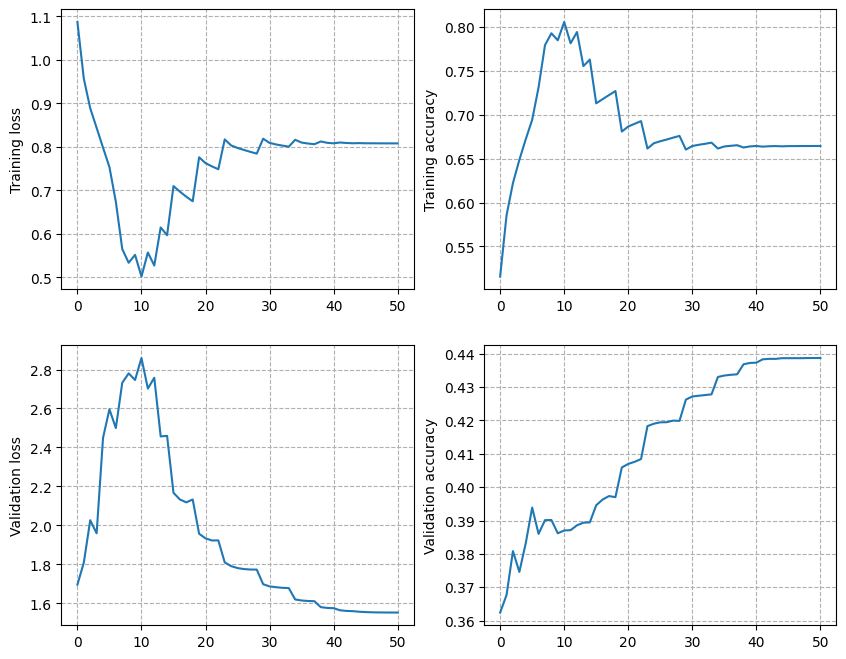
Here is an example of the log printed to the terminal, and you should
obtain the following curve in results/seg-f1/plot.png:
Code components
-
wav2feat.pycreates directories where the wav files are stored as fixed length frames for faster access during training and testing. -
train.pyis the Keras training script. -
Model architecture can be configured in
model_architecture.py. -
rawdataset.pyprovides an object that reads the saved directories in batches and retrieves mini-batches for training. -
test.pyperforms the testing and generates scores as posterior probabilities. If you need the results per speaker, configure it accordingly (see the script for details). The default output format is:<speakerID> <label> [<posterior_probability_vector>]
-
plot.pygenerates and saves the learning curves.
Training schedule
The script uses stochastic gradient descent with 0.5 momentum. It starts with a learning rate of 0.1 for a minimum of 5 epochs. Whenever the validation loss reduces by less than 0.002 between successive epochs, the learning rate is halved. Halving is performed until the learning rate reaches 1e-7.
Contributors
Idiap Research Institute
Authors: S. Pavankumar Dubagunta and Dr. Mathew Magimai-Doss
License
GNU GPL v3
Project details
Verified details
These details have been verified by PyPIProject links
Owner
GitHub Statistics
Maintainers


Download files
Download the file for your platform. If you're not sure which to choose, learn more about installing packages.
Source Distribution
Built Distribution
Filter files by name, interpreter, ABI, and platform.
If you're not sure about the file name format, learn more about wheel file names.
Copy a direct link to the current filters
File details
Details for the file raw_speech_classification-1.0.4.tar.gz.
File metadata
- Download URL: raw_speech_classification-1.0.4.tar.gz
- Upload date:
- Size: 24.7 kB
- Tags: Source
- Uploaded using Trusted Publishing? Yes
- Uploaded via: twine/6.1.0 CPython/3.12.9
File hashes
| Algorithm | Hash digest | |
|---|---|---|
| SHA256 |
df1e0c1e57f37bc8cb9eeec53e2dac0d40cc2e7e0d86c7ee9d10c2d4c5dcfc6a
|
|
| MD5 |
05e9a18858c5e840d9363b4e92160616
|
|
| BLAKE2b-256 |
7e195ff46c856b35d7f90812878cc80a6057981c430daedd400ab5e185638be5
|
Provenance
The following attestation bundles were made for raw_speech_classification-1.0.4.tar.gz:
Publisher:
deploy.yml on idiap/RawSpeechClassification
-
Statement:
-
Statement type:
https://in-toto.io/Statement/v1 -
Predicate type:
https://docs.pypi.org/attestations/publish/v1 -
Subject name:
raw_speech_classification-1.0.4.tar.gz -
Subject digest:
df1e0c1e57f37bc8cb9eeec53e2dac0d40cc2e7e0d86c7ee9d10c2d4c5dcfc6a - Sigstore transparency entry: 195000850
- Sigstore integration time:
-
Permalink:
idiap/RawSpeechClassification@f5530089d90413e0aa49a033ae95215c5e1056bd -
Branch / Tag:
refs/tags/v1.0.4 - Owner: https://github.com/idiap
-
Access:
public
-
Token Issuer:
https://token.actions.githubusercontent.com -
Runner Environment:
github-hosted -
Publication workflow:
deploy.yml@f5530089d90413e0aa49a033ae95215c5e1056bd -
Trigger Event:
release
-
Statement type:
File details
Details for the file raw_speech_classification-1.0.4-py3-none-any.whl.
File metadata
- Download URL: raw_speech_classification-1.0.4-py3-none-any.whl
- Upload date:
- Size: 26.6 kB
- Tags: Python 3
- Uploaded using Trusted Publishing? Yes
- Uploaded via: twine/6.1.0 CPython/3.12.9
File hashes
| Algorithm | Hash digest | |
|---|---|---|
| SHA256 |
7918022d893e85d410d920d6dc7cfb7276172b65fd7dd6cfe842062ac306b1e9
|
|
| MD5 |
9e5f6b297a079fdb8111b1b87ee2915a
|
|
| BLAKE2b-256 |
c1f359a20e7bd19e115781d7e54d3b59e68c47cfe55629ebd7d1366fdad02ade
|
Provenance
The following attestation bundles were made for raw_speech_classification-1.0.4-py3-none-any.whl:
Publisher:
deploy.yml on idiap/RawSpeechClassification
-
Statement:
-
Statement type:
https://in-toto.io/Statement/v1 -
Predicate type:
https://docs.pypi.org/attestations/publish/v1 -
Subject name:
raw_speech_classification-1.0.4-py3-none-any.whl -
Subject digest:
7918022d893e85d410d920d6dc7cfb7276172b65fd7dd6cfe842062ac306b1e9 - Sigstore transparency entry: 195000854
- Sigstore integration time:
-
Permalink:
idiap/RawSpeechClassification@f5530089d90413e0aa49a033ae95215c5e1056bd -
Branch / Tag:
refs/tags/v1.0.4 - Owner: https://github.com/idiap
-
Access:
public
-
Token Issuer:
https://token.actions.githubusercontent.com -
Runner Environment:
github-hosted -
Publication workflow:
deploy.yml@f5530089d90413e0aa49a033ae95215c5e1056bd -
Trigger Event:
release
-
Statement type:






