
Reinforcement learning algorithms in RLlib and PyTorch.

Project description





Reinforcement learning algorithms in RLlib and PyTorch.
Introduction
Raylab provides agents and environments to be used with a normal RLlib/Tune setup.
import ray
from ray import tune
import raylab

def main():
    raylab.register_all_agents()
    raylab.register_all_environments()
    ray.init()
    tune.run(
        "NAF",
        local_dir=...,
        stop={"timesteps_total": 100000},
        config={
            "env": "CartPoleSwingUp-v0",
            "exploration_config": {
                "type": tune.grid_search([
                    "raylab.utils.exploration.GaussianNoise",
                    "raylab.utils.exploration.ParameterNoise"
                ])
            }
            ...
        },
    )

if __name__ == "__main__":
    main()
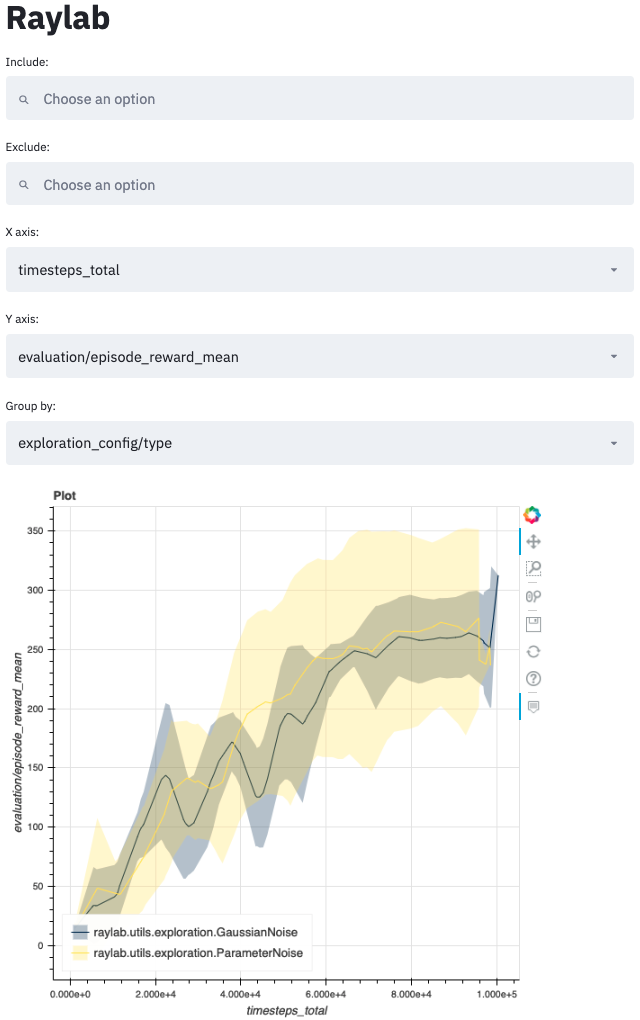
One can then visualize the results using raylab dashboard
Installation
pip install raylabAlgorithms
Paper |
Agent Name |
ACKTR |
|
TRPO |
|
NAF |
|
SVG(inf)/SVG(1)/SoftSVG |
|
SoftAC |
|
Streamlined Off-Policy (DDPG) |
SOP |
MBPO |
|
MAGE |
Command-line interface
For a high-level description of the available utilities, run raylab --help
Usage: raylab [OPTIONS] COMMAND [ARGS]...

  RayLab: Reinforcement learning algorithms in RLlib.

Options:
  --help  Show this message and exit.

Commands:
  dashboard    Launch the experiment dashboard to monitor training progress.
  episodes     Launch the episode dashboard to monitor state and action...
  experiment   Launch a Tune experiment from a config file.
  find-best    Find the best experiment checkpoint as measured by a metric.
  info         View information about an agent's config parameters.
  rollout      Wrap `rllib rollout` with customized options.
  test-module  Launch dashboard to test generative models from a checkpoint.
Packages
The project is structured as follows
raylab
|-- agents            # Trainer and Policy classes
|-- cli               # Command line utilities
|-- envs              # Gym environment registry and utilities
|-- logger            # Tune loggers
|-- policy            # Extensions and customizations of RLlib's policy API
|   |-- losses        # RL loss functions
|   |-- modules       # PyTorch neural network modules for TorchPolicy
|-- pytorch           # PyTorch extensions
|-- utils             # miscellaneous utilities
Release history Release notifications | RSS feed


Download files
Download the file for your platform. If you're not sure which to choose, learn more about installing packages.
Source Distribution
Built Distribution
Filter files by name, interpreter, ABI, and platform.
If you're not sure about the file name format, learn more about wheel file names.
Copy a direct link to the current filters
File details
Details for the file raylab-0.11.7.tar.gz.
File metadata
- Download URL: raylab-0.11.7.tar.gz
- Upload date:
- Size: 147.3 kB
- Tags: Source
- Uploaded using Trusted Publishing? No
- Uploaded via: poetry/1.0.10 CPython/3.8.3 Linux/5.3.0-1032-azure
File hashes
| Algorithm | Hash digest | |
|---|---|---|
| SHA256 |
3959baa85f347ba8c069495d338ed8594a458f34bb6b893f87534b56009da8c7
|
|
| MD5 |
0122286d65d2b9194fd794b7e1b67964
|
|
| BLAKE2b-256 |
facfa48dd88e131e3d06bdcd32d47ef40e68d1a315b041c0f49cf6766dd23013
|
File details
Details for the file raylab-0.11.7-py3-none-any.whl.
File metadata
- Download URL: raylab-0.11.7-py3-none-any.whl
- Upload date:
- Size: 242.1 kB
- Tags: Python 3
- Uploaded using Trusted Publishing? No
- Uploaded via: poetry/1.0.10 CPython/3.8.3 Linux/5.3.0-1032-azure
File hashes
| Algorithm | Hash digest | |
|---|---|---|
| SHA256 |
d5197af3e8e94ca1f0357a5b8273f04b2bc2635d17f0350dd5aa050b4fa7e530
|
|
| MD5 |
56c2c85554ab467ace00a3f14a630fd8
|
|
| BLAKE2b-256 |
d37e652341170e734d0fdae9e0fd2060a30b616e554a41bc8468cd1920ec35a2
|






