
razer-cli

Command line interface for controlling Razer devices on Linux
📢 Maintainers wanted 📢
Please reach out here if you're intersted in becoming a maintainer.
About
With this command line interface you can configure your Razer peripherals, such as keyboard and mouse, set their colors and effects, etc.
The most simple use case (for which this tool was originally developed) is to
use it in symbiosis with pywal. Then
this tool will set your Razer colors to Pywal's colors. See below for more
information.
Installation
OR
git clone https://github.com/LoLei/razer-cli.git
cd razer-cli
sudo python setup.py install
OR
git clone https://github.com/LoLei/razer-cli.git
cd razer-cli
pip install . --user
If you're using Arch Linux, you can install the razer-cli AUR package:
sudo pacman -S --needed base-devel
git clone https://aur.archlinux.org/razer-cli.git
cd razer-cli
makepkg -si
Or install it through an AUR helper if you're using one.
Usage
$ razer-cli -h
usage: razer-cli [-h] [-man [MANUAL ...]] [-v] [-d DEVICE [DEVICE ...]]
                 [-a] [-e EFFECT [EFFECT ...]] [-c COLOR [COLOR ...]]
                 [-z ZONES [ZONES ...]] [-b BRIGHTNESS [BRIGHTNESS ...]]
                 [--dpi DPI] [--poll POLL]
                 [--battery BATTERY [BATTERY ...]] [-l] [-ll] [-ls]
                 [--sync] [--restore] [--version]

optional arguments:
  -h, --help            show this help message and exit
  -man [MANUAL ...], --manual [MANUAL ...]
                        Print help details for given feature(s)
  -v, --verbose         increase output verbosity
  -d DEVICE [DEVICE ...], --device DEVICE [DEVICE ...]
                        only affect these devices, same name as output of
                        -l
  -a, --automatic       try to find colors and set them to all devices
                        without user arguments, uses X or pywal colors
  -e EFFECT [EFFECT ...], --effect EFFECT [EFFECT ...]
                        set effect
  -c COLOR [COLOR ...], --color COLOR [COLOR ...]
                        choose color (default: X color1), use one argument
                        for hex, or three for base10 rgb
  -z ZONES [ZONES ...], --zone ZONES [ZONES ...]
                        choose zone for color(s)
  -b BRIGHTNESS [BRIGHTNESS ...], --brightness BRIGHTNESS [BRIGHTNESS ...]
                        set brightness of device
  --dpi DPI             set DPI of device (use print as a value to show
                        it)
  --poll POLL           set polling rate of device (use print as a value
                        to show it)
  --battery BATTERY [BATTERY ...]
                        set low threshold and/or idle delay (use print as
                        a value to show it)
  -l, --list_devices    list available devices, settings, and their
                        supported capabilities/effects
  -ll, --list_devices_long
                        list available devices settings, and list their
                        supported capabilities/effects
  -ls, --list_devices_short
                        list available devices and their settings
  --sync                sync lighting effects to all supported Razer
                        products
  --restore             Load last used settings
  --version             Print version number
This might be out of date, just run it with -h yourself to see the newest
options.
Example usage with Pywal
To get your mouse and keyboard to use Pywal's colors, simply start razer-cli
with the -a flag, after having executed wal: razer-cli -a
Example in action
here.
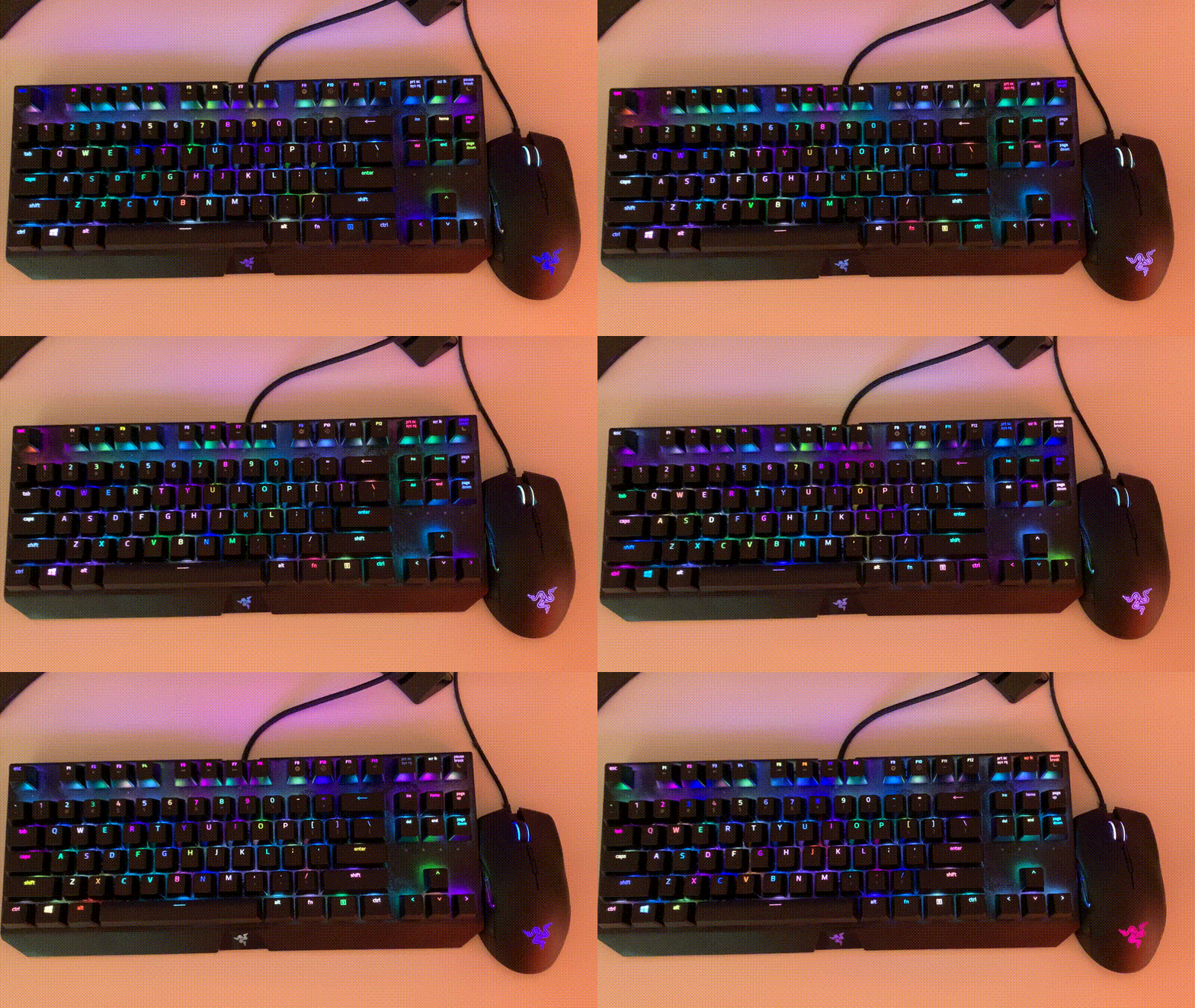
Another option is to use razer-cli -e multicolor,xpalette, which not only
uses a single color from pywal, but uses the entire 16 color palette.
Other examples
$ razer-cli -e ripple -c ff0000
$ razer-cli -e static -c ffffff
You can also leave out the color or the effect:
$ razer-cli -e breath_single
$ razer-cli -c 55ff99
Currently this will imply the -a flag being used for the missing setting. I
plan on also having the option to reuse the current color/effect, if the
argument is missing, in the future.
Effects
Effects are listed in
razer_cli/razer_cli/settings.py.
The effects that are supported per device can be listed with razer-cli -l[l].
Some of the built-in effects or not implemented yet. If such an effect is
chosen, a notice will be logged. There are also custom effects that do not exist
normally, such as multicolor, which is described in the same file.
Here's a showcase of that effect:
Other symbiosis tools
Dependencies
openrazer- ⚠️ Do not install
openrazerfrom pip, which is something else. - Instead install it from one of the various package managers of your distribution.
- ⚠️ Do not install
xrdb- Also available on most distros.
Publishing a new version
- Edit and commit the existing version numbers in
razer_cli/razer_cli/main.pyandsetup.py. - Create new tag/release on GitHub.
- Build and publish package via:
pip install --upgrade setuptools wheel twinepython setup.py sdist bdist_wheeltwine upload dist/*
Disclaimer
Not all devices have been tested, but basic effects should work everywhere. Some guesswork is being done as to what capabilities are supported on specific devices. If you need more advanced configuration, consider using the GUIs Polychromatic, RazerGenie or RazerCommander which have specific implementations for most devices.
Feel free to open feature request issues or PRs.
Contributors ✨
Thanks goes to these wonderful people (emoji key):
 Ansis 💻 |
 Kainoa Kanter 🤔 |
 IFo Hancroft 🐛 📓 📖 |
 GM-Script-Writer-62850 💻 |
 Stephen Thomas-Dorin 💻 |
 Romain Richard 💻 |
 justbispo 📦 |
 Ce1er 📖 |
 Chris 💻 |
 Arthur Canga 💻 |
 Garth de Wet 💻 |
This project follows the all-contributors specification. Contributions of any kind welcome!


Release files for razer-cli 2.3.2
For a detailed explanation of source distributions (sdists) and built distributions (wheels), please see the package formats documentation.
Source distribution (sdist)
| File | Size | Uploaded | |
|---|---|---|---|
| razer_cli-2.3.2.tar.gz | 36.3 kB | Details |
Built distribution (wheel)
| File | Interpreter | ABI | Platform | Reset |
|---|---|---|---|---|
| razer_cli-2.3.2-py3-none-any.whl | Python 3 | none | any | Details |
Total release size: 80.3 kB
Release files / razer_cli-2.3.2.tar.gz
| Download URL | razer_cli-2.3.2.tar.gz |
|---|---|
| Size | 36.3 kB |
| Tags | Source |
|
SHA-256 checksum How to use checksums |
316150aeca295a8550263b38ec50f309c4250cbc877bea1bc2f16f6298c6b225
|
|
BLAKE2b-256 checksum How to use checksums |
109dfe21930e96e9a343da161937330cbad6522da06f3c86a73f15e68de462f4
|
| Upload date | |
|
Uploaded using Trusted Publishing? What is trusted publishing? |
No |
| Uploaded via |
twine/3.8.0 pkginfo/1.10.0 readme-renderer/34.0 requests/2.27.1 requests-toolbelt/1.0.0 urllib3/1.26.20 tqdm/4.64.1 importlib-metadata/4.8.3 keyring/23.4.1 rfc3986/1.5.0 colorama/0.4.5 CPython/3.6.15
|
Release files / razer_cli-2.3.2-py3-none-any.whl
| Download URL | razer_cli-2.3.2-py3-none-any.whl |
|---|---|
| Size | 44.0 kB |
| Tags | Python 3 |
|
SHA-256 checksum How to use checksums |
045540450e008d49cd42be4aa6f1beb876c06e499a507b43cd5d47f2f601d380
|
|
BLAKE2b-256 checksum How to use checksums |
bb243f5feb65e796961ad429488a0d0e0761de630d1a0b00e275c4ae113f85ba
|
| Upload date | |
|
Uploaded using Trusted Publishing? What is trusted publishing? |
No |
| Uploaded via |
twine/3.8.0 pkginfo/1.10.0 readme-renderer/34.0 requests/2.27.1 requests-toolbelt/1.0.0 urllib3/1.26.20 tqdm/4.64.1 importlib-metadata/4.8.3 keyring/23.4.1 rfc3986/1.5.0 colorama/0.4.5 CPython/3.6.15
|














