





Keep your CLI output consistent. Write what a message means, not how it should look. RazTint handles colors, icons, and common secret redaction for you.
Preview
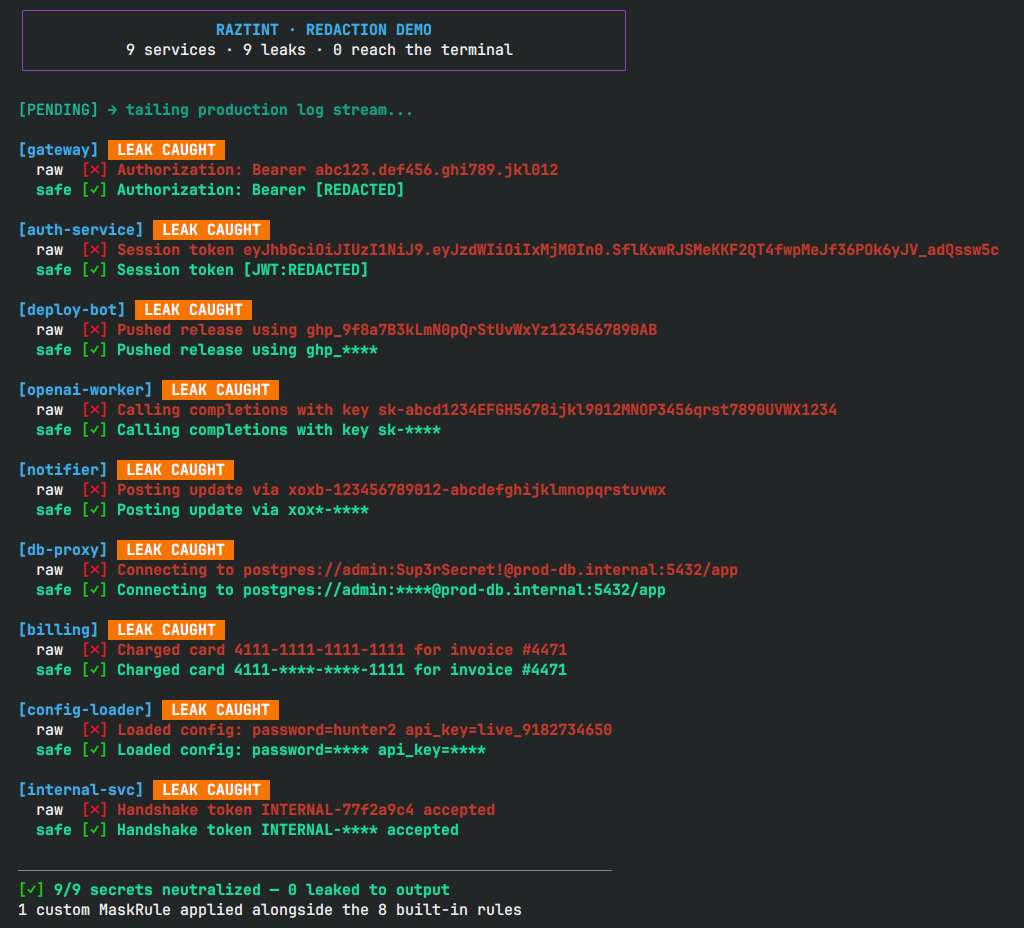
A simulated production log stream: 9 secrets detected, 9 secrets redacted, 0 leaked to the terminal.
Installation
Requires Python 3.10+.
pip install raztint
# with uv
uv add raztint
From source:
git clone https://github.com/razbuild/raztint.git
cd raztint
uv sync
Quick Start
from raztint import paint, ok

# icon shortcut
print(f"{ok()} Build passed.")

print(paint("Connection failed.", intent="error"))

# secrets are redacted before the string is printed
print(paint("password=1234", intent="debug", redact=True))
# password=****
paint() returns a plain string. Pass it to print(), a logging handler, or anywhere else a string works.
See Getting Started for a full walkthrough, including logging integration.
Why RazTint
- Semantic output instead of ANSI escape codes
- Automatic secret redaction before rendering
- Works anywhere a string is accepted
The problem
CLI output drifts over time. One module prints green for success, another adds an emoji, a third does both differently. Six months in, nothing agrees.
Debug logging is often where secrets slip through. A stray print(f"token={token}") is easy to add while troubleshooting and easy to forget. It ends up in your terminal or your logs.
# before: every call site invents its own formatting, and secrets slip through
print(f"\033[31mAuth failed for token={token}\033[0m")

# after: one call, styled and redacted
print(paint(f"Auth failed for token={token}", intent="error", redact=True))
# Auth failed for token=****
Core features
-
Semantic intents
success,error,warning,debug, and more. Use semantic names instead of choosing colors manually. -
Redaction masks
key=valuepairs such aspassword=,api_key=, andtoken=. Patterns are configurable, see Security & Redaction. -
Icon helpers
ok(),err(),warn(),info(),pending(),debug(). Falls back from Nerd Font to Unicode to ASCII depending on the terminal. -
Manual control raw
16/256/TrueColor and text styles, for the cases intents don't cover. -
Type hints throughout ships with
py.typed. RespectsNO_COLORandRAZTINT_FORCE_COLOR.
Design philosophy
[!NOTE] Make terminal output consistent, meaningful, and safe by default.
RazTint is not a terminal UI framework. It doesn't hook into logging or replace a handler. It stays a formatting layer, on purpose:
- ANSI color support
- Semantic logging helpers
- Automatic icon fallback
- Secret redaction
- Zero external dependencies
A small scope keeps RazTint focused.
Documentation
| Guide | Description |
|---|---|
| Getting Started | Functional usage, paint(), and the tint instance |
| API Reference | Colors, styles, icons, and RazTint class methods |
| Intents | Semantic presets for common CLI messages |
| Security & Redaction | Masking tokens, credentials, and custom rules |
| Icons & Detection | Icon modes and environment/font/color detection logic |
| Configuration | Environment variables and runtime toggles |
| Development | Local setup, tests, and linting |
| Tutorial | Philosophy, detection walk-through, and best practices |
Examples: showcase.py · file_processor.py · redaction_demo.py
Known limitations
- Python
3.10+only. - Font detection relies on OS tools (
fc-list,system_profiler, PowerShell). SetRAZTINT_SKIP_SYSTEM_FONT_SCAN=1in sandboxed environments. - Setting
NO_COLORsuppresses all color output, regardless of other settings.
Contributing
PRs and issues are welcome. Open an issue first to discuss any new feature.
See CONTRIBUTING.md for setup and guidelines.
License


1 maintainer

Download files
Download the file for your platform. If you're not sure which to choose, learn more about installing packages.
Source Distribution
Built Distribution
Filter files by name, interpreter, ABI, and platform.
If you're not sure about the file name format, learn more about wheel file names.
Copy a direct link to the current filters
File details
Details for the file raztint-0.9.1.tar.gz.
File metadata
- Download URL: raztint-0.9.1.tar.gz
- Upload date:
- Size: 14.2 kB
- Tags: Source
- Uploaded using Trusted Publishing? Yes
- Uploaded via:
uv/0.12.3 {"installer":{"name":"uv","version":"0.12.3","subcommand":["publish"]},"python":null,"implementation":{"name":null,"version":null},"distro":{"name":"Ubuntu","version":"24.04","id":"noble","libc":null},"system":{"name":null,"release":null},"cpu":null,"openssl_version":null,"setuptools_version":null,"rustc_version":null,"ci":true}
File hashes
| Algorithm | Hash digest | |
|---|---|---|
| SHA256 |
d6062acec54a8b0ba6d77c9e545dce3aaa0dfcef7371f04649a5426e32d1ac5c
|
|
| MD5 |
7758c8150525ee6dfd2b26dc98303ff6
|
|
| BLAKE2b-256 |
be4594aac172e169f55e67a607a7fbaa3a7385361586cf32cfd9d07a3f499570
|
File details
Details for the file raztint-0.9.1-py3-none-any.whl.
File metadata
- Download URL: raztint-0.9.1-py3-none-any.whl
- Upload date:
- Size: 21.1 kB
- Tags: Python 3
- Uploaded using Trusted Publishing? Yes
- Uploaded via:
uv/0.12.3 {"installer":{"name":"uv","version":"0.12.3","subcommand":["publish"]},"python":null,"implementation":{"name":null,"version":null},"distro":{"name":"Ubuntu","version":"24.04","id":"noble","libc":null},"system":{"name":null,"release":null},"cpu":null,"openssl_version":null,"setuptools_version":null,"rustc_version":null,"ci":true}
File hashes
| Algorithm | Hash digest | |
|---|---|---|
| SHA256 |
0e73b301ee57259caf5d6d233bc1a70f33fde2bc04715de53ba34890a49409cc
|
|
| MD5 |
12328912af69425862f7bfa585404795
|
|
| BLAKE2b-256 |
8af5574a7a3b039057cff8fe70dc5898e0a860399f590bef86c7a74b9d8672fc
|







