

The data validation toolkit
for teams that care about building better data








Introduction
Recce is data validation toolkit for pull request (PR) review in dbt projects. Get enhanced visibility into how your team’s dbt modeling changes impact data by comparing your dev branch with stable production data. Run manual data checks during development, and automate checks in CI for PR review.
Quick Start
Get up and running quickly by prepping your dev and prod environments. The key is building prod into the target-base folder to use as the base for the data comparison.
# Build prod and generate dbt docs into ./target-base
dbt seed --target prod
dbt run --target prod
dbt docs generate --target prod --target-path ./target-base

# Switch to your dev branch
git switch my-awesome-branch

# build your dev environment
dbt seed
dbt run
dbt docs generate

# Start a Recce Instance
recce server
Follow our 5-minute Jaffle Shop tutorial to try it out for yourself.
What you get
recce server launches a web UI that shows you the area of your lineage that is impacted by the branch changes.
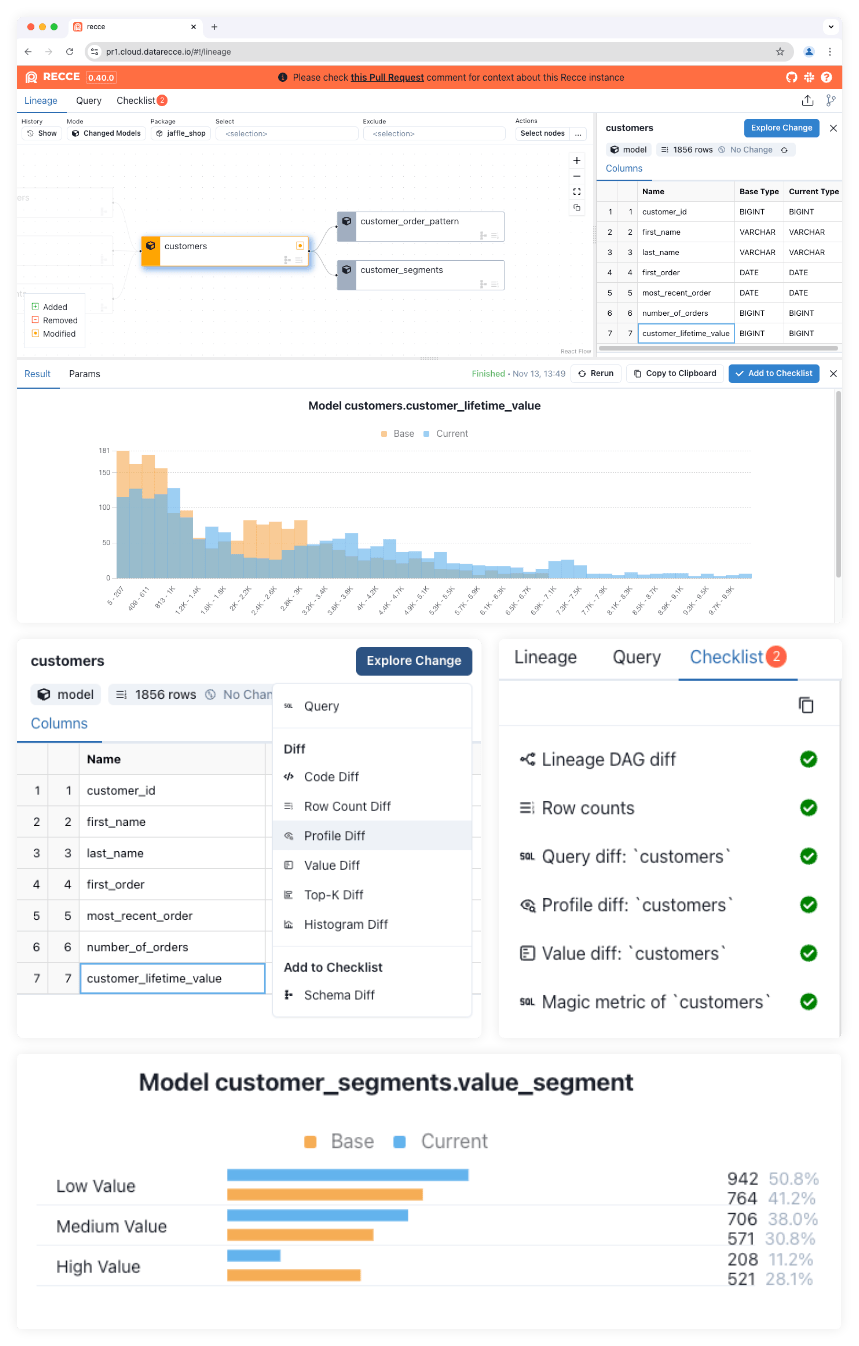
Using Recce for Impact Assessment in dbt PR Review
- Select nodes in the lineage to perform Checks (diffs) as part of your impact assessment during development or PR review.
- Add Checks to your Checklist to note observed impacts.
- Share your Checklist with the PR reviewer.
- (
Recce Cloud) Automatically sync Check status between Recce Instances - (
Recce Cloud) Block PR merging until all Recce Checks have been approved
Read more about using Recce for Impact Assessment on the Recce blog.
Try the Online Demo
We provide three online Recce demos (based on Jaffle Shop), each is related to a specific pull request. Use these demos to inspect the data impact caused by the modeling changes in the PR.
For each demo, review the following:
- The pull request comment
- The code changes
- How the lineage and data has changed in
Recce
This will enable you to validate if the intention of the PR has been successfully implemented without unintended impact.
Don't forget to click the Checks tab to view the Recce Checklist, and perform your own Checks for further investigation.
Demo 1: Calculation logic change
This pull request adjusts the logic for how customer lifetime value is calculated:
Demo 2: Refactoring
This pull request performs some refactoring on the customers model by turning two CTEs into intermediate models, enhancing readability and maintainability:
Demo 3: Analysis
This pull request introduces a new Rounding Effect Analysis feature, aimed at analyzing and reporting the impacts of rounding in our data processing.
Why Recce
dbt has brought many software best practices to data projects, such as:
- Version controlled code
- Modular SQL
- Reproducible pipelines
Even so, 'bad merges' still happen and erroneous data and silent errors make their way into prod data. As self-serve analytics opens dbt projects to many roles, and the size of dbt projects increase, the job of reviewing data modeling changes is even more critical.
The only way to understand the impact of code changes on data is to compare the data before-and-after the changes.
Features
Recce provides a data review environment for data teams to check their work during development, and then again as part of PR review. The suite of tools and diffs in Recce are specifically geared towards surfacing, understanding, and recording data impact from code changes.
Lineage Diff
Lineage Diff is the main interface to Recce and shows which nodes in the lineage have been added, removed, or modified.
Structural Diffs
- Schema Diff - Show the struture of the table including added or removed columns
- Row Count Diff - Compares the row count for tables
Statistical Diffs
Advanced Diffs provide high level statistics about data change:
- Profile Diff: Compares stats such as count, distinct count, min, max, average.
- Value Diff: The matched count and percentage for each column in the table.
- Top-K Diff: Compares the distribution of a categorical column.
- Histogram Diff: Compares the distribution of a numeric column in an overlay histogram chart.
Query Diff
Query Diff compares the results of any ad-hoc query, and supports the use of dbt macros.
Checklist
The checklist provides a way to record the results of your data validation process.
- Save the results of checks
- Re-run checks
- Annotate checks to add context
- Share the results of checks
- (
Recce Cloud) Sync checks and check results across Recce instances - (
Recce Cloud) Block PR merging until checks have been approved
Who's using Recce?
Recce is useful for validating your own work or the work of others, and can also be used to share data impact with non-technical stakeholders to approve data checks.
- Data engineers can use
Recceto ensure the structural integrity of the data and understand the scope of impact before merging. - Analysts can use
Recceto self-review and understand how data modeling changes have changed the data. - Stakeholders can use
Recceto sign-off on data after updates have been made
Documentation / How to use Recce
The Recce Documentation covers everything you need to get started.
We’d advise first following the 5-minute tutorial that uses Jaffle Shop and then trying out Recce in your own project.
For advice on best practices in preparing dbt environments to enable effective PR review, check out Best Practices for Preparing Environments.
Recce Cloud
Recce Cloud provides a backbone of supporting services that make Recce usage more suitable for teams reviewing multiple pull requests.
With Recce Cloud:
RecceInstances can be launched directly from a PR- Checks are automatically synced across
RecceInstances - Blocked merging until all checks are approved
Recce Cloud is currently in early-access private beta.
To find out how you can get access please book an appointment for a short meeting.
Data Security
Recce consists of a local server application that you run on your own device or compute services.
- Diffs or queries that are performed by
Reccehappen either in your data warehouse, or in the browser itself. Reccedoes not store your data.
For Recce Cloud users:
- An encrypted version of your
Reccestate file is storedonRecce Cloud. This file is encrypted before transmission.
Community & Support
Here's where you can get in touch with the Recce team and find support:
- dbt Slack in the #tools-recce channel
- Recce Discord
- Email us product@datarecce.io
If you believe you have found a bug, or there is some missing functionality in Recce, please open a GitHub Issue.
Recce on the web
You can follow along with news about Recce and blogs from our team in the following places:
- DataRecce.io
- Medium blog
- @datarecce on Twitter/X
- @DataRecce@mastodon.social on Mastodon
- @datarecce.bsky.social on BlueSky
1 maintainer

Metadata
1 maintainer
Release files for recce-nightly 0.51.0.20250119
For a detailed explanation of source distributions (sdists) and built distributions (wheels), please see the package formats documentation.
Source distribution (sdist)
| File | Size | Uploaded | |
|---|---|---|---|
| recce_nightly-0.51.0.20250119.tar.gz | 1.1 MB | Details |
Built distribution (wheel)
| File | Interpreter | ABI | Platform | Reset |
|---|---|---|---|---|
| recce_nightly-0.51.0.20250119-py3-none-any.whl | Python 3 | none | any | Details |
Total release size: 2.3 MB
Release files / recce_nightly-0.51.0.20250119.tar.gz
| Download URL | recce_nightly-0.51.0.20250119.tar.gz |
|---|---|
| Size | 1.1 MB |
| Tags | Source |
|
SHA-256 checksum How to use checksums |
8780a753e808de435013ae0950a2ff76e258a51ac2fbb2e6e7c840db96fd7c70
|
|
BLAKE2b-256 checksum How to use checksums |
a461b5df3ee669cc3d1b27bcddee4c44757a3c7a9a077c60806153d0beb32956
|
| Upload date | |
|
Uploaded using Trusted Publishing? What is trusted publishing? |
No |
| Uploaded via |
twine/6.0.1 CPython/3.10.16
|
Release files / recce_nightly-0.51.0.20250119-py3-none-any.whl
| Download URL | recce_nightly-0.51.0.20250119-py3-none-any.whl |
|---|---|
| Size | 1.2 MB |
| Tags | Python 3 |
|
SHA-256 checksum How to use checksums |
361eea848abc6ee81d4164b70ad7bbae4da73d0f532f9cdd24ed280713a267b2
|
|
BLAKE2b-256 checksum How to use checksums |
6363c86624ab50573fd17fc1c2752184ca8c092e086eeafb5965dbb7d0397ebd
|
| Upload date | |
|
Uploaded using Trusted Publishing? What is trusted publishing? |
No |
| Uploaded via |
twine/6.0.1 CPython/3.10.16
|














