

Helping data teams preview, validate, and ship data changes with confidence.








Trust, Verify, Ship
Cut dbt review time by 90% and ship accurate data fast
Recce gives data teams a faster, more reliable way to understand, review, and ship changes without all the guesswork or manual overhead.
Quick Start
Installation
Recce offers two packages to fit different use cases:
For full local development and Recce Cloud features:
pip install -U recce
recce server
For CI/CD artifact uploads only (lightweight):
pip install -U recce-cloud
recce-cloud upload
The recce-cloud package is a lightweight CLI tool designed specifically for CI/CD environments where you only need to upload dbt artifacts to Recce Cloud. It has minimal dependencies and installs faster than the full recce package.
Getting Started
You can launch Recce in any dbt project in just two commands:
# cd into your dbt project
pip install -U recce
recce server
(Note: while recce is not version spsecific, dbt-core is currently not compatible with Python 3.13. Please make sure to use Python 3.10 - 3.12.)
This starts Recce locally, where you can explore lineage and run queries. To unlock the full set of diffing tools, such as data comparisons and impact checks, you'll need to prepare two environments to compare against. You can follow our Getting Started and 5-minute Jaffle Shop tutorial to try it out step-by-step.
What You Get
Recce gives you a clear, fast way to understand what your data changes are doing and why they matter. It helps you catch problems early, verify metrics, and share your findings with others, all as part of your normal workflow.
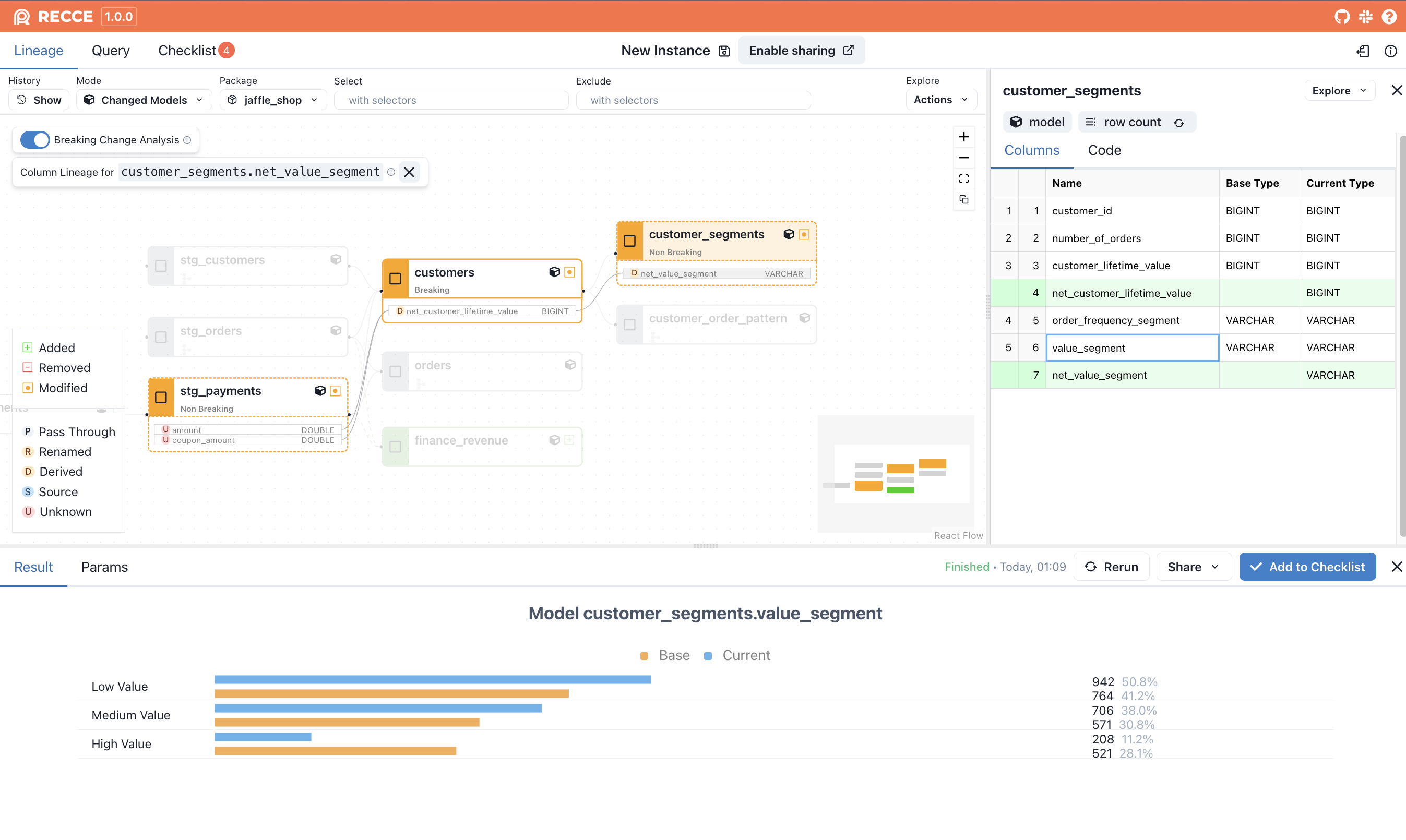
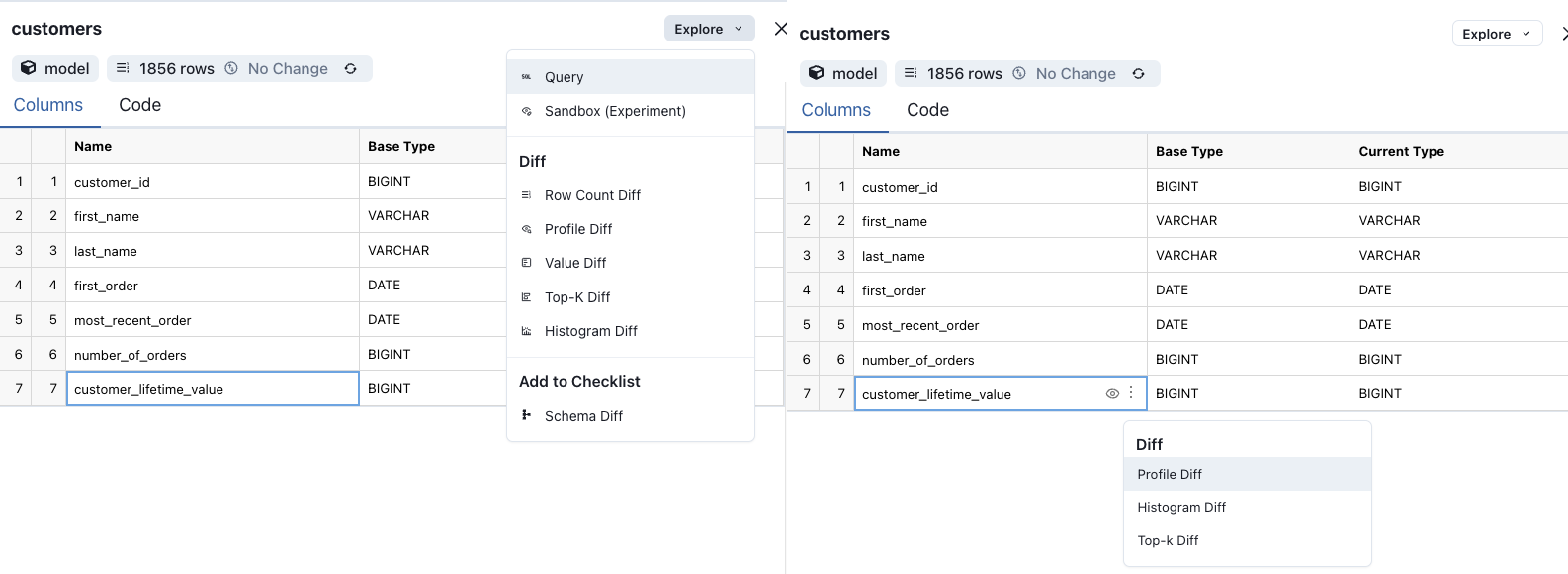
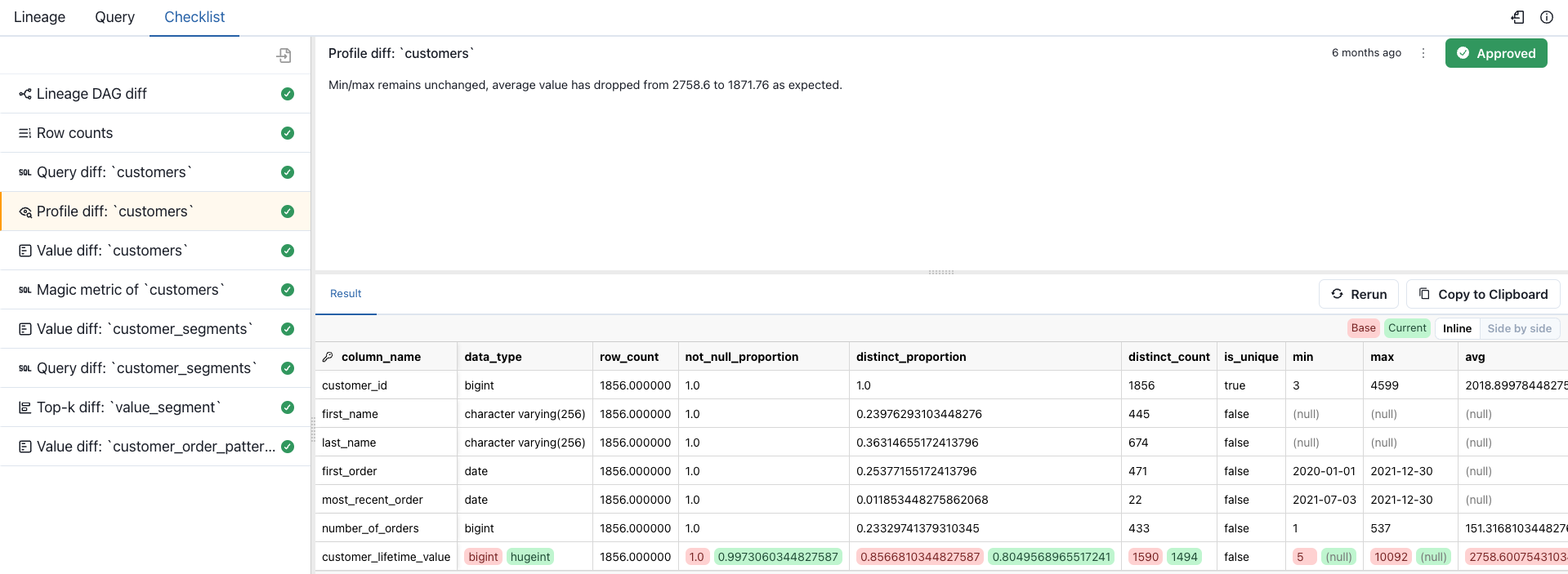
Using Recce for Impact Assessment in dbt PR Review
- Select nodes in the lineage to perform Checks (diffs) as part of your impact assessment during development or PR review.
- Add Checks to your Checklist to note observed impacts.
- Share your Checklist with the PR reviewer.
- (
Recce Cloud) Automatically sync Check status between Recce Instances - (
Recce Cloud) Block PR merging until all Recce Checks have been approved
Read more about using Recce on our blog.
What’s Included
- Lineage and impact mapping: Quickly see which models and columns are affected by a change. Navigate lineage down to the column level, and spot breaking changes with clear visual cues.
- Metric and data comparisons: Use Profile, Value, Top-K, and Histogram Diffs to compare results before and after changes. Validate things like row counts, category distributions, and numeric ranges without writing extra SQL.
- Query diff: Write and compare any two queries side by side. This is helpful when validating fixes or reviewing changes with teammates.
- Checklist for reviews and approvals: Turn your validation steps into a checklist. Add notes, rerun checks, and share the results with reviewers or stakeholders. In Recce Cloud, checklists can sync automatically and even block PRs until checks are approved.
- Secure by design: Recce is SOC 2 compliant to meet enterprise security standards. It runs locally or in your private environment, and your data stays in your warehouse.
👉 Want to dive deeper? Check out the full documentation.
Recce Cloud
Ready to collaborate and move faster as a team? Recce Cloud adds real-time collaboration, automatic checklist sync, and PR gating, so nothing gets merged without a full review.
- Share checklists across environments
- Invite stakeholders to review data changes
- Block merges until all Checks are approved
- Launch demo links from your CI with full context
Recce Cloud is a hosted version of Recce that standardizes your workflow, keeps teams aligned, and reduces errors—so you can ship data changes with confidence. 👉 View Pricing and Plans
Developer Documentation
If you want to contribute to Recce or test local changes in your dbt project, follow these steps to install the development version.
Installing the Local Dev Version
-
Clone the repository (if you haven't already):
git clone https://github.com/DataRecce/recce.git
cd recce
-
Build the project from the repository root:
make buildThis builds the frontend assets and prepares the package for installation.
-
Install the local dev version in your dbt project:
# Navigate to your dbt project
cd /path/to/your/dbt-project

# Install recce in editable mode (replace with your actual path to the recce repo)
pip install -e /path/to/recce
Using
-e(editable mode) means any changes you make to the Recce source code will be immediately available without reinstalling. -
Start the Recce server to verify the installation:
recce server
Development Tips
- After making frontend changes in
js/, runmake buildagain to rebuild the static assets - Run
make install-devin the recce repository to install development dependencies - Use
make testto run the Python test suite - Use
cd js && pnpm testto run the frontend test suite
For more detailed development guidelines, see CONTRIBUTING.md.
Community & Support
Here's where you can get in touch with the Recce team and find support, add a subscribe to our newsletter option as well:
- chat on our website. We welcome you to start a chat or drop us a note. Our team monitors the chat box and will follow up soon.
- Our discord
- dbt Slack in the #tools-recce channel
- Email us help@reccehq.com
If you believe you have found a bug on our open source, or there is some missing functionality in Recce, please open a GitHub Issue.
Recce on the web
You can follow along with news about Recce and blogs from our team in the following places:
- RecceHQ.com
- Blog
- @datarecce on Twitter/X
- @DataRecce@mastodon.social on Mastodon
- @datarecce.bsky.social on BlueSky
1 maintainer

Metadata
1 maintainer
Release files for recce-nightly 1.46.0.20260428
For a detailed explanation of source distributions (sdists) and built distributions (wheels), please see the package formats documentation.
Source distribution (sdist)
| File | Size | Uploaded | |
|---|---|---|---|
| recce_nightly-1.46.0.20260428.tar.gz | 2.3 MB | Details |
Built distribution (wheel)
| File | Interpreter | ABI | Platform | Reset |
|---|---|---|---|---|
| recce_nightly-1.46.0.20260428-py3-none-any.whl | Python 3 | none | any | Details |
Total release size: 4.8 MB
Release files / recce_nightly-1.46.0.20260428.tar.gz
| Download URL | recce_nightly-1.46.0.20260428.tar.gz |
|---|---|
| Size | 2.3 MB |
| Tags | Source |
|
SHA-256 checksum How to use checksums |
0e088a2afdf293b4dd6d8559a0356bbfa871397820e83ef9593e1684ad076489
|
|
BLAKE2b-256 checksum How to use checksums |
361e71f856a5a8bb879f9c26c539caed7ace992b12c606819f237e8f0605d9f4
|
| Upload date | |
|
Uploaded using Trusted Publishing? What is trusted publishing? |
No |
| Uploaded via |
twine/6.2.0 CPython/3.10.20
|
Release files / recce_nightly-1.46.0.20260428-py3-none-any.whl
| Download URL | recce_nightly-1.46.0.20260428-py3-none-any.whl |
|---|---|
| Size | 2.4 MB |
| Tags | Python 3 |
|
SHA-256 checksum How to use checksums |
325669ce32d8b1984d3a0fa0a72ffef1c7605a8c6855170b0b31912a81054fbe
|
|
BLAKE2b-256 checksum How to use checksums |
bc3c842079d8ddeb2c618f7f61f4691299764bbd035a47884773fcd9abe1b4d7
|
| Upload date | |
|
Uploaded using Trusted Publishing? What is trusted publishing? |
No |
| Uploaded via |
twine/6.2.0 CPython/3.10.20
|














