

Features
- Automatically renewing token
- Supports 2FA accounts
- Decoding the bearer token
- Detailed exceptions
Installation
Download the recnetlogin folder and place it in your project.
pip installation once this is stable.
Setup
Gathering your session token
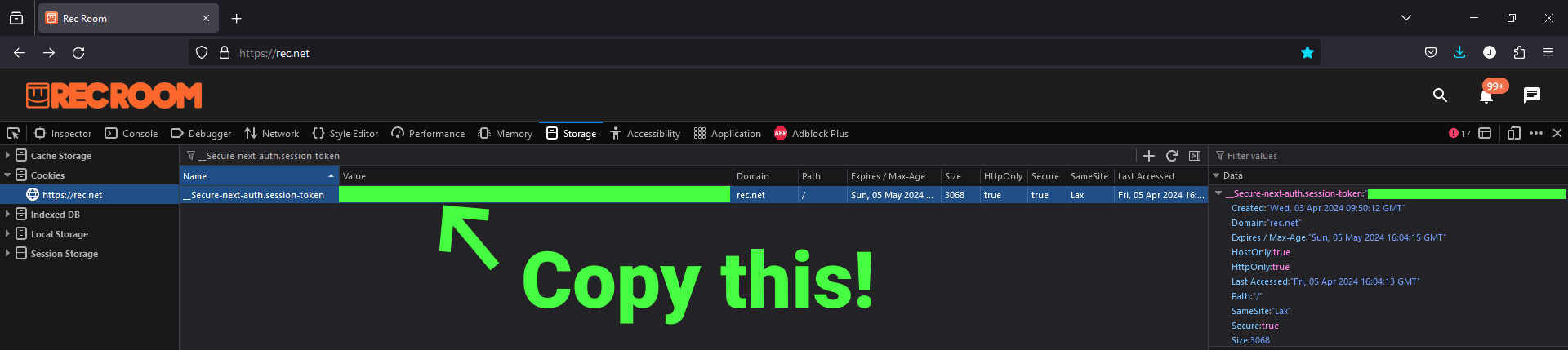
- Login to RecNet. While logging in, make sure you toggle on "Remember me / my machine".
- Open your browser's DevTools (Inspect Element)
- Open the
StorageorApplicationtab on the top - Locate
Cookies>https://rec.neton the directory - Search for
__Secure-next-auth.session-tokenby filtering the cookies - Double click the value and copy it
Option 1/2: Storing it in your environment variables (Windows)
- Search for environment variables and open the first result
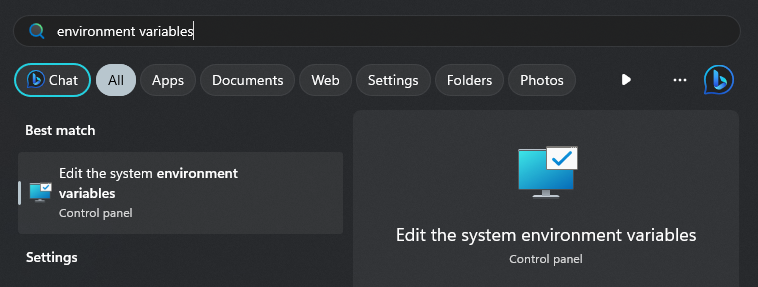
- Click
Environment Variables...
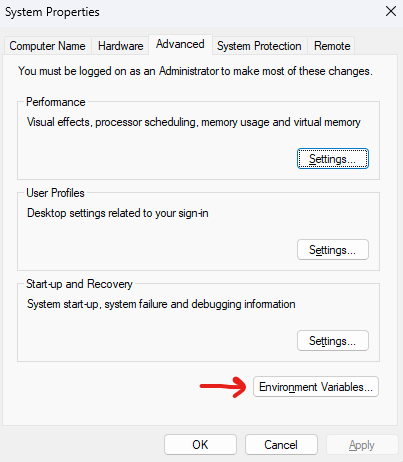
- Click
Newunder System Variables
- Name the variable
RN_COOKIEand paste the copied value
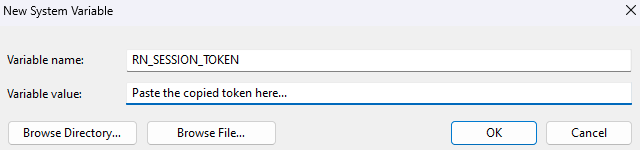
-
Press OK on all the opened tabs
-
Restart your computer for it to take effect
Option 2/2: Storing it in a .env.secret file
- Make a new file named
.env.secretin your project's directory - Type
RN_SESSION_TOKEN=in the file and paste the copied value

- If the file is not in your project's directory, make sure to specify it
rnl = RecNetLogin(env_path=".env.secret") # Env path defaults to local directory
Usage
Getting your token
from RecNetLogin import RecNetLogin

rnl = RecNetLogin()
token = rnl.get_token()
decoded_token = rnl.get_decoded_token()  # JWT decoded
print(token, decoded_token)
Making authorized calls
from recnetlogin import RecNetLogin

rnl = RecNetLogin(env_path=".env.secret")

# Fetch using RecNetLogin's HTTPX client
r = rnl.client.get("https://accounts.rec.net/account/me")

for key, value in r.json().items():
    print(key, value)

# Close the client once done
rnl.close()
1 maintainer

Metadata
1 maintainer
Release files for recnetlogin 0.2.0
For a detailed explanation of source distributions (sdists) and built distributions (wheels), please see the package formats documentation.
Source distribution (sdist)
| File | Size | Uploaded | |
|---|---|---|---|
| recnetlogin-0.2.0.tar.gz | 5.2 kB | Details |
Built distribution (wheel)
| File | Interpreter | ABI | Platform | Reset |
|---|---|---|---|---|
| recnetlogin-0.2.0-py3-none-any.whl | Python 3 | none | any | Details |
Total release size: 10.9 kB
Release files / recnetlogin-0.2.0.tar.gz
| Download URL | recnetlogin-0.2.0.tar.gz |
|---|---|
| Size | 5.2 kB |
| Tags | Source |
|
SHA-256 checksum How to use checksums |
81bea257d9cc48aa22aaf6daa2d7d261fdafc8f7d748f4b4daf22dd677dfc1df
|
|
BLAKE2b-256 checksum How to use checksums |
23aada87ceb28e2b3acb588fd1a74abb5fae00a2850a22501452449bd8919403
|
| Upload date | |
|
Uploaded using Trusted Publishing? What is trusted publishing? |
No |
| Uploaded via |
twine/5.0.0 CPython/3.12.0
|
Release files / recnetlogin-0.2.0-py3-none-any.whl
| Download URL | recnetlogin-0.2.0-py3-none-any.whl |
|---|---|
| Size | 5.8 kB |
| Tags | Python 3 |
|
SHA-256 checksum How to use checksums |
24776d9e5c0f041ed70238b1a3ce4cc5f6062e51f68f29c641f5c111b46a6f1f
|
|
BLAKE2b-256 checksum How to use checksums |
4398104f7b731df542809a1646868a67d7219605a60243a95f97eecd7def97de
|
| Upload date | |
|
Uploaded using Trusted Publishing? What is trusted publishing? |
No |
| Uploaded via |
twine/5.0.0 CPython/3.12.0
|














