
RecNetLogin is a Python library that allows you to acquire your RecNet access token and more!

Project description

Features
- Automatically renewing token
- Supports 2FA accounts
- Decoding the bearer token
- Detailed exceptions
Installation
Download the recnetlogin folder and place it in your project.
pip installation once this is stable.
Setup
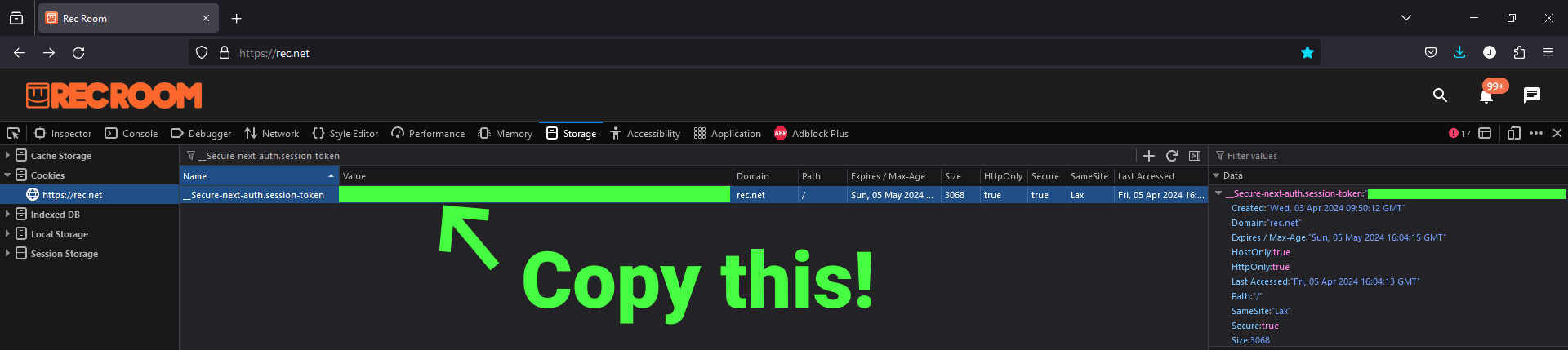
Gathering your session token
- Login to RecNet. While logging in, make sure you toggle on "Remember me / my machine".
- Open your browser's DevTools (Inspect Element)
- Open the
StorageorApplicationtab on the top - Locate
Cookies>https://rec.neton the directory - Search for
__Secure-next-auth.session-tokenby filtering the cookies - Double click the value and copy it
Option 1/2: Storing it in your environment variables (Windows)
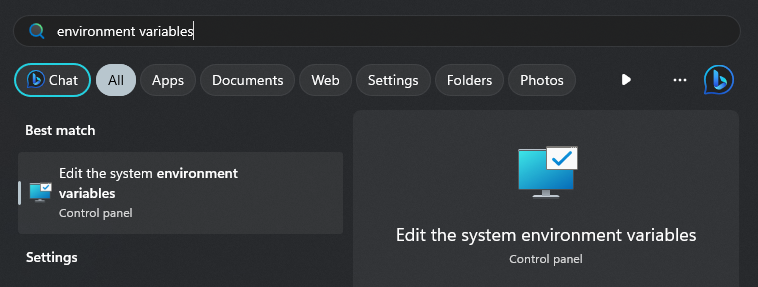
- Search for environment variables and open the first result
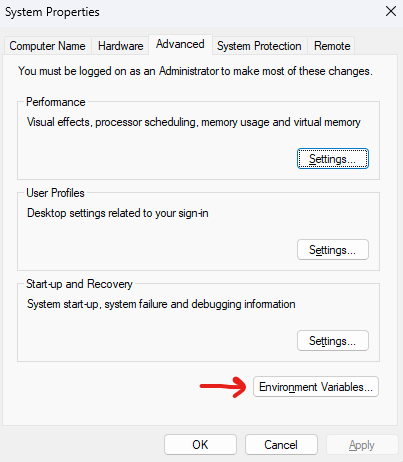
- Click
Environment Variables...
- Click
Newunder System Variables
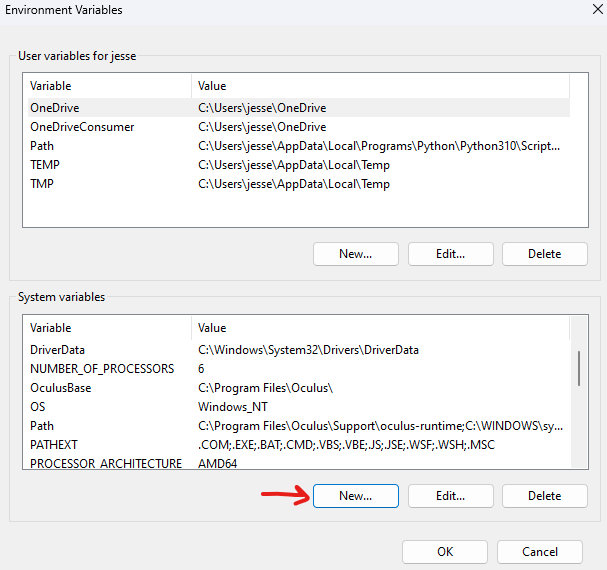
- Name the variable
RN_COOKIEand paste the copied value
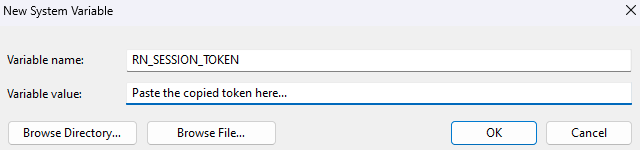
-
Press OK on all the opened tabs
-
Restart your computer for it to take effect
Option 2/2: Storing it in a .env.secret file
- Make a new file named
.env.secretin your project's directory - Type
RN_SESSION_TOKEN=in the file and paste the copied value

- If the file is not in your project's directory, make sure to specify it
rnl = RecNetLogin(env_path=".env.secret") # Env path defaults to local directory
Usage
Getting your token
from RecNetLogin import RecNetLogin

rnl = RecNetLogin()
token = rnl.get_token()
decoded_token = rnl.get_decoded_token()  # JWT decoded
print(token, decoded_token)
Making authorized calls
from recnetlogin import RecNetLogin

rnl = RecNetLogin(env_path=".env.secret")

# Fetch using RecNetLogin's HTTPX client
r = rnl.client.get("https://accounts.rec.net/account/me")

for key, value in r.json().items():
    print(key, value)

# Close the client once done
rnl.close()
Release history Release notifications | RSS feed


Download files
Download the file for your platform. If you're not sure which to choose, learn more about installing packages.
Source Distribution
Built Distribution
Filter files by name, interpreter, ABI, and platform.
If you're not sure about the file name format, learn more about wheel file names.
Copy a direct link to the current filters
File details
Details for the file recnetlogin-0.1.1.tar.gz.
File metadata
- Download URL: recnetlogin-0.1.1.tar.gz
- Upload date:
- Size: 5.1 kB
- Tags: Source
- Uploaded using Trusted Publishing? No
- Uploaded via: twine/5.0.0 CPython/3.12.0
File hashes
| Algorithm | Hash digest | |
|---|---|---|
| SHA256 |
4e19cbd4042046a32a997ea0257cc5faaf6ac67ced14e8ac5d425ca8ff1e304a
|
|
| MD5 |
5b1ae180d2ffbb899e773ee1bdef8f63
|
|
| BLAKE2b-256 |
bf438e1d633db2bbd6e8fbd12744963f9523f66b1ca9e23c58f2e94dd0fe08ac
|
File details
Details for the file recnetlogin-0.1.1-py3-none-any.whl.
File metadata
- Download URL: recnetlogin-0.1.1-py3-none-any.whl
- Upload date:
- Size: 5.8 kB
- Tags: Python 3
- Uploaded using Trusted Publishing? No
- Uploaded via: twine/5.0.0 CPython/3.12.0
File hashes
| Algorithm | Hash digest | |
|---|---|---|
| SHA256 |
151d20b53366294aac321a377c53a5b87c56c77373675a8306891ab31227a8f6
|
|
| MD5 |
6fd6d0b640d3fbb901d09c09e24e22a5
|
|
| BLAKE2b-256 |
78fe27c5aff7c1bdb719cdec931731de3f0cd34c743031bb0eb5b5c9c4b103ba
|






