
recOrder




recOrder is a collection of computational imaging methods. It currently provides QLIPP (quantitative label-free imaging with phase and polarization), phase from defocus, and fluorescence deconvolution.

Acquisition, calibration, background correction, reconstruction, and applications of QLIPP are described in the following E-Life Paper:
Syuan-Ming Guo, Li-Hao Yeh, Jenny Folkesson, Ivan E Ivanov, Anitha P Krishnan, Matthew G Keefe, Ezzat Hashemi, David Shin, Bryant B Chhun, Nathan H Cho, Manuel D Leonetti, May H Han, Tomasz J Nowakowski, Shalin B Mehta, "Revealing architectural order with quantitative label-free imaging and deep learning," eLife 2020;9:e55502 DOI: 10.7554/eLife.55502 (2020).
These are the kinds of data you can acquire with recOrder and QLIPP:
https://user-images.githubusercontent.com/9554101/271128301-cc71da57-df6f-401b-a955-796750a96d88.mov
https://user-images.githubusercontent.com/9554101/271128510-aa2180af-607f-4c0c-912c-c18dc4f29432.mp4
What do I need to use recOrder
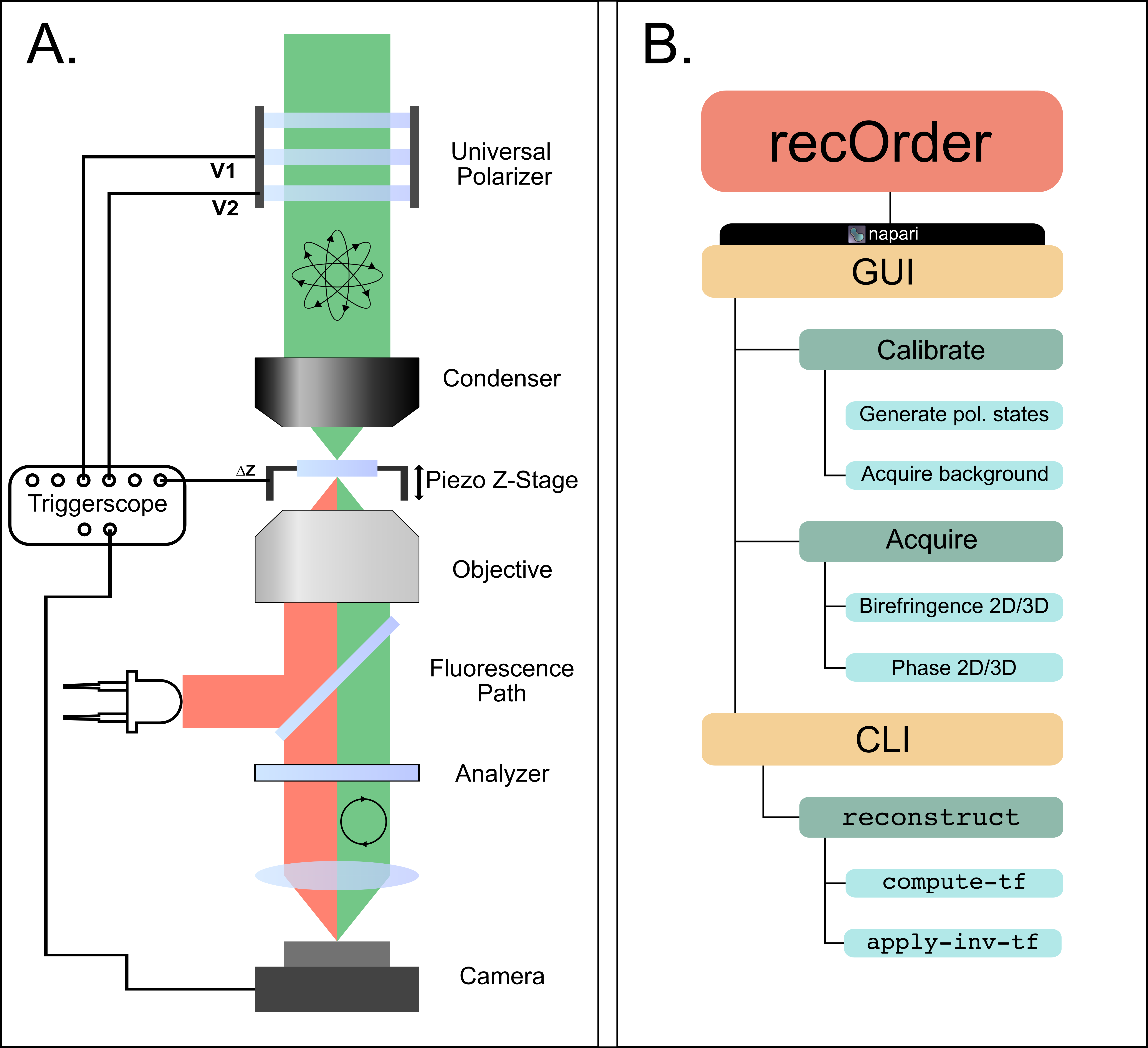
recOrder is to be used alongside a conventional widefield microscope. For QLIPP, the microscope must be fitted with an analyzer and a universal polarizer:
https://user-images.githubusercontent.com/9554101/273073475-70afb05a-1eb7-4019-9c42-af3e07bef723.mp4
For phase-from-defocus or fluorescence deconvolution methods, the universal polarizer is optional.
The overall structure of recOrder is shown in Panel B, highlighting the structure of the graphical user interface (GUI) through a napari plugin and the command-line interface (CLI) that allows users to perform reconstructions.
Software Quick Start
(Optional but recommended) install anaconda and create a virtual environment:
conda create -y -n recOrder python=3.9
conda activate recOrder
Install recOrder-napari:
pip install recOrder-napari
Open napari with recOrder-napari:
napari -w recOrder-napari
For more help, see recOrder's documentation. To install recOrder
on a microscope, see the microscope installation guide.
Dataset
Slides and a dataset shared during a workshop on QLIPP and recOrder can be found on Zenodo, and the napari plugin's sample contributions (File > Open Sample > recOrder-napari in napari).




Release files for recOrder-napari 0.4.1
For a detailed explanation of source distributions (sdists) and built distributions (wheels), please see the package formats documentation.
Source distribution (sdist)
| File | Size | Uploaded | |
|---|---|---|---|
| recOrder-napari-0.4.1.tar.gz | 7.1 MB | Details |
Built distribution (wheel)
| File | Interpreter | ABI | Platform | Reset |
|---|---|---|---|---|
| recOrder_napari-0.4.1-py3-none-any.whl | Python 3 | none | any | Details |
Total release size: 14.2 MB
Release files / recOrder-napari-0.4.1.tar.gz
| Download URL | recOrder-napari-0.4.1.tar.gz |
|---|---|
| Size | 7.1 MB |
| Tags | Source |
|
SHA-256 checksum How to use checksums |
664b473d7ed5889391bc94949d29f5351e7144d02325affb641512eefd545227
|
|
BLAKE2b-256 checksum How to use checksums |
cff8f8b2402240aaa5301ebad2038e53958c24eee1cc83237026cbd8e09abd3a
|
| Upload date | |
|
Uploaded using Trusted Publishing? What is trusted publishing? |
No |
| Uploaded via |
twine/4.0.2 CPython/3.9.18
|
Release files / recOrder_napari-0.4.1-py3-none-any.whl
| Download URL | recOrder_napari-0.4.1-py3-none-any.whl |
|---|---|
| Size | 7.1 MB |
| Tags | Python 3 |
|
SHA-256 checksum How to use checksums |
dd98db46f8f8b4b61b5ee5629d735d7b4808d8a533a9ceb7becbe8cf75b356e3
|
|
BLAKE2b-256 checksum How to use checksums |
7ef653994ed58df8e2e699986bd3d17131d906272573766c15fece87c2e6c7c8
|
| Upload date | |
|
Uploaded using Trusted Publishing? What is trusted publishing? |
No |
| Uploaded via |
twine/4.0.2 CPython/3.9.18
|














