
AI-powered Git workflow assistant with task management integration







Installation • Quick Start • Features • Documentation • Integrations
What is RedGit?
RedGit analyzes your code changes, groups them logically, matches them with your active tasks (Jira, Linear, etc.), and creates well-structured commits automatically.
Stop writing commit messages manually. Let AI understand your changes and create meaningful commits that link to your issues.
# Before: Manual workflow
git add .
git commit -m "fix: resolve login issue PROJ-123"
git push

# After: RedGit workflow
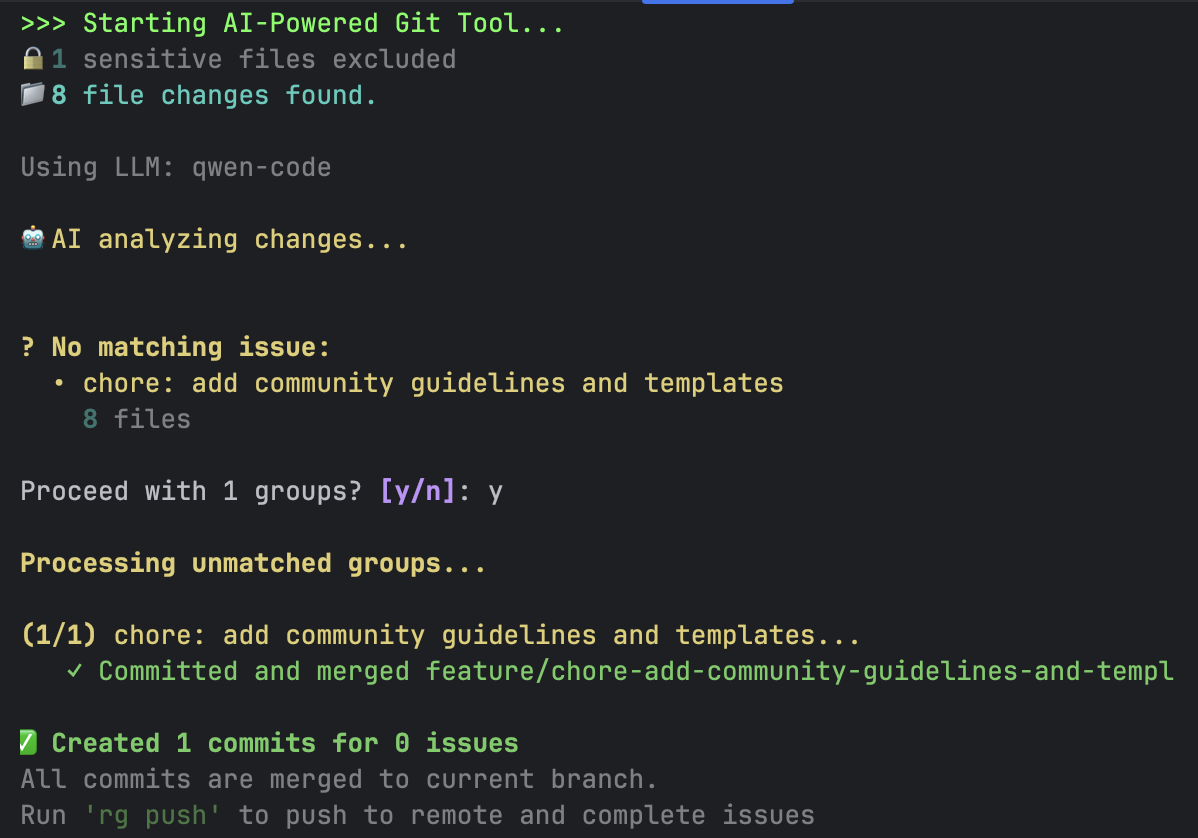
rgt propose   # AI analyzes, groups, and commits
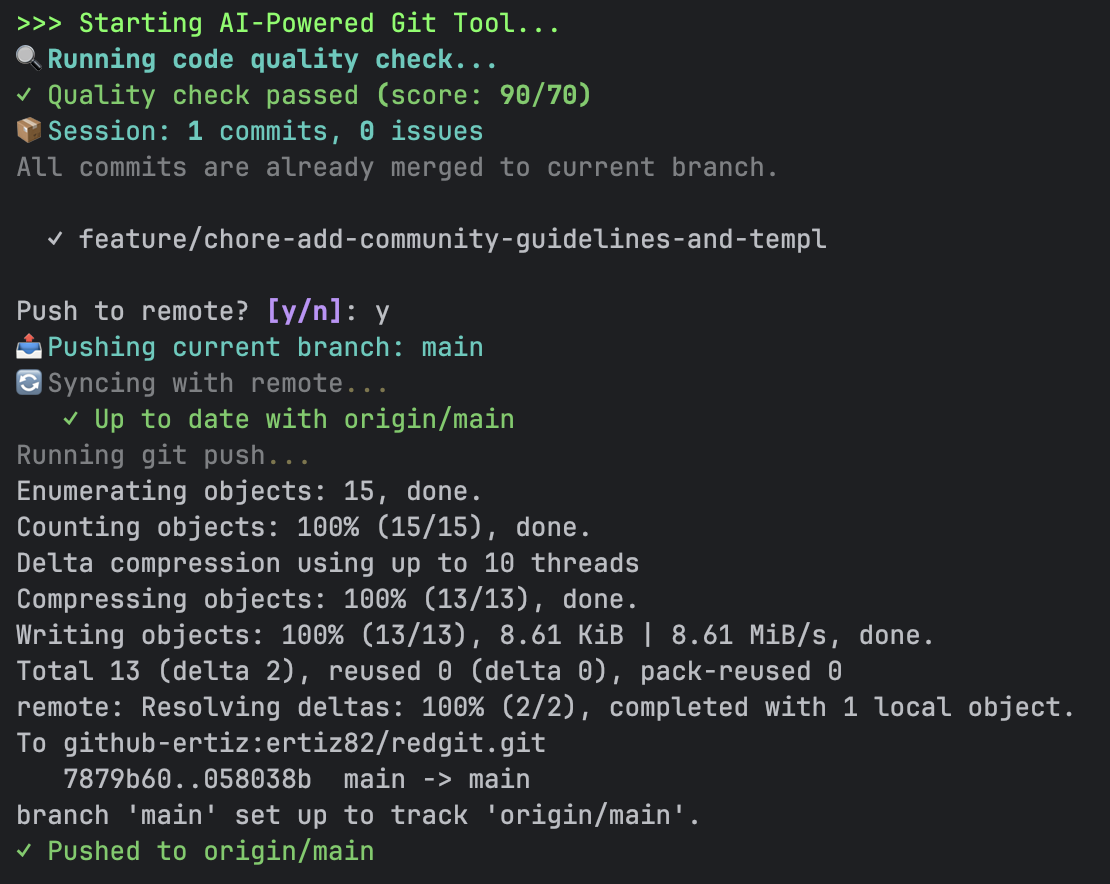
rgt push      # Push and update Jira/Linear
Demo
Features
| Feature | Description |
|---|---|
| AI-Powered Grouping | Automatically groups related file changes into logical commits |
| Task Management | Integrates with Jira, Linear, Asana, Trello, and more |
| Smart Branching | Creates branches based on issue keys (feature/PROJ-123-description) |
| Task-Filtered Mode | Auto-create subtasks under parent task, detect task from branch name |
| Auto Transitions | Moves issues through workflow statuses (To Do → In Progress → Done) |
| PR Creation | Automatically creates pull requests with proper descriptions |
| Code Quality | Built-in quality checks with ruff/flake8 + AI analysis |
| Semgrep Integration | Multi-language static analysis (35+ languages) for security & best practices |
| CI/CD Integration | Trigger and monitor pipelines from the command line |
| Planning Poker | Real-time sprint estimation with WebSocket, task distribution, sprint creation |
| Tunnel Support | Expose local ports for webhooks and remote access (ngrok, cloudflare, etc.) |
| Plugin System | Framework-specific prompts (Laravel, Django, etc.) |
Why RedGit?
| RedGit | Commitizen | Manual | |
|---|---|---|---|
| AI-powered commit messages | ✅ | ❌ | ❌ |
| Groups related changes | ✅ | ❌ | ❌ |
| Task management integration | ✅ | ❌ | ❌ |
| Auto branch creation | ✅ | ❌ | ❌ |
| Issue status transitions | ✅ | ❌ | ❌ |
| PR creation | ✅ | ❌ | ❌ |
| Multi-language static analysis | ✅ | ❌ | ❌ |
| Works with any LLM | ✅ | - | - |
Installation
# Using Homebrew (macOS/Linux) - Recommended
brew tap ertiz82/tap
brew install redgit

# Using pip
pip install redgit

# Using pipx (isolated environment)
pipx install redgit
After installation, use either redgit or the short alias rgt.
Quick Start
# 1. Initialize in your project
rgt init

# 2. Make changes to your code...

# 3. Let AI analyze and create commits
rgt propose

# 4. Push and complete issues
rgt push
With Jira Integration
# Setup Jira
rgt install jira

# Your workflow
rgt propose        # AI matches changes with your Jira issues
rgt push           # Push and transition issues to Done
With GitHub PRs
# Setup GitHub
rgt integration install github

# Create commits and PRs
rgt propose
rgt push --pr      # Creates pull requests automatically
Task-Filtered Mode (Subtasks)
# Create subtasks under a parent task
rgt propose -t PROJ-123

# Auto-detect task from branch name
git checkout feature/PROJ-123-some-work
rgt propose  # Detects PROJ-123 automatically

# AI analyzes files, creates relevant subtasks, always returns to original branch
Integrations
RedGit supports 30+ integrations across different categories:
| Category | Integrations |
|---|---|
| Task Management | Jira, Linear, Asana, Trello, Notion |
| Code Hosting | GitHub, GitLab, Bitbucket, Azure Repos |
| CI/CD | GitHub Actions, GitLab CI, Jenkins, CircleCI |
| Notifications | Slack, Discord, Telegram, MS Teams |
| Code Quality | SonarQube, Snyk, Codecov, Codacy |
| Tunnel | ngrok, Cloudflare Tunnel, localtunnel, bore, serveo |
Install integrations from RedGit Tap:
rgt install linear
rgt install slack
rgt install sonarqube
Documentation
Core Documentation
| Section | Description |
|---|---|
| Getting Started | Installation and first steps |
| Commands Reference | All CLI commands |
| Configuration | Config file options |
| Workflows | Local merge vs merge request strategies |
| Troubleshooting | Common issues and solutions |
Features
| Feature | Description |
|---|---|
| Planning Poker | Real-time sprint estimation with WebSocket |
| Tunnel | Expose local ports for remote access |
Integrations & Plugins
| Section | Description |
|---|---|
| Integrations | Task management, code hosting, CI/CD, notifications |
| Plugins | Framework plugins and release management |
| Custom Integrations | Build your own integrations |
LLM Support
RedGit works with multiple LLM providers:
- Claude Code - Anthropic's Claude (recommended)
- OpenAI - GPT-4, GPT-3.5
- Ollama - Local models (Qwen, Llama, etc.)
- Any OpenAI-compatible API
Contributing
We welcome contributions! See CONTRIBUTING.md for guidelines.
- Report bugs via GitHub Issues
- Submit integrations to RedGit Tap
Support
If you find RedGit useful, consider supporting the project:

License
MIT License - see LICENSE for details.

"Gölgenden hızlı commit at, Red Git!"
Made with ❤️ for developers who want smarter commits
1 maintainer

Metadata
1 maintainer
Release files for redgit 1.5.0
For a detailed explanation of source distributions (sdists) and built distributions (wheels), please see the package formats documentation.
Source distribution (sdist)
| File | Size | Uploaded | |
|---|---|---|---|
| redgit-1.5.0.tar.gz | 249.2 kB | Details |
Built distribution (wheel)
| File | Interpreter | ABI | Platform | Reset |
|---|---|---|---|---|
| redgit-1.5.0-py3-none-any.whl | Python 3 | none | any | Details |
Total release size: 525.4 kB
Release files / redgit-1.5.0.tar.gz
| Download URL | redgit-1.5.0.tar.gz |
|---|---|
| Size | 249.2 kB |
| Tags | Source |
|
SHA-256 checksum How to use checksums |
27579785f6f460d85dfe70881928b63169759182082f909e204599fb2b14799c
|
|
BLAKE2b-256 checksum How to use checksums |
60166d23b04dd9b91c5e412c5587aeff3168da15f1ebba7c16a357f137508228
|
| Upload date | |
|
Uploaded using Trusted Publishing? What is trusted publishing? |
No |
| Uploaded via |
twine/6.2.0 CPython/3.9.6
|
Release files / redgit-1.5.0-py3-none-any.whl
| Download URL | redgit-1.5.0-py3-none-any.whl |
|---|---|
| Size | 276.2 kB |
| Tags | Python 3 |
|
SHA-256 checksum How to use checksums |
4ee61edb1c3de1bd67c4e5efbde4c801f82d7679a5a2949ecdd908a13733aac5
|
|
BLAKE2b-256 checksum How to use checksums |
718f5f417a1747b515c2cc51090d000e7e312b27c241255bbe40ee404168a556
|
| Upload date | |
|
Uploaded using Trusted Publishing? What is trusted publishing? |
No |
| Uploaded via |
twine/6.2.0 CPython/3.9.6
|














