

reqtrace-py
Lightweight HTTP request/response logger for Python web frameworks. Designed for developers who need clear, structured debug output without writing print() everywhere.
Features
- Auto-log every request & response via middleware
- Colorized terminal output with status color coding
- File output in JSON (NDJSON) or plain text format
- Configurable output mode: terminal, file, or both
- Auto-diff mode — detects response changes per endpoint automatically
- Filter log by route, method, or status code (whitelist & blacklist)
- Press
cto clear terminal while server is running - Authorization header auto-masking
- Web UI log viewer via CLI (
reqtrace view)
Installation
pip install reqtrace-py
The package is installed as
reqtrace-pybut imported asreqtrace.
Quickstart
from fastapi import FastAPI
from reqtrace import ReqTrace
from reqtrace.middleware import ReqTraceMiddleware

rt = ReqTrace(output="terminal")

app = FastAPI()
app.add_middleware(ReqTraceMiddleware, config=rt.config)
That's it — every request will be logged automatically.
Output Modes
# Terminal only (default)
rt = ReqTrace(output="terminal")

# File only — JSON format
rt = ReqTrace(output="file", file_path="logs/trace.json")

# File only — plain text
rt = ReqTrace(output="file", file_path="logs/trace.txt", file_format="txt")

# Both terminal and file
rt = ReqTrace(output="both", file_path="logs/trace.json")

# Disabled (useful for production)
rt = ReqTrace(output="terminal", enabled=False)
Web UI Viewer
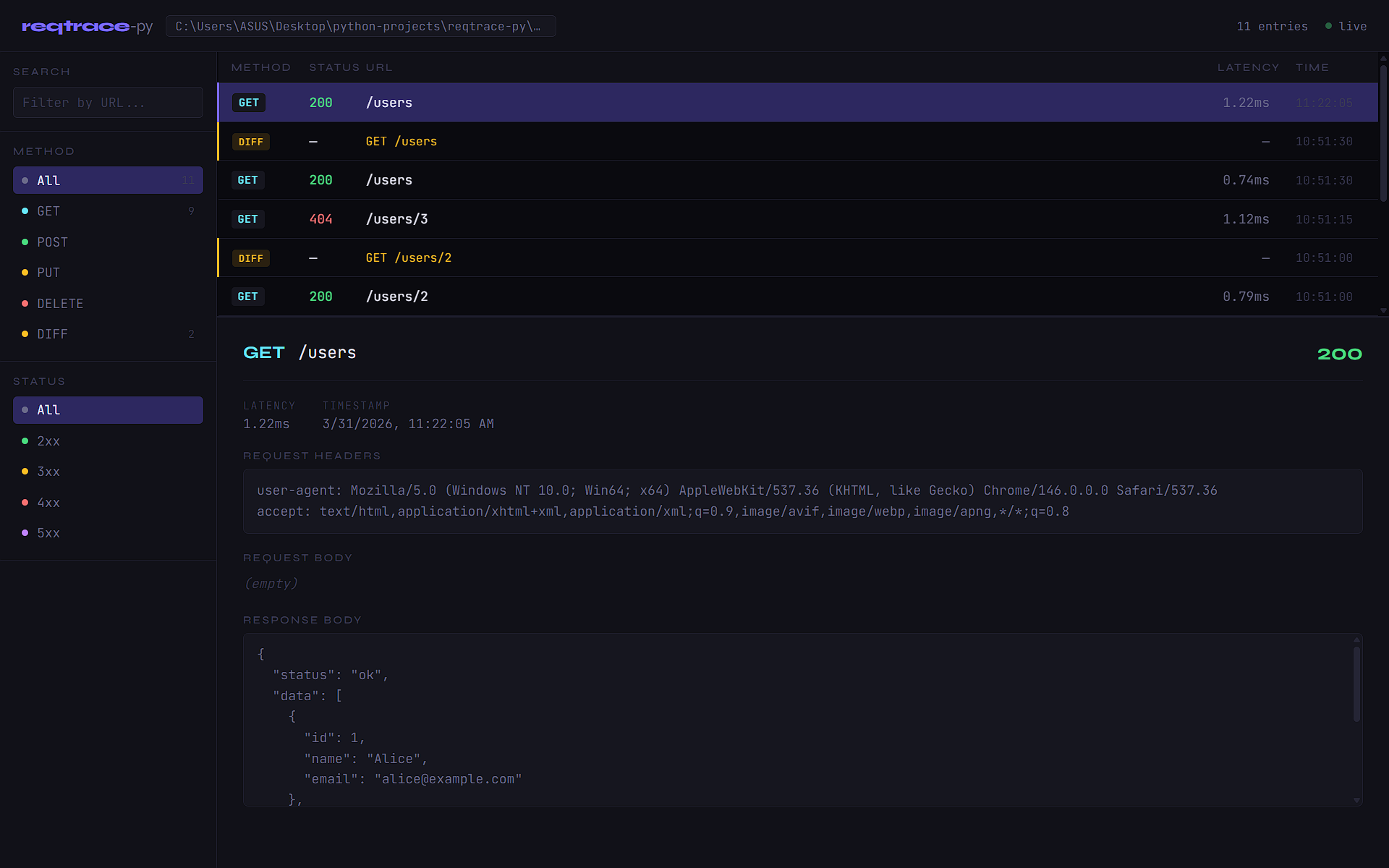
Visualize your log file in a browser-based UI with real-time updates, filtering, search, and diff viewer.
First, configure reqtrace to write to a file:
rt = ReqTrace(output="file", file_path="logs/trace.json")
# or both terminal and file
rt = ReqTrace(output="both", file_path="logs/trace.json", diff=True)
Then open the viewer from your terminal:
reqtrace view logs/trace.json
The UI will open automatically at http://localhost:8765.
# Custom port
reqtrace view logs/trace.json --port 8080

# Don't open browser automatically
reqtrace view logs/trace.json --no-browser
UI features:
- Table view of all log entries, sorted newest first
- Click any row to inspect full request/response detail
- Resizable detail panel — drag the handle between table and detail
- Filter by method (GET, POST, PUT, DELETE, DIFF) and status code (2xx–5xx)
- Search by URL
- Diff viewer — shows added, removed, and changed fields
- Live updates via SSE — new entries appear automatically without refresh
Filter
Control which requests are logged using whitelist or blacklist mode.
from reqtrace import ReqTrace, ReqTraceFilter

# Whitelist — only log errors
rt = ReqTrace(
    output="terminal",
    filters=ReqTraceFilter(
        mode="whitelist",
        status_codes=["4xx", "5xx"],
    )
)

# Whitelist — only log specific methods
rt = ReqTrace(
    output="terminal",
    filters=ReqTraceFilter(
        mode="whitelist",
        methods=["POST", "PUT", "DELETE"],
    )
)

# Blacklist — hide docs routes and all 200 responses
rt = ReqTrace(
    output="terminal",
    filters=ReqTraceFilter(
        mode="blacklist",
        routes=["/docs", "/redoc", "/openapi.json"],
        status_codes=[200],
    )
)
Filter rules:
- whitelist — only log requests that match the filter. Empty whitelist logs nothing.
- blacklist — log everything except requests that match the filter. Empty blacklist logs everything.
- Filters can be combined:
routes,methods, andstatus_codesare evaluated with OR logic. status_codesaccepts specific codes (404) or ranges ("4xx","5xx"), or mixed ([404, "5xx"]).
Auto-Diff
Enable auto-diff to automatically compare each response against the previous one for the same endpoint. Useful for detecting unintended changes after modifying your code.
rt = ReqTrace(output="terminal", diff=True)

# With file output
rt = ReqTrace(output="both", file_path="logs/trace.json", diff=True)
On the first request to an endpoint, reqtrace saves a snapshot. On every subsequent request to the same endpoint, it compares and displays what changed:
┌─ DIFF GET /users ────────────────────────────────────────────
  +1  -0  ~0
  + data[2]     {'id': 3, 'name': 'Diz', 'email': 'diz@example.com'}
└──────────────────────────────────────────────────────────────
Diff symbols:
+— field or item added-— field or item removed~— value or type changed
Terminal Output Example
┌─ REQUEST ────────────────────────────────────────────────────
  POST    /api/users
  content-type: application/json
  Body:
    {
      "name": "Diz",
      "email": "diz@mail.com"
    }
├─ RESPONSE ───────────────────────────────────────────────────
  Status :  422  43.2ms
  Body:
    {
      "detail": [{"loc": ["body", "email"], "msg": "value is not a valid email"}]
    }
└──────────────────────────────────────────────────────────────
Status codes are color-coded:
- 🟢
2xx— green - 🟡
3xx— yellow - 🔴
4xx— red - 🟣
5xx— magenta
Clear Terminal
While the server is running, press c to clear the terminal output. The key can be customized or disabled:
# Custom key
rt = ReqTrace(output="terminal", clear_key="r")

# Disable
rt = ReqTrace(output="terminal", clear_key=None)
JSON Log Format
Each log entry is one JSON object per line (NDJSON), easy to stream and parse:
{"timestamp": "2026-03-23T10:15:00+00:00", "method": "POST", "url": "/api/users", "status_code": 422, "latency_ms": 43.2, "request_headers": {...}, "request_body": {"name": "Diz"}, "response_body": {...}}
Diff entries are written as a separate record with "type": "diff":
{"timestamp": "2026-03-23T10:16:00+00:00", "type": "diff", "method": "GET", "url": "/users", "changes": {"added": [{"path": "data[2]", "value": {...}}], "removed": [], "changed": []}, "has_changes": true}
Configuration Reference
| Parameter | Type | Default | Description |
|---|---|---|---|
output |
"terminal" | "file" | "both" |
"terminal" |
Where to send log output |
file_path |
str |
None |
Log file path. Required if output is "file" or "both" |
file_format |
"json" | "txt" |
"json" |
Log file format |
enabled |
bool |
True |
Master on/off switch |
diff |
bool |
False |
Enable auto-diff per endpoint |
clear_key |
str | None |
"c" |
Terminal clear shortcut. None to disable |
filters |
ReqTraceFilter | None |
None |
Filter which requests are logged |
ReqTraceFilter Reference
| Parameter | Type | Default | Description |
|---|---|---|---|
mode |
"whitelist" | "blacklist" |
"blacklist" |
Filter mode |
routes |
list[str] |
[] |
Routes to filter. Supports exact and prefix match |
methods |
list[str] |
[] |
HTTP methods to filter. Case-insensitive |
status_codes |
list[int | str] |
[] |
Status codes to filter. Accepts 404 or "4xx" |
Requirements
- Python >= 3.10
- Starlette >= 0.27.0
Changelog
v0.4.0
- Web UI log viewer via
reqtrace view <file>CLI command - Table layout with resizable detail panel
- Real-time updates via SSE — new entries appear without refresh
- Filter by method, status code, and URL search in the UI
- Diff viewer in detail panel
- Log entries sorted newest first
v0.3.0
- Filter log by route, method, and status code
- Whitelist and blacklist mode
status_codessupports specific codes and ranges ("4xx","5xx")
v0.2.0
- Auto-diff mode (
diff=True) — compares responses per endpoint automatically - Diff output in both terminal and file
- Press
cto clear terminal (configurable viaclear_key) - Fix:
CTRL+Cnow works correctly whenclear_keyis active
v0.1.0
- Initial release
- Request/response logging via middleware
- Terminal (colorized) and file (JSON/txt) output
Roadmap
v0.5.0— Flask/Django support
License
MIT
1 maintainer

Metadata
1 maintainer
Release files for reqtrace-py 0.4.0
For a detailed explanation of source distributions (sdists) and built distributions (wheels), please see the package formats documentation.
Source distribution (sdist)
| File | Size | Uploaded | |
|---|---|---|---|
| reqtrace_py-0.4.0.tar.gz | 495.4 kB | Details |
Built distribution (wheel)
| File | Interpreter | ABI | Platform | Reset |
|---|---|---|---|---|
| reqtrace_py-0.4.0-py3-none-any.whl | Python 3 | none | any | Details |
Total release size: 520.6 kB
Release files / reqtrace_py-0.4.0.tar.gz
| Download URL | reqtrace_py-0.4.0.tar.gz |
|---|---|
| Size | 495.4 kB |
| Tags | Source |
|
SHA-256 checksum How to use checksums |
d809810e250a96e4727b12019bb1090a07a6b4b9234b7c30628423e5284e301f
|
|
BLAKE2b-256 checksum How to use checksums |
5874df232531170fd3a1db26fbddd8734c84dc84d6126c25fb1a2c0d31925ccc
|
| Upload date | |
|
Uploaded using Trusted Publishing? What is trusted publishing? |
No |
| Uploaded via |
twine/6.2.0 CPython/3.13.12
|
Release files / reqtrace_py-0.4.0-py3-none-any.whl
| Download URL | reqtrace_py-0.4.0-py3-none-any.whl |
|---|---|
| Size | 25.2 kB |
| Tags | Python 3 |
|
SHA-256 checksum How to use checksums |
e295d4996ce3b24600db067139cc56ba2e174f78a86008358440388c6d3b6743
|
|
BLAKE2b-256 checksum How to use checksums |
e1b618867eb13cad288593d81a0d048d47ac25e828603c97b21eb6f5fab55caf
|
| Upload date | |
|
Uploaded using Trusted Publishing? What is trusted publishing? |
No |
| Uploaded via |
twine/6.2.0 CPython/3.13.12
|














