
The Rerun Logging SDK

Project description
The Rerun Python SDK
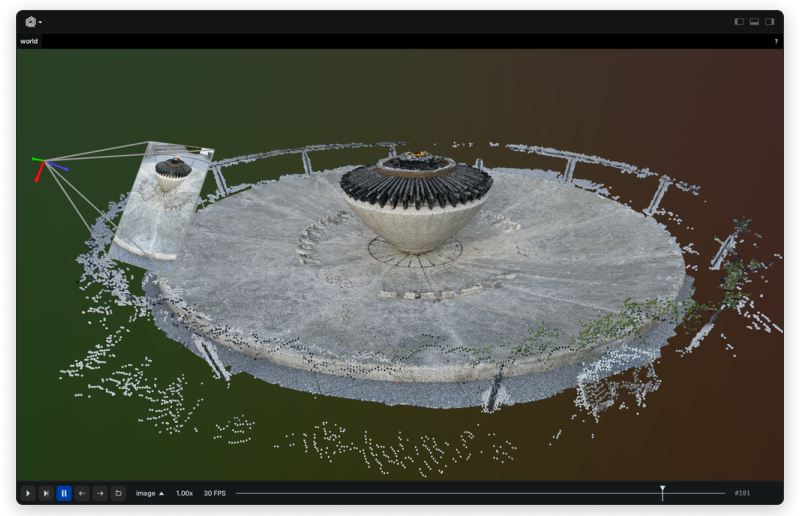
Use the Rerun SDK to record data like images, tensors, point clouds, and text. Data is streamed to the Rerun Viewer for live visualization or to file for later use.
Install
pip3 install rerun-sdk
ℹ️ Note:
The Python module is called rerun, while the package published on PyPI is rerun-sdk.
For other SDK languages see Installing Rerun.
We also provide a Jupyter widget for interactive data visualization in Jupyter notebooks:
pip3 install rerun-sdk[notebook]
Example
import rerun as rr
import numpy as np

rr.init("rerun_example_app", spawn=True)

positions = np.vstack([xyz.ravel() for xyz in np.mgrid[3 * [slice(-5, 5, 10j)]]]).T
colors = np.vstack([rgb.ravel() for rgb in np.mgrid[3 * [slice(0, 255, 10j)]]]).astype(np.uint8).T

rr.log("points3d", rr.Points3D(positions, colors=colors))
Resources
Logging and viewing in different processes
You can run the Viewer and logger in different processes.
In one terminal, start up a Viewer with a server that the SDK can connect to:
python3 -m rerun
In a second terminal, run the example with the --connect option:
python3 examples/python/plots/plots.py --connect
Note that SDK and Viewer can run on different machines!
Building Rerun from source
We use pixi for managing dev-tool versioning, download and task running. See here for installation instructions.
pixi run py-build
This builds the SDK for Python (use pixi run py-build --release for a release build).
You can then run examples via uv:
pixi run uv run examples/python/minimal/minimal.py
To build a wheel instead for manual install use:
pixi run py-build-wheel
Refer to BUILD.md for details on the various different build options of the Rerun Viewer and SDKs for all target languages.
Installing a pre-release
Prebuilt dev wheels from head of main are available at https://github.com/rerun-io/rerun/releases/tag/prerelease.
While we try to keep the main branch usable at all times, it may be unstable occasionally. Use at your own risk.
Running Python unit tests
pixi run py-test
If you run into a problem, run rm -rf .pixi .venv and try again.
Running specific Python unit tests
pixi run py-build && pixi run uvpy -m pytest rerun_py/tests/unit/test_tensor.py
Profiling the Python SDK
Set RERUN_PUFFIN=1 to spawn a puffin_viewer attached to the SDK on startup. The Rust side of the SDK then streams scopes (anything wrapped in re_tracing::profile_function! / profile_scope!) to the viewer for the lifetime of the process.
RERUN_PUFFIN=1 pixi run uvpy your_script.py
Save a recording from the viewer for offline analysis (use the investigate-puffin skill in .claude/skills/).
Release history Release notifications | RSS feed


Download files
Download the file for your platform. If you're not sure which to choose, learn more about installing packages.
Source Distributions
Built Distributions
Filter files by name, interpreter, ABI, and platform.
If you're not sure about the file name format, learn more about wheel file names.
Copy a direct link to the current filters
File details
Details for the file rerun_sdk-0.32.2-cp310-abi3-win_amd64.whl.
File metadata
- Download URL: rerun_sdk-0.32.2-cp310-abi3-win_amd64.whl
- Upload date:
- Size: 119.8 MB
- Tags: CPython 3.10+, Windows x86-64
- Uploaded using Trusted Publishing? No
- Uploaded via: maturin/1.10.2
File hashes
| Algorithm | Hash digest | |
|---|---|---|
| SHA256 |
7f52f5419c2f50aa122331cd6913eab27085ac2972cde7a8481b78bd4cc85dbf
|
|
| MD5 |
737ed9cfdbb71ecea685b1c2dd9329f6
|
|
| BLAKE2b-256 |
36cd52e319cf80636b7fec8e981dd6b241b458cdd9007ddf26870d0e382f592f
|
File details
Details for the file rerun_sdk-0.32.2-cp310-abi3-manylinux_2_28_x86_64.whl.
File metadata
- Download URL: rerun_sdk-0.32.2-cp310-abi3-manylinux_2_28_x86_64.whl
- Upload date:
- Size: 139.0 MB
- Tags: CPython 3.10+, manylinux: glibc 2.28+ x86-64
- Uploaded using Trusted Publishing? No
- Uploaded via: maturin/1.10.2
File hashes
| Algorithm | Hash digest | |
|---|---|---|
| SHA256 |
7b4d104c1c7aa1e5abd093807b4f9787345d7f82613418ed0a301aa89fc6b30d
|
|
| MD5 |
0cb8be2e33afc712f53404013cabb774
|
|
| BLAKE2b-256 |
cccf0e8a7687f9c8554f9ba9c7497e40fe5bf1fc0e6e11ad7d8cef55d11439fb
|
File details
Details for the file rerun_sdk-0.32.2-cp310-abi3-manylinux_2_28_aarch64.whl.
File metadata
- Download URL: rerun_sdk-0.32.2-cp310-abi3-manylinux_2_28_aarch64.whl
- Upload date:
- Size: 134.7 MB
- Tags: CPython 3.10+, manylinux: glibc 2.28+ ARM64
- Uploaded using Trusted Publishing? No
- Uploaded via: maturin/1.10.2
File hashes
| Algorithm | Hash digest | |
|---|---|---|
| SHA256 |
2ca4905083cdac100661b5ca449545f83d4cb84b79d626ad734a871e0c677fdf
|
|
| MD5 |
0c5e120f5f195eb6c60ff706516e9ba3
|
|
| BLAKE2b-256 |
a57686dcddc761891cf1358dacf4ec46a13dad229dc6a7b1dbbd0300ca727bd0
|
File details
Details for the file rerun_sdk-0.32.2-cp310-abi3-macosx_11_0_arm64.whl.
File metadata
- Download URL: rerun_sdk-0.32.2-cp310-abi3-macosx_11_0_arm64.whl
- Upload date:
- Size: 125.2 MB
- Tags: CPython 3.10+, macOS 11.0+ ARM64
- Uploaded using Trusted Publishing? No
- Uploaded via: maturin/1.10.2
File hashes
| Algorithm | Hash digest | |
|---|---|---|
| SHA256 |
de3e554e876760eba4401fb736f015ff195d4e7f30e054707bf2295309646e85
|
|
| MD5 |
30fd4118852e9d4c3c1ae28d644a30d0
|
|
| BLAKE2b-256 |
62acf6ee8bc1782869d2cb9a5f0550b8db32713502d56b63f723af1f81550043
|






