
reshoot
Give your agent a task. Get a demo you can run again.
An agent-first toolkit for software demos: open source skills and recording tools for Codex and Claude Code. Turn a task in your app into a captioned MP4, a README GIF, and source files that keep the demo repeatable as the app changes.
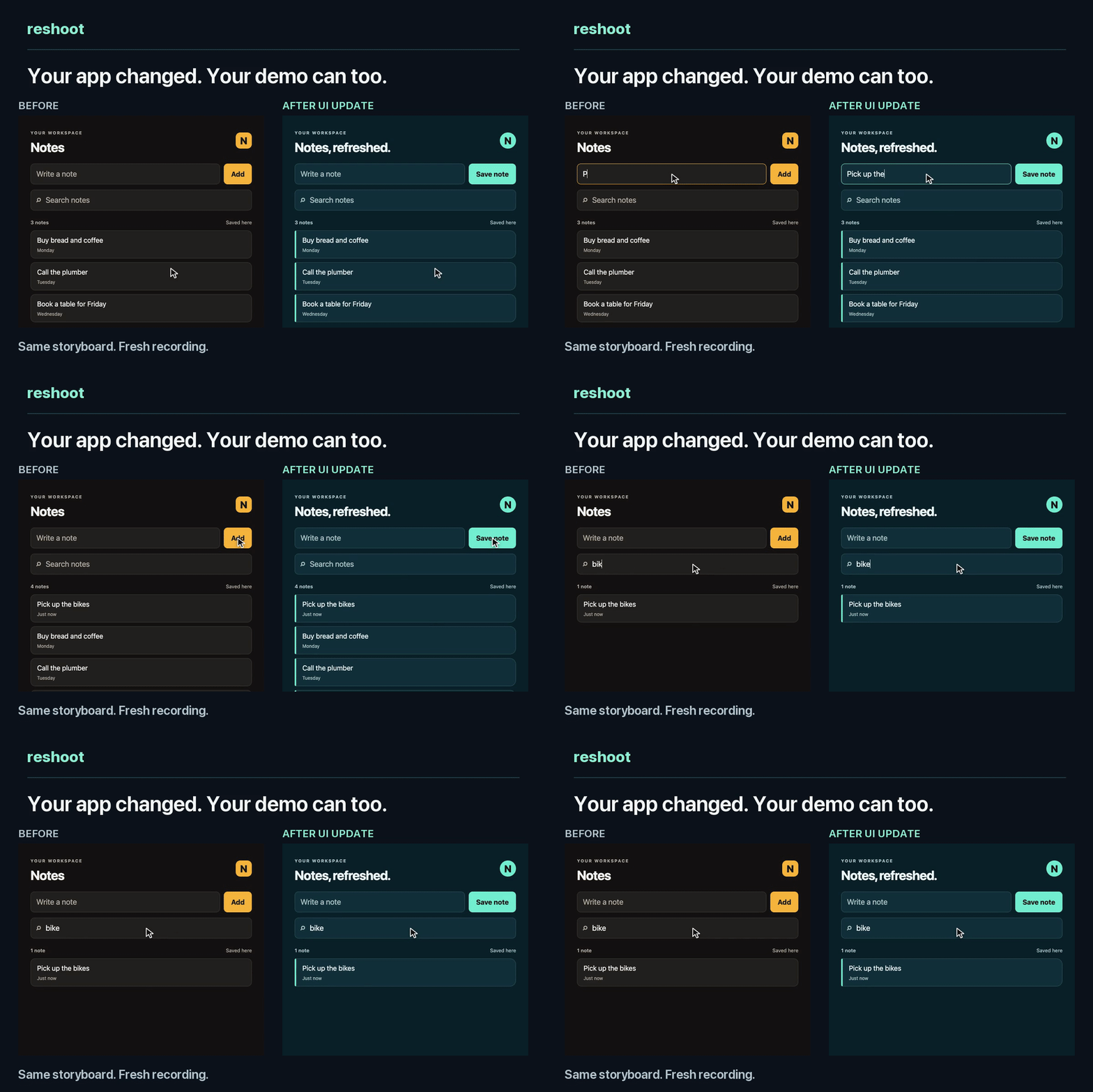
The UI changed. The same story still saves and finds the same note. Watch the 21-second demo · Make a demo of your app · Explore the skills · Use the CLI
Make a demo of your app
Open Codex or Claude Code in your app's repository, or an empty demo folder
if you only have a running app. Paste this prompt. Change Target: to your
web app's URL or the name of a macOS app and its demo window when needed.
Make a short demo with reshoot.
Read https://github.com/mumit/reshoot/blob/main/guide/agent-quickstart.md
and follow its setup and creation workflow.

Target: the app in this repository.
Choose one useful task with a clear visible result. Use synthetic demo data.
Produce a short captioned MP4 and a README GIF. Keep the recording source in
demo/ so it can be updated later.

Inspect a preview, then record a fresh final and open both exports for review.
Ask only for permissions or missing details needed to proceed.
Add a task if you have one: “Show creating a project and finding it by search.” Otherwise, let the agent inspect the app and propose a useful task. Source code is optional. Browser recording runs on macOS or Linux; native window capture requires macOS and app-specific automation or your interaction during capture. The agent needs a local session with a shell and access to the target.
The agent handles setup, reads the app's controls, writes the story, records a preview and prepares the final exports. You watch the result, request changes and decide whether to share it. Initial setup may need installation permissions or an isolated demo login.
You get a video, a GIF, and their source. Keep the demo/ recipe beside the
app's code or in its own folder. Browser projects retain each attempt in a
versioned run folder. Native recipes retain standalone takes and edit scripts.
Already installed the skills? Start with $reshoot-demo in Codex or
/reshoot-demo in Claude Code, followed by the task.
Three skills, one workflow
A skill gives the coding agent a reusable workflow: how to choose the task, record it, check the result and present it for review. Reshoot's CLI performs the recording and editing. The agent uses available source code or the running app's controls to adapt that workflow to the product.
| When | Skill | What to ask for |
|---|---|---|
| Make the first demo | reshoot-demo | “Show a customer saving a search and seeing its results.” |
| The app changed | reshoot-refresh | “Record that task again with the updated UI. Keep the old take for comparison.” |
| Check before sharing | reshoot-review | “Inspect the final video and GIF, compare the previous run, and report anything that needs attention.” |
For a refresh or review, include the demo's configuration and the exact previous run, or the native capture recipe and previous media. See the copyable follow-up prompts.
Browser projects keep actions, captions and expected results in editable files. Result checks can verify that a saved item appears or that a search returns one match. When a control moves or a label changes, the agent can repair the story and record a new candidate. Watch and approve the new exports before sharing.
Install the skills
Use the first-demo prompt above to let the agent handle setup, or install the tools and skills yourself. The skills need the reshoot CLI, Python 3.11+, Git, ffmpeg and, for browser recording, Chrome or Chromium. Linux text scanning also needs Tesseract. Follow the platform setup, then choose one installation route.
Codex
Run this in the app repository or demo work folder:
reshoot skills codex --directory .
This installs reshoot-demo, reshoot-refresh and reshoot-review into
.agents/skills/. In Codex, invoke a skill and describe the task:
$reshoot-demo
Create a short demo of saving a task and finding it by search.
Produce an MP4 and a README GIF using synthetic data.
Claude Code
Run this in the app repository or demo work folder:
reshoot skills claude --directory .
This installs the same three skills into .claude/skills/. In Claude Code:
/reshoot-demo
Create a short demo of saving a task and finding it by search.
Produce an MP4 and a README GIF using synthetic data.
Claude Code plugin
To install all ten skills through Claude Code's plugin system, run these commands inside Claude Code and follow its installation prompts:
/plugin marketplace add mumit/reshoot
/plugin install reshoot@reshoot
Use /reshoot:reshoot-demo, /reshoot:reshoot-refresh or
/reshoot:reshoot-review, followed by the task. The plugin includes seven
supporting skills for planning, individual recordings, editing, privacy checks
and CI. Install the CLI and recording dependencies as well.
The agent quickstart covers skill discovery and the differences between these routes. The CLI installer preserves existing skill folders; compare updates before replacing local changes.
Keep the demo with the code
Reshoot records real interactions with the app. The demo project describes what to do, what should happen, how long the result should remain visible and which formats to export.
| Keep in a browser project | Purpose |
|---|---|
BRIEF.md |
Audience, task, visible result and destination |
storyboard.toml |
Actions, captions and expected results |
edit.toml |
Cuts, result holds and output formats |
reshoot.toml |
App startup, recording and check settings |
Each versioned browser or terminal candidate retains its report, video, GIF and
review evidence under takes/runs/ID/. Keep the recording source in version control and generated
takes outside it. Select an explicit baseline when comparing updates.
Native demos keep their capture instructions and edit script separately; see the macOS window workflow. The CI workflow records the demo again when the app changes and opens a pull request with the new video, GIF and a beat-by-beat comparison with the accepted run. Merging it accepts the new recording.
Choose the recording for the task
| Show | Tools |
|---|---|
| A web app | Headless Chrome, native browser actions, cursor, typing and captions |
| A CLI or an agent at work | VHS terminal recordings |
| A native app on macOS | One window captured by its ID; app-specific automation or manual interaction |
| The result in different formats | MP4 and GIF exports, custom edits and intentional portrait crops |
| A narrated explanation | Optional voiceover, music and subtitles |
Use synthetic demo data. Capture a browser page, a terminal or one app window. Watch the finished exports and inspect the scan sheets. Automatic checks flag potential problems; you make the final review decisions. Reshoot keeps publication manual.
Browser workflows are tested on macOS and Linux. Native window capture and Vision face/person detection require macOS; Linux uses Tesseract for text. See platforms and tested limits.
Use the CLI directly
Start with the bundled notes app to try the tools without a coding agent:
reshoot init demo
reshoot doctor --config demo/reshoot.toml
reshoot preview demo/reshoot.toml
reshoot run demo/reshoot.toml
The CLI tutorial covers the complete first recording,
an app change, a deliberate failure, repair, comparison, review and export.
For your own app, reshoot init demo --url http://localhost:3000/ creates a
project draft. Replace its placeholder story with actions and result checks
using the own-app walkthrough.
Grow the demo at your own pace
| Stage | Start here |
|---|---|
| 1. Get a first recording | One agent prompt, or the CLI notes tutorial |
| 2. See what else is possible | Explore features and examples |
| 3. Change something small | Edit a caption, timing and GIF size |
| 4. Make a fuller demo or tutorial | Build the story and edit |
| 5. Keep it current and share it | Updates and publishing, then GitHub Actions |
Start from source code, a running web URL or a macOS app window. Skip directly to the stage you need.
Find the right guide
| Task | Start here |
|---|---|
| Get a first demo with an agent | Agent quickstart |
| Browse the skill package | Skill catalog |
| Install or upgrade the tools | Installation |
| Learn the CLI workflow from scratch | Notes tutorial |
| Write a story for an existing app | Own-app walkthrough |
| Look up actions, captions, edits and exports | Project reference |
| Find a command or fix a failed step | Command map · Troubleshooting |
| Record a terminal or native window | Manual workflow |
| Reproduce the README demo | Before-and-after recipe |
Why reshoot exists
I made the launch video for photosearch this way, and pulled the tools and what I learned into reshoot. A demo takes work to make. Keeping its story beside the app makes that work useful again when the product changes.
The original notes recording and its source files remain available.
Contributing
New pitfalls, skills and fixes are welcome. See CONTRIBUTING.md for contribution instructions and ROADMAP.md for planned work.
License
MIT. See LICENSE.
1 maintainer

Metadata
1 maintainer
Release files for reshoot 0.3.3
For a detailed explanation of source distributions (sdists) and built distributions (wheels), please see the package formats documentation.
Source distribution (sdist)
| File | Size | Uploaded | Provenance | |
|---|---|---|---|---|
| reshoot-0.3.3.tar.gz | 132.6 kB | With provenance | Details |
Built distribution (wheel)
| File | Interpreter | ABI | Platform | Reset |
|---|---|---|---|---|
| reshoot-0.3.3-py3-none-any.whl | Python 3 | none | any | Details |
Total release size: 250.6 kB
Release files / reshoot-0.3.3.tar.gz
| Download URL | reshoot-0.3.3.tar.gz |
|---|---|
| Size | 132.6 kB |
| Tags | Source |
|
SHA-256 checksum How to use checksums |
285dcb0c5c2c7386c9b9484f13f931fb23ddd5274763e02c835c4b53433a456f
|
|
BLAKE2b-256 checksum How to use checksums |
d420e010678ad0dd9808823d73916e76c5493fb557c5460d01867abffb497f7f
|
| Upload date | |
|
Uploaded using Trusted Publishing? What is trusted publishing? |
Yes |
| Uploaded via |
twine/7.0.0 CPython/3.13.16
|
Provenance
Provenance describes where a file came from. On PyPI, provenance is shared via attestations, which provide a verifiable record of the build or publishing details. View details, limitations and caveats.


PyPI Publish Attestation
PyPI verified that this artifact, at this checksum, originated from the publisher listed below.
Signed by GitHub Actions, verified by PyPI on Oct 24, 2026.
Transparency logRelease files / reshoot-0.3.3-py3-none-any.whl
| Download URL | reshoot-0.3.3-py3-none-any.whl |
|---|---|
| Size | 118.0 kB |
| Tags | Python 3 |
|
SHA-256 checksum How to use checksums |
473c960e887c267dd7ea46e1396985dd29ec08ceff1141ba0fcb771e9af82ed2
|
|
BLAKE2b-256 checksum How to use checksums |
b120b813bdd8cbb5c8c1b2cfa1c6b5f20ec0b038bc3df79925b014d6863787ee
|
| Upload date | |
|
Uploaded using Trusted Publishing? What is trusted publishing? |
Yes |
| Uploaded via |
twine/7.0.0 CPython/3.13.16
|
Provenance
Provenance describes where a file came from. On PyPI, provenance is shared via attestations, which provide a verifiable record of the build or publishing details. View details, limitations and caveats.
PyPI Publish Attestation
PyPI verified that this artifact, at this checksum, originated from the publisher listed below.
Signed by GitHub Actions, verified by PyPI on Oct 24, 2026.
Transparency logSecurity for reshoot 0.3.3
Provenance
Provenance describes where a file came from. On PyPI, provenance is shared via attestations, which provide a verifiable record of the build or publishing details. View details, limitations and caveats.
Full provenance
All 2 files in this release have been uploaded with provenance metadata.
Attestation for reshoot-0.3.3.tar.gz
PyPI Publish Attestation
PyPI verified that this artifact, at this checksum, originated from the publisher listed below.
Signed by GitHub Actions, verified by PyPI on Oct 24, 2026.
Transparency logA note on package security
PyPI is a repository for distributing packages, not a service for auditing them. While third-party security researchers and our staff do their best to detect and remove malicious packages, PyPI cannot guarantee the quality, security or suitability of any given package.
To learn more about protecting yourself from malicious actors, visit our package security documentation.














