
reshoot
Demos that stay current.
Script a task in your app once. reshoot records it as a captioned MP4 and a README GIF, checks that the result really appeared, and keeps the script beside your code. When the UI changes, run it again: the same story, freshly recorded.
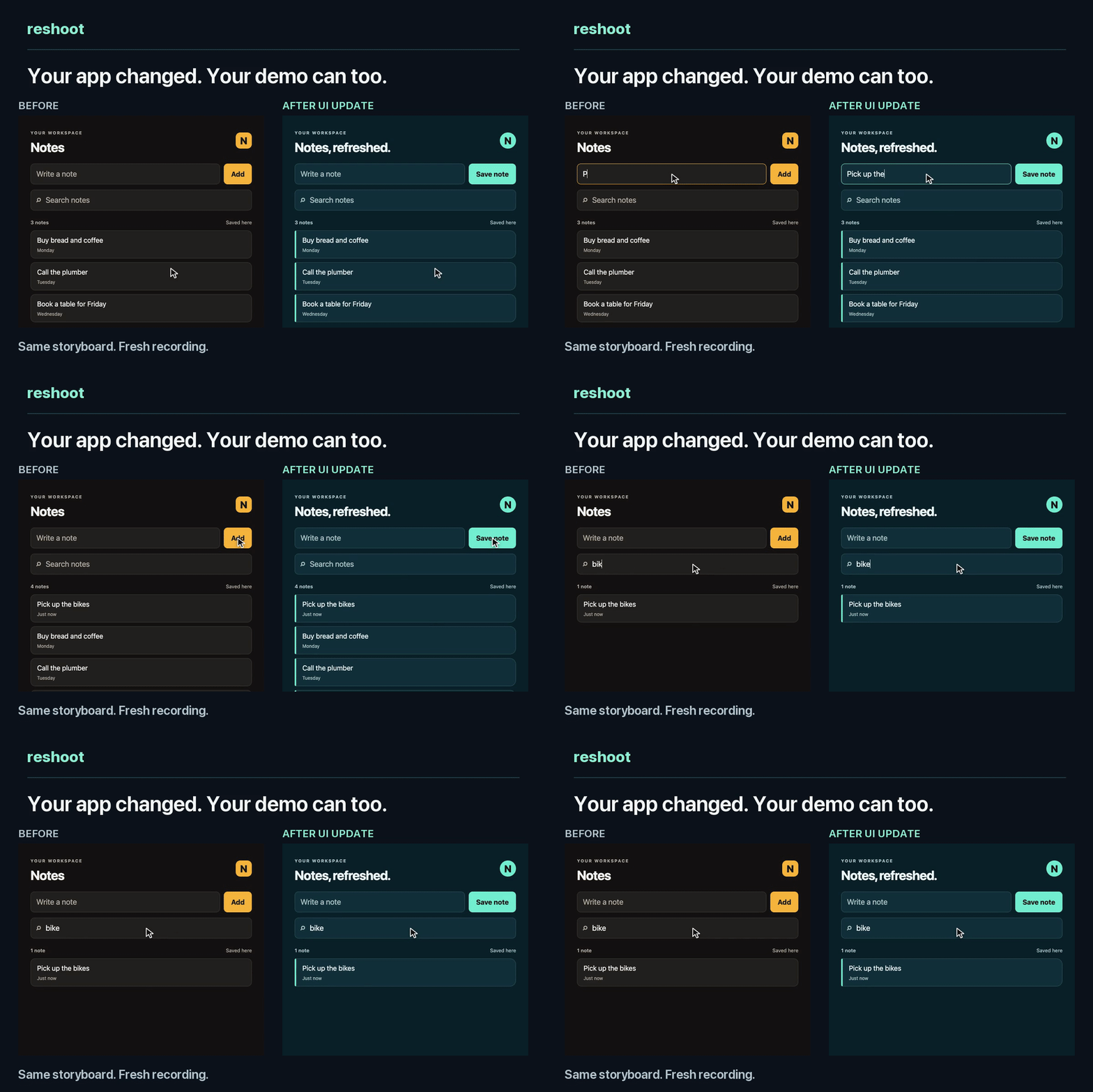
Before and after a UI change, from one storyboard. Watch the 21-second social cut.
- Re-record, don't redo. The demo is a
storyboard.tomlof clicks, typing, captions and the result that should appear. Run it after every UI change. - Checked, not just captured. Each run confirms that the result you named appeared, such as a saved item or a search match, and stops on the exact step whose control or label no longer matches. It scans the frames for email addresses, keys and, on macOS, faces before you share anything.
- Your agent can drive it. Skills for Claude Code and Codex write the story from your app, and a GitHub workflow records it again when the app changes and opens a pull request with the new video.
Try it in a minute
uv tool install 'reshoot[browser]'
reshoot init demo                # a made-up notes app and its storyboard
reshoot preview demo/reshoot.toml
Once Chrome is up, the preview takes seconds and ends with what it made:
Done in 13 s: 3 of 3 result checks passed · scan: 6 items, 0 flagged · not accepted yet.
  video  demo/takes/runs/RUN_ID/takes/demo-final.mp4
  GIF    demo/takes/runs/RUN_ID/takes/demo-final-readme.gif
  review demo/takes/runs/RUN_ID/review.html

This is a preview, smaller and quicker than a final. When it looks right, record the final:
  reshoot run demo/reshoot.toml
reshoot runs on macOS or Linux with Python 3.11+, ffmpeg and Chrome or Chromium, plus Tesseract on Linux; installation covers each platform. The CLI tutorial shows the part only reshoot does: change the app, watch the story stop on the beat that broke, fix one line, and compare the new recording with the old one.
Or let your agent make it
Open Claude Code or Codex in your app's repository, or in an empty folder if you only have a running app, and paste:
Make a short demo with reshoot.
Read https://github.com/mumit/reshoot/blob/main/guide/agent-quickstart.md
and follow its setup and creation workflow.

Target: the app in this repository.
Choose one useful task with a clear visible result. Use synthetic demo data.
Produce a short captioned MP4 and a README GIF. Keep the recording source in
demo/ so it can be updated later.

Inspect a preview, then record a fresh final and open both exports for review.
Ask only for permissions or missing details needed to proceed.
Change Target: to a URL, or to a macOS app and its window, if there's no
source. Add a task if you have one: "Show creating a project and finding it by
search."
What to expect, from trials on four new apps:
- Time: 2 to 3 minutes in Claude Code, 5 to 9 in Codex.
- Files: the agent writes
demo/and its skills, in.claude/skills/or.agents/skills/, and leaves your README and other files alone. - Permissions: it may ask to install reshoot and ffmpeg, and in Codex to run Chrome outside the sandbox.
- At the end: it opens the MP4 and GIF, and you reply "accept" or ask for changes, such as shorter captions. Nothing is published.
The story is a file
[[beat]]
id = "search"
caption = "Find the matching note"
hold = 2.0
[[beat.action]]
type = "type"
target = {css = "#q"}
text = "bike"
[[beat.expect]]
type = "text"
target = {css = "#list li"}
contains = "Pick up the bikes"
reshoot types into the real page with a visible cursor, shows the caption, and
holds on the result so people can read it. When the app renames #q, the run
stops on that beat: type target {css = '#q'} matched 0 elements. Fix the
target and run again; the comparison shows the same beats
with the same results.
Keep it current
Record a final, watch it, and accept it once. That writes demo/accepted/, a
small record to commit with demo/:
reshoot run demo/reshoot.toml
reshoot accept demo/latest
After the app changes, record again and compare with the accepted run before accepting the new one:
reshoot run demo/reshoot.toml
reshoot compare demo/accepted demo/latest --out demo/comparison.json
reshoot accept demo/latest
Or let CI do it: the GitHub workflow records the demo when the
app changes on main and opens a pull request with the new video, GIF and a
beat-by-beat comparison. A broken story fails on its beat and opens nothing.
How it differs
| If you use | reshoot adds |
|---|---|
| Screen Studio, Loom, ScreenFlow | Re-recording on demand. You give up some hand polish; you never record the same flow by hand again |
| VHS | The same idea for web apps and macOS windows. reshoot uses VHS for terminals |
| Playwright video | A cursor, typing, captions, zoom, cuts, a GIF, result checks and a privacy scan |
| Arcade, Supademo | Ordinary MP4 and GIF files, made locally from open source, that CI can refresh |
What it records
| Show | How |
|---|---|
| A web app | Headless Chrome: the page only, never your desktop |
| A CLI or an agent at work | VHS terminal recordings |
| A native app on macOS | One window, by its ID |
| A narrated explanation | Voiceover timed to the beats, music under it, subtitles |
| Other formats | Edits, portrait crops and size limits for each export |
Use made-up demo data. Platforms and tested limits lists what runs where.
Skills for Claude Code and Codex
| When | Skill | Ask for |
|---|---|---|
| The first demo | reshoot-demo | "Show a customer saving a search and seeing its results." |
| The app changed | reshoot-refresh | "Record that task again with the updated UI." |
| Before sharing | reshoot-review | "Check the final video and GIF against the accepted run." |
The first-demo prompt installs them. To install them yourself, run
reshoot skills claude --directory . or reshoot skills codex --directory .
in the project, and add --replace after an upgrade. In Claude Code, the
plugin installs all ten: these three, plus seven supporting skills for
planning, recording, editing, privacy checks and CI:
/plugin marketplace add mumit/reshoot
/plugin install reshoot@reshoot
The agent quickstart has follow-up prompts for refreshing and reviewing, and the skill catalog describes each skill.
Where next
| To | Read |
|---|---|
| Record your own app | A web app, from source or a URL, or a macOS window |
| Change captions, timing or GIF size | Change and grow a demo |
| See the cursor, zoom, captions and shapes | How the videos look |
| Use it on a team | Ownership, review, alerts and CI cost |
| Keep it current in CI | GitHub Actions |
| Look something up | Project reference · Commands · Troubleshooting |
| Rebuild the video above | Before-and-after recipe |
Why reshoot exists
I made the launch video for photosearch this way, and pulled the tools and what I learned into reshoot. A demo takes work to make. Keeping its story beside the app makes that work pay off again every time the product changes.
The original notes recording and its source files are still here.
Contributing
New pitfalls, skills and fixes are welcome. See CONTRIBUTING.md for how to work on it and ROADMAP.md for what's planned.
License
MIT. See LICENSE.
1 maintainer

Metadata
1 maintainer
Release files for reshoot 0.3.5
For a detailed explanation of source distributions (sdists) and built distributions (wheels), please see the package formats documentation.
Source distribution (sdist)
| File | Size | Uploaded | Provenance | |
|---|---|---|---|---|
| reshoot-0.3.5.tar.gz | 143.2 kB | With provenance | Details |
Built distribution (wheel)
| File | Interpreter | ABI | Platform | Reset |
|---|---|---|---|---|
| reshoot-0.3.5-py3-none-any.whl | Python 3 | none | any | Details |
Total release size: 268.8 kB
Release files / reshoot-0.3.5.tar.gz
| Download URL | reshoot-0.3.5.tar.gz |
|---|---|
| Size | 143.2 kB |
| Tags | Source |
|
SHA-256 checksum How to use checksums |
2cea16c56238ce615d0027957ddbf7a91c9d4dcd16f6ebf78ddda0784d237d43
|
|
BLAKE2b-256 checksum How to use checksums |
e162d14bab29cf052c6dee4a0d8a4ff7fe84d7954c89dd2de3e43a92ec9ce699
|
| Upload date | |
|
Uploaded using Trusted Publishing? What is trusted publishing? |
Yes |
| Uploaded via |
twine/7.0.0 CPython/3.13.16
|
Provenance
Provenance describes where a file came from. On PyPI, provenance is shared via attestations, which provide a verifiable record of the build or publishing details. View details, limitations and caveats.


PyPI Publish Attestation
PyPI verified that this artifact, at this checksum, originated from the publisher listed below.
Signed by GitHub Actions, verified by PyPI on Oct 24, 2026.
Transparency logRelease files / reshoot-0.3.5-py3-none-any.whl
| Download URL | reshoot-0.3.5-py3-none-any.whl |
|---|---|
| Size | 125.6 kB |
| Tags | Python 3 |
|
SHA-256 checksum How to use checksums |
1a6b8f08d96b9859a4574b5681b9b6801cb3238c4ba7409eb81927dd3a97d4e3
|
|
BLAKE2b-256 checksum How to use checksums |
f5398ca75878251dadae9f90dbb215b42bdf90d6f584a29ea1b0d9d1ea3d5841
|
| Upload date | |
|
Uploaded using Trusted Publishing? What is trusted publishing? |
Yes |
| Uploaded via |
twine/7.0.0 CPython/3.13.16
|
Provenance
Provenance describes where a file came from. On PyPI, provenance is shared via attestations, which provide a verifiable record of the build or publishing details. View details, limitations and caveats.
PyPI Publish Attestation
PyPI verified that this artifact, at this checksum, originated from the publisher listed below.
Signed by GitHub Actions, verified by PyPI on Oct 24, 2026.
Transparency logSecurity for reshoot 0.3.5
Provenance
Provenance describes where a file came from. On PyPI, provenance is shared via attestations, which provide a verifiable record of the build or publishing details. View details, limitations and caveats.
Full provenance
All 2 files in this release have been uploaded with provenance metadata.
Attestation for reshoot-0.3.5.tar.gz
PyPI Publish Attestation
PyPI verified that this artifact, at this checksum, originated from the publisher listed below.
Signed by GitHub Actions, verified by PyPI on Oct 24, 2026.
Transparency logA note on package security
PyPI is a repository for distributing packages, not a service for auditing them. While third-party security researchers and our staff do their best to detect and remove malicious packages, PyPI cannot guarantee the quality, security or suitability of any given package.
To learn more about protecting yourself from malicious actors, visit our package security documentation.














