
Resilient Automation Test Stand




A ready-to-run deterministic failure sandbox for browser automation.
Use it to prove that Playwright, Selenium, scrapers, and HTTP automation workers recover from real, repeatable failure sequences—not just happy-path responses. Unlike a static mock endpoint, it ships browser and API workflows with deterministic stateful failures, stable locators, login, and pagination.
Try the Automation Gauntlet · See the C# reference consumer for a production-style worker that is validated against a pinned Test Stand release. · Read the public compatibility contract
Start in minutes
These two paths work without cloning this repository.
Install from PyPI
Requires Python 3.11 or newer.
python -m pip install resilient-automation-test-stand
automation-test-stand --port 8080
Run the released container
docker run --rm -p 8080:8080 \
  ghcr.io/bockuden/resilient-automation-test-stand:1.2.0
After starting either distribution, open this URL in a browser or navigate to it with an automation worker:
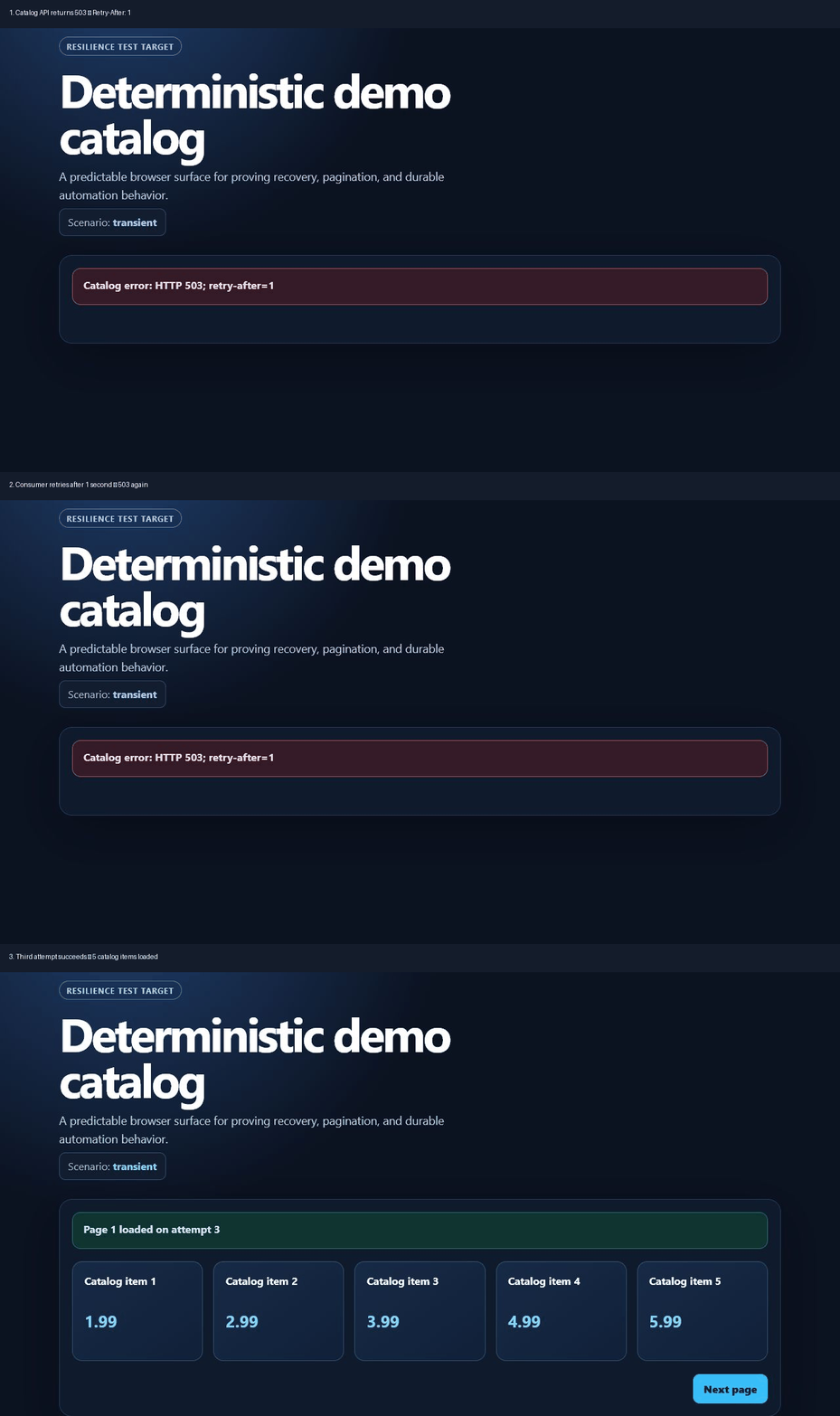
http://localhost:8080/catalog?scenario=transient&run_id=demo&fail_for=2
The consumer—not the stand—owns the retry policy. The first two catalog API
requests for this run_id return 503 with Retry-After: 1; the third
succeeds. Use a new run_id for a clean, independent failure sequence.
Who this is for
- QA and SDET engineers validating retry, timeout, checkpoint, and evidence handling in browser workers.
- Scraping and data engineers who need a deterministic target for pagination, duplicates, DOM changes, and resumable collection.
- Library authors who want contract fixtures before integrating with a variable third-party website.
- Educators teaching resilient automation without depending on a live site.
What each case proves
An ordinary mock often returns one static response. This stand keeps a small,
isolated state machine per run_id, so a consumer has to prove its behavior
across an ordered sequence of requests.
| Case | Deterministic behavior | What the consumer must prove |
|---|---|---|
success |
Every in-range page returns five stable items and 200. |
It can complete the baseline paginated workflow. |
transient |
The first fail_for requests per page return 503 with Retry-After: 1, then 200. |
It honors the delay, caps its retry budget, and eventually succeeds. |
rate-limit |
The first rate_limit_for requests per page return 429 with the configured Retry-After, then 200. |
It distinguishes rate limiting from transient server errors and resumes after the indicated delay. |
permanent |
Every catalog API request returns 500. |
It stops retrying and reports a terminal failure instead of looping forever. |
slow |
Each API response waits for delay_ms, then returns the normal page. |
Its timeout and cancellation policies end the operation cleanly. |
resume |
Only fail_page returns 500; the other pages remain available. |
It persists a checkpoint and resumes without reprocessing completed pages. |
duplicates |
Each page after the first begins with the previous page's final item ID. | It deduplicates records across pagination boundaries. |
dom-change |
CSS classes and element nesting change while stable data-testid locators remain. |
It uses semantic or stable locators rather than DOM shape. |
selector-failure |
One configured browser locator is missing, changed, duplicated, delayed, hidden, or disabled on a selected page. | It retries locator strategies and applies a fallback only when the target is unavailable. |
malformed-api |
The API returns one selected deterministic contract violation: invalid JSON, truncated JSON, a wrong content type, missing fields, or a wrong field type. | It rejects or safely handles broken upstream responses without silently accepting corrupt data. |
protected=true |
The browser route redirects through the configured login and back to the original catalog URL. | It preserves the session cookie and return URL. |
expire_session_after_page=N |
A protected session expires before page N + 1; re-login returns to the interrupted page. |
It detects expiry, authenticates again, and continues without restarting the workflow. |
| Composite events | One preset schedules bounded 503 responses, delay, duplicate items, session expiry, and locator changes on selected pages. |
It handles an ordered sequence of independent failures and replays the same result for the same configuration and run_id. |
Where WireMock and Toxiproxy fit
This stand complements general-purpose mocking and network-fault tools. Start with the tool whose primary surface matches the behavior you need to test.
| Primary need | Start with |
|---|---|
| Arbitrary HTTP mappings and configurable state-machine transitions | WireMock |
| TCP latency, bandwidth limits, timeouts, connection shutdowns, and resets | Toxiproxy |
| A ready-made browser workflow with login, UI, API, pagination, and recovery cases | Resilient Automation Test Stand |
WireMock lets a team define its own mappings and scenario states. Toxiproxy manipulates connections between a client and an upstream service. This stand trades that generality for a shorter path from startup to a reproducible browser-automation resilience test.
Development setup
Use this section after cloning the repository. Requirements: Python 3.11 or newer.
Only virtual-environment creation and activation differ by platform.
Windows PowerShell:
python -m venv .venv
.\.venv\Scripts\Activate.ps1
Linux and macOS:
python3 -m venv .venv
source .venv/bin/activate
After activation, installation and startup are identical in PowerShell, Linux, and macOS shells:
python -m pip install -e '.[dev]'
automation-test-stand --port 8080
The module entry point is equivalent on every platform:
python -m resilient_automation_test_stand --port 8080
Docker Compose
These commands are the same in PowerShell, Linux shells, and macOS Terminal:
docker compose up --build --detach --wait
docker compose down
Check readiness while the service is running.
Windows PowerShell:
Invoke-RestMethod http://localhost:8080/health
Linux and macOS:
curl --fail http://localhost:8080/health
The development image is named resilient-automation-test-stand:dev.
Released images are published as
ghcr.io/bockuden/resilient-automation-test-stand:<version>.
Troubleshooting
| Symptom | Resolution |
|---|---|
Port 8080 is already in use |
Change the Compose port mapping or stop the process that owns the port, then run docker compose up --build --detach --wait again. |
| A transient scenario succeeds or fails at an unexpected attempt | Use a new run_id, or call POST /admin/reset before the test. Counters are intentionally shared only within one run_id. |
| A protected catalog returns the login form again | Preserve the demo_session cookie after submitting the login form; direct API requests to /api/catalog do not require it. |
| Docker cannot run the image on the current machine | Use a Docker engine that can run the image platform, or run the Python quick start locally instead. |
Demo authentication
Add protected=true to a /catalog URL, or select a preset with
protected = true, to redirect the browser to the login form. The credentials
default to these test-stand values:
| Value | Input |
|---|---|
| Username | demo |
| Password | automation |
They can be overridden globally in the TOML configuration. For example, keep the default username and read a password from the environment:
[auth]
username = "demo"
password_env = "TEST_PASSWORD"
When the named environment variable is set, its value overrides the literal
TOML value. If it is absent, the literal value is used, then the built-in
default. Do not store real secrets in the repository; set them in the process
environment or your secret manager. The [auth] section only supplies
credentials: protected=true remains the switch that requires login.
A user enters the configured values in the form, while an automation script
fills input[name="username"] and input[name="password"], then submits the
form. Credentials are server-level configuration and are never part of the
scenario URL.
The equivalent form request is:
POST /login
Content-Type: application/x-www-form-urlencoded

username=demo&password=automation&next_url=/catalog?protected=true
Successful login sets the demo_session=authenticated cookie and redirects
back to next_url. A script that posts the form directly must preserve this
cookie for the following /catalog request. Authentication protects the
browser catalog route; /api/catalog remains directly accessible for API-only
tests.
Stable browser locators
Browser elements expose configurable data-testid tokens. The defaults keep
existing automation working: username, password, login-submit, catalog,
catalog-item, item-name, item-price, and next-page. The login form also
keeps its name="username" and name="password" fields.
Set tokens in the same TOML file used for presets. Values are tokens, not CSS
selectors; they may contain letters, digits, ., _, :, and -:
[selectors]
username = "account-name"
password = "account-secret"
login_button = "submit-login"
catalog = "product-list"
item = "product-card"
item_name = "product-title"
item_price = "product-cost"
next_page = "page-forward"
Start the server with automation-test-stand --config scenarios.toml to apply
the settings, with or without --preset. Locator settings are sent to the
browser page at runtime and are never included in URLs printed by --print-url.
Scenario cookbook
Start the server first, then use one of the commands below. Protected scenarios redirect to the demo login form described above.
Windows PowerShell
$catalog = 'http://localhost:8080/catalog'

# Ten successful catalog pages.
Start-Process "$catalog?scenario=success&run_id=ten-pages&total_pages=10"

# Login, then ten successful catalog pages.
Start-Process "$catalog?protected=true&scenario=success&run_id=login-ten-pages&total_pages=10"

# Login, then two delayed 503 responses per page before recovery.
Start-Process "$catalog?protected=true&scenario=transient&run_id=login-delayed-503&total_pages=10&fail_for=2&failure_delay_ms=1500"
Linux
catalog='http://localhost:8080/catalog'

xdg-open "${catalog}?scenario=success&run_id=ten-pages&total_pages=10"
xdg-open "${catalog}?protected=true&scenario=success&run_id=login-ten-pages&total_pages=10"
xdg-open "${catalog}?protected=true&scenario=transient&run_id=login-delayed-503&total_pages=10&fail_for=2&failure_delay_ms=1500"
macOS
catalog='http://localhost:8080/catalog'

open "${catalog}?scenario=success&run_id=ten-pages&total_pages=10"
open "${catalog}?protected=true&scenario=success&run_id=login-ten-pages&total_pages=10"
open "${catalog}?protected=true&scenario=transient&run_id=login-delayed-503&total_pages=10&fail_for=2&failure_delay_ms=1500"
The delayed transient example waits 1.5 seconds before each of the first two
503 responses on every page. A manual browser displays the error and can be
reloaded; an automation worker can exercise its retry policy and recover on the
third attempt.
Runnable resilience examples
Start the stand first. Each example generates a fresh run_id unless one is
provided, prints reproducible JSON evidence, and exits nonzero when the expected
behavior is not proved.
Playwright: login and bounded browser retries
Install the optional browser dependency once, then run the standalone Playwright example:
python -m pip install playwright
playwright install chromium
python -m resilient_automation_test_stand.examples.playwright_resilience
The script logs in with the configured account, reads Retry-After, performs at
most three browser attempts, and asserts five items on recovery.
HTTP API: retry, pagination, and deduplication
The standard-library API example needs no additional dependency:
python -m resilient_automation_test_stand.examples.api_retry_dedup
It first completes three transient pages with a bounded retry budget, then collects the duplicate scenario and reports raw, unique, and removed item IDs.
Checkpoint and resume
The first invocation intentionally stops with a nonzero exit code on page 3 and leaves a checkpoint containing the ten items from pages 1 and 2:
python -m resilient_automation_test_stand.examples.resume_checkpoint \
  --checkpoint .tmp/resume-example.json
After the simulated dependency recovers, run the same consumer against the success scenario. It reads the checkpoint and requests only pages 3 and 4:
python -m resilient_automation_test_stand.examples.resume_checkpoint \
  --scenario success \
  --checkpoint .tmp/resume-example.json
These examples correspond to retry, authentication, deduplication, and checkpoint levels in the Automation Gauntlet.
For a production-style .NET consumer with retries, checkpoints, cancellation, and browser evidence, see resilient-browser-automation.
Automation Gauntlet
Work through the ten-level, reproducible Automation Gauntlet to validate a consumer against pagination, retries, authentication, selector changes, deduplication, checkpoint recovery, session expiry, rate limiting, and composite failures. Any client can emit the portable JSON evidence format and validate it locally:
automation-gauntlet list
automation-gauntlet describe 1
automation-gauntlet template 1 > evidence.json
automation-gauntlet validate evidence.json
The validator returns machine-readable JSON and exits with 0 for pass, 1
for an unmet objective, or 2 for invalid evidence. It runs separately from
the test stand server and does not change ordinary scenario behavior.
Named scenario presets
For repeated scenarios, the same values can be stored in a TOML file instead
of copied into every startup command. The repository includes
examples/scenarios.toml with the three cookbook
scenarios above, selector-failure and rate-limit presets, a malformed JSON
preset, a deterministic session-expiry preset, and a composite failure preset.
These CLI commands are identical in PowerShell, Linux, and macOS shells:
automation-test-stand --config examples/scenarios.toml --list-presets
automation-test-stand --config examples/scenarios.toml --print-url login-delayed-retry
automation-test-stand --config examples/scenarios.toml --preset login-delayed-retry --port 8080
--print-url emits a URL that is self-contained with respect to scenario
parameters. Server-level authentication still comes from the TOML config and
environment. --config applies global auth and stable locator settings even without --preset;
--preset additionally starts the server with that preset as its scenario
defaults. An explicit query parameter overrides only the matching preset
field, so the following URL uses the preset's ten pages but disables its
transient failures:
http://localhost:8080/catalog?scenario=success&run_id=override-example
Preset files use this shape; omitted fields inherit the built-in defaults:
[presets.login-delayed-retry]
protected = true
scenario = "transient"
total_pages = 10
fail_for = 2
failure_delay_ms = 1500
The rate-limit scenario returns 429 twice by default, then serves the normal
catalog response. Configure the number of failures and exact retry header in a
preset:
[presets.rate-limited]
scenario = "rate-limit"
rate_limit_for = 2
retry_after_seconds = 1
The counter is isolated by run_id and page; POST /admin/reset clears it.
The malformed-api scenario intentionally bypasses normal response-model
serialization so clients can exercise broken upstream handling. Select one of
invalid_json, truncated_json, wrong_content_type, missing_fields, or
wrong_field_type. Every mode uses a fixed payload construction; the same
configuration, run_id, and request sequence produce the same response bytes.
[presets.malformed-json]
scenario = "malformed-api"
malformed_mode = "invalid_json"
These responses deliberately violate the normal OpenAPI CatalogPage response
contract. They still return status 200, allowing a client to distinguish
payload and media-type validation failures from HTTP status failures.
To test authentication expiring during pagination, set a page boundary together
with protected = true. With a boundary of 2, pages 1 and 2 work, page 3
returns 401 SESSION_EXPIRED, and the browser redirects to login. Successful
re-login restores access for that run_id and resumes page 3. The boundary is
request based and never depends on wall-clock time.
[presets.session-expiry]
scenario = "success"
protected = true
expire_session_after_page = 2
Session-expiry state is isolated by run_id. POST /admin/reset clears it so
the same configuration and request sequence replay from a clean state.
A composite preset schedules several existing failure primitives in one run.
The supported event types are http_error (status = 503, optional
attempts), delay (delay_ms), duplicate_items, expire_session, and
selector_change (target = "item" or "next_page"). Composite events use
the success base scenario and each event page must be within total_pages.
[presets.composite-nightmare]
scenario = "success"
protected = true
total_pages = 10

[[presets.composite-nightmare.events]]
page = 2
type = "http_error"
status = 503
attempts = 2

[[presets.composite-nightmare.events]]
page = 4
type = "duplicate_items"

[[presets.composite-nightmare.events]]
page = 5
type = "expire_session"

[[presets.composite-nightmare.events]]
page = 7
type = "selector_change"
target = "next_page"

[[presets.composite-nightmare.events]]
page = 9
type = "delay"
delay_ms = 3000
Different event types may share a page. Their execution order is session
expiry, HTTP error, delay, duplicate payload, then browser locator change.
Repeating the same event type on one page is rejected. Only one session-expiry
event is allowed, and it cannot be combined with
expire_session_after_page. --print-url composite-nightmare serializes the
validated event list into events_json, so the browser, login redirects, and
API calls preserve the full sequence. A fresh run_id or POST /admin/reset
replays it from the beginning.
To simulate a missing next-page locator on page 2, add a selector failure to a
preset. Supported targets are login_button, item, and next_page; modes
are missing, changed, multiple, delayed, hidden, and disabled.
Failures affect only their configured target and page. The delayed mode waits
between 1 and 5000 ms (default 500 ms). A login_button failure applies on
page 1; a catalog target beyond total_pages is ignored.
[presets.selector-missing]
scenario = "selector-failure"

[presets.selector-missing.selector_failure]
target = "next_page"
mode = "missing"
page = 2
Use --config examples/scenarios.toml --preset selector-missing to run the
scenario. --print-url selector-missing includes the target, mode, and page as
query parameters so it can be reproduced without the preset name.
To fetch all ten pages directly from the API, use either loop below.
Windows PowerShell:
1..10 | ForEach-Object {
    Invoke-RestMethod "http://localhost:8080/api/catalog?scenario=success&run_id=api-ten-pages&page=$_&total_pages=10"
}
Linux and macOS:
page=1
while [ "$page" -le 10 ]; do
  curl --fail "http://localhost:8080/api/catalog?scenario=success&run_id=api-ten-pages&page=${page}&total_pages=10"
  printf '\n'
  page=$((page + 1))
done
Endpoints
| Method | Path | Purpose |
|---|---|---|
GET |
/health |
Container and service readiness |
GET |
/catalog |
JavaScript-rendered catalog and pagination shell |
GET |
/api/catalog |
Deterministic paginated catalog data |
GET |
/login |
Predictable login form |
POST |
/login |
Authenticate the demo user and set a session cookie |
POST |
/admin/reset |
Clear all in-memory attempt and session-expiry state |
GET |
/api-docs |
Interactive OpenAPI documentation |
Scenario parameters
Both /catalog and /api/catalog accept the common parameters below.
/catalog additionally accepts resume_page; /api/catalog accepts page,
both from 1 through 20.
| Parameter | Built-in default | Meaning |
|---|---|---|
scenario |
success |
Selects a case from the proof matrix |
run_id |
manual |
Isolates request-attempt counters between test cases |
total_pages |
4 |
Number of catalog pages to expose (1-20) |
fail_for |
2 |
Initial 503 responses per page in transient (0-10) |
failure_delay_ms |
0 |
Delay before each transient 503 response (0-30000 ms) |
rate_limit_for |
2 |
Initial 429 responses per page in rate-limit (0-10) |
retry_after_seconds |
1 |
Retry-After header value in rate-limit (0-300 seconds) |
malformed_mode |
invalid_json |
Broken response emitted by malformed-api: invalid_json, truncated_json, wrong_content_type, missing_fields, or wrong_field_type |
expire_session_after_page |
— | Expire an authenticated session before the following page (1-20); implies protected browser flow |
events_json |
— | Portable JSON array of validated composite failure events; generated by --print-url for presets with events |
delay_ms |
1500 |
Delay per API request in slow (0-30000 ms) |
fail_page |
3 |
Permanently failing page in resume (1-20) |
protected |
false |
Require the demo login for /catalog and its authenticated cookie for /api/catalog |
resume_page |
1 |
Browser page loaded after login or re-login; /catalog only (1-20) |
selector_failure_target |
— | Locator target for selector-failure: login_button, item, or next_page |
selector_failure_mode |
— | Locator failure: missing, changed, multiple, delayed, hidden, or disabled |
selector_failure_page |
1 |
Catalog page where the failure is injected (1-20) |
selector_failure_delay_ms |
500 |
Delayed locator appearance in selector-failure (1-5000 ms) |
The same run_id, scenario, and page share an attempt counter. Call
POST /admin/reset or choose a fresh run_id when a test needs clean state.
Development and contract checks
After activating the virtual environment:
python -m pip install -e '.[dev]' build
python -m pytest
python scripts/export_openapi.py --check
python -m build
The committed contract is docs/api/openapi.json. If an endpoint or model changes, regenerate it with:
python scripts/export_openapi.py
Contract changes require an updated snapshot, release notes, a package version change, and a backward-compatibility review. The release roadmap is tracked in the development plan. The intended 1.0 public contract and compatibility policy are documented in docs/compatibility.md. Release prerequisites and the one-time PyPI Trusted Publisher setup are documented in docs/release-checklist.md.
License
MIT. See LICENSE.
1 maintainer

Metadata
1 maintainer
Release files for resilient-automation-test-stand 1.2.0
For a detailed explanation of source distributions (sdists) and built distributions (wheels), please see the package formats documentation.
Source distribution (sdist)
| File | Size | Uploaded | |
|---|---|---|---|
| resilient_automation_test_stand-1.2.0.tar.gz | 407.7 kB | Details |
Built distribution (wheel)
| File | Interpreter | ABI | Platform | Reset |
|---|---|---|---|---|
| resilient_automation_test_stand-1.2.0-py3-none-any.whl | Python 3 | none | any | Details |
Total release size: 447.3 kB
Release files / resilient_automation_test_stand-1.2.0.tar.gz
| Download URL | resilient_automation_test_stand-1.2.0.tar.gz |
|---|---|
| Size | 407.7 kB |
| Tags | Source |
|
SHA-256 checksum How to use checksums |
ea77c099ebf496a7be5c58af4432576f5b3fbb65d6f3862c5753f5d23fc58681
|
|
BLAKE2b-256 checksum How to use checksums |
accbee75182b8e5e246feb66cfc719961b6284d900551493d502aadbb02b5063
|
| Upload date | |
|
Uploaded using Trusted Publishing? What is trusted publishing? |
Yes |
| Uploaded via |
twine/7.0.0 CPython/3.13.14
|
Provenance
Provenance describes where a file came from. On PyPI, provenance is shared via attestations, which provide a verifiable record of the build or publishing details. View details, limitations and caveats.


PyPI Publish Attestation
PyPI verified that this artifact, at this checksum, originated from the publisher listed below.
Signed by GitHub Actions, verified by PyPI on Oct 9, 2026.
Transparency logRelease files / resilient_automation_test_stand-1.2.0-py3-none-any.whl
| Download URL | resilient_automation_test_stand-1.2.0-py3-none-any.whl |
|---|---|
| Size | 39.5 kB |
| Tags | Python 3 |
|
SHA-256 checksum How to use checksums |
fa7ddabdd89b1342ec81120db01a5d8af52fa9851c92df3084235163d839cff0
|
|
BLAKE2b-256 checksum How to use checksums |
52b295d56837a69dd2173b3764f1260794c8d5faed9660336db1e1ca5b8dd935
|
| Upload date | |
|
Uploaded using Trusted Publishing? What is trusted publishing? |
Yes |
| Uploaded via |
twine/7.0.0 CPython/3.13.14
|
Provenance
Provenance describes where a file came from. On PyPI, provenance is shared via attestations, which provide a verifiable record of the build or publishing details. View details, limitations and caveats.
PyPI Publish Attestation
PyPI verified that this artifact, at this checksum, originated from the publisher listed below.
Signed by GitHub Actions, verified by PyPI on Oct 9, 2026.
Transparency log













