
Process and server-level resource usage tracker and cloud server suggestion tool.
Project description
resource-tracker
A no-dependency Python package for tracking resource usage of processes and system-wide, with a focus on batch jobs like Metaflow steps.
Installation
You can install the stable version of the package from PyPI:
pip install resource-tracker
Development version can be installed directly from the repository:
pip install git+https://github.com/sparecores/resource-tracker.git
Standalone Usage
The package comes with helper functions and classes for tracking resource usage,
such as PidTracker and SystemTracker:
from resource_tracker import SystemTracker
tracker = SystemTracker()
Would track system-wide resource usage, including CPU, memory, GPU, network traffic, disk I/O and space usage every 1 second, and write CSV to the standard output stream by default, e.g.:
"timestamp","processes","utime","stime","cpu_usage","memory_free","memory_used","memory_buffers","memory_cached","memory_active_anon","memory_inactive_anon","disk_read_bytes","disk_write_bytes","disk_space_total_gb","disk_space_used_gb","disk_space_free_gb","net_recv_bytes","net_sent_bytes","gpu_usage","gpu_vram","gpu_utilized"
1741785685.6762981,1147955,40,31,0.7098,37828072,26322980,16,1400724,13080320,1009284,86016,401408,5635.25,3405.81,2229.44,10382,13140,0.24,1034.0,1
1741785686.676473,1147984,23,49,0.7199,37836696,26316404,16,1398676,13071060,1009284,86016,7000064,5635.25,3405.81,2229.44,1369,1824,0.15,1033.0,1
1741785687.6766264,1148012,38,34,0.7199,37850036,26301016,16,1400724,13043036,1009284,40960,49152,5635.25,3405.81,2229.44,10602,9682,0.26,1029.0,1
This can be redirected to a file by passing a path to the csv_file_path
argument, and can use different intervals for sampling via the interval
argument.
The PidTracker class tracks resource usage of a running process and its
children recursively in a similar manner, although somewhat limited in
functionality, as e.g. nvidia-smi pmon can only track up-to 4 GPUs, and
network traffic monitoring is not available.
Helpers functions are also provided for tracking memory usage, e.g.
get_pid_stats and get_system_stats for current process and system-wide stats
-- which are used internally by the above classes after diffing values between
subsequent calls. See more details in the
[API References](https://sparecores.github.io/resource-tracker/reference/resource_tracker/tracker/.
Discovery Helpers
The packages also comes with helpers for discovering the cloud environment and basic server hardware specs. Quick example on an AWS EC2 instance:
from resource_tracker import get_cloud_info, get_server_info
get_cloud_info()
# {'vendor': 'aws', 'instance_type': 'g4dn.xlarge', 'region': 'us-west-2', 'discovery_time': 0.1330404281616211}
get_server_info()
# {'vcpus': 4, 'memory_mb': 15788.21, 'gpu_count': 1, 'gpu_names': ['Tesla T4'], 'gpu_memory_mb': 15360.0}
Metaflow Integration
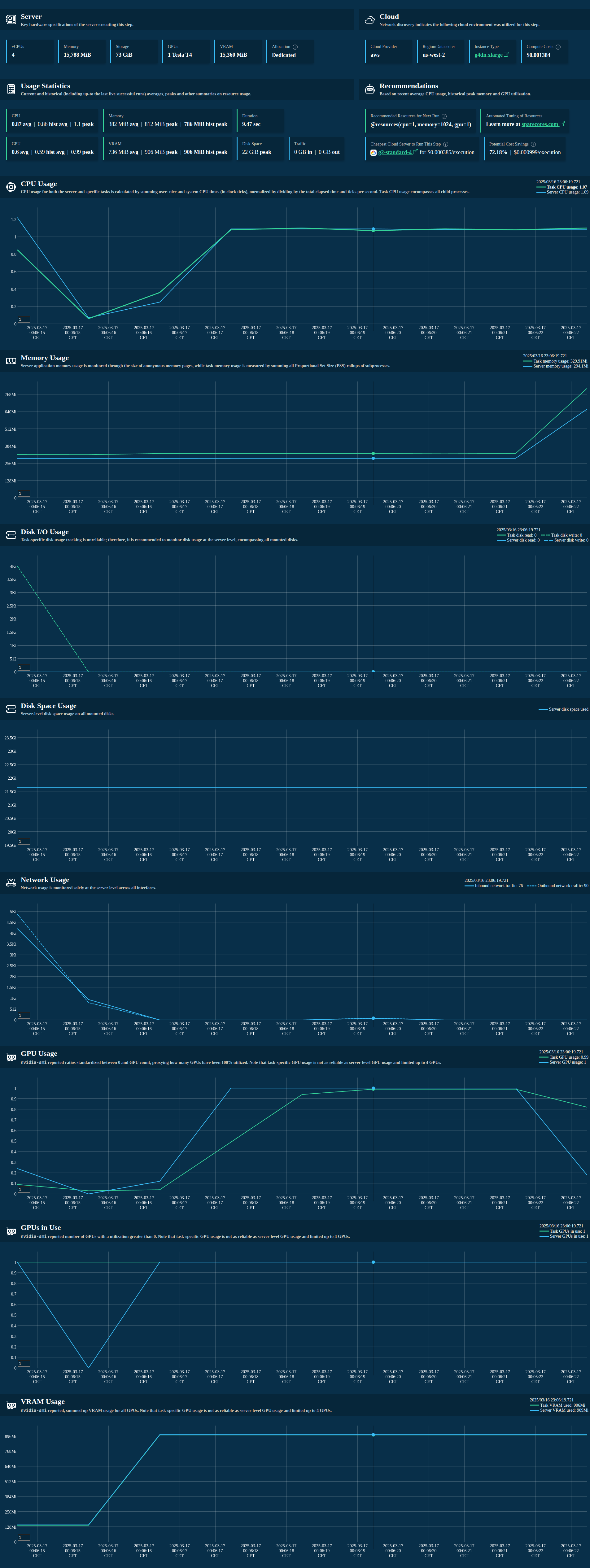
The package also comes with a Metaflow extension for tracking resource usage of
Metaflow steps, including the visualization of the collected data in a card with
recommended @resources and cheapest cloud server type for future runs.
To get started, import the track_resources decorator from metaflow and use it to decorate your
Metaflow steps:
from metaflow import Flow, FlowSpec, step, track_resources

class ResourceTrackingFlow(FlowSpec):
    @step
    def start(self):
        print("Starting step")
        self.next(self.my_sleeping_data)

    @track_resources
    @step
    def my_sleeping_data(self):
        data = bytearray(500 * 1024 * 1024)  # 500MB
        sleep(3)
        self.next(self.end)

    @step
    def end(self):
        print("Step finished")
        pass

if __name__ == "__main__":
    ResourceTrackingFlow()
Example output of an auto-generated Metaflow card:
Example data collected and then stored as an artifact of the step:
from metaflow import Flow
from rich import print as pp

artifact = Flow("ResourceTrackingFlow").latest_run.data.resource_tracker_data
pp(artifact)
# {
#     'pid_tracker': TinyDataFrame with 9 rows and 12 columns. First row as a dict: {'timestamp': 1741732803.3076203, 'pid':
# 777691.0, 'children': 3.0, 'utime': 95.0, 'stime': 13.0, 'cpu_usage': 1.0796, 'pss': 563273.0, 'read_bytes': 52260.0,
# 'write_bytes': 0.0, 'gpu_usage': 0.0, 'gpu_vram': 0.0, 'gpu_utilized': 0.0},
#     'system_tracker': TinyDataFrame with 9 rows and 21 columns. First row as a dict: {'timestamp': 1741732803.2471318,
# 'processes': 777773.0, 'utime': 225.0, 'stime': 53.0, 'cpu_usage': 2.7797, 'memory_free': 38480700.0, 'memory_used':
# 24338580.0, 'memory_buffers': 4792.0, 'memory_cached': 2727720.0, 'memory_active_anon': 15931396.0, 'memory_inactive_anon':
# 0.0, 'disk_read_bytes': 380928.0, 'disk_write_bytes': 10088448.0, 'disk_space_total_gb': 5635.25, 'disk_space_used_gb':
# 3405.11, 'disk_space_free_gb': 2230.14, 'net_recv_bytes': 8066.0, 'net_sent_bytes': 8593.0, 'gpu_usage': 0.29, 'gpu_vram':
# 998.0, 'gpu_utilized': 1.0},
#     'cloud_info': {
#         'vendor': 'unknown',
#         'instance_type': 'unknown',
#         'region': 'unknown',
#         'discovery_time': 1.0617177486419678
#     },
#     'server_info': {
#         'vcpus': 12,
#         'memory_mb': 64015.42,
#         'gpu_count': 1,
#         'gpu_names': ['Quadro T1000'],
#         'gpu_memory_mb': 4096.0
#     },
#     'stats': {
#         'cpu_usage': {'mean': 1.42, 'max': 6.11},
#         'memory_usage': {'mean': 342509.0, 'max': 591621.0},
#         'gpu_usage': {'mean': 0.0, 'max': 0.0},
#         'gpu_vram': {'mean': 0.0, 'max': 0.0},
#         'gpu_utilized': {'mean': 0.0, 'max': 0.0},
#         'disk_usage': {'max': 3405.11},
#         'traffic': {'inbound': 77383.0, 'outbound': 58481.0},
#         'duration': 9.89
#     },
#     'historical_stats': {
#         'available': True,
#         'runs_analyzed': 5,
#         'avg_cpu_mean': 1.52,
#         'max_memory_max': 597372.0,
#         'avg_gpu_mean': 0.0,
#         'max_vram_max': 0.0,
#         'max_gpu_count': 0.0,
#         'avg_duration': 10.2
#     }
# }
Find more examples in the examples directory, including multiple Metaflow flows with different resource usage patterns, e.g. GPU jobs as well.
References
- Documentation: https://sparecores.github.io/resource-tracker
- Source code: https://github.com/SpareCores/resource-tracker
- PyPI: https://pypi.org/project/resource-tracker
- Spare Cores: https://sparecores.com
Project details
Release history Release notifications | RSS feed


Download files
Download the file for your platform. If you're not sure which to choose, learn more about installing packages.
Source Distribution
Built Distribution
Filter files by name, interpreter, ABI, and platform.
If you're not sure about the file name format, learn more about wheel file names.
Copy a direct link to the current filters
File details
Details for the file resource_tracker-0.1.0.tar.gz.
File metadata
- Download URL: resource_tracker-0.1.0.tar.gz
- Upload date:
- Size: 87.8 kB
- Tags: Source
- Uploaded using Trusted Publishing? No
- Uploaded via: twine/6.1.0 CPython/3.13.1
File hashes
| Algorithm | Hash digest | |
|---|---|---|
| SHA256 |
77cca8e4c463e35d647e63aa9ef165510ba29d40a9761b5f727b4a7534eceee0
|
|
| MD5 |
d596a8f09a7f8c87e402568aedc4838f
|
|
| BLAKE2b-256 |
4c2082b8378b21daecae54daf2dffb237e1d20b9d5eef3450b9ee22ea86756ed
|
File details
Details for the file resource_tracker-0.1.0-py3-none-any.whl.
File metadata
- Download URL: resource_tracker-0.1.0-py3-none-any.whl
- Upload date:
- Size: 94.0 kB
- Tags: Python 3
- Uploaded using Trusted Publishing? No
- Uploaded via: twine/6.1.0 CPython/3.13.1
File hashes
| Algorithm | Hash digest | |
|---|---|---|
| SHA256 |
b463a6f8dcb677810567be8786f5d81cb4c84900665a59905a4fa332a0f8df07
|
|
| MD5 |
2df80f51951509ca255630514d07b504
|
|
| BLAKE2b-256 |
509a6a4c6a97535e2750c53a8faf3a71e11de2cfab1a6955894b8167d7abf245
|






