
resume.md
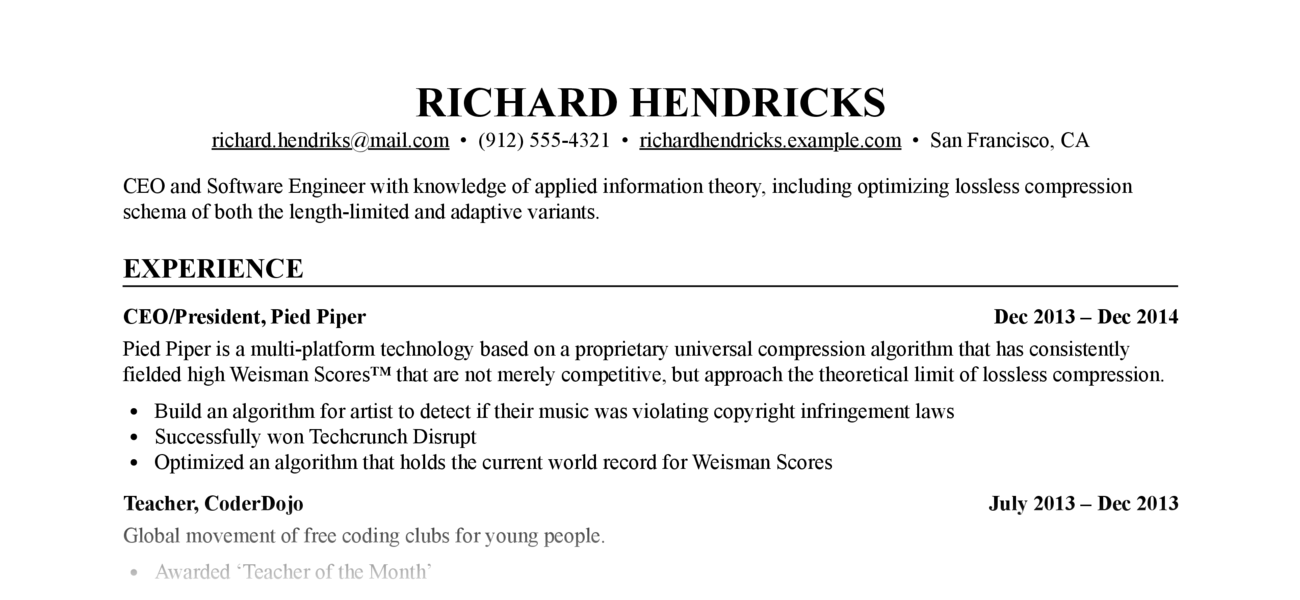
Write your resume in
Markdown,
style it with CSS, output to resume.html and
resume.pdf.
Prerequisites
- Python ≥ 3.9 or
uv - Optional, required for PDF output: Google Chrome or Chromium
Installation
Using uv
Run directly without installing:
uvx resume-markdown
Or install once:
uv tool install resume-markdown
Using pip
pip install resume-markdown
Usage
Quick start
-
Create template files in your current directory:
resume-markdown init
# or with uvx: uvx resume-markdown init
This creates
resume.mdandresume.cssin the current directory. -
Edit your copy of
resume.mdwith your resume content (the placeholder text is taken with thanks from the JSON Resume Project) -
Build HTML and PDF output:
resume-markdown build
# or with uvx: uvx resume-markdown build
Build options
-
Use
--no-htmlor--no-pdfto disable HTML or PDF output:resume-markdown build --no-pdf
-
Use
--chrome-path=/path/to/chromeif the tool cannot find your Chrome or Chromium executable (needed for PDF output)resume-markdown build --chrome-path=/path/to/chrome
-
Specify a custom input file:
resume-markdown build myresume.md
Customization
Edit resume.css to change the appearance of your resume. The
default style is extremely generic, which is perhaps what you want in a resume,
but CSS gives you a lot of flexibility. See, e.g. The Tech Resume
Inside-Out for good advice about what a
resume should look like (and what it should say).
Change the appearance of the PDF version (without affecting the HTML version) by
adding rules under the @media print CSS selector.
Change the margins and paper size of the PDF version by editing the @page CSS
rule.
1 maintainer

Release files for resume-markdown 1.0.1
For a detailed explanation of source distributions (sdists) and built distributions (wheels), please see the package formats documentation.
Source distribution (sdist)
| File | Size | Uploaded | |
|---|---|---|---|
| resume_markdown-1.0.1.tar.gz | 295.4 kB | Details |
Built distribution (wheel)
| File | Interpreter | ABI | Platform | Reset |
|---|---|---|---|---|
| resume_markdown-1.0.1-py3-none-any.whl | Python 3 | none | any | Details |
Total release size: 304.2 kB
Release files / resume_markdown-1.0.1.tar.gz
| Download URL | resume_markdown-1.0.1.tar.gz |
|---|---|
| Size | 295.4 kB |
| Tags | Source |
|
SHA-256 checksum How to use checksums |
6e64f0de41cd110e93619f83bedbe531e7448b569498eb1420abc47dafffc3da
|
|
BLAKE2b-256 checksum How to use checksums |
87b03548d4c9b4f92ff8830b039b79b5ddfc176ec3daeb7324f804162a66b5a4
|
| Upload date | |
|
Uploaded using Trusted Publishing? What is trusted publishing? |
Yes |
| Uploaded via |
twine/6.1.0 CPython/3.13.7
|
Provenance
Provenance describes where a file came from. On PyPI, provenance is shared via attestations, which provide a verifiable record of the build or publishing details. View details, limitations and caveats.


PyPI Publish Attestation
PyPI verified that this artifact, at this checksum, originated from the publisher listed below.
Signed by GitHub Actions, verified by PyPI on Oct 12, 2025.
Transparency logRelease files / resume_markdown-1.0.1-py3-none-any.whl
| Download URL | resume_markdown-1.0.1-py3-none-any.whl |
|---|---|
| Size | 8.7 kB |
| Tags | Python 3 |
|
SHA-256 checksum How to use checksums |
ed8c474ae38402032cb64822fbcf4b826e12994e5b06cfc415066752a522d44d
|
|
BLAKE2b-256 checksum How to use checksums |
939f38a885134854d86041e7e7360198ab5f2641bb3c836e718f195263edda90
|
| Upload date | |
|
Uploaded using Trusted Publishing? What is trusted publishing? |
Yes |
| Uploaded via |
twine/6.1.0 CPython/3.13.7
|
Provenance
Provenance describes where a file came from. On PyPI, provenance is shared via attestations, which provide a verifiable record of the build or publishing details. View details, limitations and caveats.
PyPI Publish Attestation
PyPI verified that this artifact, at this checksum, originated from the publisher listed below.
Signed by GitHub Actions, verified by PyPI on Oct 12, 2025.
Transparency log













