
resume-resume
New free tool we're dropping.
| Resume | Find old programming sessions in plain English and pick up where you left off. |
| Dirty Repos | See every repo with uncommitted changes across your entire machine — your standing to-do list. Scored by file count and recency. |
| Crash Recovery | boot_up finds interrupted sessions AND scans all repos for dirty git state. Ready-to-paste resume commands. |
| Prioritize | Auto-ranks sessions and repos by urgency — dirty files don't age out, recent active work surfaces first. |
| Speed | Parallelized BM25 search across gigabytes of past chats in seconds. Parallel git status scans across 50+ repos. |
| Cost Savings | Uses Haiku to summarize past context once, then caches permanently — searching thousands of sessions costs nothing after first run. |
| Merge | Merge multiple old chats together, pulling context across sessions into a single conversation. |
MCP Server
Add it to Claude Code and every session on your machine can search, read, and merge your full session history — in plain English.
pip install resume-resume
claude mcp add resume-resume -- resume-resume-mcp
Or manually in your MCP config:
{
  "mcpServers": {
    "resume-resume": {
      "command": "resume-resume-mcp"
    }
  }
}
We built Eidos, a multi-agent AI system. In our benchmark, Eidos outperformed Claude Opus 4.6 by 3.6x in both accuracy and speed on complex tasks with 15+ reasoning chains. Below, we use Claude Resume to pick up where we left off across multiple sessions.
Finding the benchmark where Eidos beat Claude Opus 4.6
"use resume-resume to find the eidos test where we beat claude"
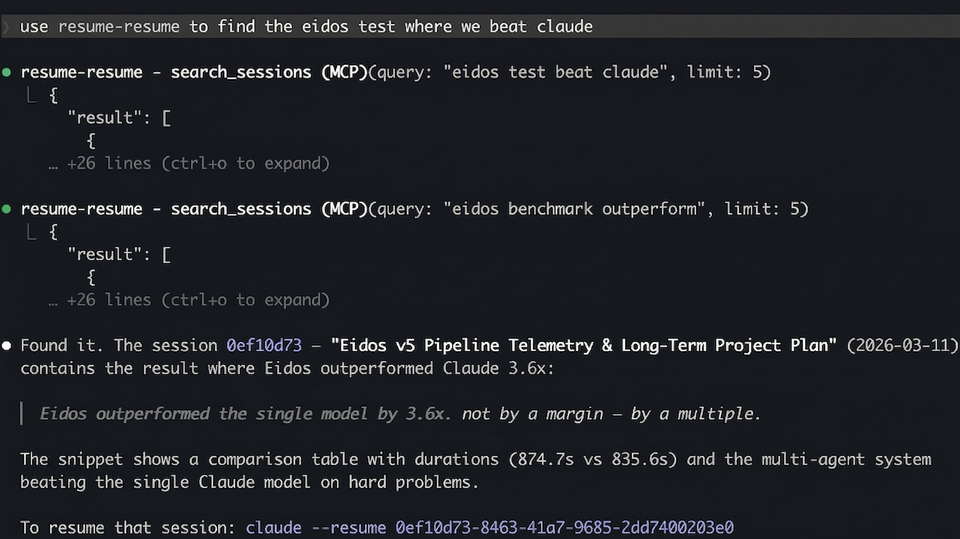
Searching for a past session in plain English
"use resume-resume to find the latest chats about eidos philosophy docs"
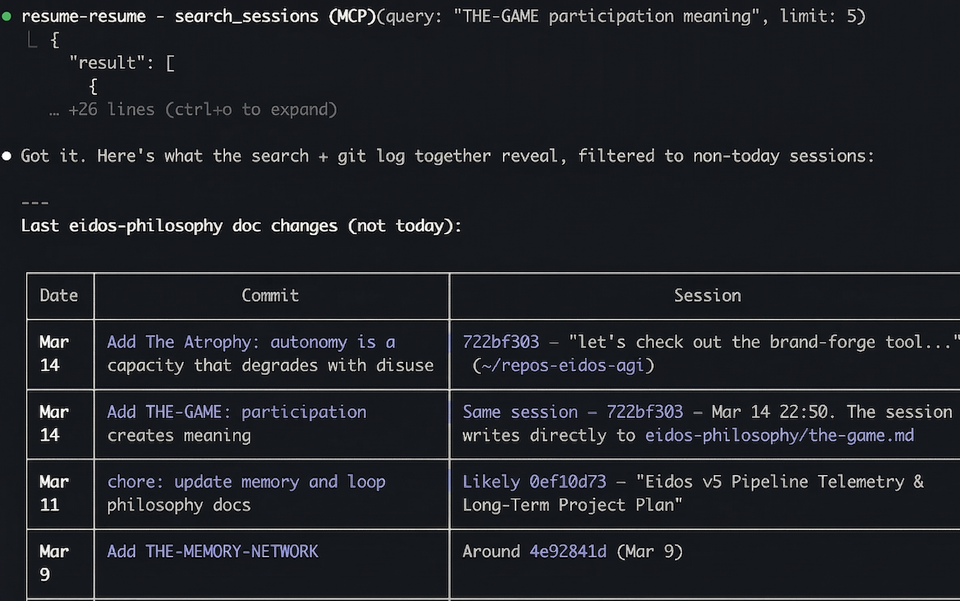
Merging multiple past sessions into this chat
"use claude resume to merge march 14th conversations and Eidos v5 Pipeline Telemetry convo from march 11th into this chat"
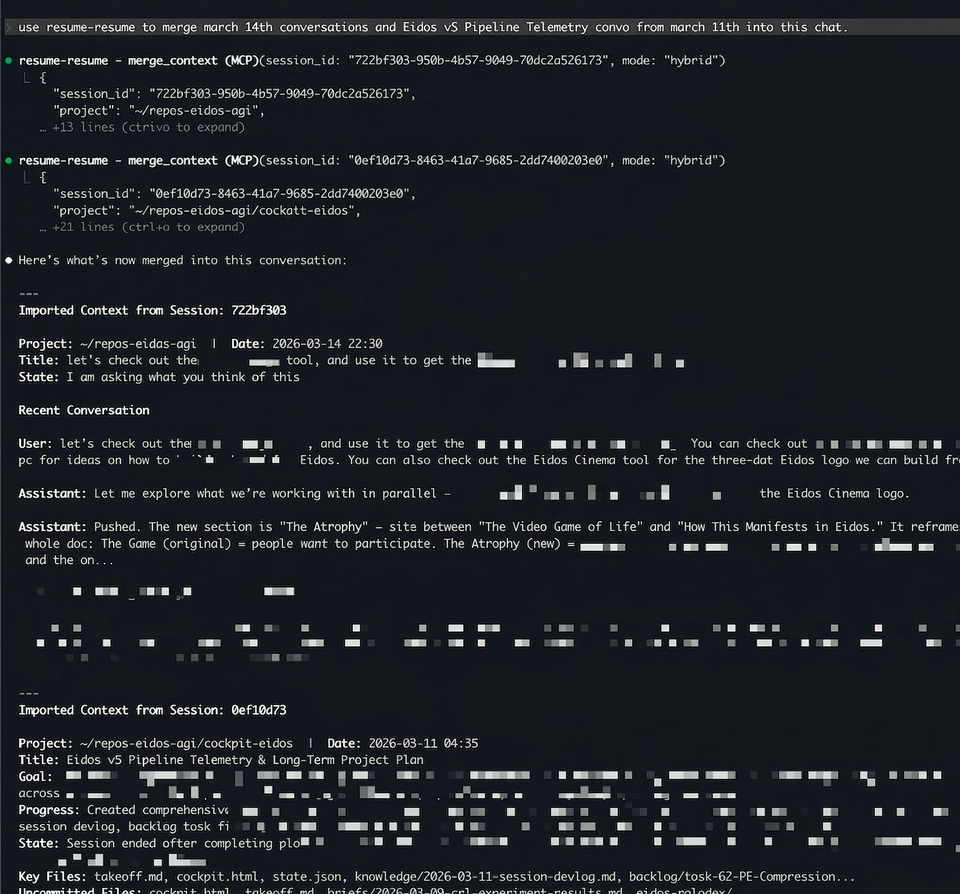
Two sessions — one about eidos-philosophy doc changes (Mar 14) and one with a full 28-task strategic plan (Mar 11) — merged into the current conversation with a single command.
MCP Tools
| Tool | What it does |
|---|---|
boot_up(hours) |
Crash recovery — finds interrupted sessions + scans all repos for dirty git state. Scores by urgency (session recency + dirty file count + dirty file recency). Includes ready-to-paste resume_cmd for each result. |
dirty_repos() |
Standing inventory of every repo with uncommitted changes. No time window — only shrinks by committing. Sorted by urgency score. |
search_sessions(query) |
Full-text search across 5,000+ sessions in ~3s, ranked by BM25 |
recent_sessions(hours) |
List recently active sessions |
read_session(id, keyword) |
Read actual messages from a session, with optional keyword filter |
session_summary(id) |
AI summary — cached instantly, generated in ~15s if not |
merge_context(id, mode) |
Import context from another session (summary, messages, or hybrid) |
session_timeline(id) |
Structured milestone timeline — file edits, commits, instructions |
session_thread(id) |
Follow continuation links across a multi-session thread |
resume_in_terminal(id) |
Open a session in a new terminal window (iTerm2 or Terminal.app) |
session_insights(section) |
Deep analytics across all sessions — patterns, personality, predictions |
session_xray(id) |
Single-session breakdown — duration, tokens, tool counts, branches |
Quick Resume — Paste & Go
claude --resume <id> fails if you're in the wrong directory. cr fixes that — paste any claude command and it auto-discovers the correct project directory, ensures the right flags are on, and launches.
cr claude --resume ddf7fc98-6c93-40c8-9444-503d8a716dbf
cr claude --resume ddf7fc98-6c93-40c8-9444-503d8a716dbf --model opus --chrome
cr ddf7fc98-6c93-40c8-9444-503d8a716dbf
What it does:
- Parses the session ID out of whatever you pasted
- Searches
~/.claude/projects/*/to find which project owns that session - Resolves the encoded directory name back to a real filesystem path
- Adds
--dangerously-skip-permissionsand--enable-auto-modeif not already present - Pops a macOS dialog showing the session, resolved cwd, and full command (proof it worked — visible outside the TUI)
cds to the correct directory andexecs into Claude
No more "No conversation found" errors from being in the wrong folder.
TUI
For when your machine died and you just need to get back to work.
pip install resume-resume
resume-resume        # last 4 hours
cr 24                # last 24 hours
cr --all             # everything
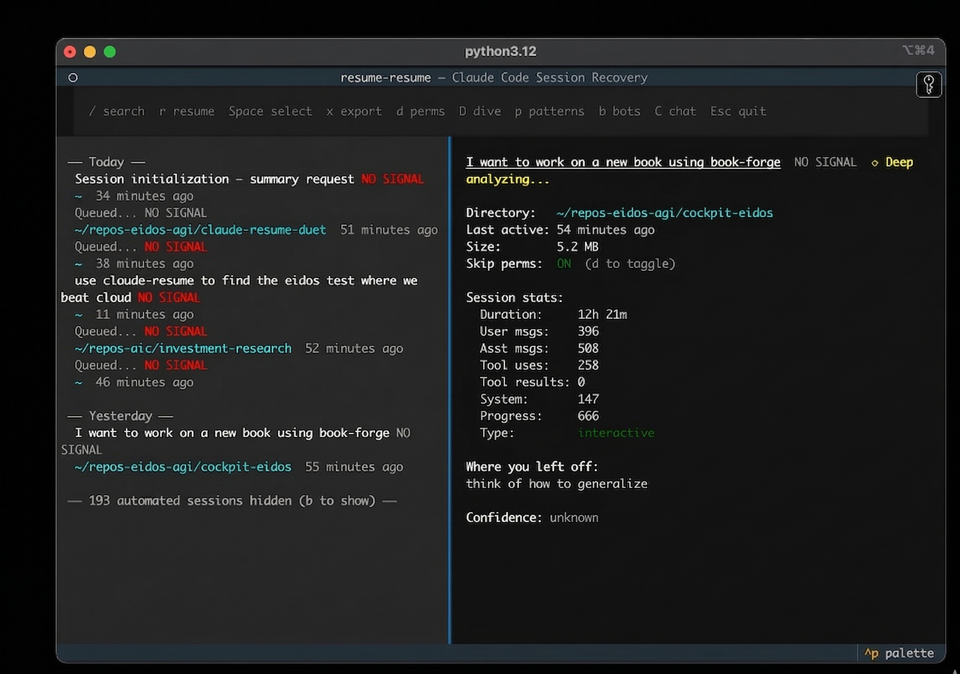
| Key | Action |
|---|---|
↑ ↓ |
Navigate sessions |
r |
Resume directly — exec into the session |
Enter |
Copy resume command to clipboard |
Space |
Select for multi-resume (opens all in iTerm tabs) |
x |
Export context briefing as markdown |
/ |
Search across all session content |
D |
Deep dive summary |
p |
Analyze prompting patterns |
b |
Toggle automated/bot sessions |
Requires Python 3.11+ and Claude Code.
How It Works
- Scans
~/.claude/projects/for JSONL session files - Scans all project directories for dirty git state (parallel
git status --porcelain) - Scores sessions by urgency: session recency (2h half-life) + repo dirty urgency (file count + dirty file recency)
- Dirty repos bypass age filters — uncommitted work doesn't age out
- Summarizes via
claude -pwith Haiku, cached permanently after first run - Classifies sessions as human or automated using a gradient boosting model trained on 3,800 sessions — bot sessions hidden by default
- Surfaces bookmark data (lifecycle badges, next actions, blockers) when present
- Reports negative space — how many repos were scanned, how many were clean vs dirty
Run /bookmark inside any Claude Code session to capture lifecycle state (done, paused, blocked, handoff) before closing. An auto-bookmark Stop hook captures minimal state when you don't.
Related
- claude-session-commons — Shared session parsing, caching, and classification used by this repo and others
- resume-resume-duet — Web UI companion with session browser and
resume-resume://URL scheme handler
License
MIT
1 maintainer

Metadata
1 maintainer
Release files for resume-resume 0.5.5
For a detailed explanation of source distributions (sdists) and built distributions (wheels), please see the package formats documentation.
Source distribution (sdist)
| File | Size | Uploaded | Provenance | |
|---|---|---|---|---|
| resume_resume-0.5.5.tar.gz | 160.9 kB | With provenance | Details |
Built distribution (wheel)
| File | Interpreter | ABI | Platform | Reset |
|---|---|---|---|---|
| resume_resume-0.5.5-py3-none-any.whl | Python 3 | none | any | Details |
Total release size: 311.1 kB
Release files / resume_resume-0.5.5.tar.gz
| Download URL | resume_resume-0.5.5.tar.gz |
|---|---|
| Size | 160.9 kB |
| Tags | Source |
|
SHA-256 checksum How to use checksums |
b0372edf6afcbf38150fc5e3d0c198f8421a975c9a8add0d3be40f709700cacd
|
|
BLAKE2b-256 checksum How to use checksums |
379613229bf5816e63f58b10af2cf8e6d6e2c65855f9251a3bfd415d4a753b23
|
| Upload date | |
|
Uploaded using Trusted Publishing? What is trusted publishing? |
Yes |
| Uploaded via |
twine/6.1.0 CPython/3.13.12
|
Provenance
Provenance describes where a file came from. On PyPI, provenance is shared via attestations, which provide a verifiable record of the build or publishing details. View details, limitations and caveats.


PyPI Publish Attestation
PyPI verified that this artifact, at this checksum, originated from the publisher listed below.
Signed by GitHub Actions, verified by PyPI on Apr 17, 2026.
Transparency logRelease files / resume_resume-0.5.5-py3-none-any.whl
| Download URL | resume_resume-0.5.5-py3-none-any.whl |
|---|---|
| Size | 150.2 kB |
| Tags | Python 3 |
|
SHA-256 checksum How to use checksums |
65fee188c41a65a44fdc94dc1ae10e23e060c30c53e7f25e1f1f99d8c89d69d2
|
|
BLAKE2b-256 checksum How to use checksums |
ea88aad7ee25ed22ef53b7fce73be2ad7ee402ced8848f8530d3c7e151362ede
|
| Upload date | |
|
Uploaded using Trusted Publishing? What is trusted publishing? |
Yes |
| Uploaded via |
twine/6.1.0 CPython/3.13.12
|
Provenance
Provenance describes where a file came from. On PyPI, provenance is shared via attestations, which provide a verifiable record of the build or publishing details. View details, limitations and caveats.
PyPI Publish Attestation
PyPI verified that this artifact, at this checksum, originated from the publisher listed below.
Signed by GitHub Actions, verified by PyPI on Apr 17, 2026.
Transparency logSecurity for resume-resume 0.5.5
Provenance
Provenance describes where a file came from. On PyPI, provenance is shared via attestations, which provide a verifiable record of the build or publishing details. View details, limitations and caveats.
Full provenance
All 2 files in this release have been uploaded with provenance metadata.
Attestation for resume_resume-0.5.5.tar.gz
PyPI Publish Attestation
PyPI verified that this artifact, at this checksum, originated from the publisher listed below.
Signed by GitHub Actions, verified by PyPI on Apr 17, 2026.
Transparency logA note on package security
PyPI is a repository for distributing packages, not a service for auditing them. While third-party security researchers and our staff do their best to detect and remove malicious packages, PyPI cannot guarantee the quality, security or suitability of any given package.
To learn more about protecting yourself from malicious actors, visit our package security documentation.














