
Post-crash Claude Code session recovery TUI

Project description

resume-resume
New free tool we're dropping.
| Resume | Ask resume-resume to find old programming sessions in plain English, and pick up where you left off. |
| Prioritize | resume-resume auto-ranks your past chats based on recency and incomplete worktrees, so you don't leave important work unfinished or uncommitted. |
| Speed | resume-resume uses parallelized search to look through gigabytes of past chats in seconds. |
| Cost Savings | resume-resume uses Haiku (smallest Claude model) to summarize past context once, then caches it permanently — so after the first run, searching thousands of sessions costs nothing. |
| Merge | Ask resume-resume to merge multiple old chats together, pulling your thoughts across sessions into a single conversation. |
MCP Server
Add it to Claude Code and every session on your machine can search, read, and merge your full session history — in plain English.
pip install resume-resume
claude mcp add resume-resume -- resume-resume-mcp
Or manually in your MCP config:
{
  "mcpServers": {
    "resume-resume": {
      "command": "resume-resume-mcp"
    }
  }
}
We built Eidos, a multi-agent AI system. In our benchmark, Eidos outperformed Claude Opus 4.6 by 3.6x in both accuracy and speed on complex tasks with 15+ reasoning chains. Below, we use Claude Resume to pick up where we left off across multiple sessions.
Finding the benchmark where Eidos beat Claude Opus 4.6
"use resume-resume to find the eidos test where we beat claude"
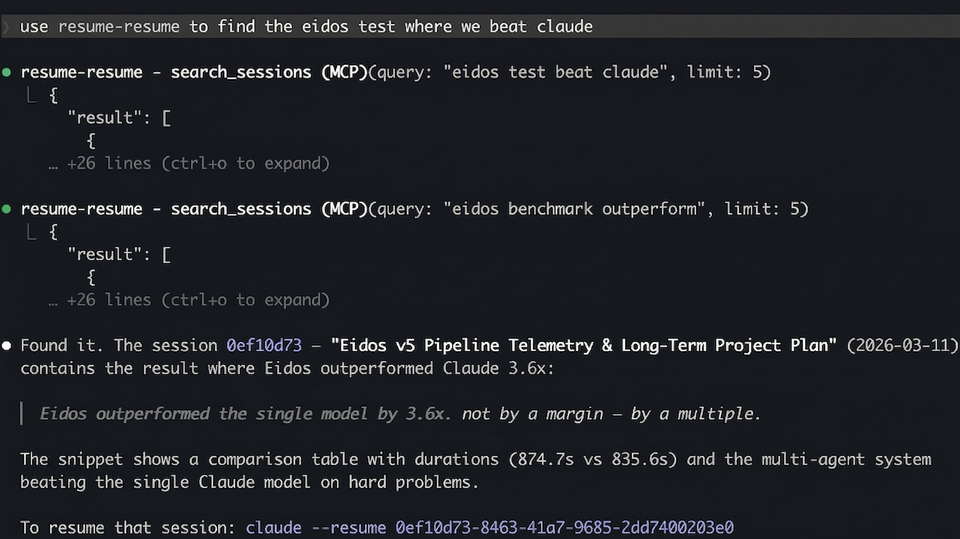
Searching for a past session in plain English
"use resume-resume to find the latest chats about eidos philosophy docs"
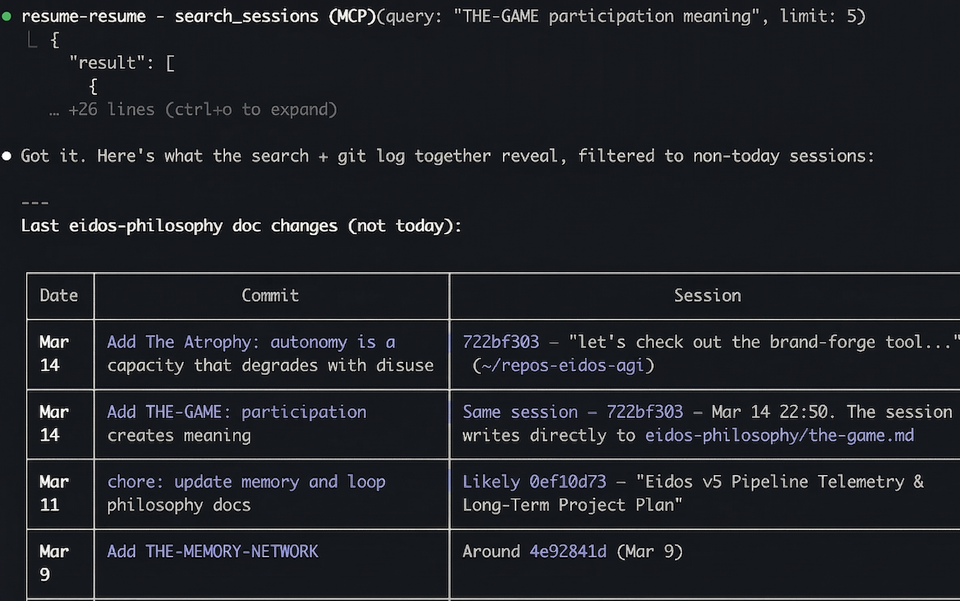
Merging multiple past sessions into this chat
"use claude resume to merge march 14th conversations and Eidos v5 Pipeline Telemetry convo from march 11th into this chat"
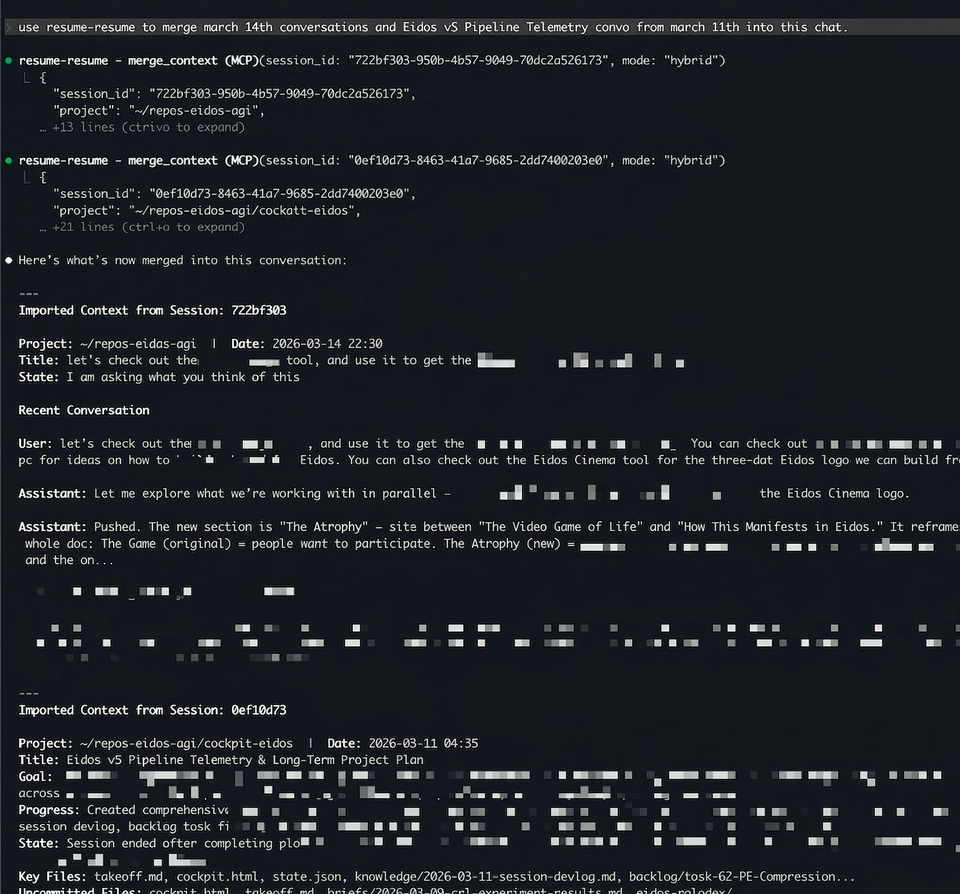
Two sessions — one about eidos-philosophy doc changes (Mar 14) and one with a full 28-task strategic plan (Mar 11) — merged into the current conversation with a single command.
MCP Tools
| Tool | What it does |
|---|---|
boot_up(hours) |
Crash recovery — finds sessions that didn't exit cleanly, scored by urgency |
search_sessions(query) |
Full-text search across 5,000+ sessions in ~3s, ranked by RRF |
recent_sessions(hours) |
List recently active sessions |
read_session(id, keyword) |
Read actual messages from a session, with optional keyword filter |
session_summary(id) |
AI summary — cached instantly, generated in ~15s if not |
merge_context(id, mode) |
Import context from another session (summary, messages, or hybrid) |
session_timeline(id) |
Structured milestone timeline — file edits, commits, instructions |
session_thread(id) |
Follow continuation links across a multi-session thread |
resume_in_terminal(id) |
Open a session in a new terminal window (iTerm2 or Terminal.app) |
session_insights(section) |
Deep analytics across all sessions — patterns, personality, predictions |
session_xray(id) |
Single-session breakdown — duration, tokens, tool counts, branches |
TUI
For when your machine died and you just need to get back to work.
pip install resume-resume
resume-resume        # last 4 hours
cr 24                # last 24 hours
cr --all             # everything
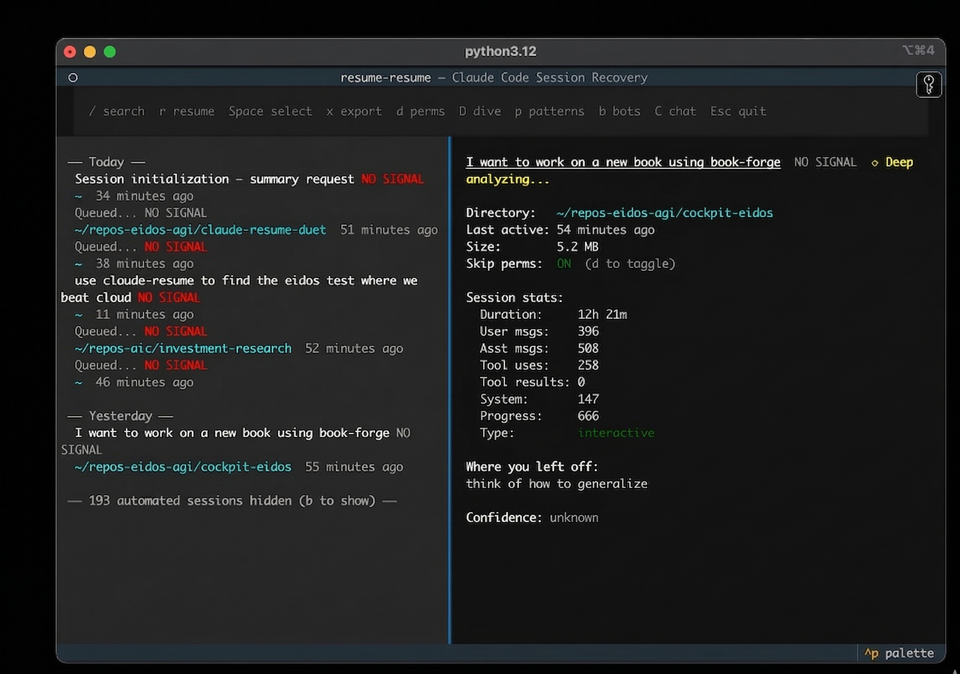
| Key | Action |
|---|---|
↑ ↓ |
Navigate sessions |
r |
Resume directly — exec into the session |
Enter |
Copy resume command to clipboard |
Space |
Select for multi-resume (opens all in iTerm tabs) |
x |
Export context briefing as markdown |
/ |
Search across all session content |
D |
Deep dive summary |
p |
Analyze prompting patterns |
b |
Toggle automated/bot sessions |
Requires Python 3.11+ and Claude Code.
How It Works
- Scans
~/.claude/projects/for JSONL session files - Scores each by interruption severity — crashed mid-tool-use sessions first, lifecycle-aware for bookmarked ones
- Summarizes via
claude -pwith Haiku, cached permanently after first run - Classifies sessions as human or automated using a gradient boosting model trained on 3,800 sessions — bot sessions hidden by default
- Surfaces bookmark data (lifecycle badges, next actions, blockers) when present
Run /bookmark inside any Claude Code session to capture lifecycle state (done, paused, blocked, handoff) before closing. An auto-bookmark Stop hook captures minimal state when you don't.
Related
- claude-session-commons — Shared session parsing, caching, and classification used by this repo and others
- resume-resume-duet — Web UI companion with session browser and
resume-resume://URL scheme handler
License
MIT
Release history Release notifications | RSS feed


Download files
Download the file for your platform. If you're not sure which to choose, learn more about installing packages.
Source Distribution
Built Distribution
Filter files by name, interpreter, ABI, and platform.
If you're not sure about the file name format, learn more about wheel file names.
Copy a direct link to the current filters
File details
Details for the file resume_resume-0.1.8.tar.gz.
File metadata
- Download URL: resume_resume-0.1.8.tar.gz
- Upload date:
- Size: 107.5 kB
- Tags: Source
- Uploaded using Trusted Publishing? No
- Uploaded via: twine/6.2.0 CPython/3.12.7
File hashes
| Algorithm | Hash digest | |
|---|---|---|
| SHA256 |
9189ef7f3f67a35e8e287b73159ca55d4b733c5e4189e01b993dd0185bb83de2
|
|
| MD5 |
e0c2f606b376f1a8476138c4b2641805
|
|
| BLAKE2b-256 |
a6ac41dd93b9b2e720904fcb850072652658376b7275f85d419ef1760e94b28a
|
File details
Details for the file resume_resume-0.1.8-py3-none-any.whl.
File metadata
- Download URL: resume_resume-0.1.8-py3-none-any.whl
- Upload date:
- Size: 107.4 kB
- Tags: Python 3
- Uploaded using Trusted Publishing? No
- Uploaded via: twine/6.2.0 CPython/3.12.7
File hashes
| Algorithm | Hash digest | |
|---|---|---|
| SHA256 |
70be8f2c3250109112dacfcf754e8cc92eb6efd416895805dc37c8f8cfec254f
|
|
| MD5 |
faea0aa5c3565262c7e19ee625322fa3
|
|
| BLAKE2b-256 |
e84fba2cfb292246c08f748a28bd0254ad691cf95aa421017306b1c4c4f6b21d
|






