
🤖 About
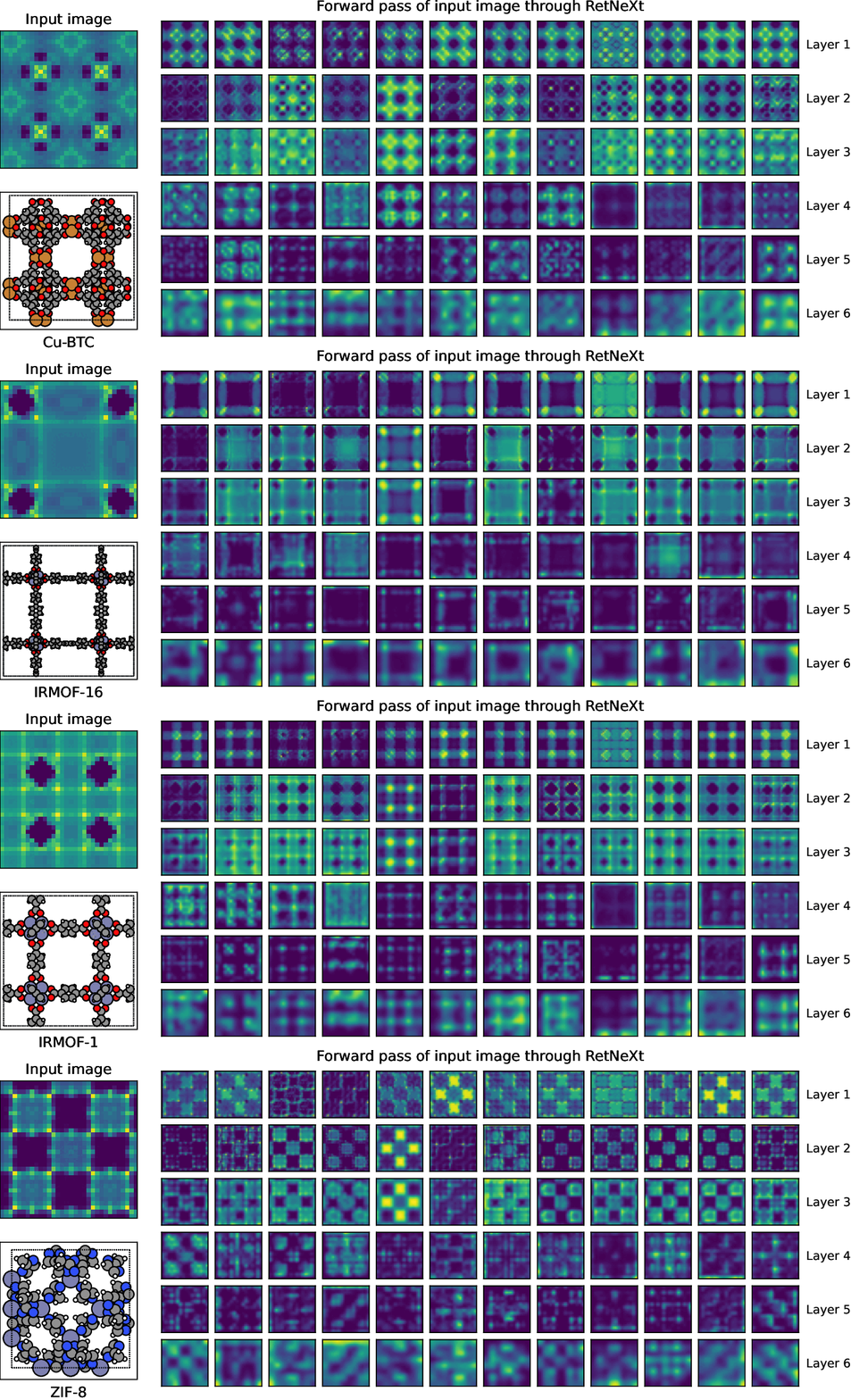
RetNeXt is a pretrained model for transfer learning across the MOF adsorption space. This package provides:
-
The model architecture, a 3D convolutional neural network for voxel-based material representations.
-
Pretrained model via multi-task learning, enabling effective feature extraction and transfer learning.
-
Built-in transformations for preprocessing and data augmentation of 3D energy images.
The pretrained model can be used as a feature extractor or fine-tuned for adsorption property prediction.
🚀 Tutorial
Before starting, the following packages must be installed:
pip install retnext          # Model and 3D transformations
pip install torchvision      # For data augmentation
pip install pymoxel>=0.5.0   # For image generation
pip install aidsorb>=2.0.0   # For model training
[!NOTE] All examples below assume the use of the pretrained model. Therefore, the image generation and preprocessing parameters must be configured accordingly.
🎨 Generate the energy images
You can generate the energy images from the CLI as following:
moxel path/to/CIFs path/to/voxels_data/ --grid_size=32 --cubic_box=30
Alternatively, for more fine-grained control over the materials to be processed:
from moxel.utils import voxels_from_files

cifs = ['foo.cif', 'bar.cif', ...]
voxels_from_files(cifs, 'path/to/voxels_data/', grid_size=32, cubic_box=30)
❄️ Use RetNeXt as feature extractor
Energy images are passed through the pretrained model to extract 128-D features, which are then stored in a .csv file.
Show example
from types import NoneType
import os

import numpy as np
import pandas as pd
from tqdm import tqdm
import torch
from torch.utils.data import DataLoader
from torch.utils.data._utils.collate import default_collate_fn_map
from torchvision.transforms.v2 import Compose
from retnext.modules import RetNeXt
from retnext.transforms import AddChannelDim, BoltzmannFactor
from aidsorb.data import PCDDataset as VoxelsDataset


# Required for collating unlabeled samples
def collate_none(batch, *, collate_fn_map):
    return None


# Get the names of the materials
names = [f.removesuffix('.npy') for f in os.listdir('path/to/voxels_data/')]

# Preprocessing transformations
transform_x = Compose([AddChannelDim(), BoltzmannFactor()])

# Create the dataset
dataset = VoxelsDataset(names, path_to_X='path/to/voxels_data/', transform_x=transform_x)

# Create the dataloader (adjust batch_size and num_workers)
dataloader = DataLoader(dataset, shuffle=False, drop_last=False, batch_size=256, num_workers=8)
default_collate_fn_map.update({NoneType: collate_none})

# Load pretrained weights
device = torch.device('cuda' if torch.cuda.is_available() else 'cpu')
model = RetNeXt(pretrained=True).to(device)

# Freeze the model
model.requires_grad_(False)
model.eval()
model.fc = torch.nn.Identity()  # So .forward() returns the embeddings.

# Extract features
Z = torch.cat([
    model(x.to(device))
    for x, _ in tqdm(dataloader, desc='Generating embeddings')
])

# Store features in .csv file
df = pd.DataFrame(Z.cpu().numpy(), index=names)
df.to_csv(f'embeddings.csv', index=True, index_label='name')
[!TIP] You can use these features alone or combine them with others features (e.g. structural descriptors) to train classical machine learning algorithms (e.g. Random Forest or XGBoost) for adsorption property prediction.
🔥 Fine-tune RetNeXt
-
Split the data into train, validation and test:
aidsorb prepare path/to/voxels_data/ --split_ratio='[0.7, 0.15, 0.15]' --seed=42
-
Freeze part of the model and train it:
Show example
import torch
from lightning.pytorch import Trainer, seed_everything
from torchmetrics import R2Score, MeanAbsoluteError, MetricCollection
from aidsorb.datamodules import PCDDataModule as VoxelsDataModule
from aidsorb.litmodules import PCDLit as VoxelsLit
from torchvision.transforms.v2 import Compose, RandomChoice
from retnext.modules import RetNeXt
from retnext.transforms import AddChannelDim, BoltzmannFactor, RandomRotate90, RandomReflect, RandomFlip

# For reproducibility
seed_everything(42, workers=True)

# Load pretrained weights and set the number of outputs
model = RetNeXt(n_outputs=1, pretrained=True)

# Option 1
# Linear evaluation (freeze the backbone and train only the output layer)
#model.backbone.requires_grad_(False)
#model.backbone.eval()

# Option 2
# Fine-tune the last two conv and output layers
model.backbone[:7].requires_grad_(False)
model.backbone[:7].eval()

# Option 3
# Fine-tune all layers (just freeze the first BN which acts as standardizer)
#model.backbone[0].requires_grad_(False)
#model.backbone[0].eval()

# Preprocessing and data augmentation transformations
eval_transform_x = Compose([AddChannelDim(), BoltzmannFactor()])
train_transform_x = Compose([
    AddChannelDim(), BoltzmannFactor(),
    RandomChoice([
        torch.nn.Identity(),
        RandomRotate90(),
        RandomFlip(),
        RandomReflect()
        ])
    ])

# Create the datamodule
datamodule = VoxelsDataModule(
    path_to_X='path/to/voxels_data/',
	path_to_Y='path/to/labels.csv',
    index_col='id',
	labels=['adsorption_property'],
    train_batch_size=32, eval_batch_size=256,
    train_transform_x=train_transform_x,
    eval_transform_x=eval_transform_x,
    shuffle=True, drop_last=True,
    config_dataloaders=dict(num_workers=8),
)
datamodule.setup()

# Configure loss, metrics and optimizer
criterion = torch.nn.MSELoss()
metric = MetricCollection(R2Score(), MeanAbsoluteError())
config_optimizer = dict(name='Adam', hparams=dict(lr=1e-3))  # Adjust the learning rate

# Create the litmodel
litmodel = VoxelsLit(model, criterion, metric=metric, config_optimizer=config_optimizer)

# Create the trainer
trainer = Trainer(max_epochs=5)

# Initialize last bias with target mean (optional but recommended)
train_names = list(datamodule.train_dataset.pcd_names)
y_train_mean = datamodule.train_dataset.Y.loc[train_names].mean().item()
torch.nn.init.constant_(litmodel.model.fc.bias, y_train_mean)

# Train and test the model
trainer.fit(litmodel, datamodule=datamodule)
trainer.test(litmodel, datamodule=datamodule)
Show RetNeXt architecture
RetNeXt(
  (backbone): Sequential(
    (0): BatchNorm3d(1, eps=1e-05, momentum=None, affine=False, track_running_stats=True)
    (1): Sequential(
      (0): Conv3d(1, 32, kernel_size=(3, 3, 3), stride=(1, 1, 1), padding=same, bias=False)
      (1): BatchNorm3d(32, eps=1e-05, momentum=0.1, affine=True, track_running_stats=True)
      (2): ReLU()
    )
    (2): Sequential(
      (0): Conv3d(32, 32, kernel_size=(3, 3, 3), stride=(1, 1, 1), padding=same, bias=False)
      (1): BatchNorm3d(32, eps=1e-05, momentum=0.1, affine=True, track_running_stats=True)
      (2): ReLU()
    )
    (3): MaxPool3d(kernel_size=2, stride=2, padding=0, dilation=1, ceil_mode=False)
    (4): Sequential(
      (0): Conv3d(32, 64, kernel_size=(3, 3, 3), stride=(1, 1, 1), padding=same, bias=False)
      (1): BatchNorm3d(64, eps=1e-05, momentum=0.1, affine=True, track_running_stats=True)
      (2): ReLU()
    )
    (5): Sequential(
      (0): Conv3d(64, 64, kernel_size=(3, 3, 3), stride=(1, 1, 1), padding=same, bias=False)
      (1): BatchNorm3d(64, eps=1e-05, momentum=0.1, affine=True, track_running_stats=True)
      (2): ReLU()
    )
    (6): MaxPool3d(kernel_size=2, stride=2, padding=0, dilation=1, ceil_mode=False)
    (7): Sequential(
      (0): Conv3d(64, 128, kernel_size=(3, 3, 3), stride=(1, 1, 1), bias=False)
      (1): BatchNorm3d(128, eps=1e-05, momentum=0.1, affine=True, track_running_stats=True)
      (2): ReLU()
    )
    (8): Sequential(
      (0): Conv3d(128, 128, kernel_size=(3, 3, 3), stride=(1, 1, 1), bias=False)
      (1): BatchNorm3d(128, eps=1e-05, momentum=0.1, affine=True, track_running_stats=True)
      (2): ReLU()
    )
    (9): AdaptiveAvgPool3d(output_size=1)
    (10): Flatten(start_dim=1, end_dim=-1)
  )
  (fc): Linear(in_features=128, out_features=1, bias=True)
)
Show example
labels.csvid,adsorption_property sample_001,0.123 sample_002,0.456 sample_003,0.789 sample_004,1.234 sample_005,0.987
[!NOTE] The example above shows how to fine-tune the pretrained model for a regression task. For classification, you only need to adjust the final layer (e.g.
model = RetNeXt(n_outputs=10, pretrained=True)for a 10-class classification task), and use the proper loss and metrics.
For more details and customization options, refer to the AIdsorb documentation.
📑 Citing
If you use RetNeXt in your research, please consider citing the following work:
@article{Sarikas2026,
  title = {RetNeXt: A Pretrained Model for Transfer Learning Across the MOF Adsorption Space},
  ISSN = {1549-960X},
  url = {http://dx.doi.org/10.1021/acs.jcim.5c02698},
  DOI = {10.1021/acs.jcim.5c02698},
  journal = {Journal of Chemical Information and Modeling},
  publisher = {American Chemical Society (ACS)},
  author = {Sarikas,  Antonios P. and Gkagkas,  Konstantinos and Froudakis,  George E.},
  year = {2026},
  month = feb
}
⚖️ License
RetNeXt is released under the GNU General Public License v3.0 only.
1 maintainer

Metadata
1 maintainer
Release files for retnext 1.0.0.post1
For a detailed explanation of source distributions (sdists) and built distributions (wheels), please see the package formats documentation.
Source distribution (sdist)
| File | Size | Uploaded | |
|---|---|---|---|
| retnext-1.0.0.post1.tar.gz | 2.1 MB | Details |
Built distribution (wheel)
| File | Interpreter | ABI | Platform | Reset |
|---|---|---|---|---|
| retnext-1.0.0.post1-py3-none-any.whl | Python 3 | none | any | Details |
Total release size: 2.1 MB
Release files / retnext-1.0.0.post1.tar.gz
| Download URL | retnext-1.0.0.post1.tar.gz |
|---|---|
| Size | 2.1 MB |
| Tags | Source |
|
SHA-256 checksum How to use checksums |
a25cabeb7167dab9235d07370302ef41165f0a2f9fdaedad15fd7a1b71dcc328
|
|
BLAKE2b-256 checksum How to use checksums |
9a629f15380a93a98e078801d82fea321909b518f10af90dada6f160601cf791
|
| Upload date | |
|
Uploaded using Trusted Publishing? What is trusted publishing? |
Yes |
| Uploaded via |
twine/6.1.0 CPython/3.13.12
|
Provenance
Provenance describes where a file came from. On PyPI, provenance is shared via attestations, which provide a verifiable record of the build or publishing details. View details, limitations and caveats.


PyPI Publish Attestation
PyPI verified that this artifact, at this checksum, originated from the publisher listed below.
Signed by GitHub Actions, verified by PyPI on May 22, 2026.
Transparency logRelease files / retnext-1.0.0.post1-py3-none-any.whl
| Download URL | retnext-1.0.0.post1-py3-none-any.whl |
|---|---|
| Size | 19.6 kB |
| Tags | Python 3 |
|
SHA-256 checksum How to use checksums |
53f6041e371b923e7ef97888205bcd2cc9a5029dbb4f477256cbbea16fa9858a
|
|
BLAKE2b-256 checksum How to use checksums |
15142adf3ddf3a4487e120c74df69eb5a77f0ffd486e2cfec3db5b0eab661c38
|
| Upload date | |
|
Uploaded using Trusted Publishing? What is trusted publishing? |
Yes |
| Uploaded via |
twine/6.1.0 CPython/3.13.12
|
Provenance
Provenance describes where a file came from. On PyPI, provenance is shared via attestations, which provide a verifiable record of the build or publishing details. View details, limitations and caveats.
PyPI Publish Attestation
PyPI verified that this artifact, at this checksum, originated from the publisher listed below.
Signed by GitHub Actions, verified by PyPI on May 22, 2026.
Transparency log













