
reveriee
Turn your idea into a published Python package. Create the project files with one command, then check everything before you upload.


Publishing your first Python package means getting a lot of small files and settings right. One wrong detail, like a version that already exists or a README full of stray symbols, only shows up after you upload, and a published version can never be changed. reverie sets up the boring parts correctly and warns you about the common mistakes first.
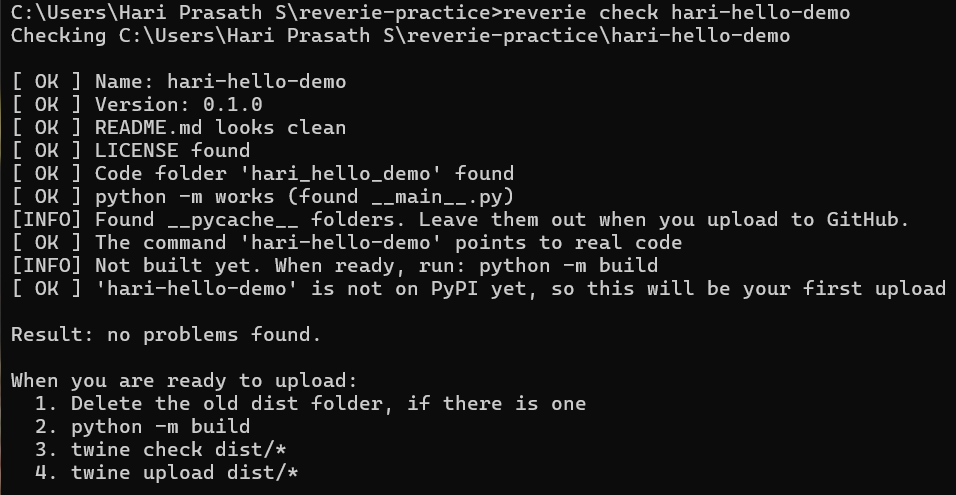
See it in action
Install
pip install reveriee
The package on PyPI is called reveriee, but the command you run is still reverie.
Create a new package
reverie new my-tool
reverie checks that the name is free on PyPI, asks for a one-line description and your name, and creates a ready-to-install project:
my-tool/
  pyproject.toml
  README.md
  LICENSE
  .gitignore
  my_tool/
    __init__.py
    __main__.py
    cli.py
The new project already installs and runs and prints a hello message. Open cli.py and replace the hello message with your own idea.
Let an AI write your package (new in 0.5.0)
reverie write
Describe your idea, and an AI model writes the whole package for you. It works with Claude, OpenAI, Gemini and Groq. You use your own key from the company, so the tokens come out of your own account. reverie itself is free.
How it works:
- Pick your company and paste your key. Nothing shows on screen while you paste, and the key is never saved. reverie checks the key right away and tells you if it is valid.
- reverie asks the company which models your key can use, and you pick one from the list.
- Answer a few questions: what the package is for, its name, a one-line description, your name, and anything specific you want.
- reverie asks the model for a plan, and shows you the list of files. You type
yesto continue, or stop there. - reverie creates the project folder with the same safe files as
reverie new, then the model writes the code one file at a time. After each file, reverie checks it. If the file has a typing mistake, an import that does not exist, or a mismatch with the other files, the model is asked to fix it. - At the end, reverie runs
reverie checkand tells you what to do next.
By default the package uses only standard Python, so there is nothing extra to install. You can allow other pip packages when it asks.
Important: the code is written by an AI. reverie checks that it can be read and that the files fit together, but it never runs it. Read the code, try it yourself, and watch for any lines reverie warns you about, such as code that deletes files.
How many tokens did that use?
reverie usage
reverie counts the tokens each package used and keeps the numbers on your own computer. reverie usage shows today's total, the last 7 days, and the latest packages. Look up your company's price for tokens to work out your spending. Prices change, so reverie does not guess them.
Options for reverie write: --provider claude|openai|gemini|groq, --model NAME, and --offline to skip the PyPI name check. To skip the key question, set the REVERIE_AI_KEY environment variable.
Check before you upload
Inside your project folder, run:
reverie check
or point it at a folder:
reverie check my-tool
It looks for the mistakes that most often hurt first-time publishers:
| It looks for | Why it matters |
|---|---|
| A version that is already on PyPI | A version can never be uploaded twice |
| Old files left in the dist folder | The upload would send them too |
| Stray backslashes, or leftover web page codes, in the README | Your PyPI page would look broken |
| Images in the README that PyPI cannot see | They would show as broken pictures |
| A missing LICENSE file | The build fails, or people will not use your package |
| A missing code folder or init.py | Your code would not be in the package |
| A command that points to code that does not exist | The command would fail after install |
| A missing main.py | python -m your_tool would not work |
| Version numbers that do not match | Easy to forget when you raise the version |
Every problem comes with a plain-language fix. Add --offline to skip the PyPI lookup.
Deep check (new in 0.2.0)
Because a published version can never be changed, run the thorough check right before you upload:
pip install build twine
reverie deepcheck
It does everything reverie check does, and then goes much further:
| It does | Why it matters |
|---|---|
| Reads every Python file | A typing mistake would break your package |
| Looks for passwords, keys and tokens in your files | A leaked key can be used by anyone |
| Looks for leftover starter text | So you do not publish "Hello from..." |
| Builds your package from a clean copy | Finds build problems before PyPI does |
| Runs twine check | Makes sure your PyPI page will work |
| Looks inside the built files | Makes sure your code and LICENSE are really included |
| Installs it in a brand-new empty environment | Proves it works for other people, not only on your laptop |
If everything is fine it says so. If not, it says exactly what is wrong and how to fix it. reverie never runs your program itself, it only checks that it can be loaded.
Options: --offline skips the PyPI lookup, --no-install skips the clean install test, --force runs the build tests even when the basic checks found problems.
Publish (new in 0.3.0)
You need a free PyPI account and an API token. Then, inside your project folder:
pip install build twine
reverie publish
reverie does the whole job for you, in three steps:
- Runs the deep check. If anything is wrong, it stops and nothing is uploaded.
- Builds fresh files in a temporary place, so old files can never be sent by accident.
- Asks you to type the version number to confirm, asks for your token, and uploads.
Your token is typed with nothing showing on screen, is never saved, and is never printed.
Options: --test uploads to TestPyPI, a practice website (it needs its own account and token), and --dry-run does everything except the upload.
If the upload fails, reverie explains the reason in plain language, for example a wrong token or a version that already exists.
You can still publish by hand if you prefer:
python -m build
twine check dist/*
twine upload dist/*
Delete any old dist folder before you build.
Upload to GitHub (new in 0.4.0)
reverie github
reverie uploads your project files straight to your GitHub account. You do not need git or any other tool, only a Personal Access Token.
Make a token once: on GitHub click your picture, then Settings, Developer settings, Personal access tokens, Tokens (classic), Generate new token (classic). Give it a name, tick the box called repo, create it, and copy it.
What reverie does:
- Looks through your files for passwords, keys and tokens. If it finds one, it stops.
- Asks for your token. Nothing shows on screen while you paste, and the token is never saved or printed.
- Finds your repository, and offers to create it if it does not exist yet.
- Asks you to type the repository name to confirm, then uploads the files. Files that did not change are skipped, so running it again only sends what you changed.
- Offers to make a release for your version, like
v0.4.0.
It leaves out files that should never go on GitHub: dist, build, __pycache__, .egg-info, .env, desktop.ini and similar.
The repository is taken from the GitHub address in your pyproject.toml. To choose another one, use --repo your-name/my-tool.
Options: --dry-run shows what would be uploaded without uploading, --private makes a new repository private, --message "text" sets the note GitHub shows next to the files, and --repo picks the repository.
Each uploaded file shows on GitHub as its own small change. That is normal for this method.
Windows sometimes creates a hidden file called desktop.ini inside a folder. It is harmless. If one ever ends up in your repository, you can remove it on GitHub: open the file, click the three dots, and choose Delete file.
Command not recognised?
On some Windows computers the reverie command is not found right after installing, because Windows does not know where pip put it. Start it through Python instead:
python -m reverie check
If pip says "defaulting to user installation" or "not writeable" while installing, that is normal and harmless.
Good to know
- reverie does not write your program for you. It sets up the packaging, and the idea is yours.
- It does not upload anything. You do that yourself with twine, after the check.
- Package names use lowercase letters, numbers and hyphens, like
my-tool. - The name check and the version check need an internet connection.
License
MIT
1 maintainer

Metadata
1 maintainer
Release files for reveriee 0.5.0
For a detailed explanation of source distributions (sdists) and built distributions (wheels), please see the package formats documentation.
Source distribution (sdist)
| File | Size | Uploaded | |
|---|---|---|---|
| reveriee-0.5.0.tar.gz | 35.8 kB | Details |
Built distribution (wheel)
| File | Interpreter | ABI | Platform | Reset |
|---|---|---|---|---|
| reveriee-0.5.0-py3-none-any.whl | Python 3 | none | any | Details |
Total release size: 73.7 kB
Release files / reveriee-0.5.0.tar.gz
| Download URL | reveriee-0.5.0.tar.gz |
|---|---|
| Size | 35.8 kB |
| Tags | Source |
|
SHA-256 checksum How to use checksums |
420633e7be08e3d2397ffa915b43cfeb18823089868b31e699d69c4089428268
|
|
BLAKE2b-256 checksum How to use checksums |
0ef185d8f11735a68d518db83fdcf50dbada17bd74252d3137db13cb8e62d5aa
|
| Upload date | |
|
Uploaded using Trusted Publishing? What is trusted publishing? |
No |
| Uploaded via |
twine/7.0.0 CPython/3.14.6
|
Release files / reveriee-0.5.0-py3-none-any.whl
| Download URL | reveriee-0.5.0-py3-none-any.whl |
|---|---|
| Size | 37.9 kB |
| Tags | Python 3 |
|
SHA-256 checksum How to use checksums |
05cd856ec1c60489904a6778131d71cb11b00ce484e7f35c7cf72b34c7663f6c
|
|
BLAKE2b-256 checksum How to use checksums |
ae4d9b135e9ebebb1cc267ed59842292a7393a7b234588bfaabf4bf694ff2e87
|
| Upload date | |
|
Uploaded using Trusted Publishing? What is trusted publishing? |
No |
| Uploaded via |
twine/7.0.0 CPython/3.14.6
|














