
A tool to capture browser traffic for API reverse engineering

Project description


CLI tool that captures browser traffic and automatically generates production-ready Python API clients.
No more manual reverse engineering—just browse, capture, and get clean API code.
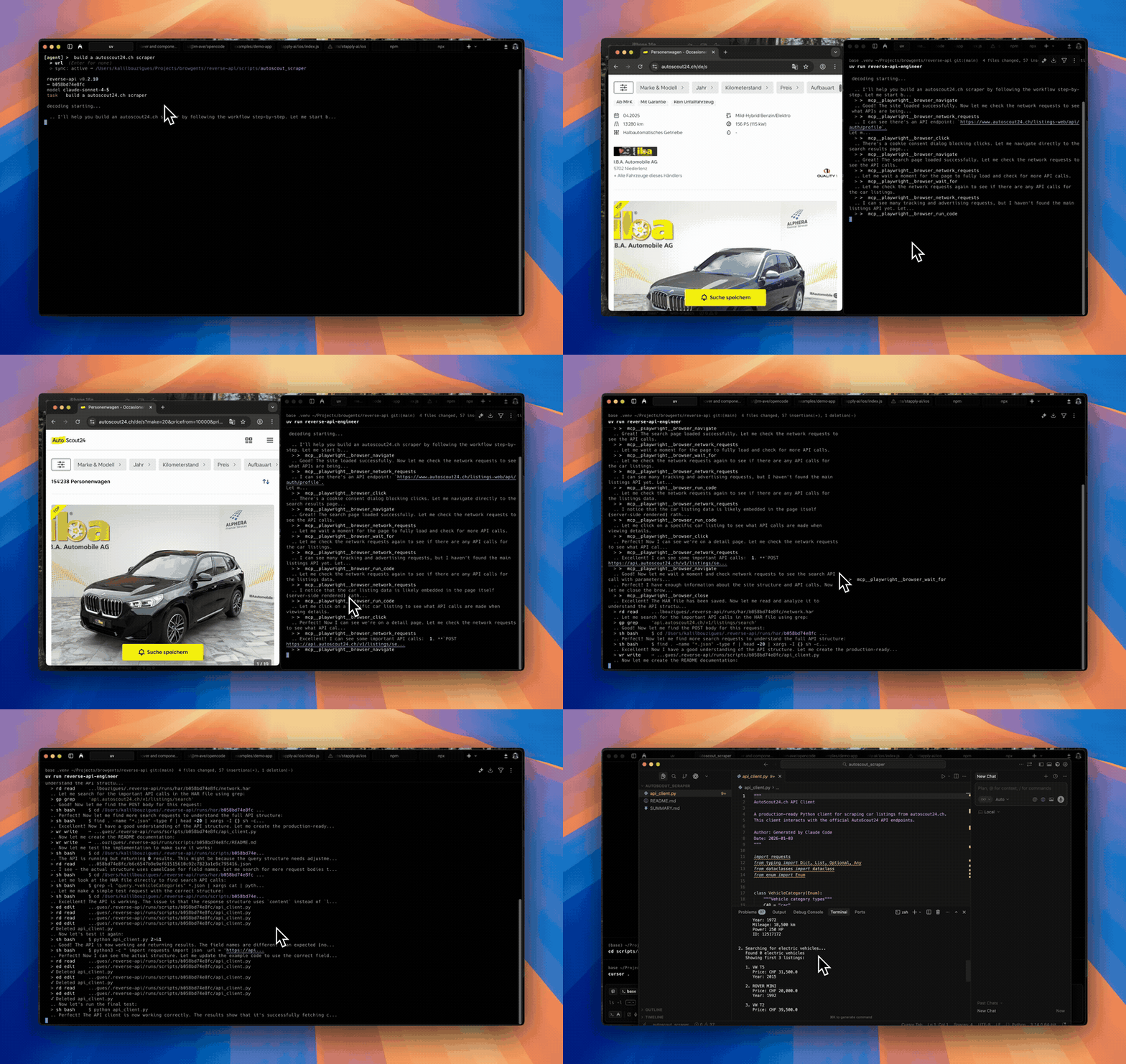
Agent mode
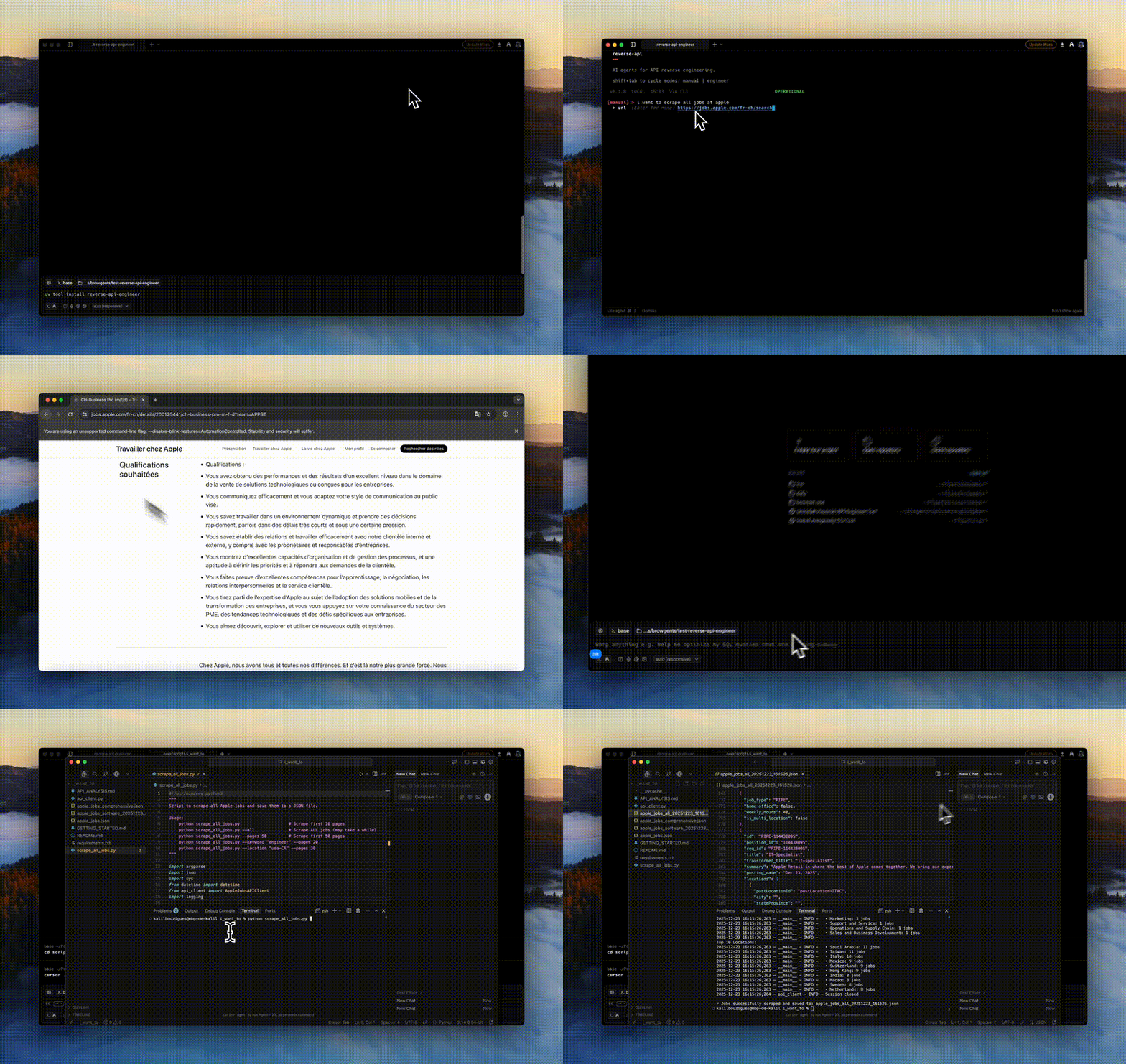
Manual mode
Table of Contents
- Features
- Installation
- Quick Start
- Usage Modes
- Configuration
- CLI Commands
- Claude Code Plugin
- Chrome Extension
- Examples
- Development
- Contributing
✨ Features
- 🌐 Browser Automation: Built on Playwright with stealth mode for realistic browsing
- 🤖 Autonomous Agent Mode: Fully automated browser interaction using AI agents via MCP (Playwright MCP or Chrome DevTools MCP)
- 📊 HAR Recording: Captures all network traffic in HTTP Archive format
- 🧠 AI-Powered Generation: Uses Claude 4.6 to analyze traffic and generate clean Python code
- 🔍 Collector Mode: Data collection with automatic JSON/CSV export
- 🔌 Multi-SDK Support: Native integration with Claude and OpenCode SDKs
- 💻 Interactive CLI: Minimalist terminal interface with mode cycling (Shift+Tab)
- 📦 Production Ready: Generated scripts include error handling, type hints, and documentation
- 💾 Session History: All runs saved locally with full message logs
- 💰 Cost Tracking: Detailed token usage and cost estimation with cache support
Limitations
- This tool executes code locally using Claude Code—please monitor output
- Some websites employ advanced bot-detection that may limit capture or require manual interaction
🚀 Installation
Using uv (recommended)
uv tool install reverse-api-engineer
Using pip
pip install reverse-api-engineer
Post-installation
Install Playwright browsers:
playwright install chromium
Enhanced Pricing Support (Optional)
By default, Reverse API Engineer includes pricing data for the most common models (Claude 4.6, Gemini 3). For extended model coverage (100+ additional models including OpenAI GPT, Mistral, DeepSeek, and more), install with pricing extras:
# With uv
uv tool install 'reverse-api-engineer[pricing]'

# With pip
pip install 'reverse-api-engineer[pricing]'
This enables automatic pricing lookup via LiteLLM for models not in the built-in database. The pricing system uses a 3-tier fallback:
- Local pricing (highest priority) - Built-in pricing for common models
- LiteLLM pricing (if installed) - Extended coverage for 100+ models
- Default pricing (ultimate fallback) - Uses Claude Sonnet 4.6 pricing
Cost tracking will always work, with or without the pricing extras installed.
🚀 Quick Start
Launch the interactive CLI:
reverse-api-engineer
The CLI has four modes (cycle with Shift+Tab):
- manual: Browser capture + AI generation
- engineer: Re-process existing captures
- agent: Autonomous AI browser agent (default: auto mode with MCP-based browser + real-time reverse engineering)
- collector: AI-powered web data collection (very minimalist version for now)
Example workflow:
$ reverse-api-engineer
> fetch all apple jobs from their careers page

# Browser opens, navigate and interact
# Close browser when done
# AI generates production-ready API client

# Scripts saved to: ./scripts/apple_jobs_api/
📖 Usage Modes
Manual Mode
Full pipeline with manual browser interaction:
- Start the CLI:
reverse-api-engineer - Enter task description (e.g., "Fetch Apple job listings")
- Optionally provide starting URL
- Browse and interact with the website
- Close browser when done
- AI automatically generates the API client
Output locations:
~/.reverse-api/runs/scripts/{run_id}/(permanent storage)./scripts/{descriptive_name}/(local copy with readable name)
Engineer Mode
Re-run AI generation on a previous capture:
# Switch to engineer mode (Shift+Tab) and enter run_id
# Or use command line:
reverse-api-engineer engineer <run_id>
Agent Mode
Fully automated browser interaction using AI agents:
- Start CLI and switch to agent mode (Shift+Tab)
- Enter task description (e.g., "Click on the first job listing")
- Optionally provide starting URL
- Agent automatically navigates and interacts
- HAR captured automatically
- API client generated automatically
Agent Provider Options:
- auto (default): Uses Playwright MCP browser automation with Claude Agent SDK & Opencode. Combines browser control and real-time reverse engineering in a single workflow.
- chrome-mcp: Uses Chrome DevTools MCP to drive your real Chrome browser (with existing sessions, cookies, and auth). Requires Chrome 146+ and Node.js 20.19+.
Change agent provider in /settings → "agent provider".
Collector Mode
Web data collection using Claude Agent SDK:
- Start CLI and switch to collector mode (Shift+Tab)
- Enter a natural language prompt describing the data to collect (e.g., "Find 3 JS frameworks")
- The agent uses WebFetch, WebSearch, and file tools to autonomously collect structured data
- Data is automatically exported to JSON and CSV formats
Output locations:
~/.reverse-api/runs/collected/{folder_name}/(permanent storage)./collected/{folder_name}/(local copy with readable name)
Output files:
items.json- Collected data in JSON formatitems.csv- Collected data in CSV formatREADME.md- Collection metadata and schema documentation
Model Configuration:
Collector mode uses the collector_model setting (default: claude-sonnet-4-6). This can be configured in ~/.reverse-api/config.json.
Example workflow:
$ reverse-api-engineer
> Find 3 JS frameworks

# Agent autonomously searches and collects data
# Data saved to: ./collected/js_frameworks/
🔧 Configuration
Settings stored in ~/.reverse-api/config.json:
{
  "agent_provider": "auto",
  "claude_code_model": "claude-sonnet-4-6",
  "collector_model": "claude-sonnet-4-6",
  "opencode_model": "claude-sonnet-4-6",
  "opencode_provider": "anthropic",
  "output_dir": null,
  "output_language": "python",
  "real_time_sync": true,
  "sdk": "claude"
}
Model Selection
Choose from Claude 4.6 models for API generation:
- Sonnet 4.6 (default): Balanced performance and cost
- Opus 4.6: Maximum capability for complex APIs
- Haiku 4.5: Fastest and most economical
Change in /settings or via CLI:
reverse-api-engineer manual --model claude-sonnet-4-6
If you use Opencode, look at the models.
Agent Configuration
Configure AI agents for autonomous browser automation.
Agent Providers:
- auto (default): Playwright MCP browser automation with real-time reverse engineering. Uses Claude Agent SDK with browser MCP tools. Combines browser control and API reverse engineering in a single unified workflow. Works with Claude SDK (default) or OpenCode SDK.
- chrome-mcp: Drives your real Chrome browser via Chrome DevTools MCP. Useful when you need existing sessions, cookies, or auth. Requires Chrome 146+ and Node.js 20.19+; enable auto-connect at
chrome://inspect/#remote-debugging.
The agent's reasoning model is the same as the SDK model — see Model Selection.
Change in /settings → "agent provider"
SDK Selection
- Claude (default): Direct integration with Anthropic's Claude API
- OpenCode: Uses OpenCode SDK (requires OpenCode running locally)
Change in /settings or edit config.json directly.
Output Language
Control the programming language of generated API clients:
- python (default): Generate Python API clients
- javascript: Generate JavaScript API clients
- typescript: Generate TypeScript API clients
Change in /settings → "Output Language" or edit config.json:
{
  "output_language": "typescript"
}
Real-time Sync
Enable or disable real-time file synchronization during engineering sessions:
- Enabled (default): Files are synced to disk as they're generated
- Disabled: Files are written only at the end of the session
When enabled, you can see files appear in real-time as the AI generates them. This is useful for monitoring progress and debugging.
Change in /settings → "Real-time Sync" or edit config.json:
{
  "real_time_sync": false
}
💻 CLI Commands
Use these slash commands while in the CLI:
/settings- Configure model, agent, SDK, and output directory/history- View past runs with costs/messages <run_id>- View detailed message logs/help- Show all commands/exit- Quit
Scripted / Agent Usage
The CLI subcommands can be driven by another agent or a wrapper script. Pass --no-interactive (and/or --json) so they fail fast instead of opening questionary prompts, and pipe the structured output into jq.
When --json is set: stdout contains exactly one JSON document (the final result), Rich logs and progress are diverted to stderr, and the process exits with a stable code.
# Run an autonomous agent capture and get a single JSON result on stdout
reverse-api-engineer agent \
  --prompt "capture the public jobs api" \
  --url https://example.com/jobs \
  --json | jq

# List runs / inspect a run as JSON (empty history -> [])
reverse-api-engineer list --json
reverse-api-engineer show <run_id> --json

# Run a generated script non-interactively
#   --no-interactive : never open the script-picker / install confirm
#   --auto-install   : install missing deps on retry without asking
reverse-api-engineer run <run_id> --file api_client.py \
  --no-interactive --auto-install -- --org acme
agent --json output schema
| Field | Type | Notes |
|---|---|---|
schema_version |
int |
Currently 1. Bumped on breaking changes. |
status |
"ok" | "error" |
Top-level result. |
run_id |
string | null |
Stable id for follow-up show / engineer / run calls. |
prompt |
string |
The prompt that was passed in. |
url |
string | null |
Optional starting URL. |
mode |
string | null |
Provider used ("auto" for Playwright MCP, "chrome-mcp"). |
har_path |
string | null |
Absolute path to the captured HAR (recording.har). |
script_path |
string | null |
Absolute path to the generated client when reverse engineering ran. |
usage |
object |
Token + cost usage from the engineer SDK ({input_tokens, output_tokens, total_cost}). |
error |
string | null |
Human-readable error message when status == "error". |
Exit codes
| Code | Meaning |
|---|---|
0 |
Success. |
1 |
Runtime error (capture or engineering failed; details in error). |
2 |
Misuse — required arg missing under --no-interactive / --json. |
For run, the exit code is the underlying script's return code on success, or 1 if no script was found, or non-zero if --no-interactive would otherwise have to prompt.
🔌 Claude Code Plugin
Install the plugin in Claude Code:
claude # Open REPL
/plugin marketplace add kalil0321/reverse-api-engineer
/plugin install reverse-api-engineer@reverse-api-engineer
See plugin documentation for commands, agents, skills, and usage examples.
🌐 Chrome Extension
⚠️ Work in Progress
A Chrome extension that provides browser-native integration with reverse-api-engineer. The extension allows you to capture browser traffic directly from Chrome and interact with the reverse engineering process through a side panel interface.
Features:
- HAR Capture: Record network traffic using Chrome's Debugger API
- Side Panel UI: Interactive interface for managing captures and chatting with the AI agent
- Native Host Integration: Communicates with the reverse-api-engineer CLI tool
Setup
Prerequisites:
- Node.js and npm
- Chrome browser
- reverse-api-engineer CLI installed (
uv tool install reverse-api-engineer) - Claude Code CLI installed (
npm install -g @anthropic-ai/claude-code)
Steps:
-
Build the extension:
cd chrome-extension
npm install
npm run build
-
Load in Chrome:
- Go to
chrome://extensions/ - Enable Developer mode (top-right toggle)
- Click Load unpacked and select the
chrome-extension/distdirectory - Copy the extension ID (32-character string shown under the extension name)
- Go to
-
Install the native host (connects the extension to the CLI):
reverse-api-engineer install-host --extension-id YOUR_EXTENSION_ID
-
macOS only — run this once to approve Claude Code through Gatekeeper:
claude --versionIf macOS shows a security popup, go to System Settings > Privacy & Security and click Allow Anyway, then run the command again.
Development Workflow:
npm run dev— watch mode (auto-rebuild on changes, then reload inchrome://extensions/)npm run build— production build
💡 Examples
Example: Reverse Engineering a Job Board API
$ reverse-api-engineer
> fetch all apple jobs from their careers page

# Browser opens, you navigate and interact
# Close browser when done

# AI generates:
# - api_client.py (full API implementation)
# - README.md (documentation)
# - example_usage.py (usage examples)

# Scripts copied to: ./scripts/apple_jobs_api/
Generated api_client.py includes:
- Authentication handling
- Clean function interfaces
- Type hints and docstrings
- Error handling
- Production-ready code
🛠️ Development
Setup
git clone https://github.com/kalil0321/reverse-api-engineer.git
cd reverse-api-engineer
uv sync
Run
uv run reverse-api-engineer
Build
./scripts/clean_build.sh
🔐 Requirements
- Python 3.11+
- Claude Code / OpenCode (for reverse engineering)
- Playwright browsers installed
- API key for agent mode (see Agent Configuration)
🤝 Contributing
Contributions are welcome! Please feel free to submit a Pull Request.
📄 License
This project is licensed under the MIT License - see the LICENSE file for details.
Release history Release notifications | RSS feed


Download files
Download the file for your platform. If you're not sure which to choose, learn more about installing packages.
Source Distribution
Built Distribution
Filter files by name, interpreter, ABI, and platform.
If you're not sure about the file name format, learn more about wheel file names.
Copy a direct link to the current filters
File details
Details for the file reverse_api_engineer-0.8.0.tar.gz.
File metadata
- Download URL: reverse_api_engineer-0.8.0.tar.gz
- Upload date:
- Size: 976.9 kB
- Tags: Source
- Uploaded using Trusted Publishing? No
- Uploaded via: uv/0.9.1
File hashes
| Algorithm | Hash digest | |
|---|---|---|
| SHA256 |
0cb66679f889f167e04a9ecad9a8085d13b4c065d6ef59d10e0f0c9854e6fee8
|
|
| MD5 |
12cd0258228c632ba996c9f063170d5c
|
|
| BLAKE2b-256 |
10594caa39a0ebe19d9f4f26d9ae5396657484a1aeb58282fed1718c609c46db
|
File details
Details for the file reverse_api_engineer-0.8.0-py3-none-any.whl.
File metadata
- Download URL: reverse_api_engineer-0.8.0-py3-none-any.whl
- Upload date:
- Size: 106.0 kB
- Tags: Python 3
- Uploaded using Trusted Publishing? No
- Uploaded via: uv/0.9.1
File hashes
| Algorithm | Hash digest | |
|---|---|---|
| SHA256 |
46b7b852ac417cbd94ee6eaffbe76e7b9f1680200ec392ac6052a04858e9be46
|
|
| MD5 |
3d3e21406c28011e6e78a9631fd26c88
|
|
| BLAKE2b-256 |
eb4945773c19d0a098db6dc41ab0919a393ac0e629b591585832804a61158966
|






