



Reverse API Engineer
Turn websites into APIs. Browse (or let an agent browse), and get a clean, typed client for the endpoints the site actually uses.
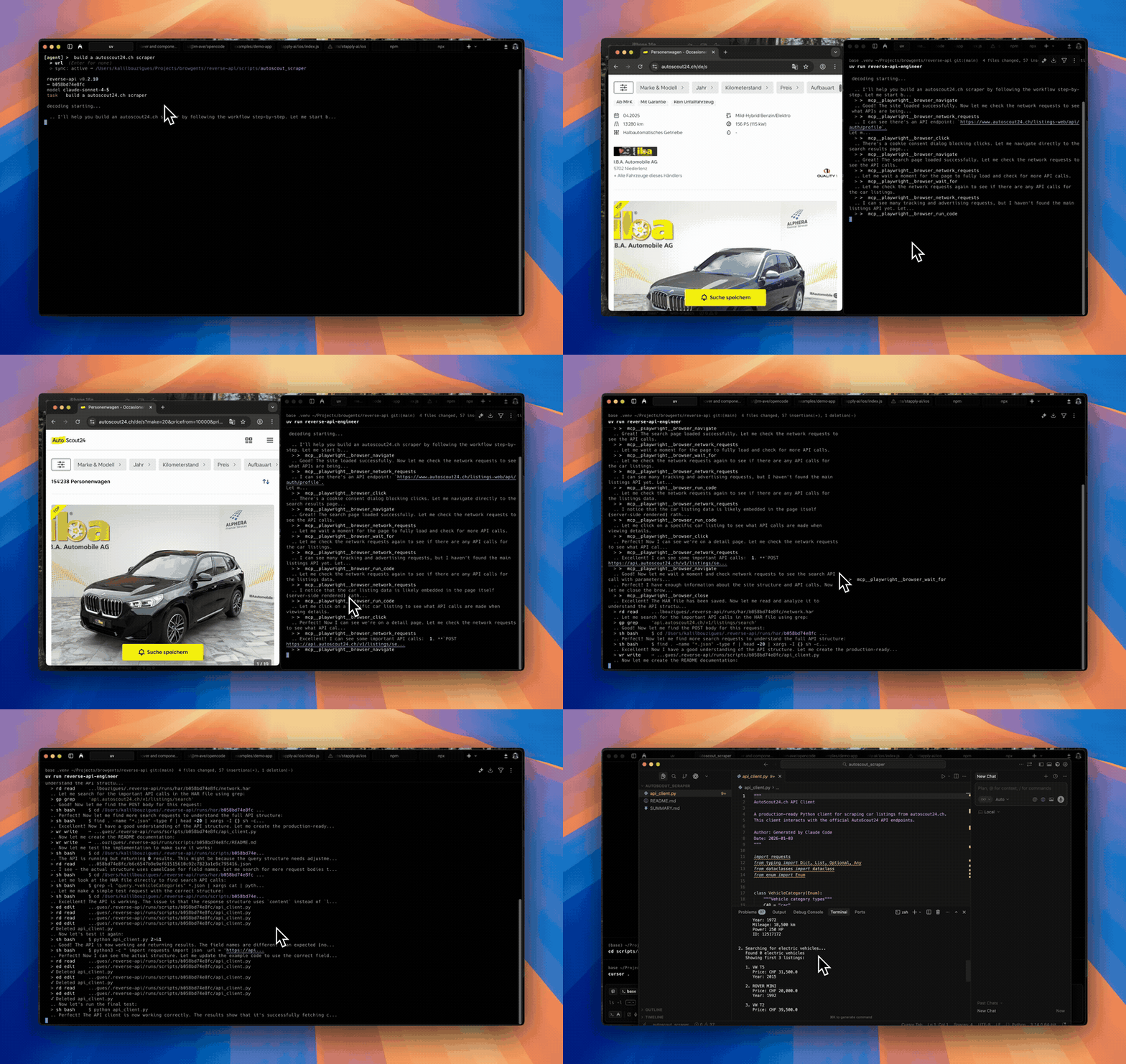
Agent mode
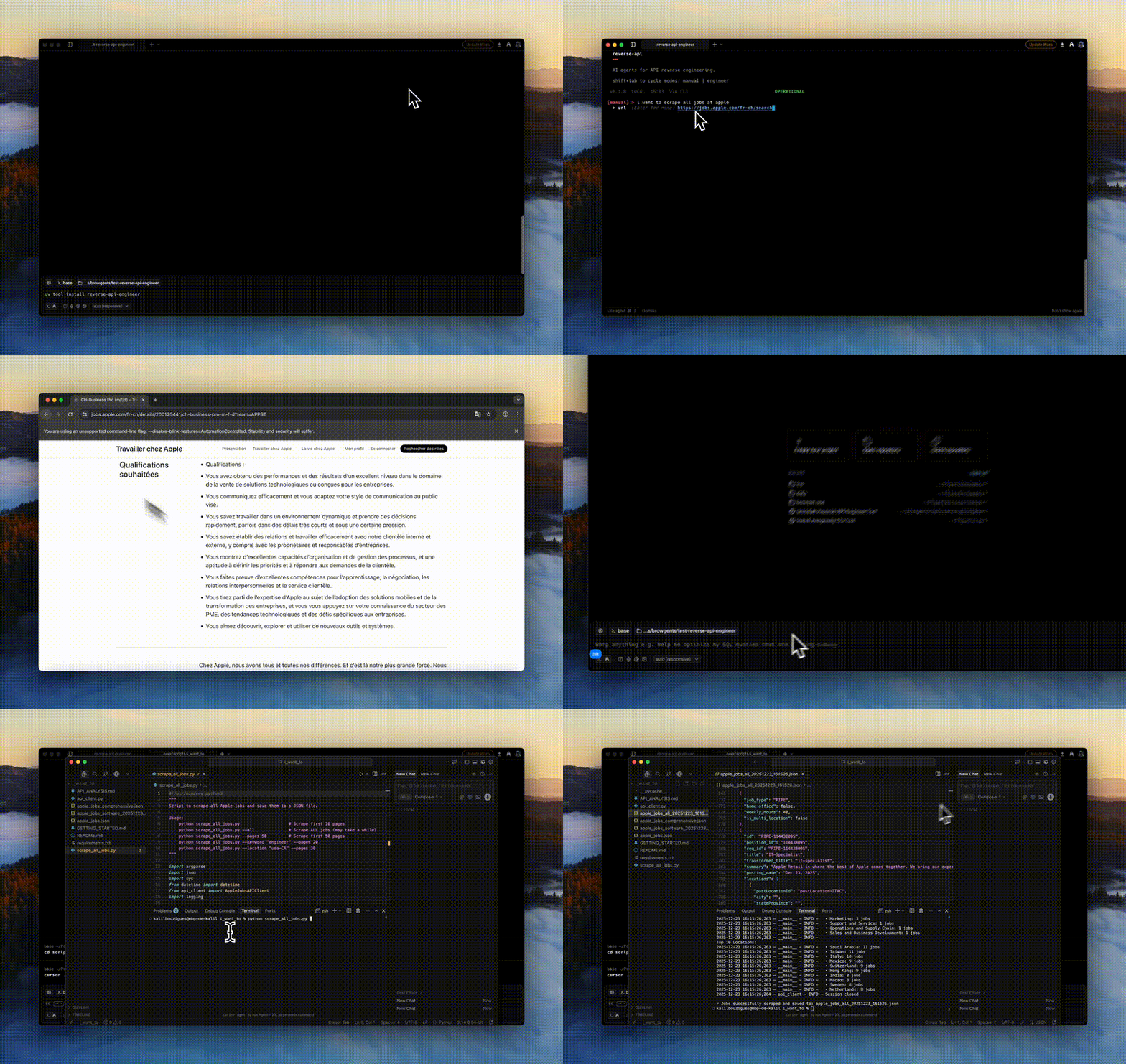
Manual mode
How it works
- You give it a website and a goal ("fetch all Apple jobs").
- A browser visits the site, either driven by you or by an AI agent.
- Network traffic is captured to a HAR file.
- Your configured model reads the traffic and writes a working API client in Python, JavaScript, TypeScript, Go, Java, C#, PHP, Ruby, C, or PowerShell.
No more manually opening DevTools, copying cURL commands, and gluing together a client.
Install
uv tool install reverse-api-engineer # or: pip install reverse-api-engineer
The secured cryptography dependency no longer supports Intel macOS or 32-bit Windows. Use Linux (including on Intel hardware), Apple Silicon macOS, or 64-bit Windows. Installing on the retired platforms may attempt an unsupported source build requiring Rust and OpenSSL development tools; this is not a supported installation path. Do not downgrade cryptography to restore old wheels. See the upstream platform changes.
Agent mode (the default) captures through npx-launched browser tooling —
browser MCP servers (Playwright or Chrome DevTools) or the Vercel agent-browser
CLI — and needs no extra Python packages. Manual mode drives a local
Playwright browser, which ships in the optional [manual] extra:
uv tool install "reverse-api-engineer[manual]"   # or: pip install "reverse-api-engineer[manual]"
playwright install chromium
Quick start
reverse-api-engineer
> fetch all apple jobs from their careers page

# Browser opens. Navigate, interact, close when done.
# → ./scripts/apple_jobs_api/  (api_client.py, README.md, example_usage.py)
Cycle modes with Shift+Tab:
| Mode | What it does |
|---|---|
manual |
You drive the browser; AI generates the client from captured traffic. |
agent |
An AI agent drives capture autonomously (Playwright or Chrome MCP, or Vercel agent-browser CLI). |
engineer |
Re-run generation on a previous capture (engineer <run_id>). |
collector |
Agent collects structured data (JSON/CSV) using web search + fetch. |
Agent mode providers:
- auto (default): Playwright MCP, single workflow for browsing + reverse engineering.
- chrome-mcp: drives your real Chrome so you keep existing sessions/cookies. Requires Chrome 146+ and Node.js 20.19+.
- agent-browser: Vercel agent-browser CLI (not a Reverse API Engineer browser MCP server). At session start RAE uses whatever
agent-browseris already onPATH, otherwise runsnpm install -g <pin>(same pin as config /RAE_AGENT_BROWSER_PACKAGE), prints a yellow notice, validates with--help, and only then falls back tonpx -y <pin>if npm cannot install. Prompts embed the resolved shell prefix alongsideskills get core --full,skills list, HAR phases, cloud notes fromagent_browser_notes. Tune withagent_browser_npx_package(optional), envRAE_AGENT_BROWSER_*. First Chromium fetch:agent-browser install(add--with-depson trimmed Linux).
Optional sanity checks:
agent-browser doctor --offline --quick || true
agent-browser skills list >/dev/null
Configuration
Settings live in ~/.reverse-api/config.json and can be edited via /settings in the CLI:
{
  "agent_provider": "auto",
  "agent_browser_npx_package": "agent-browser@0",
  "agent_browser_notes": "",
  "claude_code_model": "claude-sonnet-4-6",
  "collector_model": "claude-sonnet-4-6",
  "ollama_auto_start": true,
  "ollama_base_url": "http://127.0.0.1:11434",
  "opencode_auto_start": true,
  "opencode_base_url": "http://127.0.0.1:4096",
  "opencode_model": "big-pickle",
  "opencode_npx_package": "opencode-ai@latest",
  "opencode_provider": "opencode",
  "copilot_model": "gpt-5",
  "cursor_model": "composer-2.5",
  "output_dir": null,
  "output_language": "python",
  "real_time_sync": true,
  "sdk": "claude"
}
- Models: Sonnet 4.6 (default), Opus 4.6 (most capable), Haiku 4.5 (fastest). For OpenCode see models.dev.
- SDK:
claude(default),opencode,cursor, orcopilot(GitHub Copilot). - OpenCode setup: with
sdk: "opencode", RAE reuses an existing server or downloads/startsopencode-ai@latestthroughnpx; a global OpenCode installation is not required. Fresh configurations default to the freeopencode/big-picklemodel./settingsshows a loading spinner, then offers a searchable OpenCode Provider / Model picker populated from the server's connected, tool-capable catalog and marks free OpenCode options. Before creating a session, RAE validates the saved pair again and suggests currently available free models when configuration is invalid. Compatible older servers are reused with a version warning. Node.js 20+ is required for automatic startup. Password-protected servers useOPENCODE_SERVER_PASSWORDand optionalOPENCODE_SERVER_USERNAME. Override startup withOPENCODE_BASE_URL,RAE_OPENCODE_PACKAGE, orRAE_OPENCODE_AUTO_START=0. - Ollama through OpenCode: choose provider
ollamain/settings; RAE starts an installed Ollama daemon if needed, lists only installed models with tool calling and 64k+ context, and supplies OpenCode's provider config inline. Models are never downloaded silently. Override withRAE_OLLAMA_BASE_URLorRAE_OLLAMA_AUTO_START=0. - Output language:
python,javascript,typescript,go,java,csharp,php,ruby,c, orpowershell. C needs a POSIX toolchain (cc, libcurl headers) — macOS/Linux, or WSL/MSYS2 on Windows. PowerShell needspwsh7+ (PowerShell Core, not Windows PowerShell 5.1). Its runner executes the generatedExample.ps1besideapi_client.psm1; argument overrides are not supported. Edit the example or import the module to call its exported functions with your own arguments.
CLI
Slash commands inside the CLI:
/settings: configure model, SDK, agent provider, and sync settings./history: list past runs with timestamps, costs, and status./messages <run_id>: view detailed message logs for a run./help(alias:/commands): show the command list./exit(alias:/quit): leave the CLI.
Scriptable subcommands (pipe to jq):
reverse-api-engineer agent --prompt "capture the public jobs api" \
  --url https://example.com/jobs --json | jq

reverse-api-engineer list --json
reverse-api-engineer show <run_id> --json
reverse-api-engineer run <run_id> --file api_client.py \
  --no-interactive --auto-install -- --org acme
Pass --no-interactive (and/or --json) to skip prompts. With --json, stdout is one JSON document and logs go to stderr.
agent --json schema
| Field | Type | Notes |
|---|---|---|
schema_version |
int |
Currently 1. |
status |
"ok" | "error" |
Top-level result. |
run_id |
string | null |
Use with show / engineer / run. |
prompt |
string |
|
url |
string | null |
|
mode |
string | null |
"auto", "chrome-mcp", or "agent-browser". |
har_path |
string | null |
Captured HAR. |
script_path |
string | null |
Generated client. |
usage |
object |
{input_tokens, output_tokens, total_cost}. |
error |
string | null |
When status == "error". |
Exit codes
| Code | Meaning |
|---|---|
0 |
Success. |
1 |
Runtime error. |
2 |
Missing required arg under --no-interactive / --json. |
For run, the exit code is the underlying script's return code on success, 1 if no script was found, or non-zero if --no-interactive would have had to prompt.
Debugging agent failures
Set the RAE_DEBUG environment variable to 1 to print the Python traceback
for unexpected agent capture failures to stderr. Normal error messages remain
concise by default, and --json / --json-stream stdout remains machine-readable.
Output locations
~/.reverse-api/runs/scripts/{run_id}/: permanent storage./scripts/{descriptive_name}/: local copy with a readable name- Collector:
./collected/{folder_name}/(items.json,items.csv,README.md)
Caveats
- Generated code runs locally via Claude Code, so review before executing.
- Sites with aggressive bot detection may block capture or require manual interaction.
Development
git clone https://github.com/kalil0321/reverse-api-engineer.git
cd reverse-api-engineer
uv sync
uv run reverse-api-engineer
Build: ./scripts/clean_build.sh. Requires Python 3.11+ and an API key for agent mode. Manual mode additionally needs the [manual] extra plus playwright install chromium.
License
MIT. See LICENSE.
1 maintainer

Release files for reverse-api-engineer 0.14.0
For a detailed explanation of source distributions (sdists) and built distributions (wheels), please see the package formats documentation.
Source distribution (sdist)
| File | Size | Uploaded | |
|---|---|---|---|
| reverse_api_engineer-0.14.0.tar.gz | 251.0 kB | Details |
Built distribution (wheel)
| File | Interpreter | ABI | Platform | Reset |
|---|---|---|---|---|
| reverse_api_engineer-0.14.0-py3-none-any.whl | Python 3 | none | any | Details |
Total release size: 413.2 kB
Release files / reverse_api_engineer-0.14.0.tar.gz
| Download URL | reverse_api_engineer-0.14.0.tar.gz |
|---|---|
| Size | 251.0 kB |
| Tags | Source |
|
SHA-256 checksum How to use checksums |
909e8fe5fb2e1f4483a033505c3686a7028a251b8dbf2bd841bccce3e944c8cd
|
|
BLAKE2b-256 checksum How to use checksums |
1c1c2eed231c609de02823fe8290808c04e6b0a1aff98b95e21a683c26733334
|
| Upload date | |
|
Uploaded using Trusted Publishing? What is trusted publishing? |
No |
| Uploaded via |
uv/0.9.0
|
Release files / reverse_api_engineer-0.14.0-py3-none-any.whl
| Download URL | reverse_api_engineer-0.14.0-py3-none-any.whl |
|---|---|
| Size | 162.2 kB |
| Tags | Python 3 |
|
SHA-256 checksum How to use checksums |
dd1c55bac54a74cde7d105cf7b928b9daf51828b32ff9bac2e22af204116251b
|
|
BLAKE2b-256 checksum How to use checksums |
f70e50b397f38596ef64b6df0e2cc027a067c0936b44f49bb8890af90bfdd614
|
| Upload date | |
|
Uploaded using Trusted Publishing? What is trusted publishing? |
No |
| Uploaded via |
uv/0.9.0
|














