
The agent that turns websites into APIs.

Project description



Reverse API Engineer
Turn websites into APIs. Browse (or let an agent browse), and get a clean, typed client for the endpoints the site actually uses.
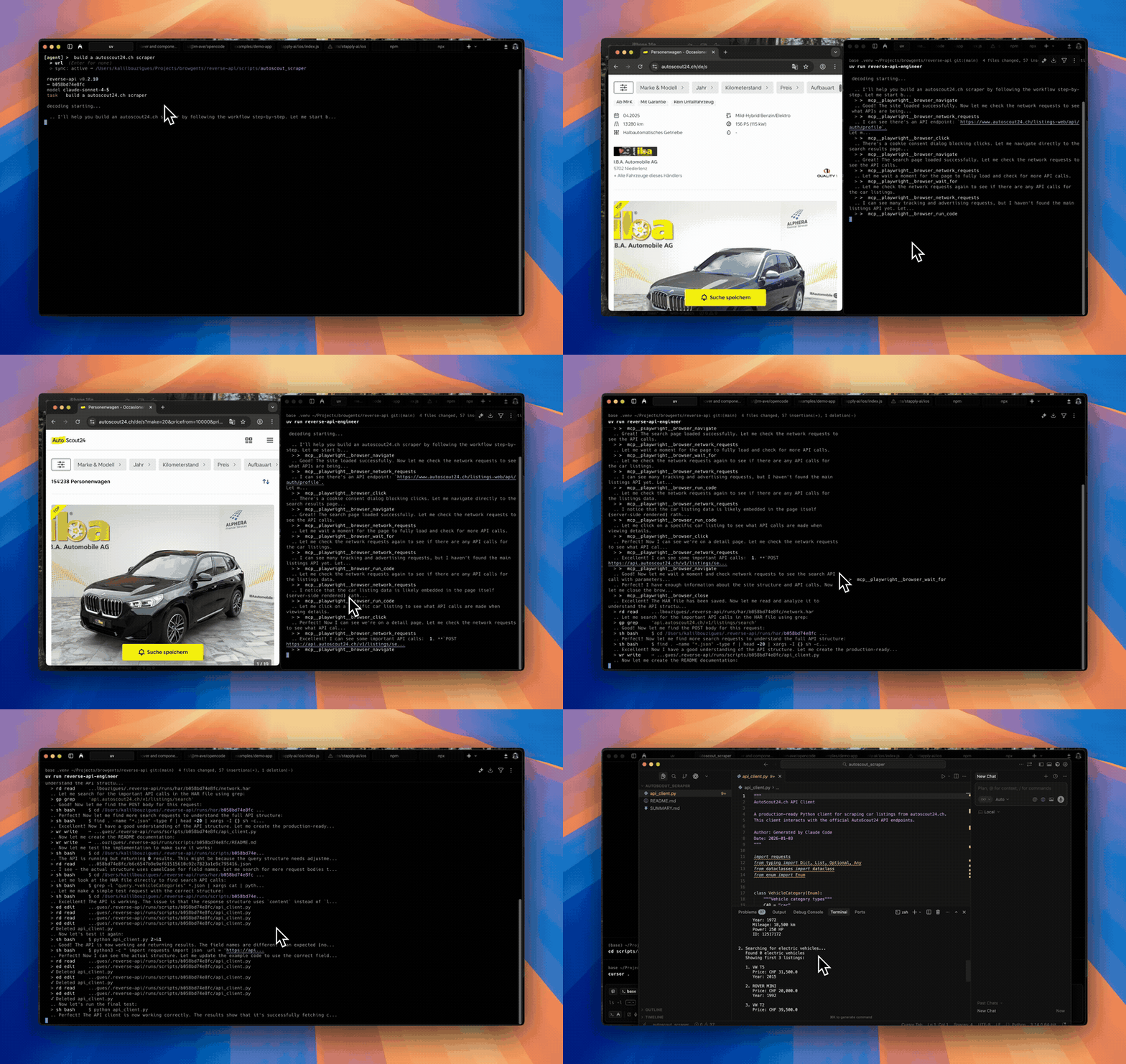
Agent mode
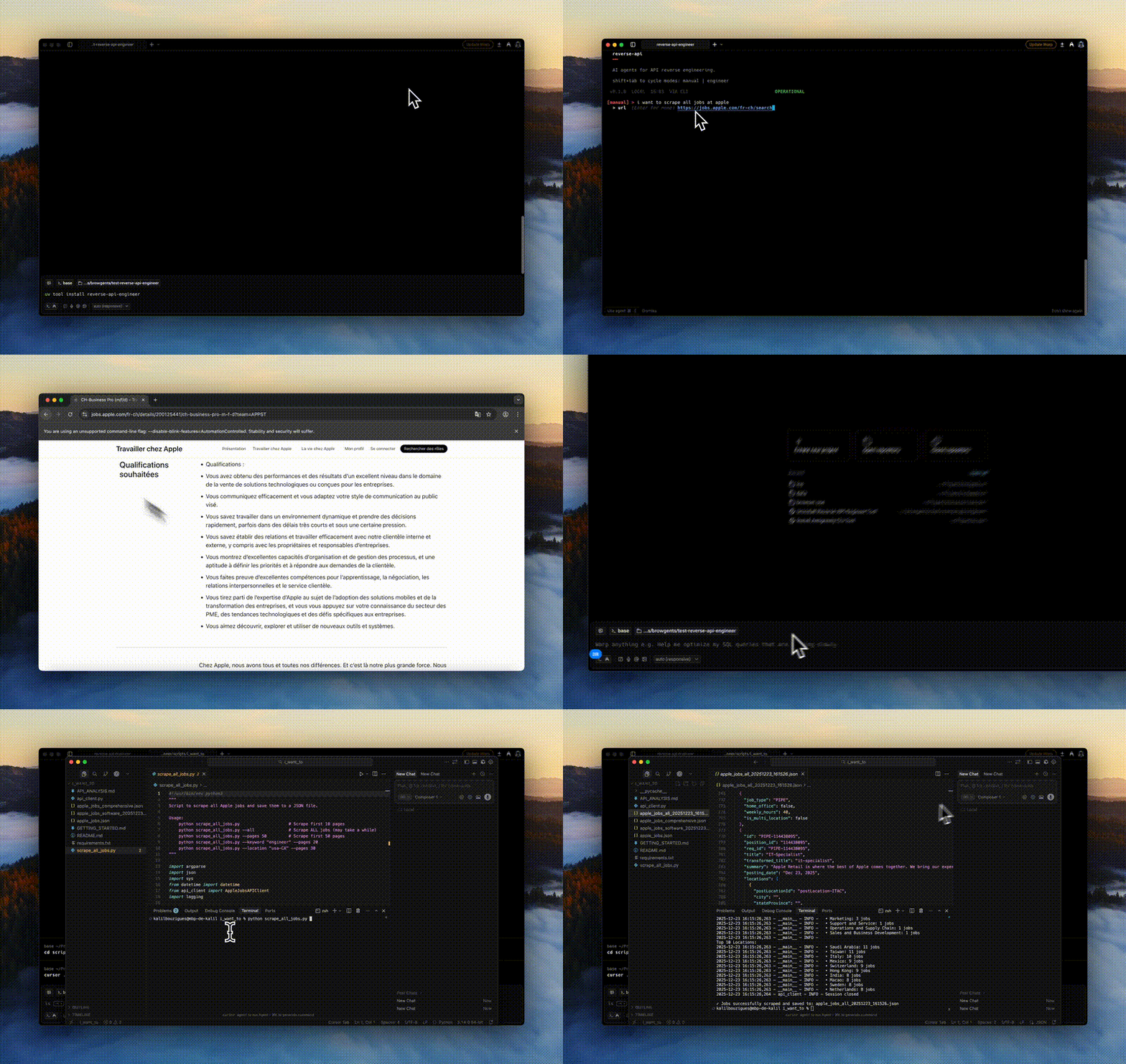
Manual mode
How it works
- You give it a website and a goal ("fetch all Apple jobs").
- A browser visits the site, either driven by you or by an AI agent.
- Network traffic is captured to a HAR file.
- Your configured model reads the traffic and writes a working API client in Python, JavaScript, TypeScript, Go, Java, C#, PHP, Ruby, or C.
No more manually opening DevTools, copying cURL commands, and gluing together a client.
Install
uv tool install reverse-api-engineer # or: pip install reverse-api-engineer
Agent mode (the default) captures through npx-launched browser tooling —
browser MCP servers (Playwright or Chrome DevTools) or the Vercel agent-browser
CLI — and needs no extra Python packages. Manual mode drives a local
Playwright browser, which ships in the optional [manual] extra:
uv tool install "reverse-api-engineer[manual]"   # or: pip install "reverse-api-engineer[manual]"
playwright install chromium
Quick start
reverse-api-engineer
> fetch all apple jobs from their careers page

# Browser opens. Navigate, interact, close when done.
# → ./scripts/apple_jobs_api/  (api_client.py, README.md, example_usage.py)
Cycle modes with Shift+Tab:
| Mode | What it does |
|---|---|
manual |
You drive the browser; AI generates the client from captured traffic. |
agent |
An AI agent drives capture autonomously (Playwright or Chrome MCP, or Vercel agent-browser CLI). |
engineer |
Re-run generation on a previous capture (engineer <run_id>). |
collector |
Agent collects structured data (JSON/CSV) using web search + fetch. |
Agent mode providers:
- auto (default): Playwright MCP, single workflow for browsing + reverse engineering.
- chrome-mcp: drives your real Chrome so you keep existing sessions/cookies. Requires Chrome 146+ and Node.js 20.19+.
- agent-browser: Vercel agent-browser CLI (not a Reverse API Engineer browser MCP server). At session start RAE uses whatever
agent-browseris already onPATH, otherwise runsnpm install -g <pin>(same pin as config /RAE_AGENT_BROWSER_PACKAGE), prints a yellow notice, validates with--help, and only then falls back tonpx -y <pin>if npm cannot install. Prompts embed the resolved shell prefix alongsideskills get core --full,skills list, HAR phases, cloud notes fromagent_browser_notes. Tune withagent_browser_npx_package(optional), envRAE_AGENT_BROWSER_*. First Chromium fetch:agent-browser install(add--with-depson trimmed Linux).
Optional sanity checks:
agent-browser doctor --offline --quick || true
agent-browser skills list >/dev/null
Configuration
Settings live in ~/.reverse-api/config.json and can be edited via /settings in the CLI:
{
  "agent_provider": "auto",
  "agent_browser_npx_package": "agent-browser@0",
  "agent_browser_notes": "",
  "claude_code_model": "claude-sonnet-4-6",
  "collector_model": "claude-sonnet-4-6",
  "ollama_auto_start": true,
  "ollama_base_url": "http://127.0.0.1:11434",
  "opencode_auto_start": true,
  "opencode_base_url": "http://127.0.0.1:4096",
  "opencode_model": "big-pickle",
  "opencode_npx_package": "opencode-ai@latest",
  "opencode_provider": "opencode",
  "copilot_model": "gpt-5",
  "cursor_model": "composer-2.5",
  "output_dir": null,
  "output_language": "python",
  "real_time_sync": true,
  "sdk": "claude"
}
- Models: Sonnet 4.6 (default), Opus 4.6 (most capable), Haiku 4.5 (fastest). For OpenCode see models.dev.
- SDK:
claude(default),opencode,cursor, orcopilot(GitHub Copilot). - OpenCode setup: with
sdk: "opencode", RAE reuses an existing server or downloads/startsopencode-ai@latestthroughnpx; a global OpenCode installation is not required. Fresh configurations default to the freeopencode/big-picklemodel./settingsshows a loading spinner, then offers a searchable OpenCode Provider / Model picker populated from the server's connected, tool-capable catalog and marks free OpenCode options. Before creating a session, RAE validates the saved pair again and suggests currently available free models when configuration is invalid. Compatible older servers are reused with a version warning. Node.js 20+ is required for automatic startup. Password-protected servers useOPENCODE_SERVER_PASSWORDand optionalOPENCODE_SERVER_USERNAME. Override startup withOPENCODE_BASE_URL,RAE_OPENCODE_PACKAGE, orRAE_OPENCODE_AUTO_START=0. - Ollama through OpenCode: choose provider
ollamain/settings; RAE starts an installed Ollama daemon if needed, lists only installed models with tool calling and 64k+ context, and supplies OpenCode's provider config inline. Models are never downloaded silently. Override withRAE_OLLAMA_BASE_URLorRAE_OLLAMA_AUTO_START=0. - Output language:
python,javascript,typescript,go,java,csharp,php,ruby, orc. C needs a POSIX toolchain (cc, libcurl headers) — macOS/Linux, or WSL/MSYS2 on Windows.
CLI
Slash commands inside the CLI:
/settings: configure model, SDK, agent provider, and sync settings./history: list past runs with timestamps, costs, and status./messages <run_id>: view detailed message logs for a run./help(alias:/commands): show the command list./exit(alias:/quit): leave the CLI.
Scriptable subcommands (pipe to jq):
reverse-api-engineer agent --prompt "capture the public jobs api" \
  --url https://example.com/jobs --json | jq

reverse-api-engineer list --json
reverse-api-engineer show <run_id> --json
reverse-api-engineer run <run_id> --file api_client.py \
  --no-interactive --auto-install -- --org acme
Pass --no-interactive (and/or --json) to skip prompts. With --json, stdout is one JSON document and logs go to stderr.
agent --json schema
| Field | Type | Notes |
|---|---|---|
schema_version |
int |
Currently 1. |
status |
"ok" | "error" |
Top-level result. |
run_id |
string | null |
Use with show / engineer / run. |
prompt |
string |
|
url |
string | null |
|
mode |
string | null |
"auto", "chrome-mcp", or "agent-browser". |
har_path |
string | null |
Captured HAR. |
script_path |
string | null |
Generated client. |
usage |
object |
{input_tokens, output_tokens, total_cost}. |
error |
string | null |
When status == "error". |
Exit codes
| Code | Meaning |
|---|---|
0 |
Success. |
1 |
Runtime error. |
2 |
Missing required arg under --no-interactive / --json. |
For run, the exit code is the underlying script's return code on success, 1 if no script was found, or non-zero if --no-interactive would have had to prompt.
Output locations
~/.reverse-api/runs/scripts/{run_id}/: permanent storage./scripts/{descriptive_name}/: local copy with a readable name- Collector:
./collected/{folder_name}/(items.json,items.csv,README.md)
Caveats
- Generated code runs locally via Claude Code, so review before executing.
- Sites with aggressive bot detection may block capture or require manual interaction.
Development
git clone https://github.com/kalil0321/reverse-api-engineer.git
cd reverse-api-engineer
uv sync
uv run reverse-api-engineer
Build: ./scripts/clean_build.sh. Requires Python 3.11+ and an API key for agent mode. Manual mode additionally needs the [manual] extra plus playwright install chromium.
License
MIT. See LICENSE.
Release history Release notifications | RSS feed


Download files
Download the file for your platform. If you're not sure which to choose, learn more about installing packages.
Source Distribution
Built Distribution
Filter files by name, interpreter, ABI, and platform.
If you're not sure about the file name format, learn more about wheel file names.
Copy a direct link to the current filters
File details
Details for the file reverse_api_engineer-0.12.0.tar.gz.
File metadata
- Download URL: reverse_api_engineer-0.12.0.tar.gz
- Upload date:
- Size: 1.1 MB
- Tags: Source
- Uploaded using Trusted Publishing? No
- Uploaded via: uv/0.9.1
File hashes
| Algorithm | Hash digest | |
|---|---|---|
| SHA256 |
4d00d18bcbc38a5dd817a2668f642f0a235e928a688c0c38b9fc633df7a3cbfd
|
|
| MD5 |
45a018ea0c9c3ffd0743c78931802ec5
|
|
| BLAKE2b-256 |
d8f149189c91c51b89ff5948093f5c6b7037e0ffc397a393c8e4d1d4f6f8abc3
|
File details
Details for the file reverse_api_engineer-0.12.0-py3-none-any.whl.
File metadata
- Download URL: reverse_api_engineer-0.12.0-py3-none-any.whl
- Upload date:
- Size: 163.7 kB
- Tags: Python 3
- Uploaded using Trusted Publishing? No
- Uploaded via: uv/0.9.1
File hashes
| Algorithm | Hash digest | |
|---|---|---|
| SHA256 |
aa9a7bce5eca836b96a17178710749aef14a7d0ee1ad10c147417e85c561d5d3
|
|
| MD5 |
20082d5a9355fd25cc51cb03c0569157
|
|
| BLAKE2b-256 |
e052ed7d5b7466e4290f975dc4abd9350c3819894e9c0adb3148fe9aa539ba7f
|






