
ReviewMiner



reviewminer is built for analyzing customer reviews, or any text datasets that are similar to review data (short opinions
collected from multiple individuals). It is built on top of nltk and TextBlob.
reviewminer takes the pain out of building NLP pipelines (for analyzing customer reviews) and provides handy tools
for quickly organizing review data into digestible insights.
Features:
- Aspects and opinions extraction The key methodology in this package is aspect-based opinoins mining. The package has its own algorithm to extract aspects and the related opinion words from the review data.
- Sentiment on comment and aspect level The package can offer sentiment scores on both comment level and aspect level
- Negative reviews investigation The users can quickly display the negative sentences in the comments. They can also investigate negative comments by aspects.
Useful Links
Installation
$ pip install reviewminer
Quickstart
One-stop text analysis
We use the Women’s Clothing E-Commerce dataset on Kaggle to run the examples.
import reviewminer as rm
import pandas as pd

# read our sample data
reviews_df = pd.read_csv("https://raw.githubusercontent.com/tianyiwangnova/2021_project__ReviewMiner/main/sample_data/Womens%20Clothing%20E-Commerce%20Reviews.csv")

# create a reviewminer object
sample_rm = rm.ReviewMiner(reviews_df, id_column="Id", review_column='Text')

# run the one time analysis and you will see
sample_rm.one_time_analysis()
The function will print out 4 visualizations:
- Popular aspects and opinions
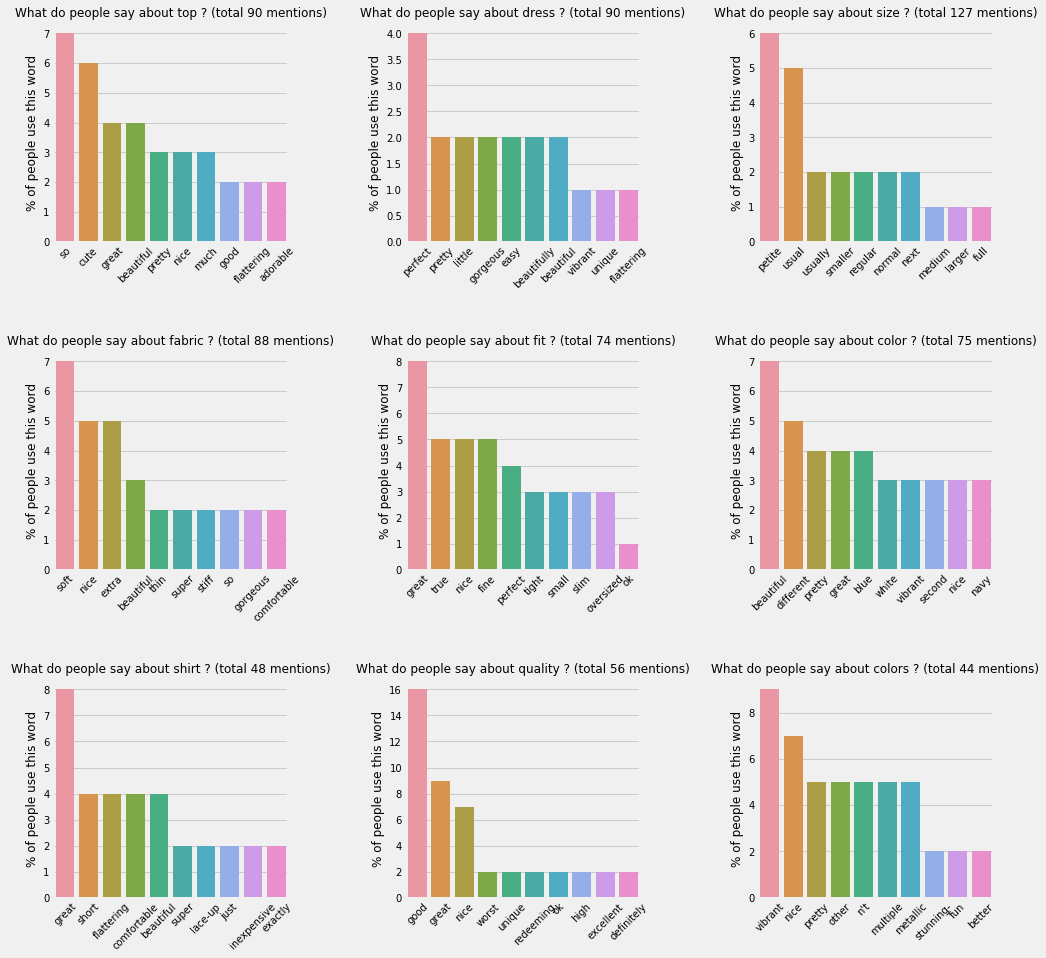
This chart displays 9 most common aspects found in the reviews and the most popular opinions words people used to describe them. In each bar chart, the heights represent the percentages of the people using the opinion words.
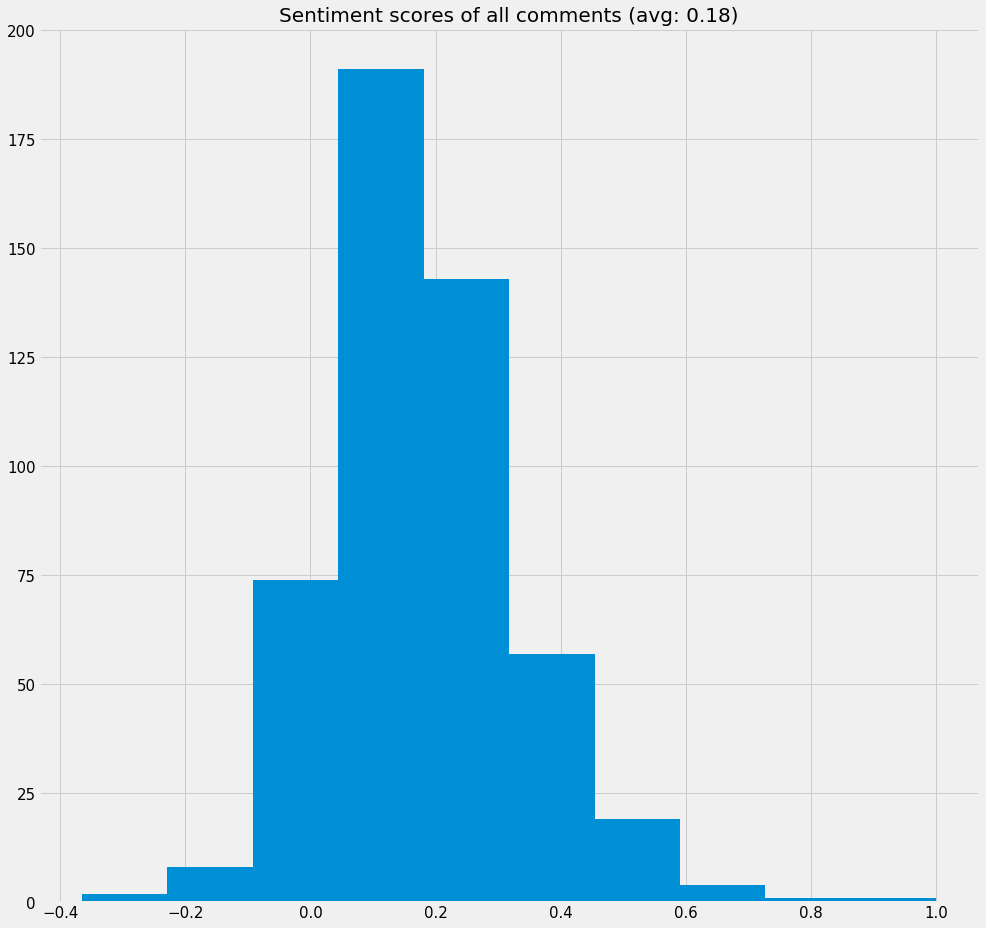
-
Distribution of sentiment scores of all comments
-
Radar chart of the most common aspects and their average sentiment scores
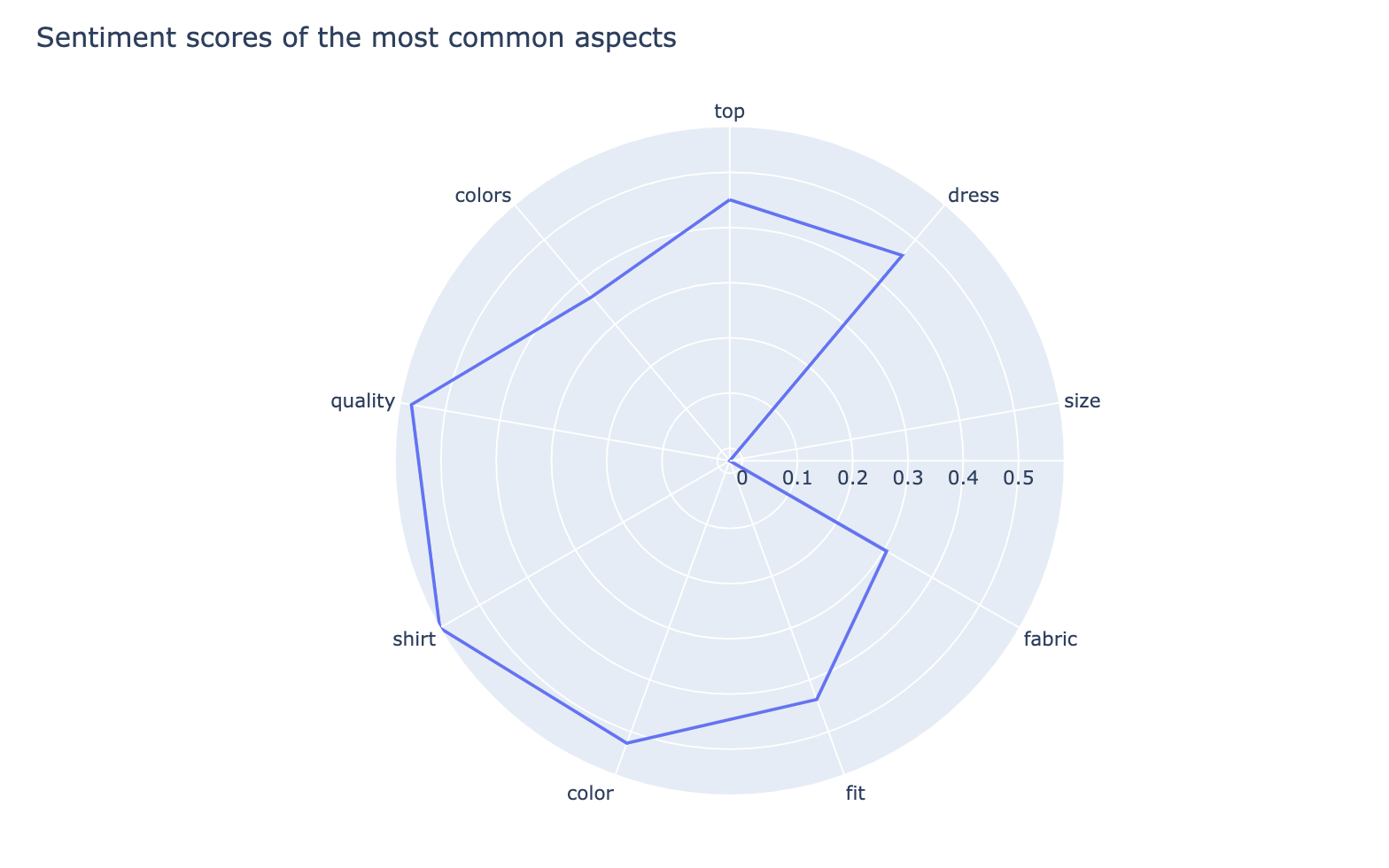
From this chart you can quickly compare customers' average sentiment on each of the common aspects. Here "size" seems to be an aspect that customers are not quite satisfied with.
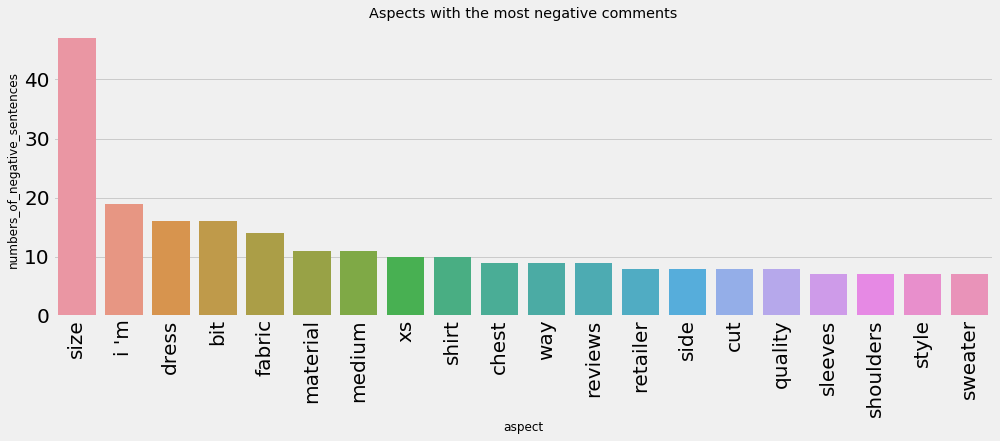
- Aspects with the most negative comments
Exclude certain aspects
You might want to exclude some aspects. For example, if you don't want the aspect "colors", you can do the following:
print("Before:", sample_rm.top_aspects)
sample_rm.aspect_mute_list = ['colors']
print("After:", sample_rm.top_aspects)

When aspect_mute_list has changed, the visualizations will change as well when the related methods are calling, but the
base intermediate output tables (e.g. aspect_opinion_df) won't change.
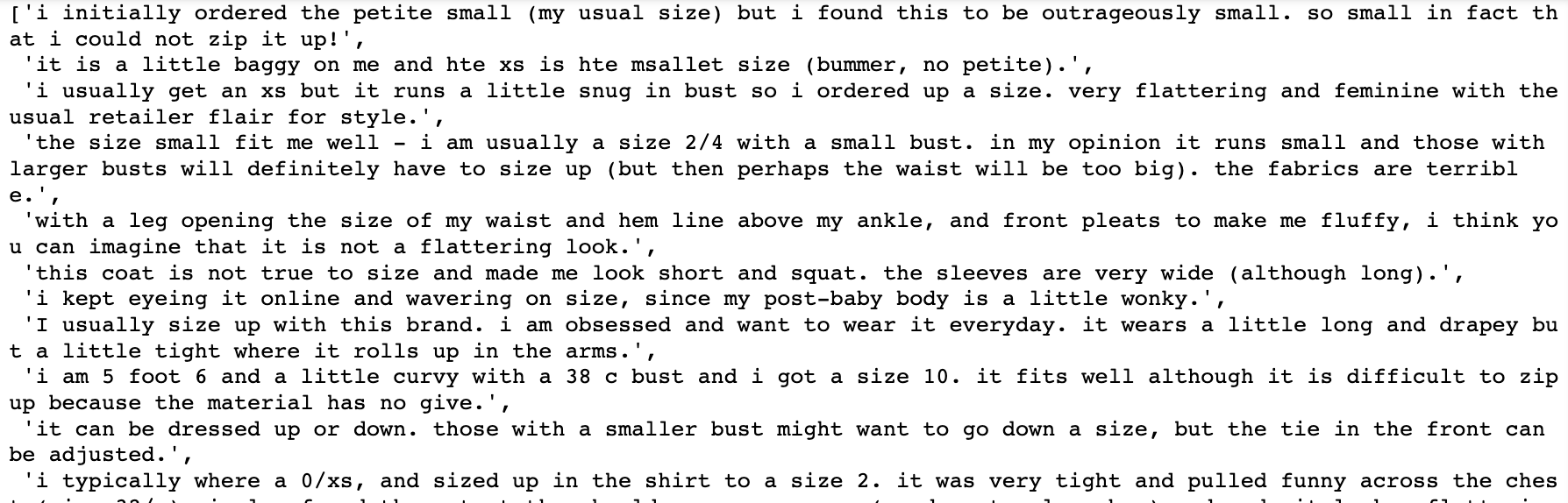
Check out negative comments of an aspect
From the radar chart above we saw that customers might not be very satisfied with "sizes" of the clothes. Let's check out the negative comments around "size"
sample_rm.negative_comments_by_aspects_dict['size']
Check out the most common opinion words of an aspect
sample_rm.single_aspect_view("material")
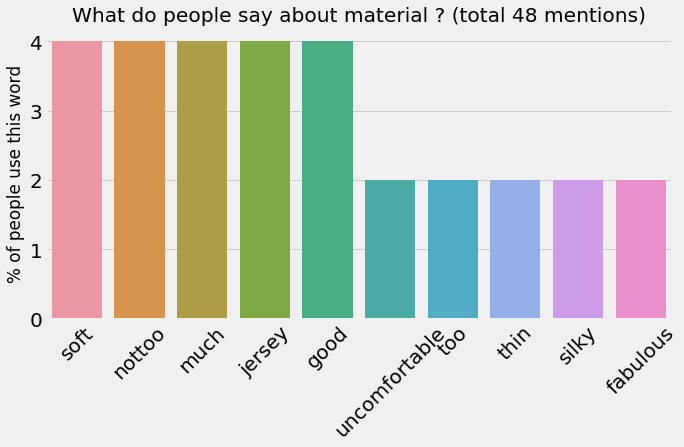
This dataset is not very large so the numbers are not quite prominent.
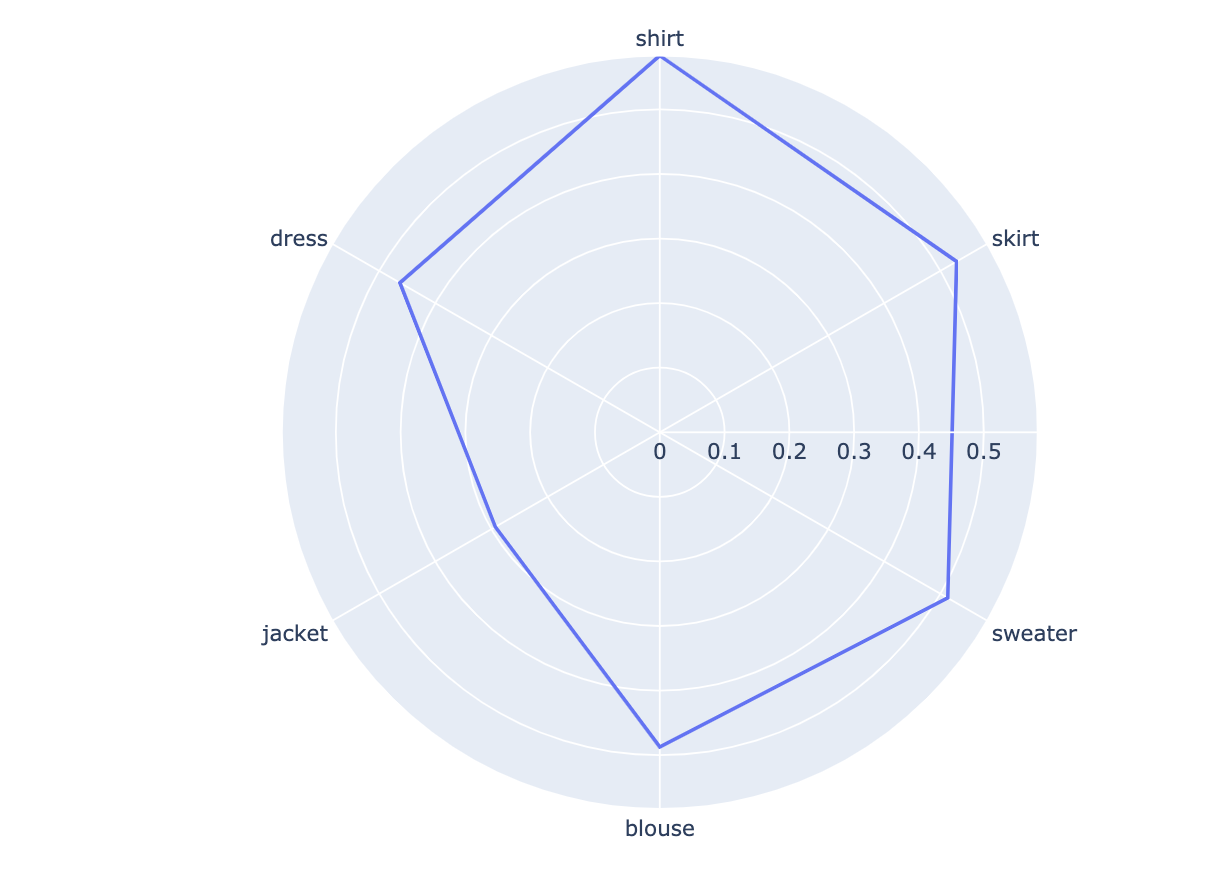
Radar chart of average sentiments for a list of aspects
sample_rm.aspects_radar_plot(['shirt','skirt','sweater','blouse','jacket','dress'])
Tips
-
It’s better to feed in review data on a specific product or service. If you run it on the review data for a specific ramen restaurant, it’s easier to find meaningful aspects. If you feed in Amazon reviews for 5 totally different products, the insights might not be very clear.
-
Sometimes a sample of the data can tell the whole story. If you have a million reviews, the result will be very similar to the result you get from a random sample of 10k reviews. Don’t rush to feed all your data in, try with a sample first ;)
1 maintainer

Metadata
1 maintainer
Release files for reviewminer 1.0.0.3
For a detailed explanation of source distributions (sdists) and built distributions (wheels), please see the package formats documentation.
Source distribution (sdist)
| File | Size | Uploaded | |
|---|---|---|---|
| reviewminer-1.0.0.3.tar.gz | 13.0 kB | Details |
Built distribution (wheel)
| File | Interpreter | ABI | Platform | Reset |
|---|---|---|---|---|
| reviewminer-1.0.0.3-py3-none-any.whl | Python 3 | none | any | Details |
Total release size: 26.9 kB
Release files / reviewminer-1.0.0.3.tar.gz
| Download URL | reviewminer-1.0.0.3.tar.gz |
|---|---|
| Size | 13.0 kB |
| Tags | Source |
|
SHA-256 checksum How to use checksums |
3058b633331da7b3d8eb90534599bb675bc630c97a53ef7ede66d06a5231c6e5
|
|
BLAKE2b-256 checksum How to use checksums |
ad2865e16c1e19f4d72980ffd0befa85c8c0c58453ef2d1e65588f74dd4c3f12
|
| Upload date | |
|
Uploaded using Trusted Publishing? What is trusted publishing? |
No |
| Uploaded via |
twine/3.3.0 pkginfo/1.4.2 requests/2.21.0 setuptools/53.0.0 requests-toolbelt/0.9.1 tqdm/4.28.1 CPython/3.7.1
|
Release files / reviewminer-1.0.0.3-py3-none-any.whl
| Download URL | reviewminer-1.0.0.3-py3-none-any.whl |
|---|---|
| Size | 13.8 kB |
| Tags | Python 3 |
|
SHA-256 checksum How to use checksums |
bc518d53237d8013946d998182b6ec45aa76efae174fa3c2bf4049a3badc296b
|
|
BLAKE2b-256 checksum How to use checksums |
9c956bdf5a6c28f31b8abb88a70778d13b3fb765507f631dca449b1696f42db5
|
| Upload date | |
|
Uploaded using Trusted Publishing? What is trusted publishing? |
No |
| Uploaded via |
twine/3.3.0 pkginfo/1.4.2 requests/2.21.0 setuptools/53.0.0 requests-toolbelt/0.9.1 tqdm/4.28.1 CPython/3.7.1
|














