
Comprehensive text analysis on customers reviews data

Project description
ReviewMiner



ReviewMiner is built for **analyzing customer reviews, or any text datasets that are similar to review data (short opinions
collected from multiple individuals) **. The package is built on top of a variety of natural language processing packages ----
nltk, TextBlob and gensim. The purpose is to allow users to run multiple common text analysis on the review data
at one time, providing intuitive visualizations that can help the users uncover insights, and intermediate output tables that can be used for
further investigations.
Features:
- Aspect and opinion extraction The key methodology in this package is aspect-based opinoin mining. The package has its own algorithm to extract aspects and the relative opinion words from the review data.
- Sentiment on comment and aspect level The package can offer sentiment scores on both comment level and aspect level
- Negative reviews investigation The users can quickly check the negative sentences in the comments. They can also investigate negative comments about certain aspects
Installation
$ pip install reviewminer
Quickstart
One-stop text analysis
import reviewminer as rm
import pandas as pd

# read our sample data
reviews_df = pd.read_csv("https://raw.githubusercontent.com/tianyiwangnova/2021_project__ReviewMiner/main/"
                                 "sample_data/reviews.csv")

# create a reviewminer object (for an example, we will just use the first 500 rows in the data
sample_rm = rm.ReviewMiner(reviews_df.head(500), id_column="Id", review_column='Text')

# run the one time analysis and you will see
sample_rm.one_time_analysis()
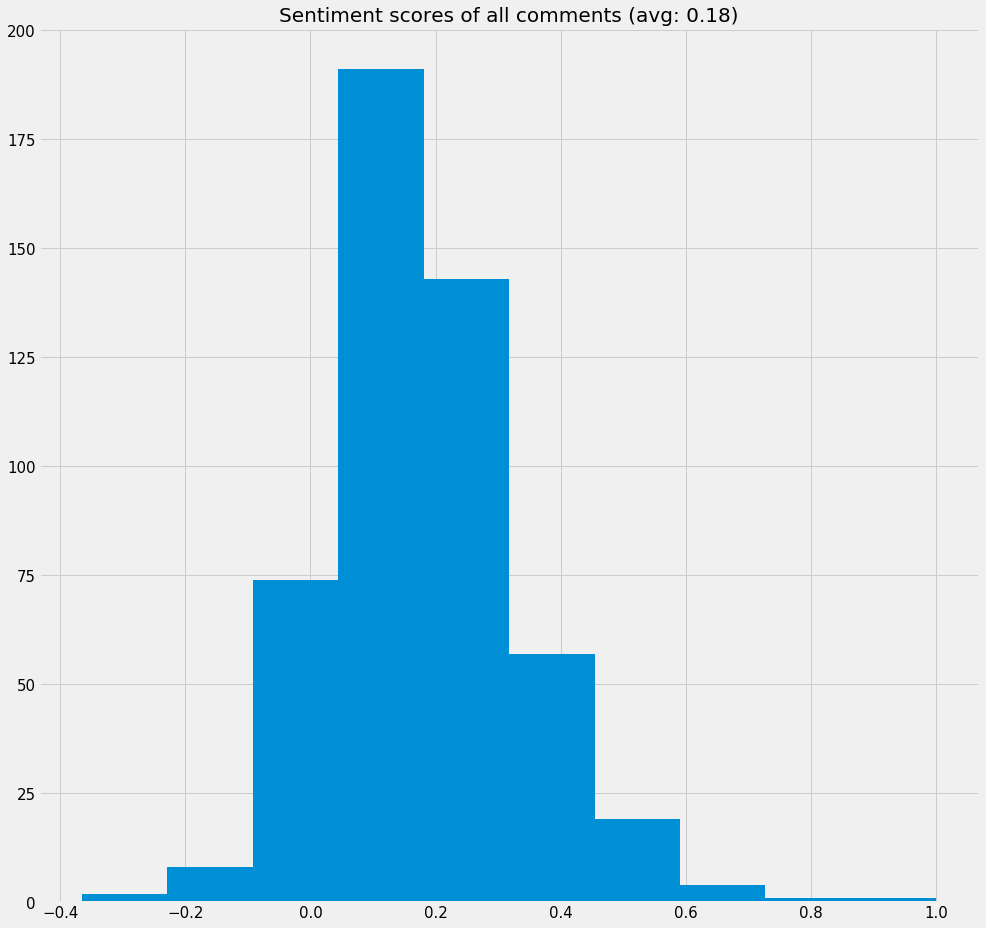
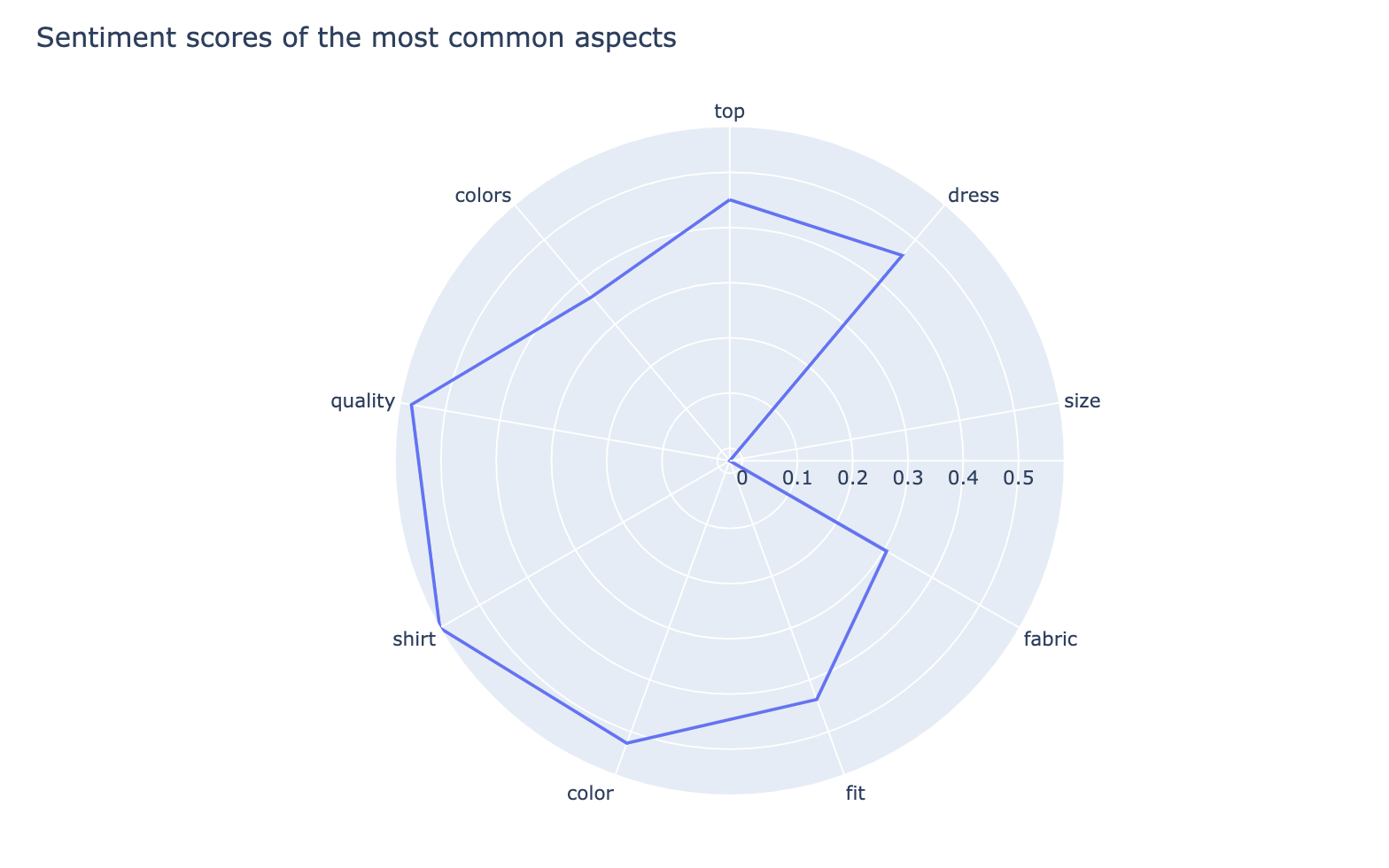
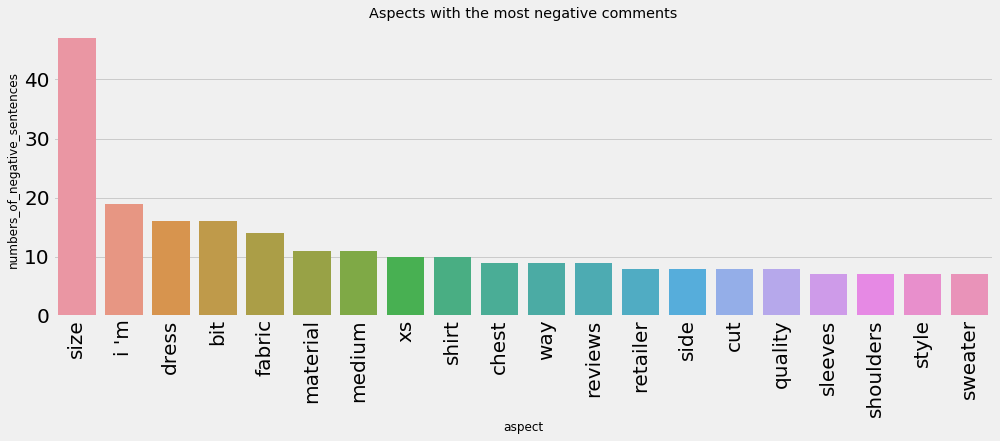
The function will print out 4 visualizations:
- Popular aspects and opinions
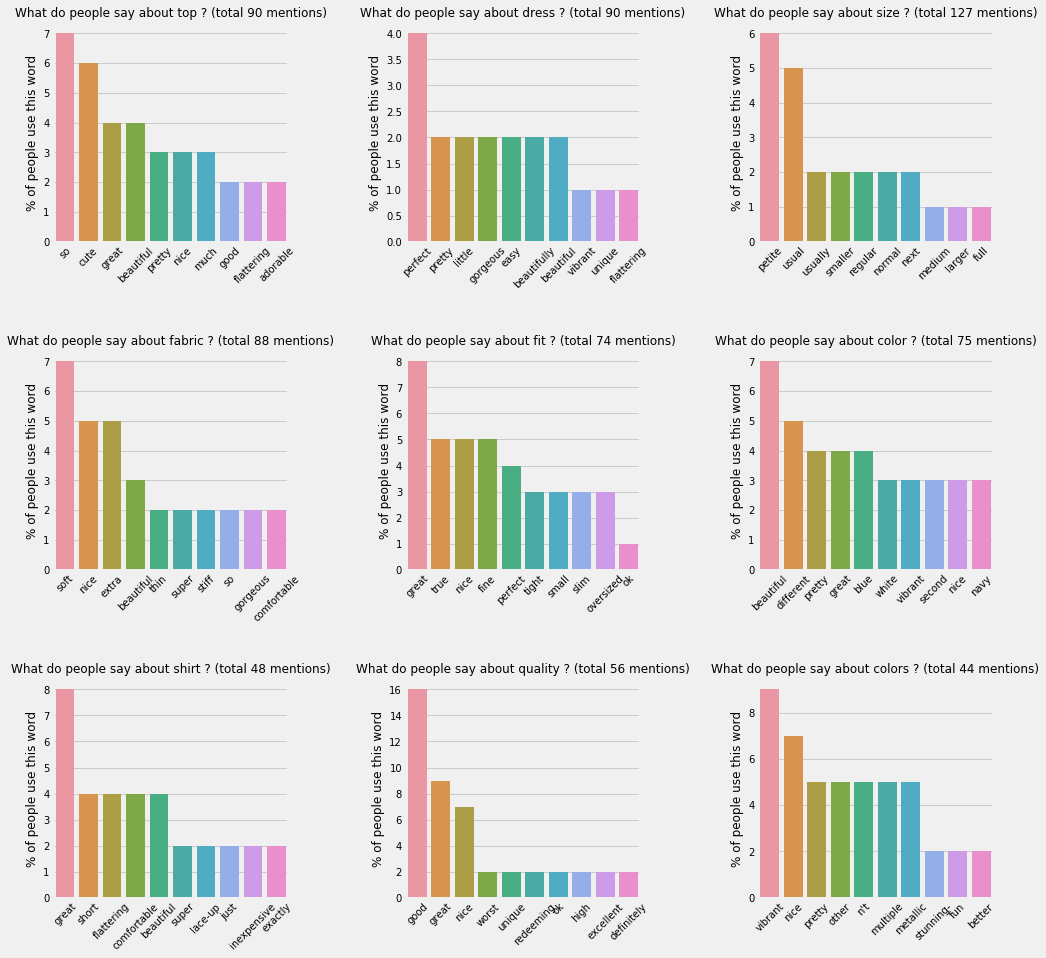
This chart displays 9 most common aspects found in the reviews and the most popular opinions words people used to describe them. In each bar chart, the heights show the percentages of the people using the each opinion word.
-
Distribution of sentiment scores of all comments
-
Radar chart of the most common aspects and their average sentiment scores
-
Aspects with the most negative comments
Exclude certain aspects
You might want to exclude some aspects. For example, the aspect "everything" can't quite offer valuable insights. Then you can do this:
sample_rm.aspect_mute_list = ['everything']
sample_rm.popular_aspects_view()
You will see that the aspect "everything" disappears from the most common aspect list.


Download files
Download the file for your platform. If you're not sure which to choose, learn more about installing packages.
Source Distribution
Built Distribution
Filter files by name, interpreter, ABI, and platform.
If you're not sure about the file name format, learn more about wheel file names.
Copy a direct link to the current filters
File details
Details for the file reviewminer-1.0.0.2.tar.gz.
File metadata
- Download URL: reviewminer-1.0.0.2.tar.gz
- Upload date:
- Size: 11.6 kB
- Tags: Source
- Uploaded using Trusted Publishing? No
- Uploaded via: twine/3.3.0 pkginfo/1.4.2 requests/2.21.0 setuptools/53.0.0 requests-toolbelt/0.9.1 tqdm/4.28.1 CPython/3.7.1
File hashes
| Algorithm | Hash digest | |
|---|---|---|
| SHA256 |
65f291692c7d28230acc2ce60c229333d8f5eb212062730dc7cceef888854d4d
|
|
| MD5 |
33afa519f8d6797aef7f0749afe209c2
|
|
| BLAKE2b-256 |
90d36096c711fd33ed91dc0dcc95d906b53fad5a76c0a035a1ebb16772c0aa27
|
File details
Details for the file reviewminer-1.0.0.2-py3-none-any.whl.
File metadata
- Download URL: reviewminer-1.0.0.2-py3-none-any.whl
- Upload date:
- Size: 13.1 kB
- Tags: Python 3
- Uploaded using Trusted Publishing? No
- Uploaded via: twine/3.3.0 pkginfo/1.4.2 requests/2.21.0 setuptools/53.0.0 requests-toolbelt/0.9.1 tqdm/4.28.1 CPython/3.7.1
File hashes
| Algorithm | Hash digest | |
|---|---|---|
| SHA256 |
51d4e84daae312a6f921e7a6c5e472daecf51276734e402027affb5a5b482e2d
|
|
| MD5 |
0f07876dd781796cfcf3e2bfb391aea3
|
|
| BLAKE2b-256 |
2d1025f36065a09fc9c31e967d87df3700491b6a235e8c059f526457c159b900
|






