
Speech recording application for creating high-quality speech datasets

Project description
Revoxx - Record Voices
This repository provides Revoxx, a graphical recording application for recording raw speech and generating datasets.








Overview
Revoxx has been created by Grammatek ehf and is part of the Icelandic Language Technology Programme.
- Category: TTS
- Domain: Laptop/Workstation
- Languages: Python
- Language Version/Dialect:
- Python: 3.9 - 3.13
- Audience: Developers, Researchers
- Origins: Icelandic EmoSpeech scripts
Status

System Requirements
- Operating System: Linux/OS-X, should work on Windows
- Recording: Audio Interface, good voice microphone and headphones
- Linux: Requires PortAudio library (
sudo apt-get install portaudio19-devon Ubuntu/Debian)
Description
Revoxx is a graphical speech recorder specialized in recording TTS datasets quickly and reliably.
You can use this project to create emotional / non-emotional voice recordings on a Workstation / Laptop with suitable audio equipment.
It has integrated support to easily transform raw recordings into datasets for training TTS voice models.
This tool is especially useful for recording many short utterances - up to an utterance duration of approx. 30-45 secs each.
For longer texts, you need to split your input texts in appropriately sized chunks that would fit on the speaker screen.
Revoxx has been inspired by Icelandic EmoSpeech scripts, but has been vastly improved and is rewritten from scratch.
Screenshot:
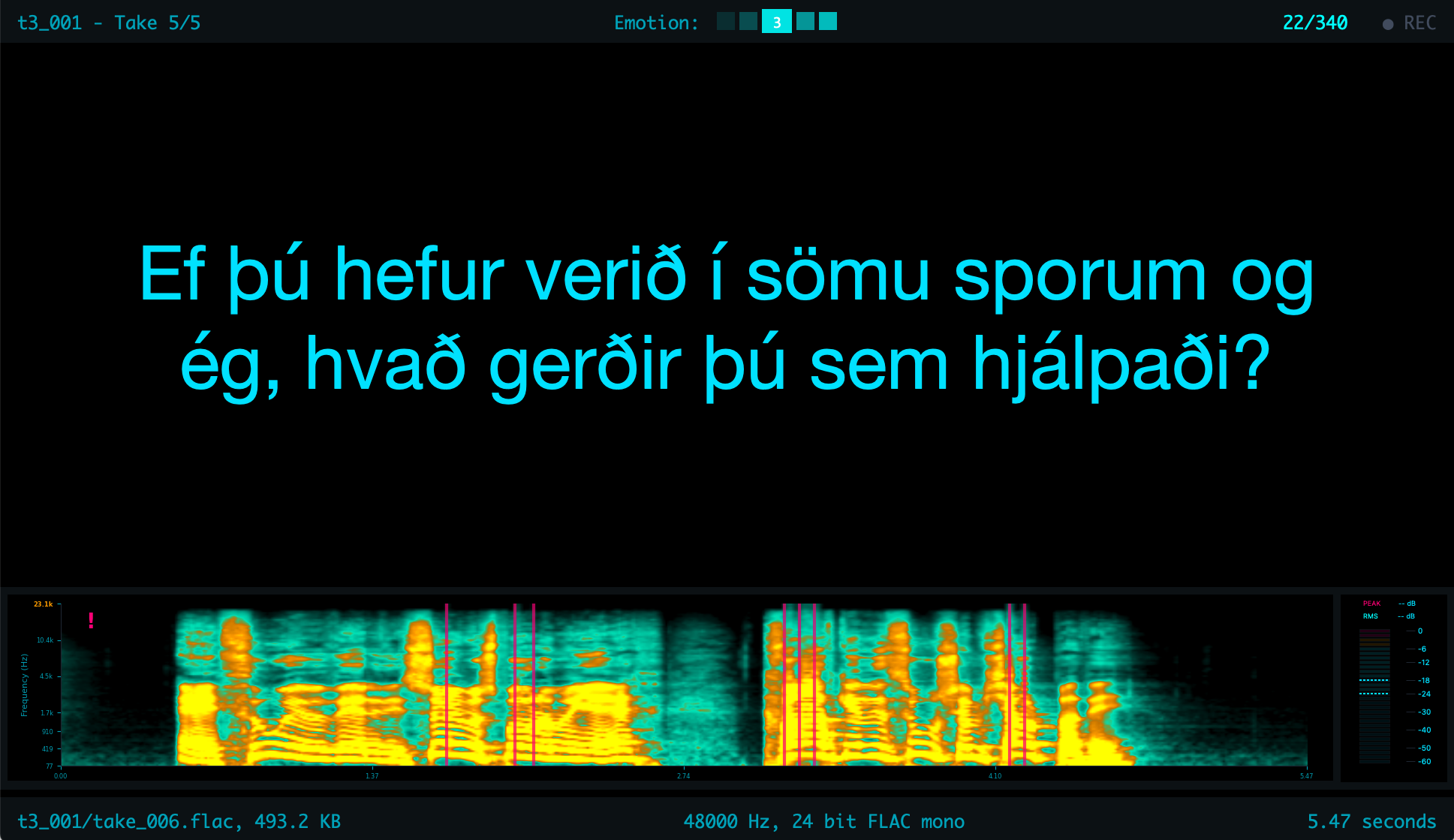
We have condensed our experience from when we recorded Talrómur 3, the Icelandic emotional speech dataset, and created this tool to minimize hassle, valuable recording & post-processing time.
- Revoxx makes recording of speech fast, reliable and convenient for the recording engineer and the voice talent
- Integrates all necessary tools to check if recordings & equipment meet your expected requirements
- Automatically analyzes and validates audio equipment compatibility, including Sample Rate, Bit Depth, and I/O channel configurations
- Supports unlimited re-recording while maintaining a complete archive of raw recordings, even for deleted content
- Text size is automatically adjusted according to available screen real-estate
- Intuitive keyboard shortcuts for accessing core functionalities
- Recordings are organized into Recording Sessions
- Record emotional sessions for each speaker or record more traditional LJSpeech-style sessions
- Seamless transitions between different recording sessions with automatic progress tracking: continue where you left-off
- Offers advanced search and navigation capabilities for utterances, with flexible sorting by label, emotion, text content, and recorded takes
- Consistent audio settings & metadata for all recordings
- Real-time monitoring including toggable recording levels, mel spectrograms, maximum frequency detection, and more
- Customizable industry-standard presets for Peak/RMS levels
- Dedicated Monitoring mode for precise input calibration
- Multi-Screen Support
- You can use multiple monitors to separate recording view from speaker view
- We support Apple's "Continuity" feature for a convenient dual screen setup with an external iPad
- Each screen appearance can be individually configured
- All screen layouts, placement & configuration is preserved at exit
- Export Dataset
- Facilitates batch export of multiple sessions into T3 (Talrómur3) dataset format
- Groups different recording sessions of the same speaker into a common dataset
Installation
Basic Installation
Using uv
uv is a fast Python package installer and resolver:
uv pip install revoxx         # From PyPI
uv pip install .              # From source
uv pip install revoxx[vad]    # With VAD support
Using pip
pip install revoxx           # From PyPI
pip install .                # From source
pip install revoxx[vad]      # With VAD support
From source
git clone https://github.com/icelandic-lt/revoxx.git
cd revoxx
# Then use either uv or pip as shown above
With Voice Activity Detection (VAD)
The VAD functionality requires PyTorch. You need only to install the PyTorch CPU-only version and save a lot of disk space in comparison to the CUDA-enabled version:
# Option 1: CPU-only PyTorch (recommended)
pip install torch --index-url https://download.pytorch.org/whl/cpu
pip install revoxx[vad]

# Option 2: Default PyTorch (often includes CUDA support > 2GB disk-space required)
pip install revoxx[vad]
Note: The VAD uses ONNX models and only requires CPU. The CPU-only version is much smaller and sufficient for all VAD operations.
Development Setup
For development
Using uv (recommended)
git clone https://github.com/icelandic-lt/revoxx.git
cd revoxx

# Create and activate virtual environment
uv venv
source .venv/bin/activate  # On Windows: .venv\Scripts\activate

# Install in editable mode with dev dependencies
uv pip install -e .[dev]
# With VAD support:
uv pip install -e .[dev,vad]
Using pip (traditional)
git clone https://github.com/icelandic-lt/revoxx.git
cd revoxx

# Create and activate virtual environment
python3 -m venv venv
source venv/bin/activate  # On Windows: venv\Scripts\activate

# Install in editable mode with dev dependencies
pip install -e .[dev]
# With VAD support:
pip install -e .[dev,vad]
Development dependencies include:
- black: Code formatter
- isort: Import statement organizer
- flake8: Code linter
- pytest: Testing framework
- pytest-cov: Code coverage reporting
Running code quality checks
# Format code
black revoxx/ scripts_module/ tests/

# Check code style
flake8 revoxx/ scripts_module/ tests/

# Run tests
pytest tests/

# Run tests with coverage
pytest tests/ --cov=revoxx --cov-report=html
Running Revoxx
After installation
Once installed, you can run Revoxx using:
revoxx
macOS Note: The first launch may take longer than usual as macOS verifies the application (Gatekeeper security check). Subsequent launches will be faster.
During development (without installation)
Run as a Python module:
python -m revoxx
In PyCharm or other IDEs
Configure your run configuration with:
- Module name:
revoxx(not script path) - Working directory: Project root directory
Command-line tools
The package includes additional utilities:
revoxx-export    # Export sessions to dataset format
revoxx-vadiate   # Voice Activity Detection tool (requires [vad] option)
Note: The revoxx-vadiate tool requires the VAD dependencies. Install with pip install revoxx[vad] or pip install .[vad] to use this tool.
Command-line arguments
revoxx --help                    # Show all available options
revoxx --show-devices            # List available audio devices
revoxx --session path/to/session # Open specific session
Prepare recordings
Before you start recording, you need to prepare an utterance script with the utterances you want to record. This can be simplified by using the "Import Text to Script" Dialog:
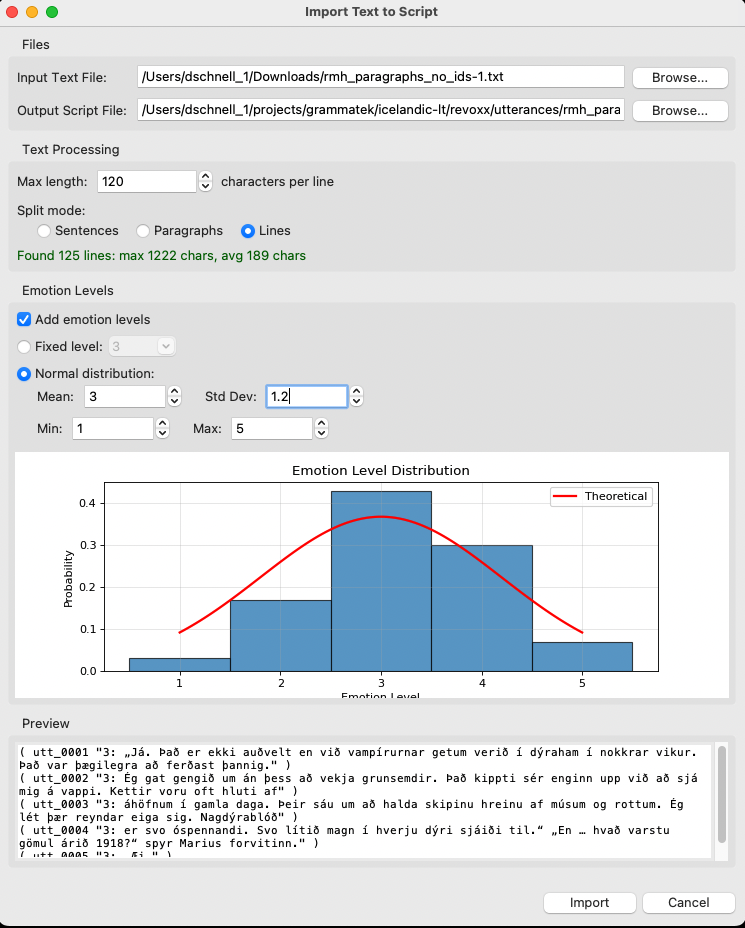
This dialog takes an input script of raw text and converts it into an utterance script. You can redo this for the same input text as many times you want, e.g. if you want to use separate emotional levels for different speakers.
Utterance script format
A script file follows Festival-style format. The script should be a simple text file with one utterance per line. The utterances can be in any language you want.
For a script with emotion levels:
( <unique id> "<emotion-level>: <utterance>" )
For a script without emotion levels. This format was used for recording our non-emotional "addendas":
( <unique id> "<utterance>" )
You can see for both formats an example in the directory t3_scripts.
The emotion levels can be from any monotonic numerical value range you want. If you want to follow Talrómur 3 conventions, you can use emotion intensity levels 1-5 and 6 emotions: neutral, happy, sad, angry, surprised, and helpful. The emotion intensity levels are used to control the emotion intensity of the speech in combination with the specific emotion. Neutral speech is treated as intensity level 0 at dataset export.
Record dataset
to be defined
Acknowledgements
This project is part of the program Language Technology for Icelandic. The program was funded by the Icelandic Ministry of Culture and Business Affairs.
License
This project is licensed under the Apache License 2.0 - see the LICENSE file for details.
Release history Release notifications | RSS feed


Download files
Download the file for your platform. If you're not sure which to choose, learn more about installing packages.
Source Distribution
Built Distribution
Filter files by name, interpreter, ABI, and platform.
If you're not sure about the file name format, learn more about wheel file names.
Copy a direct link to the current filters
File details
Details for the file revoxx-1.0.0.dev14.tar.gz.
File metadata
- Download URL: revoxx-1.0.0.dev14.tar.gz
- Upload date:
- Size: 375.3 kB
- Tags: Source
- Uploaded using Trusted Publishing? No
- Uploaded via: uv/0.8.13
File hashes
| Algorithm | Hash digest | |
|---|---|---|
| SHA256 |
9003ea0aefba5aa29e46cf267d0749ce3718e12876530c47f2ea0cc58e09a007
|
|
| MD5 |
e091bbf222d2e3c28c48cb4a2f98c88e
|
|
| BLAKE2b-256 |
ec17b3da95bb9cfd62c25993eff0e09cd46ab2c48f6684d4e9cc942c41b33865
|
File details
Details for the file revoxx-1.0.0.dev14-py3-none-any.whl.
File metadata
- Download URL: revoxx-1.0.0.dev14-py3-none-any.whl
- Upload date:
- Size: 375.4 kB
- Tags: Python 3
- Uploaded using Trusted Publishing? No
- Uploaded via: uv/0.8.13
File hashes
| Algorithm | Hash digest | |
|---|---|---|
| SHA256 |
e4e5095c881e0ced12df3e6ccdddb8d5620ab5cfde77542098efba2182110d4a
|
|
| MD5 |
f200ac401891ccdef5f872a9d9e71b7c
|
|
| BLAKE2b-256 |
88984bc0d1a962c9a3968fa61591f6d4f9c01149391f1089e2021dfc5afa3e6b
|






