
API for adding content to the Kolibri content curation server


Project description
ricecooker
The ricecooker library is a framework for creating Kolibri content channels and
uploading them to Kolibri Studio, which
is the central content server that Kolibri
applications talk to when they import content.
The Kolibri content pipeline is pictured below:
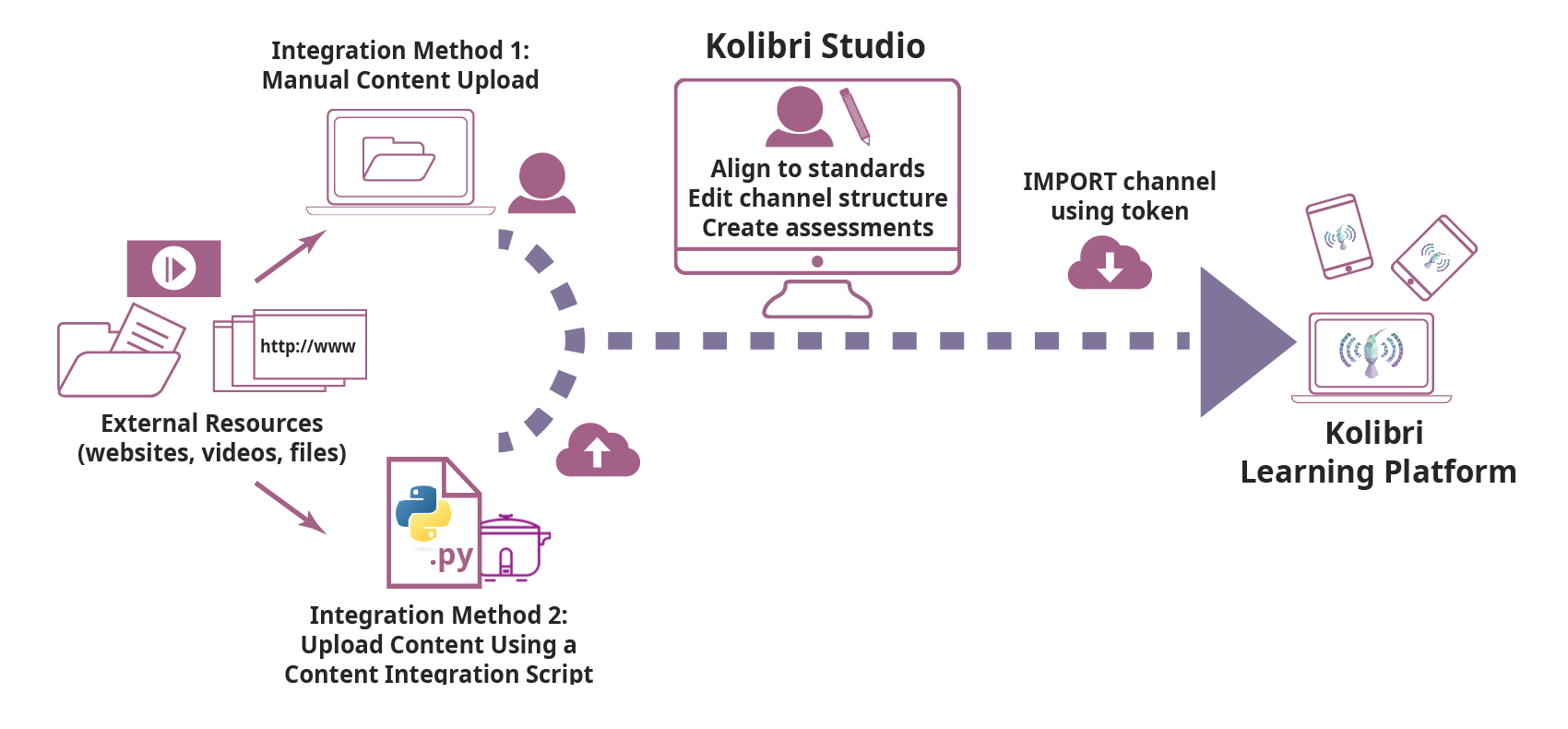
This ricecooker framework is the "main actor" in the first part of the content
pipeline, and touches all aspects of the pipeline within the region highlighted
in blue in the above diagram.
Before we continue, let's have some definitions:
- A Kolibri channel is a tree-like data structure that consist of the following content nodes:
- Topic nodes (folders)
- Content types:
- Document (
pdfandepubfiles) - Audio (
mp3files) - Video (
mp4files and subtitles) - HTML5App
zipfiles (generic container for web content: HTML+JS+CSS) - Exercises
- Document (
- A sushi chef is a Python script that uses the
ricecookerlibrary to import content from various sources, organize content into Kolibri channels and upload the channel to Kolibri Studio.
Overview
Use the following shortcuts to jump to the most relevant parts of the ricecooker
documentation depending on your role:
-
Content specialists and Administrators can read the non-technical part of the documentation to learn about how content works in the Kolibri platform.
- The best place to start is the Kolibri Platform overview.
- Read more about the supported content types here
- Content curators can consult this document for information about how to prepare "spec sheets" that guide developers how to import content into the Kolibri ecosystem.
- The Non-technical of particular interest is the CSV workflow channel metadata as spreadsheets
-
Chef authors can read the remainder of this README, and get started using the
ricecookerlibrary by following these first steps:- Quickstart, which will introduce you to the steps needed to create a sushi chef script.
- After the quickstart, you should be ready to take things into your own hands, and complete all steps in the ricecooker tutorial.
- The next step after that is to read the ricecooker usage docs, which is also available Jupyter notebooks under docs/tutorial/. More detailed technical documentation is available on the following topics:
- Installation
- Content Nodes
- File types
- Exercises
- HTML5 apps
- Parsing HTML
- Running chef scripts to learn about the command line args, for controlling chef operation, managing caches, and other options.
- Sushi chef style guide
-
Ricecooker developers should read all the documentation for chef authors, and also consult the docs in the developer/ folder for additional information info about the "behind the scenes" work needed to support the Kolibri content pipeline:
- Running chef scripts, also known as chefops.
- Running chef scripts in daemon mode
- Managing the content pipeline, also known as sushops.
Installation
We'll assume you have a Python 3 installation on your computer and are familiar
with best practices for working with Python codes (e.g. virtualenv or pipenv).
If this is not the case, you can consult the Kolibri developer docs as a guide for
setting up a Python virtualenv.
The ricecooker library is a standard Python library distributed through PyPI:
- Run
pip install ricecookerto install You can then useimport ricecookerin your chef script. - Some of functions in
ricecooker.utilsrequire additional software:- Make sure you install the command line tool ffmpeg
- Running javascript code while scraping webpages requires the phantomJS browser.
You can run
npm install phantomjs-prebuiltin your chef's working directory.
For more details and install options, see docs/installation.md.
Simple chef example
This is a sushi chef script that uses the ricecooker library to create a Kolibri
channel with a single topic node (Folder), and puts a single PDF content node inside that folder.
#!/usr/bin/env python
from ricecooker.chefs import SushiChef
from ricecooker.classes.nodes import ChannelNode, TopicNode, DocumentNode
from ricecooker.classes.files import DocumentFile
from ricecooker.classes.licenses import get_license


class SimpleChef(SushiChef):
    channel_info = {
        'CHANNEL_TITLE': 'Potatoes info channel',
        'CHANNEL_SOURCE_DOMAIN': '<domain.org>',         # where you got the content (change me!!)
        'CHANNEL_SOURCE_ID': '<unique id for channel>',  # channel's unique id (change me!!)
        'CHANNEL_LANGUAGE': 'en',                        # le_utils language code
        'CHANNEL_THUMBNAIL': 'https://upload.wikimedia.org/wikipedia/commons/b/b7/A_Grande_Batata.jpg', # (optional)
        'CHANNEL_DESCRIPTION': 'What is this channel about?',      # (optional)
    }

    def construct_channel(self, **kwargs):
        channel = self.get_channel(**kwargs)
        potato_topic = TopicNode(title="Potatoes!", source_id="<potatos_id>")
        channel.add_child(potato_topic)
        doc_node = DocumentNode(
            title='Growing potatoes',
            description='An article about growing potatoes on your rooftop.',
            source_id='pubs/mafri-potatoe',
            license=get_license('CC BY', copyright_holder='University of Alberta'),
            language='en',
            files=[DocumentFile(path='https://www.gov.mb.ca/inr/pdf/pubs/mafri-potatoe.pdf',
                                language='en')],
        )
        potato_topic.add_child(doc_node)
        return channel


if __name__ == '__main__':
    """
    Run this script on the command line using:
        python simple_chef.py -v --reset --token=YOURTOKENHERE9139139f3a23232
    """
    simple_chef = SimpleChef()
    simple_chef.main()
Let's assume the above code snippet is saved as the file simple_chef.py.
You can run the chef script by passing the appropriate command line arguments:
python simple_chef.py -v --reset --token=YOURTOKENHERE9139139f3a23232
The most important argument when running a chef script is --token which is used
to pass in the Studio Access Token which you can obtain from your profile's
settings page.
The flags -v (verbose) and --reset are generally useful in development.
These make sure the chef script will start the process from scratch and displays
useful debugging information on the command line.
To see all the ricecooker command line options, run python simple_chef.py -h.
For more details about running chef scripts see the chefops page.
If you get an error when running the chef, make sure you've replaced
YOURTOKENHERE9139139f3a23232 by the token you obtained from Studio.
Also make sure you've changed the value of channel_info['CHANNEL_SOURCE_DOMAIN']
and channel_info['CHANNEL_SOURCE_ID'] instead of using the default values.
Next steps
- See the usage docs for more explanations about the above code.
- See nodes to learn how to create different content node types.
- See file to learn about the file types supported, and how to create them.
Further reading
- Read the Kolibri Studio docs to learn more about the Kolibri Studio features
- Read the Kolibri user guide to learn how to install Kolibri on your machine (useful for testing channels)
- Read the Kolibri developer docs to learn about the inner workings of Kolibri.
======= History
0.6.30 (2019-05-01)
- Updated docs build scripts to make ricecooker docs available on read the docs
- Added
correctionscommand line script for making bulk edits to content metadata - Added
StudioApiclient to support CRUD (created, read, update, delete) Studio actions - Added pdf-splitting helper methods (see
ricecooker/utils/pdf.py)
0.6.23 (2018-11-08)
- Updated
le-utilsandpressurcookerdependencies to latest version - Added support for ePub files (
EPubFiles can be added ofDocumentNodes) - Added tag support
- Changed default value for
STUDIO_URLtoapi.studio.learningequality.org - Added
aggregatorandproviderfields for content nodes - Various bugfixes to image processing in exercises
- Changed validation logic to use
self.filenameto check file format is inself.allowed_formats - Added
is_youtube_subtitle_file_supported_languagehelper function to support importing youtube subs - Added
srt2vttsubtitles conversion - Added static assets downloader helper method in
utils.downloader.download_static_assets - Added LineCook chef functions to
--generateCSV from directory structure - Fixed the always
randomize=Truebug - Docs: general content node metadata guidelines
- Docs: video compression instructions and helper scripts
convertvideo.batandconvertvideo.sh
0.6.17 (2018-04-20)
- Added support for
roleattribute on ConentNodes (currentlycoach||learner) - Update pressurecooker dependency (to catch compression errors)
- Docs improvements, see https://github.com/learningequality/ricecooker/tree/master/docs
0.6.15 (2018-03-06)
- Added support for non-mp4 video files, with auto-conversion using ffmpeg. See
git diff b1d15fa 87f2528 - Added CSV exercises workflow support to
LineCookchef class - Added --nomonitor CLI argument to disable sushibar functionality
- Defined new ENV variables:
- PHANTOMJS_PATH: set this to a phantomjs binary (instead of assuming one in node_modules)
- STUDIO_URL (alias CONTENTWORKSHOP_URL): set to URL of Kolibri Studio server where to upload files
- Various fixes to support sushi chefs
- Removed
minimize_html_css_jsutility function fromricecooker/utils/html.pyto remove dependency oncss_html_js_minifyand support Py3.4 fully.
0.6.9 (2017-11-14)
- Changed default logging level to --verbose
- Added support for cronjobs scripts via
--cmdsock(see docs/daemonization.md) - Added tools for creating HTML5Zip files in utils/html_writer.py
- Added utility for downloading HTML with optional js support in utils/downloader.py
- Added utils/path_builder.py and utils/data_writer.py for creating souschef archives (zip archive that contains files in a folder hierarchy + Channel.csv + Content.csv)
0.6.7 (2017-10-04)
- Sibling content nodes are now required to have unique source_id
- The field
copyright_holderis required for all licenses other than public domain
0.6.7 (2017-10-04)
- Sibling content nodes are now required to have unique source_id
- The field
copyright_holderis required for all licenses other than public domain
0.6.6 (2017-09-29)
- Added
JsonTreeChefclass for creating channels from ricecooker json trees - Added
LineCookchef class to support souschef-based channel workflows
0.6.4 (2017-08-31)
- Added
languageattribute forContentNode(string key in internal repr. defined in le-utils) - Made
languagea required attribute for ChannelNode - Enabled sushibar.learningequality.org progress monitoring by default Set SUSHIBAR_URL env. var to control where progress is reported (e.g. http://localhost:8001)
- Updated le-utils and pressurecooker dependencies to latest
0.6.2 (2017-07-07)
- Clarify ricecooker is Python3 only (for now)
- Use https:// and wss:// for SuhiBar reporting
0.6.0 (2017-06-28)
- Remote progress reporting and logging to SushiBar (MVP version)
- New API based on the SuchiChef classes
- Support existing old-API chefs in compatibility mode
0.5.13 (2017-06-15)
- Last stable release before SushiBar functionality was added
- Renamed --do-not-activate argument to --stage
0.1.0 (2016-09-30)
- First release on PyPI.
Release history Release notifications | RSS feed


Download files
Download the file for your platform. If you're not sure which to choose, learn more about installing packages.
Source Distribution
File details
Details for the file ricecooker-0.6.30.tar.gz.
File metadata
- Download URL: ricecooker-0.6.30.tar.gz
- Upload date:
- Size: 1.2 MB
- Tags: Source
- Uploaded using Trusted Publishing? No
- Uploaded via: twine/1.13.0 pkginfo/1.5.0.1 requests/2.18.4 setuptools/40.8.0 requests-toolbelt/0.9.1 tqdm/4.23.4 CPython/3.6.5
File hashes
| Algorithm | Hash digest | |
|---|---|---|
| SHA256 |
ef764708a65e14ea4632b2a5e8b6faf457a30d6c1083e21babaebccd23f08ff8
|
|
| MD5 |
1eda49ce67bd8396383d056adb1e1181
|
|
| BLAKE2b-256 |
d057178f193b7fd363a43e0f2f901312776b4bbf8b38450f6a393cad97b2c41b
|






