





Purpose
rich-gradient layers smooth foreground and background gradients on top of
Rich renderables.
It includes a drop-in Text subclass, wrappers for Panel and Rule,
gradient-aware Markdown, convenience wrappers for common Rich renderables,
animated variants, and utilities for building palettes.
Highlights
- Works anywhere Rich expects a
ConsoleRenderable, including panels, tables, and live updates. - Generates color stops automatically or from CSS color names,
hex codes, RGB tuples, or
rich.color.Colorobjects. - Supports foreground and background gradients, rainbow palettes, and seedable color spectrums.
- Ships with ready-to-use renderables:
AnimatedText,AnimatedGradient,AnimatedPanel,AnimatedRule, andAnimatedMarkdownfor live gradient updates.- Loads optional JSON configuration from
~/.rich-gradient/config.json, where you can toggle animation globally and customize the default spectrum palette. Invalid settings are ignored with a logged warning rather than raising. - Optional Rich traceback formatting via
rich_gradient.install_tracebacks().
What's new in v0.4.0
- Breaking — importing
rich_gradientno longer installs Rich's pretty traceback handler (it previously replacedsys.excepthookas an import side effect). Programs run identically; only uncaught-exception formatting is affected. To keep Rich tracebacks, callrich_gradient.install_tracebacks()once at startup, or setRICH_GRADIENT_TRACEBACKS=1for the old automatic behavior with no code changes. - Changed — color strings are parsed with Rich's own parser first, falling
back to
rich-color-ext(CSS names and 3-digit hex). Names Rich defines keep Rich's meaning, so"red"is ANSI red (#800000); use"#ff0000"for pure red. Requiresrich-color-ext>=3.0.0. - Changed —
hueshas a minimum of 2 everywhere and raisesValueErrorbelow that (Gradientused to clamp silently). - Changed — configuration loading is stricter and quieter: invalid values
are ignored with a warning,
RICH_GRADIENT_ANIMATEalso accepts0/false/no/off, and the defaulthotpinkpalette entry is nowpink. - Changed — the docs moved from MkDocs to Zensical
(
zensical.toml), and CI now tests Python 3.11–3.14 and builds the docs. - Fixed gradients now reach their first and last colors:
repeat_scaledefaults toNoneand is derived from the color stops (previouslyMarkdownstopped at the second color and two-color gradients stopped halfway). Pass an explicitrepeat_scaleto keep the old spread. - Fixed
Gradientaccepts a tuple or generator of renderables, as documented, andGradient("")prints a blank line likeconsole.print(""). - Fixed
Ruleonly reports "Invalid color for Rule" for real color errors; other errors (such as a badhues) keep their own message. - Fixed
Panelcrashing whenstylewas passed as arich.style.Styleinstance instead of a string. - Fixed
Rule()can now be constructed without a title, matchingAnimatedRuleand Rich's ownRule. - Fixed
AnimatedRulenow uses its faster phase speed when animation is enabled via the global config, not only whenanimate=Trueis passed. - Removed the unused
requestsruntime dependency for lighter installs.
See the CHANGELOG for more details.
Installation
rich-gradient requires Python 3.11 or newer.
uv
# Recommended: use uv
uv add rich-gradient

# or via `uv pip`
uv pip install rich-gradient
Pip
Or with pip:
# via pip
pip install rich-gradient
Contributor notes
Use uv for everything:
- Install:
uv sync - Tests:
uv run pytestworks without an editable install becausetests/conftest.pyaddssrc/tosys.path. - Type check:
uv run mypy - Docs:
uv run zensical serveto preview anduv run zensical build --cleanto build (the docs use Zensical; there is nomkdocs.yml).
CI runs the tests on Python 3.11, 3.12, 3.13, and 3.14 and builds the docs, so
run uv run pytest and uv run zensical build --clean before committing.
Usage
Basic Gradient Text Example
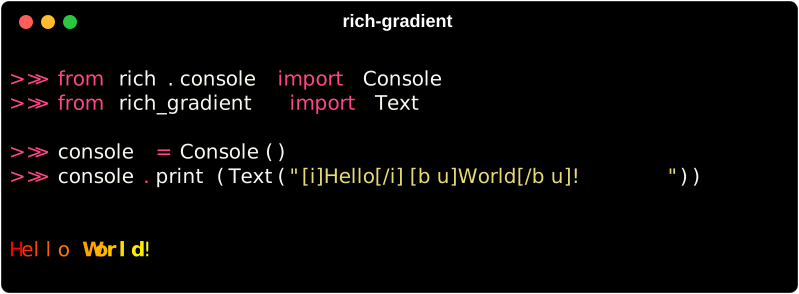
Use Text when you want a drop-in rich.text.Text replacement with gradient
spans applied to the text itself.
from rich.console import Console
from rich_gradient import Text

console = Console()
console.print(Text("[i]Hello[/i] [b u] World![/b u]"))
Gradient Text with Specific Colors
If you want a bit more control of the gradient,
you can specify the colors you want to use in the gradient
by passing them as a list of colors to the colors parameter.
Color Formats
Color can be parsed from a variety of formats including:
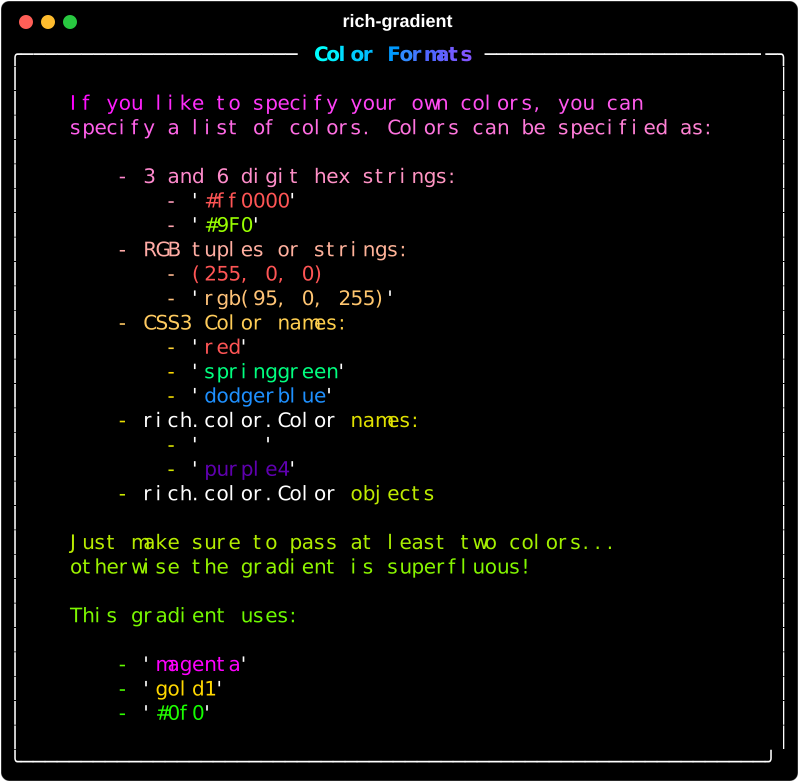
Colors are parsed with Rich's own parser first, falling back to
rich-color-ext for CSS names
and 3-digit hex. Names Rich defines keep Rich's meaning, so "red" is ANSI red
(#800000) while "#ff0000" is pure red; CSS-only names like "tomato" work as
expected.
Example Code
Specific Two-Color Gradient Example
console.print(
    Text(
        "This a gradient with two colors.",
        colors=["#f00", "orange"],
    ),
    justify="center"
)

Specific Four-Color Gradient Example
console.print(
    Text(
        "This a gradient uses four specific colors.",
        colors=["#f00", "#ff9900", "#ff0", "Lime"],
        justify="center",
    ),
)
Specific Color Gradient Result
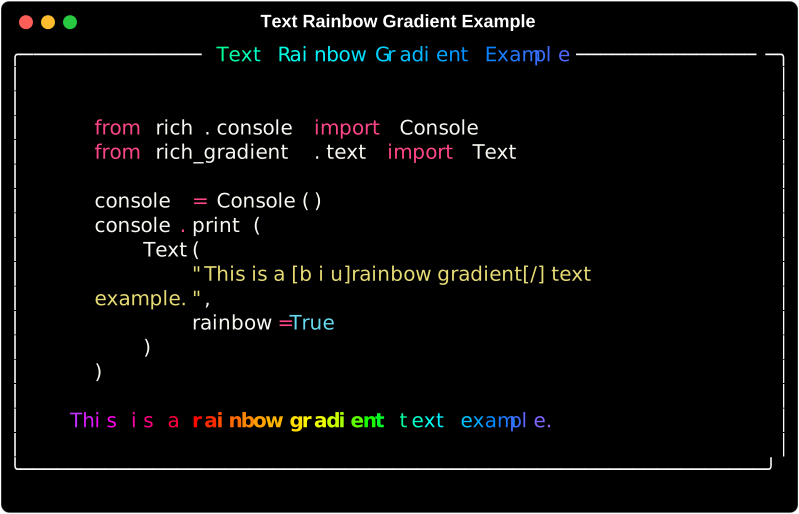
Rainbow Gradient Example
If four colors aren't enough, you can use the 'rainbow' parameter to generate a rainbow gradient that spans the full spectrum palette.
console.print(
    Text(
        "This is a rainbow gradient.",
        rainbow=True,
        justify="center",
    ),
)
Use Spectrum(hues=..., seed=...) when you need reproducible color stops.
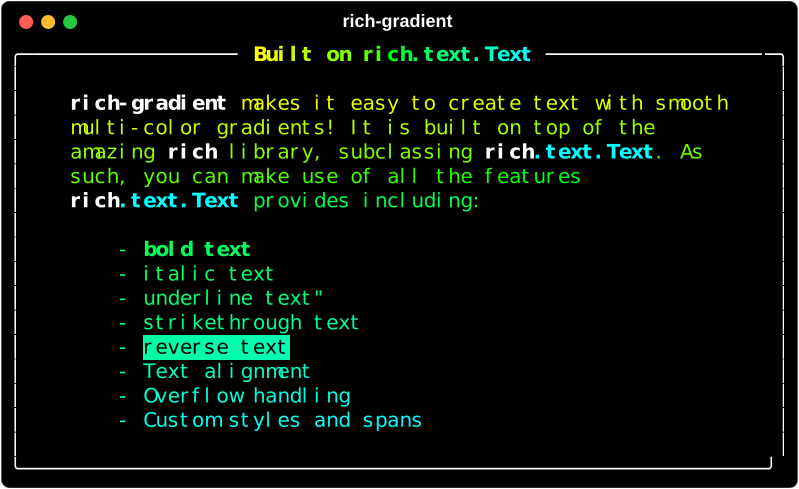
Still inherits from rich.text.Text
Since Text is a subclass of rich.text.Text, you can still use all
the same methods and properties as you would with Text.
console.print(
    Text(
        "This is an underlined rainbow gradient.",
        rainbow=True,
        style="underline",
    ),
    justify="center"
)
console.line()
console.print(
    Text(
        "This is a bold italic gradient.",
        style="bold italic",
    ),
    justify="center"
)
console.line()
Wrap Any Rich Renderable
Use Gradient when you want to paint across an existing Rich renderable, such
as Markdown, a table, a layout, or a standard Rich panel.
from rich.console import Console
from rich.markdown import Markdown
from rich_gradient import Gradient

console = Console()
console.print(
    Gradient(
        Markdown("## Renderables\n\n- Text\n- Panels\n- Markdown"),
        colors=["#38bdf8", "#a855f7", "#f97316"],
        bg_colors=["#0f172a", "#1f2937"],
        justify="center",
    )
)
Pass a list, tuple, or generator to wrap several renderables at once. See
examples/renderables_that_work.py for a
script that renders every renderable and reports which ones work:

Background Gradients
Pass bg_colors to Text, Gradient, Panel, Rule, or Markdown to apply
background color stops. A single background color is treated as a solid fill;
multiple stops interpolate across the rendered output.
from rich_gradient import Text

Text(
    "Foreground and background gradient",
    colors=["#f8fafc", "#a7f3d0"],
    bg_colors=["#0f172a", "#1e293b"],
)
Markdown
Use Markdown for a Rich Markdown renderable with the same gradient controls
as Gradient.
from rich.console import Console
from rich_gradient import Markdown

console = Console()
console.print(
    Markdown(
        "# Gradient Markdown\n\nSupports **Rich Markdown** content.",
        colors=["cyan", "magenta", "gold1"],
    )
)
CLI
This package no longer ships a command-line interface. Install
rich-gradient-cli for
terminal commands that build on the renderables provided here.

1 maintainer

Metadata
1 maintainer
Release files for rich-gradient 0.4.0
For a detailed explanation of source distributions (sdists) and built distributions (wheels), please see the package formats documentation.
Source distribution (sdist)
| File | Size | Uploaded | |
|---|---|---|---|
| rich_gradient-0.4.0.tar.gz | 17.5 MB | Details |
Built distribution (wheel)
| File | Interpreter | ABI | Platform | Reset |
|---|---|---|---|---|
| rich_gradient-0.4.0-py3-none-any.whl | Python 3 | none | any | Details |
Total release size: 17.5 MB
Release files / rich_gradient-0.4.0.tar.gz
| Download URL | rich_gradient-0.4.0.tar.gz |
|---|---|
| Size | 17.5 MB |
| Tags | Source |
|
SHA-256 checksum How to use checksums |
5f4604168d26db4b5af4a25fd0c55879a4f1b853bccc2d9f10c47f90cca576d6
|
|
BLAKE2b-256 checksum How to use checksums |
c28946f0fe11a6251bc3d9a34e7e1fccbdabe97355bef51e459cec7b7882e2be
|
| Upload date | |
|
Uploaded using Trusted Publishing? What is trusted publishing? |
No |
| Uploaded via |
uv/0.13.0 {"installer":{"name":"uv","version":"0.13.0","subcommand":["publish"]},"python":null,"implementation":{"name":null,"version":null},"distro":{"name":"macOS","version":null,"id":null,"libc":null},"system":{"name":null,"release":null},"cpu":null,"openssl_version":null,"setuptools_version":null,"rustc_version":null,"ci":null}
|
Release files / rich_gradient-0.4.0-py3-none-any.whl
| Download URL | rich_gradient-0.4.0-py3-none-any.whl |
|---|---|
| Size | 72.9 kB |
| Tags | Python 3 |
|
SHA-256 checksum How to use checksums |
b0d0cfa1dc7088fad92b65181e6cc0ff50465c8fd28bc2393f35f943bba5d46c
|
|
BLAKE2b-256 checksum How to use checksums |
b404c4b5a4b75bc9b8484c8df680999feae02d358a2c4d9eb141cebd8a0236dc
|
| Upload date | |
|
Uploaded using Trusted Publishing? What is trusted publishing? |
No |
| Uploaded via |
uv/0.13.0 {"installer":{"name":"uv","version":"0.13.0","subcommand":["publish"]},"python":null,"implementation":{"name":null,"version":null},"distro":{"name":"macOS","version":null,"id":null,"libc":null},"system":{"name":null,"release":null},"cpu":null,"openssl_version":null,"setuptools_version":null,"rustc_version":null,"ci":null}
|














