
rich-struct
Pretty, themed output for Python, built on rich. You get rich's print with 25 colour themes (23 from popular editors, two of our own) and one-call helpers for Markdown, HTML, JSON, YAML, XML, code, Python objects and tables: lists, numpy arrays, pandas DataFrames and Series. There's also coloured structlog logging in the same themes.
It works in a plain terminal and looks best in Jupyter notebooks, VS Code's in particular.
Note: rich-struct is an independent wrapper around
rich. It isn't part of the Textualize/rich project, and that project doesn't endorse it.
Install
You need Python 3.9 or newer. The only required dependency is rich 13+.
pip install rich-struct
Some features need an extra:
| Extra | Adds | Needed for |
|---|---|---|
yaml |
pyyaml |
print_yaml with an object, or with max_list_length (a plain YAML string works without it) |
html |
markdownify |
print_html |
log |
structlog 22+ |
rich_struct.log |
pip install "rich-struct[yaml,html,log]" # all of them
numpy and pandas aren't dependencies. If you have them installed, rich-struct prints them as tables.
Quick start
from rich.markdown import Markdown
from rich.theme import Theme
from rich_struct import (
    ThemeName, print, print_err, print_html, print_json, print_list, print_md,
    print_obj, print_syntax, print_table, print_xml, print_yaml, set_default_theme,
)

print("[bold]hello[/bold]", {"a": 1})                 # works like rich.print, in Midnight Slate by default
print(Markdown("## Printing structs"), theme=ThemeName.DRACULA)

print_md("# Title\n\n```python\nprint('hi')\n```")
print_json({"a": [1, 2, None]}, theme="Nord")         # a theme's name as a string works too
print_yaml("a: 1\nb: [x, y]")
print_xml("<a><b c='d'/></a>")                        # or an ElementTree element, which gets indented
print_html("<h1>Title</h1><p>Some <b>bold</b> text</p>")  # renders the page instead of showing its tags
print_obj(my_dataclass, theme=ThemeName.GITHUB_LIGHT)
print_obj(data, max_list_length=10, max_string=80)    # long containers and strings end in "... +N"
print_obj(doc, apply_newlines=True)                   # a "\n" inside a string starts a new line
print_json(data, max_list_length=10)                  # print_yaml takes max_list_length too
print_syntax("SELECT 1", "sql")                       # any pygments lexer
print_table(df, title="Sales")                        # DataFrame, Series, numpy array, list...
print(df)                                             # print turns arrays and frames into tables too
print_err(ValueError("bad input"))                    # error text or an exception, in the theme's error colour
print_list(series, head_tail_only=True)               # [1, 2.5, 'text',  ...  98, 99]

print_md("# Mine", theme=Theme({"markdown.h1": "bold magenta", "syntax.keyword": "red"}))
set_default_theme("Dracula")                          # every call from now on uses Dracula
Choosing a theme
Every function takes theme=, which can be a ThemeName, its string value ("Nord"), or your own rich Theme. To change the theme everywhere at once, call set_default_theme("Dracula"). It accepts the same values, and calling it with no argument goes back to Midnight Slate.
In a VS Code notebook the default theme follows VS Code's colour theme (workbench.colorTheme in your user settings): you get Light Modern with a light VS Code theme and Dark Modern with a dark one. This only works when the kernel runs on the same machine as VS Code. Otherwise the default stays Midnight Slate.
If you want a theme for your own Console, ThemeName.X.theme gives you the underlying rich Theme.
Notebooks
In a notebook, each print_* output sits in its own box: rounded corners, a little padding and a 1px border in a colour between the theme's background and text. That keeps it separate from the rest of the notebook, even when the notebook uses the same theme. Log blocks look the same and also have an accent bar on the left.
VS Code notebooks show rich's output in rich's own monospace font (Menlo, DejaVu Sans Mono...). Call use_rich_font_override(True) to use the font that plain print() gets, and False to switch back. Lines stay closer together than in print() output on purpose. VS Code gives print() a looser line height, but rich keeps line-height:normal so that table and panel borders join into solid lines, and copying print()'s spacing would leave gaps in them.
A few things that hold for every function
- Passing
NoneprintsNone(nullfor JSON) in the theme's colour for null values. Nothing raises. - In a notebook, output is painted on the theme's background across the full width. In a terminal it keeps the terminal's own background. Pass
background=TrueorFalseto one call, or calluse_background(True/False)to change the default;use_background(None)brings back the automatic choice. - Output without colour, such as output piped to a file, gets no background or padding.
- Other keyword arguments (
style=,justify=, ...) go through to rich'sConsole.print.
Screenshots
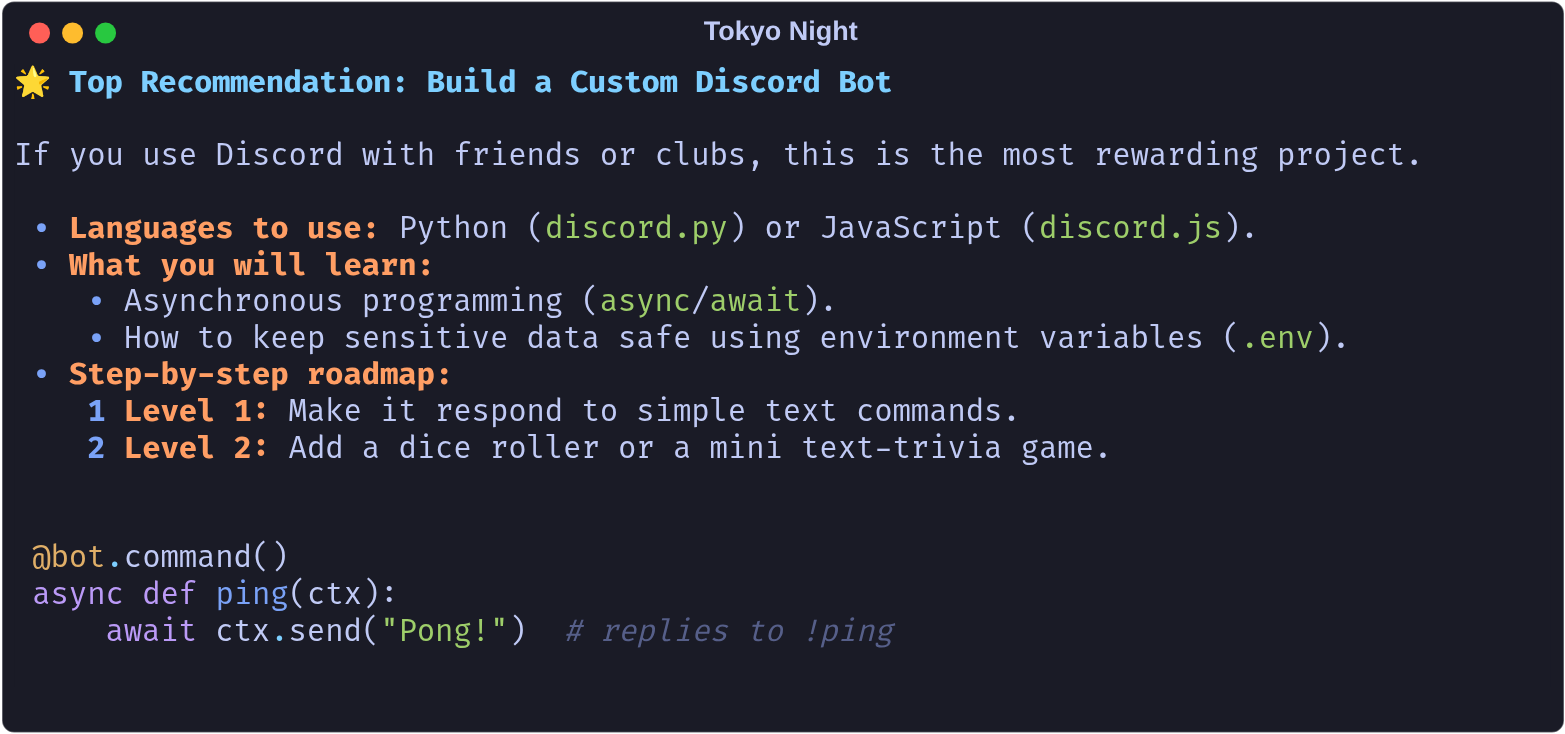
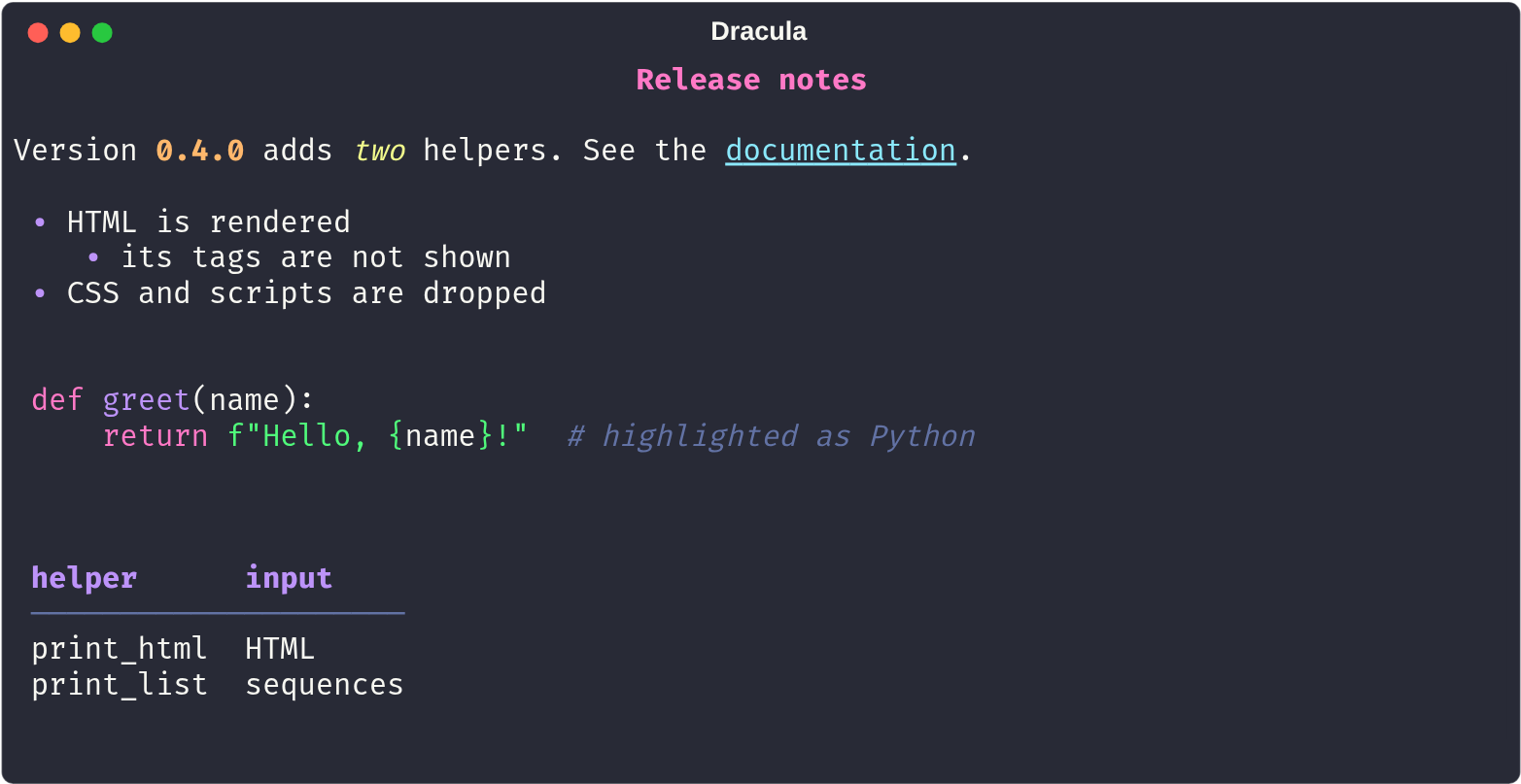
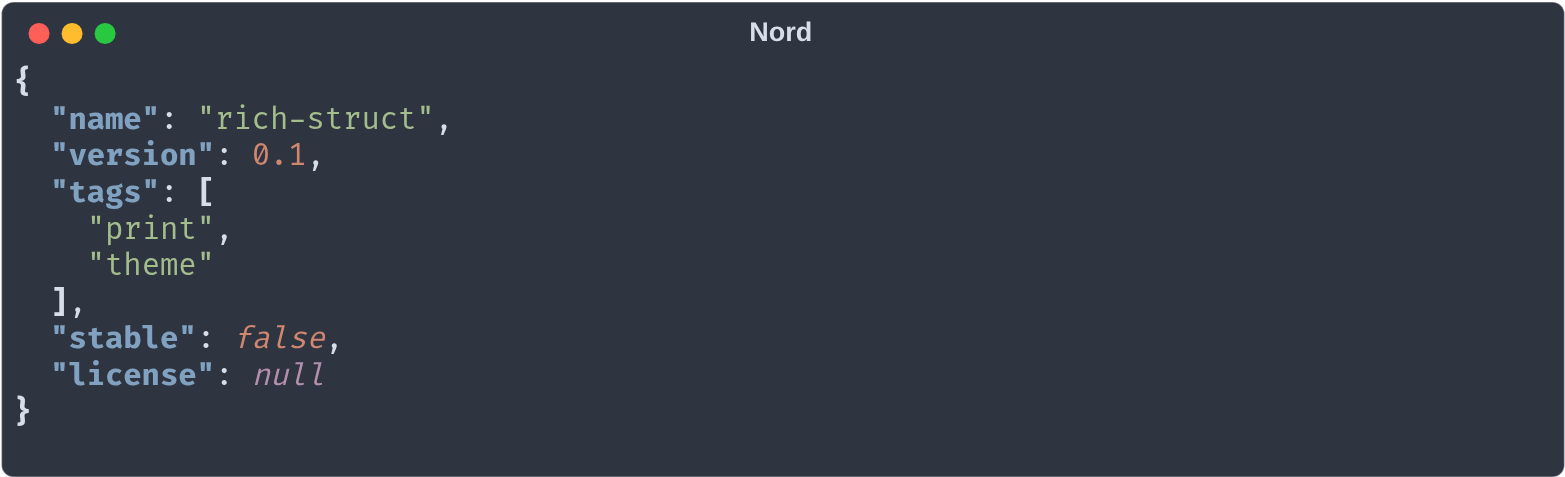
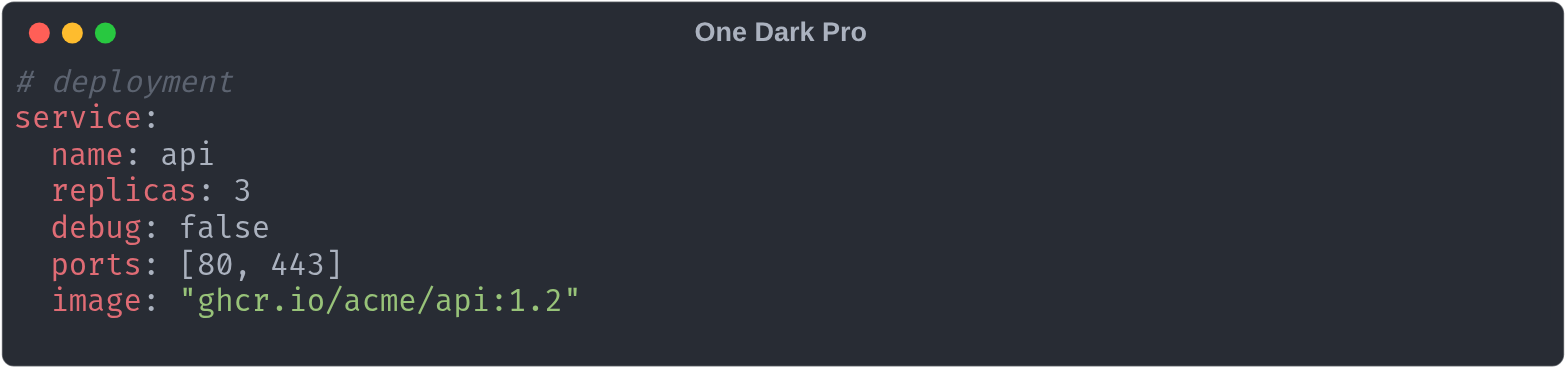
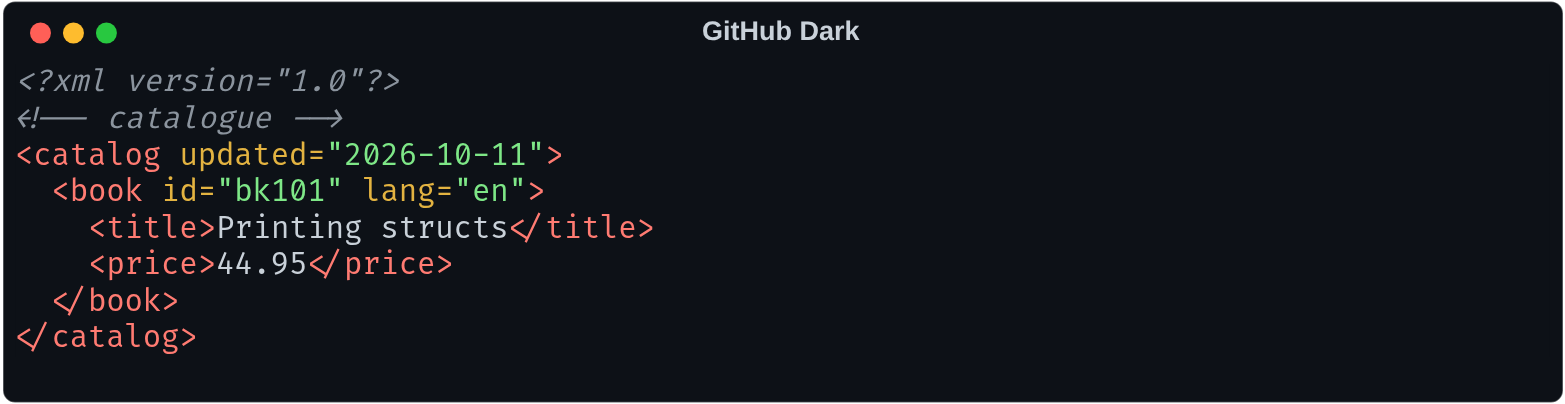
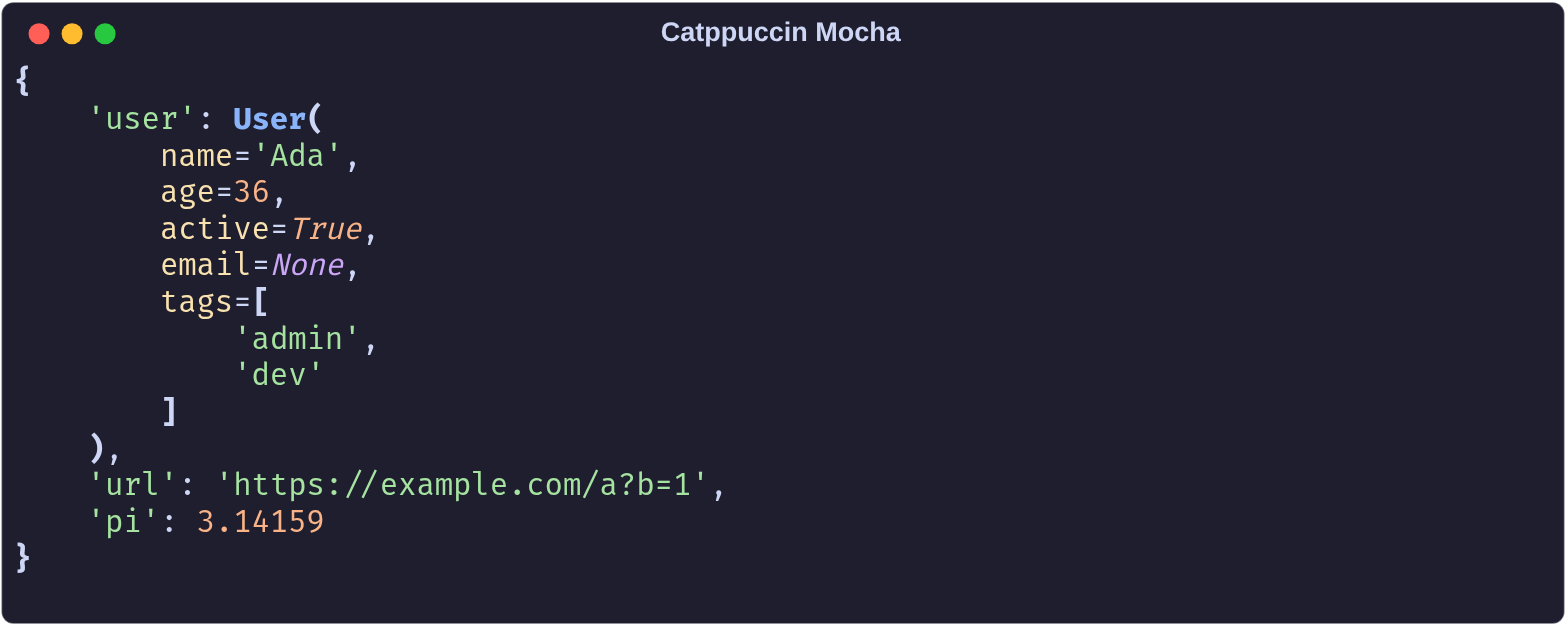
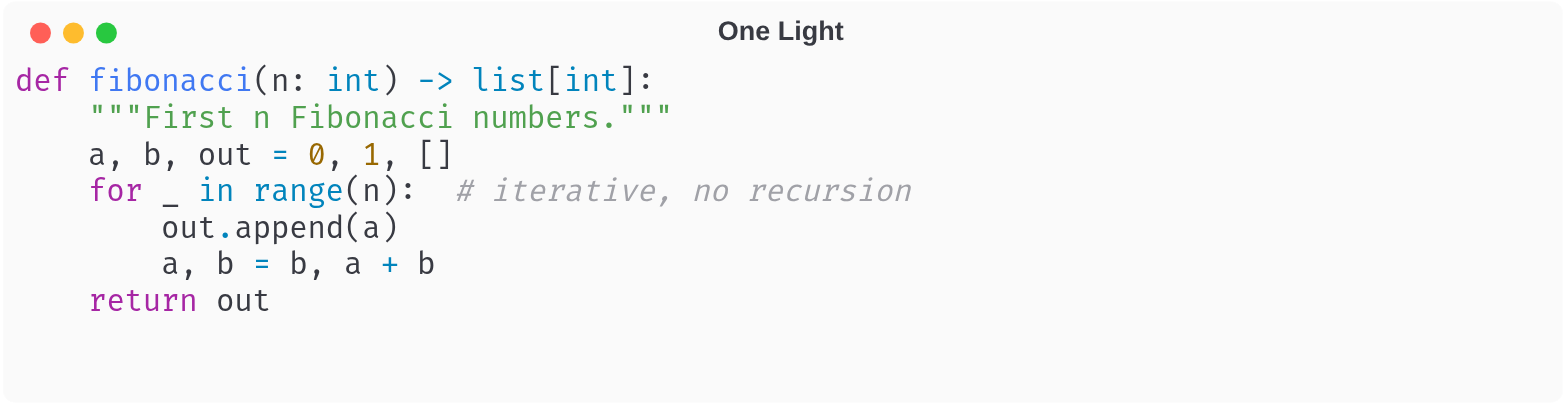
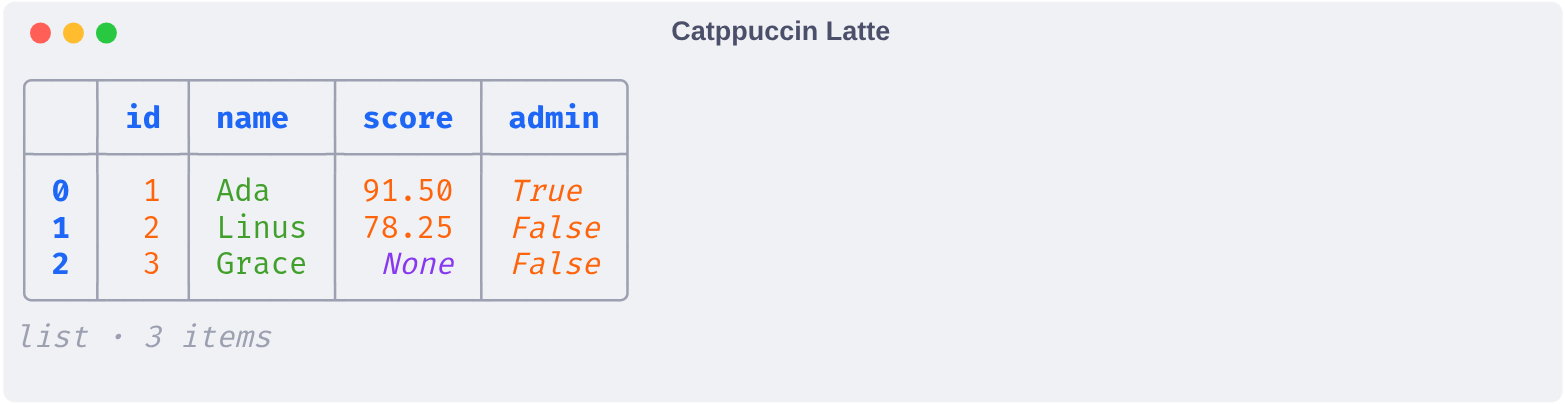
Each kind of struct is shown in a different theme, as it looks in a notebook cell. The demo notebook has every kind in all 25 themes; open it in Jupyter or VS Code to see the colours.
Markdown with print_md, in Midnight Slate (the default):
HTML with print_html, in Dracula:
JSON with print_json, in Nord:
YAML with print_yaml, in One Dark Pro:
XML with print_xml, in GitHub Dark:
Python objects with print_obj, in Catppuccin Mocha:
Code with print_syntax, in One Light:
Lists with print_table, in Catppuccin Latte:
A sequence with print_list and head_tail_only, in Tokyo Night:

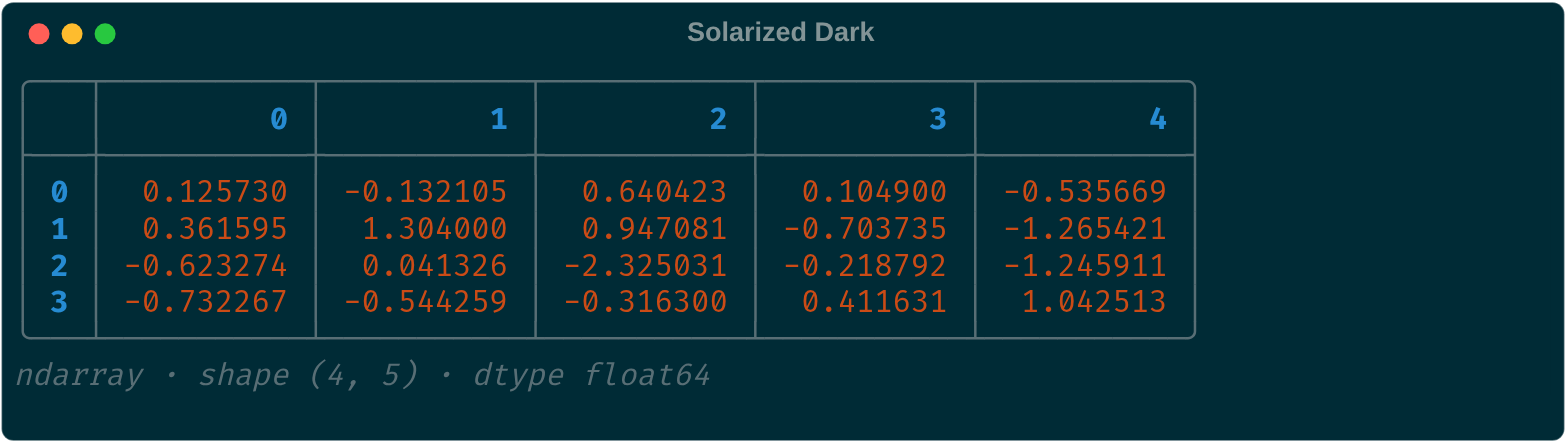
NumPy arrays with print_table, in Solarized Dark:
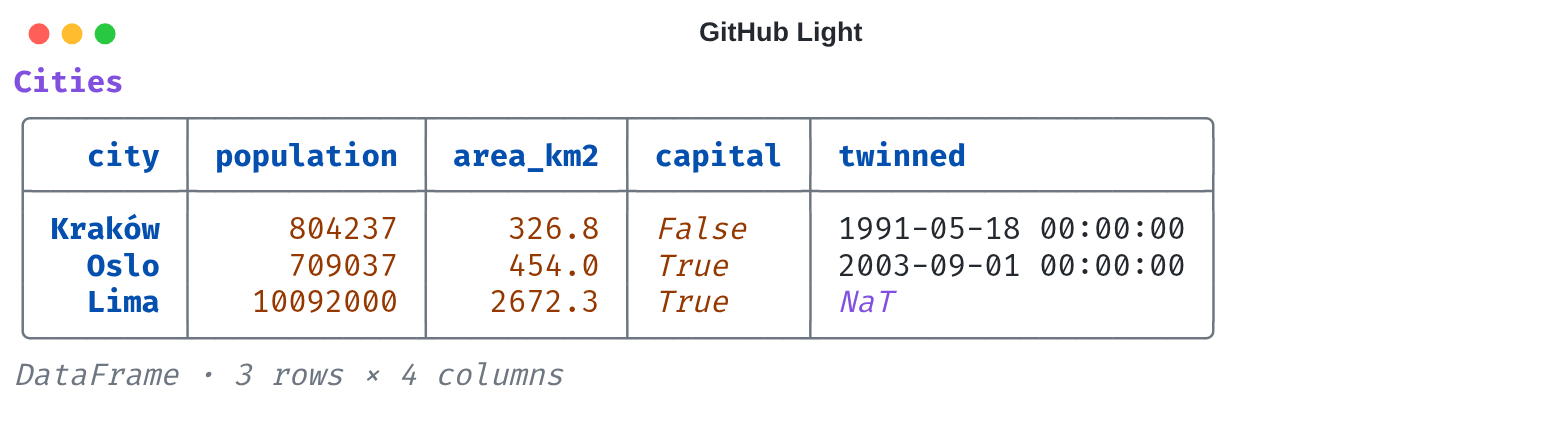
pandas DataFrames with print_table, in GitHub Light:
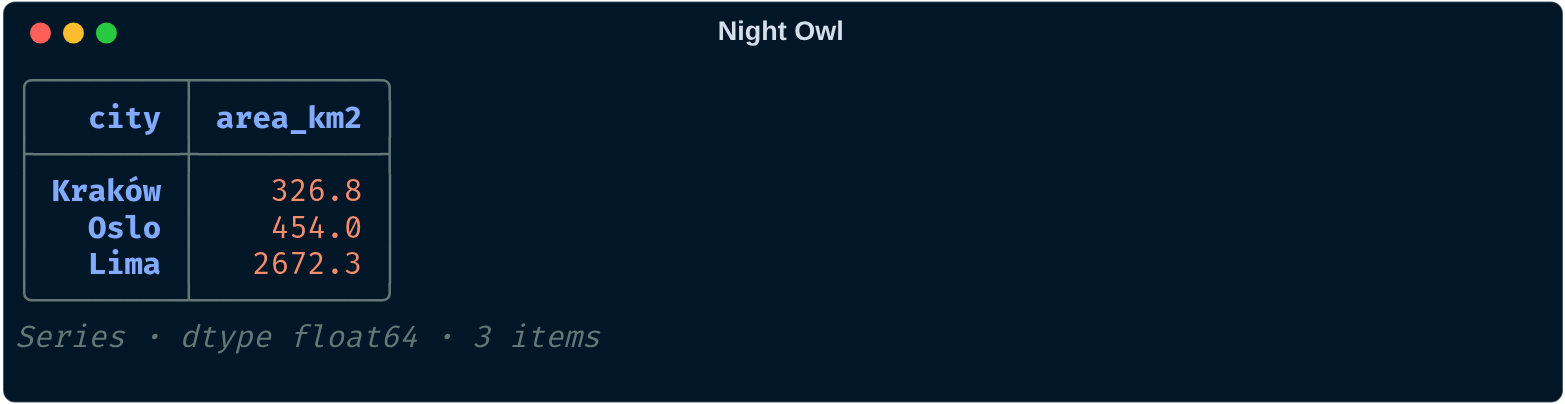
pandas Series with print_table, in Night Owl:
Tables
print_table(data, title=None, max_rows=20, max_cols=10) accepts:
- pandas
DataFrameandSeries, and numpy arrays of any dimension (with more than two dimensions you get one table per slice) - lists of dicts (one row per dict), lists of lists (a grid), and any other sequence, such as
array.arrayorrange, as a single column
Numbers are right-aligned, floats in a column line up on the same number of decimals, and missing values are dimmed. Long data shows its first and last rows with a … gap between them. Columns that don't fit the terminal width go into the gap too.
Use to_table(data) to get the rich renderable without printing it.
Lists
print_list(data, wrap=True, head_tail_only=False, head_tail_size=100) prints a list, tuple, array.array, numpy array or pandas Series on one line, like [123, 1444.555, 'Test text', 4345.666].
Long lists wrap at the terminal width, unless you pass wrap=False. With head_tail_only=True you see only the first and last head_tail_size items, with a highlighted ... between them.
Logging
rich_struct.log gives you coloured console logging, and daily log files if you want them, on top of structlog. Install it with pip install "rich-struct[log]". The rest of rich-struct works without it.
from rich_struct.log import get_logger

log = get_logger()                                        # console only, no setup needed
log.info("Processed %s in %03d ms.", position, elapsed)   # printf style...
log.info("Processed {} in {:03d} ms.", position, elapsed) # ...or str.format style
log.info("Saved", user="bob", retries=3)                  # extra fields as key=value
log.exception("Caught {!r}", err)                         # adds the traceback

job_log = log.bind(job="nightly")                         # every line from job_log carries job=nightly
job_log.info("Started")                                   # unbind("job") and new(...) work as in structlog
12:33:30.238 INFO     Processed A-17 in 042 ms.
12:33:30.239 ERROR    Caught ZeroDivisionError('division by zero')
On the console, the level name is coloured by level (errors get the brightest red) and each argument by its type: text, numbers, True/False, None, paths, exceptions and everything else. The colours come from the theme, and nothing is bold.
A datetime argument or field without a format spec is shown to the millisecond with its own UTC offset, like 2026-10-29 12:33:30.238+09:00. It isn't converted to local time, so you can see which zone it came from.
If a message doesn't match its arguments, the line is still logged with the arguments added at the end. Logging never raises.
In Jupyter notebooks (VS Code or JupyterLab), consecutive log lines share one block that grows while the cell runs, in the theme's background with a border and an accent bar. Without this you'd get a separate output per line with gaps between them. Any other output in between, such as a print or a plot, closes the block, so the logs stay in order with everything else.
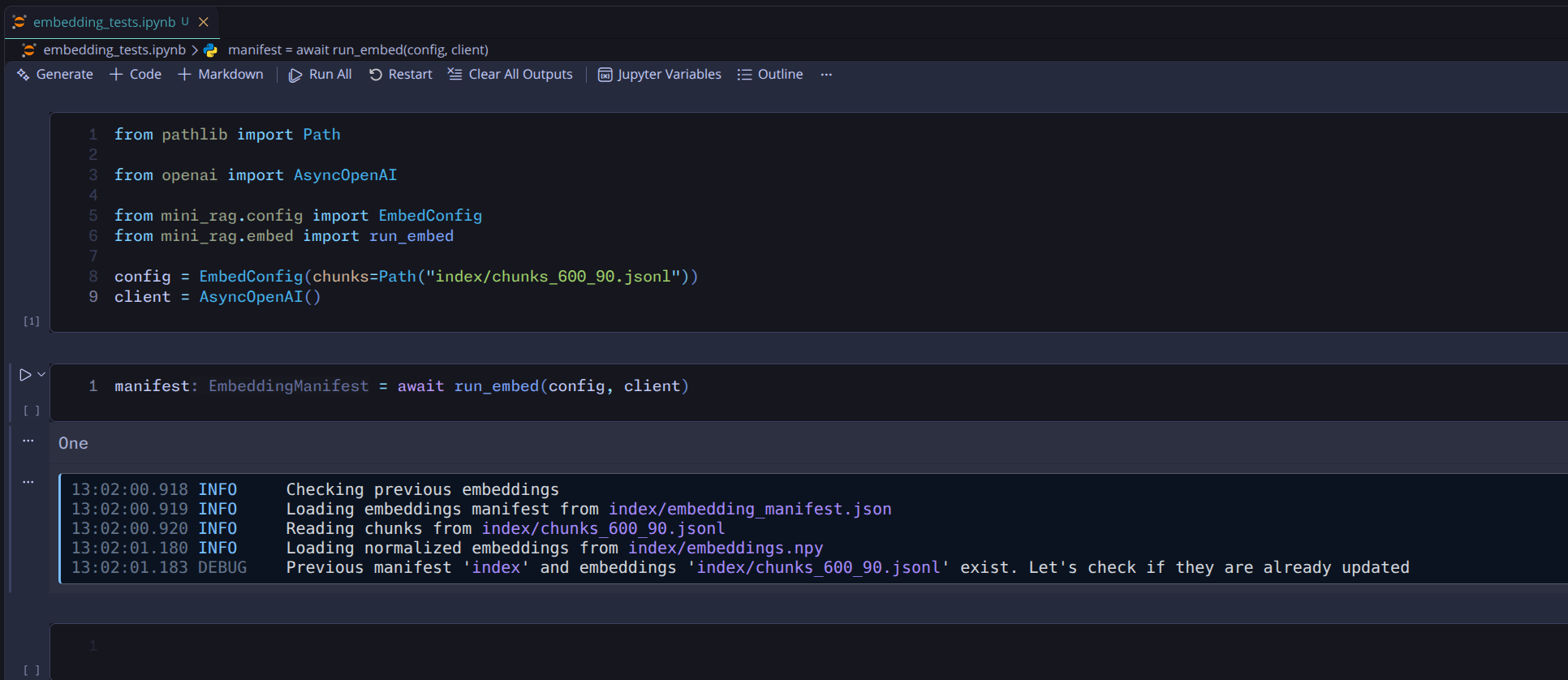
Configuring
configure() is optional. It changes the defaults, and you need to call it before the first get_logger():
from rich_struct.log import configure

configure(level="info")                  # debug (default), info, warning, error or critical
configure(theme="Dracula")               # any rich-struct theme; defaults to the one from set_default_theme()
configure(message="tint")                # colour of the message text, see below
configure(console=False)                 # no console output
configure(thread=True)                   # thread name on every line (default: only on free-threaded Python)
configure(file=True)                     # also write logs/<script name>_yyyy_mm_dd.log
configure(file="var/log", keep=14)       # use another folder and keep 14 days
configure(handler=my_handler)            # send every line to any logging.Handler as well
message= sets the colour of the message text. "plain" (the default) uses the theme's text colour, "level" uses the level's colour, and "tint" mixes a little of the level's colour into the text colour. Fields keep their own colours in all three.
With file=True, the file gets the same lines without colours. Each line starts with the local date, time and UTC offset, and names the module (and the class, when the call is inside a method) that logged it:
2026-10-29 12:33:30.238+09:00 INFO `__main__.Job` Processed A-17 in 042 ms.
A new file starts at local midnight, and only the newest keep files (7 by default) are kept. The handler behind this is DailyFileHandler, which you can also use on its own.
On free-threaded Python, both the console and the file show the thread name, like [worker-1], after the level. thread=True or False turns it on or off anywhere.
configure() calls structlog.configure(), so it affects every structlog logger in the process. examples/log_demo.py shows all of it in one script.
Themes
| Dark | Light |
|---|---|
| Tokyo Night | GitHub Light |
| Dracula | Solarized Light |
| One Dark Pro | One Light |
| Monokai | Catppuccin Latte |
| Nord | Gruvbox Light |
| Gruvbox Dark | Tokyo Night Light |
| Catppuccin Mocha | Ayu Light |
| Solarized Dark | Night Owl Light |
| GitHub Dark | Light+ |
| Night Owl | Everforest Light |
| Winter is Coming | Light Modern |
| Dark Modern | Paper Frost |
| Midnight Slate (default) |
Midnight Slate and Paper Frost are rich-struct's own. The others take their colours from each editor theme's palette, so they look close to the original, though a given token may not get the exact colour your editor gives it.
Making your own
Any rich Theme works. These styles have a special meaning:
backgroundpaints the output's background, e.g."background": "#c0caf5 on #1a1b26". Without it, a custom theme gets no background.syntax.*styles colour code:text,comment,keyword,string,number,function,type,tag,attributeandoperator. You can override any of them.syntax.block(e.g."on #111c2e") shades code blocks inside Markdown.repr.backgroundgivesprint_objoutput its own background.
License
MIT. See LICENSE.
1 maintainer

Metadata
1 maintainer
Release files for rich-struct 0.14.1
For a detailed explanation of source distributions (sdists) and built distributions (wheels), please see the package formats documentation.
Source distribution (sdist)
| File | Size | Uploaded | Provenance | Actions |
|---|---|---|---|---|
| rich_struct-0.14.1.tar.gz | 32.4 kB | Without provenance | Details for rich_struct-0.14.1.tar.gz |
Built distribution (wheel)
| File | Interpreter | ABI | Platform | Actions Reset |
|---|---|---|---|---|
| rich_struct-0.14.1-py3-none-any.whl | Python 3 | none | any | Details for rich_struct-0.14.1-py3-none-any.whl |
Total release size: 60.1 kB
Release files / rich_struct-0.14.1.tar.gz
| Download URL | rich_struct-0.14.1.tar.gz |
|---|---|
| Size | 32.4 kB |
| Tags | Source |
|
SHA-256 checksum How to use checksums |
65d06d74bc2a08f37ce0d78636772e7c886638d666222a1d5b0f54921b2a281f
|
|
BLAKE2b-256 checksum How to use checksums |
4cf82176994be63e14fabd2e892e1d245667de9ac3696d2bea503d7f65aa3232
|
| Upload date | |
|
Uploaded using Trusted Publishing? What is trusted publishing? |
No |
| Uploaded via |
twine/7.0.0 CPython/3.14.7
|
Release files / rich_struct-0.14.1-py3-none-any.whl
| Download URL | rich_struct-0.14.1-py3-none-any.whl |
|---|---|
| Size | 27.7 kB |
| Tags | Python 3 |
|
SHA-256 checksum How to use checksums |
d7c8977786cf4a09c0f80dc21b70e30407f76168d93c2a2b6201ea6b748f5b5c
|
|
BLAKE2b-256 checksum How to use checksums |
dadf81ef64b8eba39e60a2938917f76b2cd2e46ee90b04b8988004ae48f0f980
|
| Upload date | |
|
Uploaded using Trusted Publishing? What is trusted publishing? |
No |
| Uploaded via |
twine/7.0.0 CPython/3.14.7
|
Security for rich-struct 0.14.1
Provenance
Provenance describes where a file came from. On PyPI, provenance is shared via attestations, which provide a verifiable record of the build or publishing details. View details, limitations and caveats.
No provenance found
None of the files in this release were uploaded with provenance metadata.
A note on package security
PyPI is a repository for distributing packages, not a service for auditing them. While third-party security researchers and our staff do their best to detect and remove malicious packages, PyPI cannot guarantee the quality, security or suitability of any given package.
To learn more about protecting yourself from malicious actors, visit our package security documentation.














