
RichQueue
💰 RichQueue: A colourful and pythonic SLURM queue viewer
Installation from a modern python environment (>3.10) should be as simple as:
pip install --upgrade richqueue
To see your live-updating SLURM queue:
rq
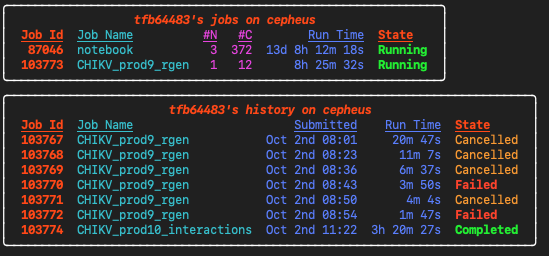
Other rq options
To see more detail:
rq --long
To see someone else's queue:
rq --user USER
To see the last X weeks history:
rq --hist X
To see history for a given time period, e.g.:
rq --hist '3 days'
To list available nodes on the cluster:
rq --idle
To show a static view:
rq --no-loop
Monitoring log files
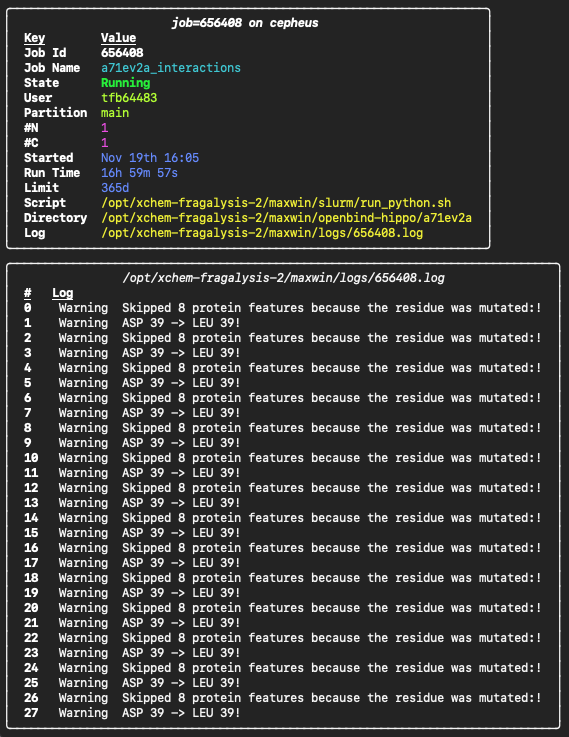
If you keep your SLURM log files in a specific directory exported as the LOGS variable, you can use RichQueue to monitor results as they come in with
res <JOB_ID>
Changing to the working directory of a job
To change to the submission/working directory of a job:
cd $(res --dir <JOB_ID>)
You might find it convenient to add a shortcut to this to your login profile, e.g. .bashrc_user or .bash_profile:
res --install-jd >> ~/.bashrc_user
source ~/.bashrc_user
This will make the jd executable available. Change to the directory of the single active or most recently submitted job:
jd
Change to a specific job's directory:
jd <JOB_ID>
Submitting SLURM jobs
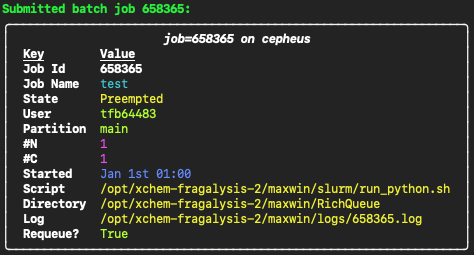
RichQueue also provides a convenient wrapper to the sbatch command which makes sure your log files end up in the directory specified by the LOGS variable, and prints a pretty summary of the submitted job. Just replace sbatch with sb. E.g.:
sb --job-name test script.sh --script-arg1
Would run this under the hood:
sbatch --output=$LOGS/%j.log --error=$LOGS/%j.log --job-name test script.sh --script-arg1
and display the following:
1 maintainer

Metadata
1 maintainer
Release files for richqueue 1.11.2
For a detailed explanation of source distributions (sdists) and built distributions (wheels), please see the package formats documentation.
Source distribution (sdist)
| File | Size | Uploaded | |
|---|---|---|---|
| richqueue-1.11.2.tar.gz | 24.4 kB | Details |
Built distribution (wheel)
| File | Interpreter | ABI | Platform | Reset |
|---|---|---|---|---|
| richqueue-1.11.2-py3-none-any.whl | Python 3 | none | any | Details |
Total release size: 51.2 kB
Release files / richqueue-1.11.2.tar.gz
| Download URL | richqueue-1.11.2.tar.gz |
|---|---|
| Size | 24.4 kB |
| Tags | Source |
|
SHA-256 checksum How to use checksums |
a6776947a9fbb078f74e7d93038769cec54c80fb4d40f0c1573850eeacfa7857
|
|
BLAKE2b-256 checksum How to use checksums |
432b070f3a4b9c2179156faa49ccbed5d1329c09874d9ab70c53d266ea9ab3fd
|
| Upload date | |
|
Uploaded using Trusted Publishing? What is trusted publishing? |
No |
| Uploaded via |
twine/6.2.0 CPython/3.9.25
|
Release files / richqueue-1.11.2-py3-none-any.whl
| Download URL | richqueue-1.11.2-py3-none-any.whl |
|---|---|
| Size | 26.8 kB |
| Tags | Python 3 |
|
SHA-256 checksum How to use checksums |
533e97009ad1b7eb746ec5f1905d4989b2e1947149c1faed53ffba80618894ed
|
|
BLAKE2b-256 checksum How to use checksums |
d6212a365bd25519310fc24702dc055181d342c3796d9508bfeeaf17cbdd516f
|
| Upload date | |
|
Uploaded using Trusted Publishing? What is trusted publishing? |
No |
| Uploaded via |
twine/6.2.0 CPython/3.9.25
|














