
RichQueue

Project description
RichQueue
💰 RichQueue: A colourful and pythonic SLURM queue viewer
Installation from a modern python environment (>3.10) should be as simple as:
pip install --upgrade richqueue
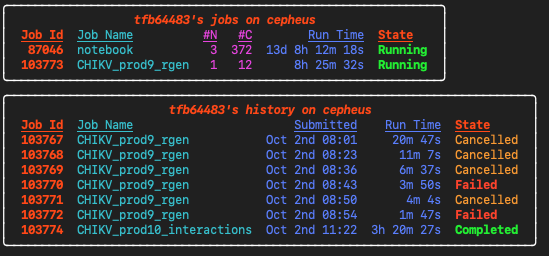
To see your live-updating SLURM queue:
rq
Other rq options
To see more detail:
rq --long
To see someone else's queue:
rq --user USER
To see the last X weeks history:
rq --hist X
To see history for a given time period, e.g.:
rq --hist '3 days'
To list available nodes on the cluster:
rq --idle
To show a static view:
rq --no-loop
Monitoring log files
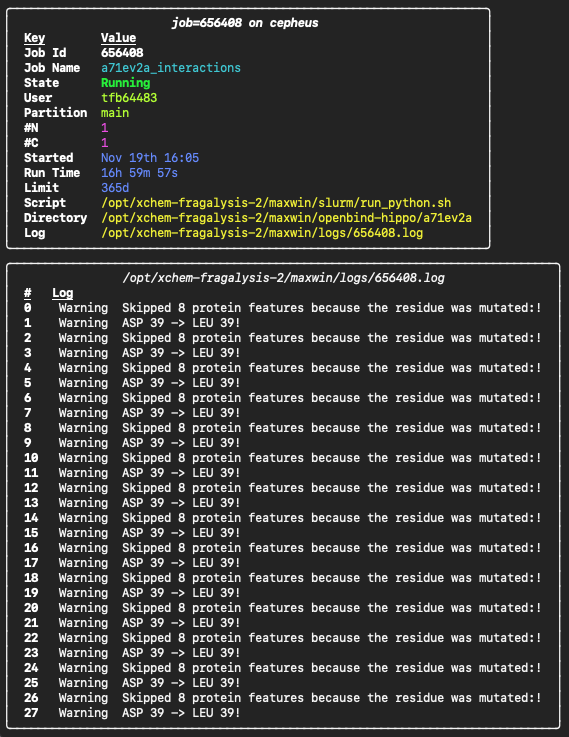
If you keep your SLURM log files in a specific directory exported as the LOGS variable, you can use RichQueue to monitor results as they come in with
res <JOB_ID>
Changing to the working directory of a job
To change to the submission/working directory of a job:
cd $(res --dir <JOB_ID>)
You might find it convenient to add a shortcut to this to your login profile, e.g. .bashrc_user or .bash_profile:
res --install-jd >> ~/.bashrc_user
source ~/.bashrc_user
This will make the jd executable available. Change to the directory of the single active or most recently submitted job:
jd
Change to a specific job's directory:
jd <JOB_ID>
Submitting SLURM jobs
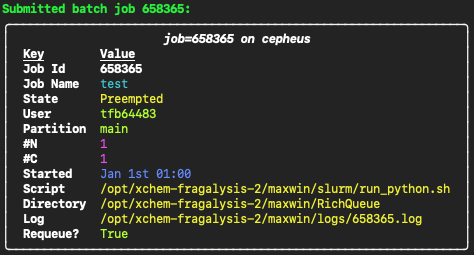
RichQueue also provides a convenient wrapper to the sbatch command which makes sure your log files end up in the directory specified by the LOGS variable, and prints a pretty summary of the submitted job. Just replace sbatch with sb. E.g.:
sb --job-name test script.sh --script-arg1
Would run this under the hood:
sbatch --output=$LOGS/%j.log --error=$LOGS/%j.log --job-name test script.sh --script-arg1
and display the following:
Release history Release notifications | RSS feed


Download files
Download the file for your platform. If you're not sure which to choose, learn more about installing packages.
Source Distribution
Built Distribution
Filter files by name, interpreter, ABI, and platform.
If you're not sure about the file name format, learn more about wheel file names.
Copy a direct link to the current filters
File details
Details for the file richqueue-1.11.1.tar.gz.
File metadata
- Download URL: richqueue-1.11.1.tar.gz
- Upload date:
- Size: 12.9 kB
- Tags: Source
- Uploaded using Trusted Publishing? No
- Uploaded via: twine/6.2.0 CPython/3.9.25
File hashes
| Algorithm | Hash digest | |
|---|---|---|
| SHA256 |
13da5159abd77ca16a468a5e853b2c410b3af67080724eaf2d5af334b011c45a
|
|
| MD5 |
0e5b57b446e7e40b7e0d14933da75746
|
|
| BLAKE2b-256 |
9bc51f10d238698a55806d98a62c9cdbc0ef2ae23cfa8b782d0c7aa0e36f6dca
|
File details
Details for the file richqueue-1.11.1-py3-none-any.whl.
File metadata
- Download URL: richqueue-1.11.1-py3-none-any.whl
- Upload date:
- Size: 15.3 kB
- Tags: Python 3
- Uploaded using Trusted Publishing? No
- Uploaded via: twine/6.2.0 CPython/3.9.25
File hashes
| Algorithm | Hash digest | |
|---|---|---|
| SHA256 |
63b671dc32e802b0e5734118071167bde5198016b87a5650028fb69f932cf148
|
|
| MD5 |
ae91640e2fba8cc09444c66b75f3a433
|
|
| BLAKE2b-256 |
d957379166a89978e34674a85dc7876a35d4e83c81daeca1ec375ed3eefc4765
|






