
riggen


The blazingly fast, lightweight robot assembler for RL researchers. Drop meshes in, get a simulation-ready MJCF or URDF out.
Install
uv tool install riggen      # or: uvx riggen  /  pip install riggen
riggen --example arm        # the bundled sample robot
One wheel per platform (Linux x86_64 / aarch64, macOS arm64 / x86_64,
Windows x86_64), Python 3.10 or later, nothing else to install — the
riggen command is a native executable, and there is no Rust toolchain
on this path. On a platform without a wheel, pip install builds it from
source with cargo on PATH.
The first minute
-
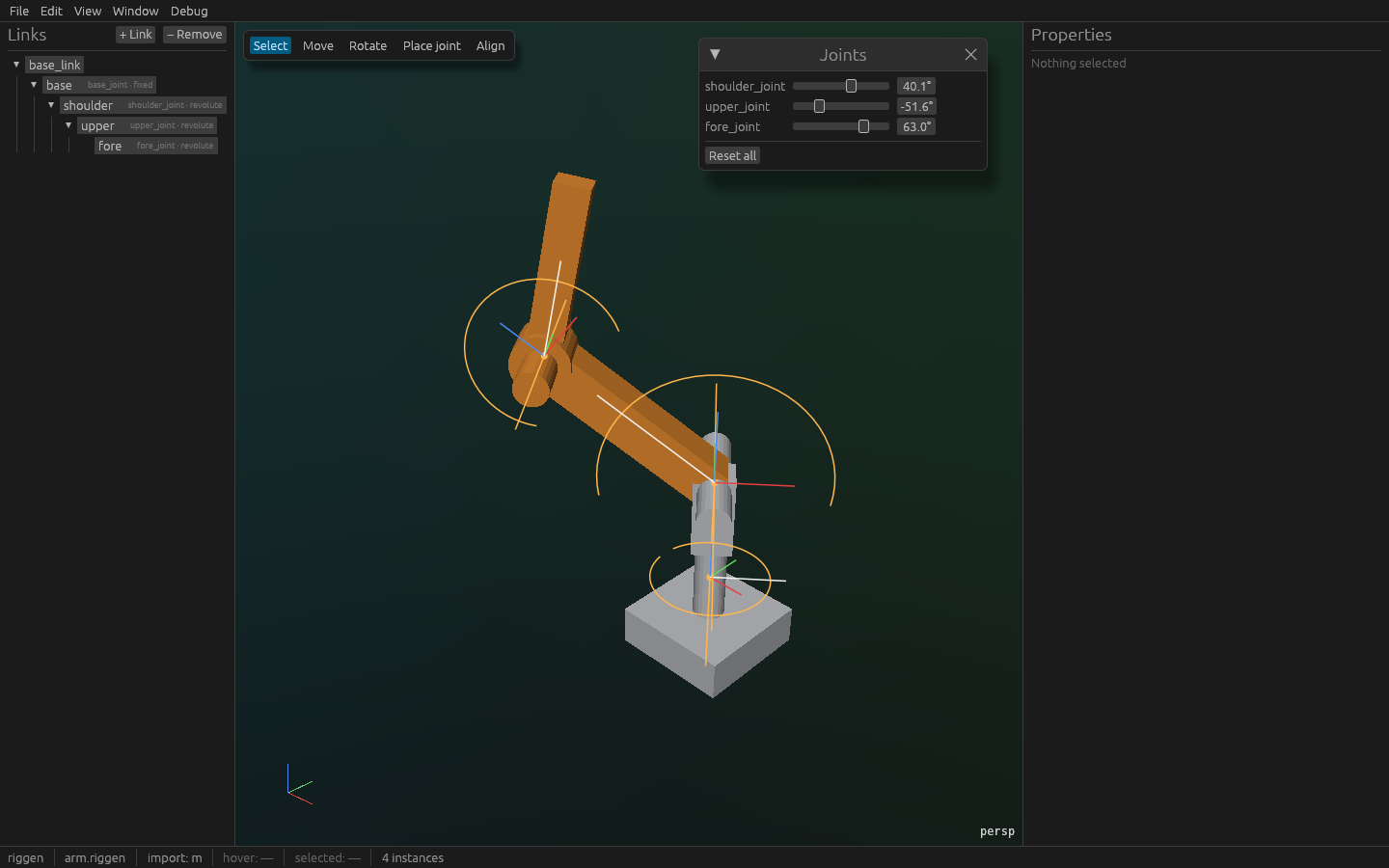
riggen --example armopens a four-part arm: link tree on the left, the viewport in the middle, Properties on the right. Orbit with the middle mouse button, zoom with the wheel,Hometo frame everything. -
Drag the sliders in Window › Joints — the arm moves; that is the kinematic tree you will build for your own robot.
-
File › Export…, pick MJCF, choose a directory. The dialog lists anything that would stop the export (a link with no mass, a joint with no axis) and writes
arm.xmlbesidemeshes/*.stlwhen there is nothing. -
Load it:
python -c "import mujoco; m = mujoco.MjModel.from_xml_path('out/arm.xml'); print(m.nbody, 'bodies')"
or
python -m mujoco.viewer --mjcf out/arm.xml.
Then your robot: riggen base.stl upper.stl fore.stl drops each mesh as a
link under the root (meters or millimetres — the import units are in the
status bar). Reparent by dragging rows in the tree; Place joint puts a
revolute joint on a bore by clicking its edge; Align snaps a part's
bore concentric with its parent's; Properties computes the inertial from
the mesh and a material, and fits a hull or primitives for collision.
What it does
- Assembles: STL and OBJ meshes into a kinematic tree — fixed, revolute and prismatic joints, placed by clicking geometry, with limits.
- Computes: mass, centre of mass and the inertia tensor from the mesh and a material density, or from a spec you type; convex hulls and fitted boxes / cylinders / spheres for collision.
- Exports: MJCF and URDF from the same document, meshes baked to meters as STL, so MuJoCo loads it with zero warnings and its forward kinematics agree with riggen's (that is a CI job, not a hope).
- Imports: an existing URDF,
package://paths resolved beside the file, to fix and convert it. - Stays out of the way: a native window through wgpu, a document that
is plain JSON (
.riggen), undo for everything, and a headless CLI.
Command line
usage:
  riggen [FILE...]        open a .riggen document, or drop meshes (.stl, .obj) as links
  riggen --example arm    open the bundled sample arm
  riggen --export mjcf|urdf|both --out DIR [--fk-samples] INPUT
                          write INPUT's export to DIR without opening a window

options:
  --example NAME          open a bundled example: arm (the five-link sample robot)
  --export FORMAT         headless export of INPUT (.riggen or .urdf): mjcf, urdf or both
  --out DIR               where --export writes; created if missing
  --fk-samples            with --export: also write <name>.fk.json, five sampled joint configurations
  --timing                print the time from launch to the first frame on stderr
  -h, --help              print this help
  -V, --version           print the version and the git commit it was built from
riggen --export needs no display, so it runs in CI and in scripts: give
it a .riggen or a .urdf and it writes the model, the meshes and, with
--fk-samples, five joint configurations with every body's world pose —
the file python/tests/test_mjcf_load.py checks MuJoCo against.
python -m riggen is the same executable, for an environment whose
bin/ is not on PATH.
Developing
Rust stable, then:
git clone https://github.com/Divelix/riggen && cd riggen
git config core.hooksPath .githooks   # fmt, clippy -D warnings, test before every commit
cargo run                             # the app
cargo test --workspace                # incl. the visual snapshot suite (needs a Vulkan driver;
                                      # lavapipe / mesa-vulkan-drivers is the reference)
RIGGEN_GIT_HASH=$(git rev-parse --short HEAD) uv build   # the wheel and the sdist
The Rust route to the binary is cargo install --git https://github.com/Divelix/riggen riggen-app; publishing the workspace to
crates.io so that cargo install riggen works is a later release.
Read, in order: SEED.md (what and why),
docs/01-architecture.md,
docs/02-data-model.md,
docs/03-roadmap.md, docs/adr/ — then
AGENTS.md for the rules, agent or human. A Python SDK
(riggen-py, the same core through PyO3) is v0.2.
Licence
MIT or Apache-2.0, at your option.
1 maintainer

Download files
Download the file for your platform. If you're not sure which to choose, learn more about installing packages.
Source Distribution
Built Distributions
Filter files by name, interpreter, ABI, and platform.
If you're not sure about the file name format, learn more about wheel file names.
Copy a direct link to the current filters
File details
Details for the file riggen-0.1.0.tar.gz.
File metadata
- Download URL: riggen-0.1.0.tar.gz
- Upload date:
- Size: 296.0 kB
- Tags: Source
- Uploaded using Trusted Publishing? Yes
- Uploaded via:
twine/7.0.0 CPython/3.13.14
File hashes
| Algorithm | Hash digest | |
|---|---|---|
| SHA256 |
775786cec61bafc7012f00a920cd71d6651927b482751fafa80e499fa4bcce0b
|
|
| MD5 |
bf4593415f6a60429a25b72037cd21b0
|
|
| BLAKE2b-256 |
0cd3872503ba3d240bee90a7087446157df6988232e3d0ed8122628f2cdfe39c
|
Provenance
The following attestation bundles were made for riggen-0.1.0.tar.gz:
Publisher:
release.yml on Divelix/riggen
-
Statement:
-
Statement type:
https://in-toto.io/Statement/v1 -
Predicate type:
https://docs.pypi.org/attestations/publish/v1 -
Subject name:
riggen-0.1.0.tar.gz -
Subject digest:
775786cec61bafc7012f00a920cd71d6651927b482751fafa80e499fa4bcce0b - Sigstore transparency entry: 2645365823
- Sigstore integration time:
-
Permalink:
Divelix/riggen@fbd26be0c2c76fe0727f17b0df302383bed6af34 -
Branch / Tag:
refs/tags/v0.1.0 - Owner: https://github.com/Divelix
-
Access:
public
-
Token Issuer:
https://token.actions.githubusercontent.com -
Runner Environment:
github-hosted -
Publication workflow:
release.yml@fbd26be0c2c76fe0727f17b0df302383bed6af34 -
Trigger Event:
push
-
Statement type:
File details
Details for the file riggen-0.1.0-py3-none-win_amd64.whl.
File metadata
- Download URL: riggen-0.1.0-py3-none-win_amd64.whl
- Upload date:
- Size: 7.3 MB
- Tags: Python 3, Windows x86-64
- Uploaded using Trusted Publishing? Yes
- Uploaded via:
twine/7.0.0 CPython/3.13.14
File hashes
| Algorithm | Hash digest | |
|---|---|---|
| SHA256 |
fb35b9ad4e4f11e78c19ae1b43a78a71779ff0476844b1f99f4d5d4599b954ae
|
|
| MD5 |
f445ca348b5d72120f40c1dd46e9a264
|
|
| BLAKE2b-256 |
dcbc1eafdc1bae950ef313389a73619fd5c3841216d04823b562d80f62d190d9
|
Provenance
The following attestation bundles were made for riggen-0.1.0-py3-none-win_amd64.whl:
Publisher:
release.yml on Divelix/riggen
-
Statement:
-
Statement type:
https://in-toto.io/Statement/v1 -
Predicate type:
https://docs.pypi.org/attestations/publish/v1 -
Subject name:
riggen-0.1.0-py3-none-win_amd64.whl -
Subject digest:
fb35b9ad4e4f11e78c19ae1b43a78a71779ff0476844b1f99f4d5d4599b954ae - Sigstore transparency entry: 2645366153
- Sigstore integration time:
-
Permalink:
Divelix/riggen@fbd26be0c2c76fe0727f17b0df302383bed6af34 -
Branch / Tag:
refs/tags/v0.1.0 - Owner: https://github.com/Divelix
-
Access:
public
-
Token Issuer:
https://token.actions.githubusercontent.com -
Runner Environment:
github-hosted -
Publication workflow:
release.yml@fbd26be0c2c76fe0727f17b0df302383bed6af34 -
Trigger Event:
push
-
Statement type:
File details
Details for the file riggen-0.1.0-py3-none-manylinux_2_28_x86_64.whl.
File metadata
- Download URL: riggen-0.1.0-py3-none-manylinux_2_28_x86_64.whl
- Upload date:
- Size: 9.6 MB
- Tags: Python 3, manylinux: glibc 2.28+ x86-64
- Uploaded using Trusted Publishing? Yes
- Uploaded via:
twine/7.0.0 CPython/3.13.14
File hashes
| Algorithm | Hash digest | |
|---|---|---|
| SHA256 |
2f3726e6228d124b8350ee0bd8bb43d4508cc7f18eb31e91be160fcacf2cb889
|
|
| MD5 |
cd74f976d819bf1ef805803bea832fb2
|
|
| BLAKE2b-256 |
a60637b6afb223fe0434781dc50ec478ccccaff76555056165c618c7732a70a8
|
Provenance
The following attestation bundles were made for riggen-0.1.0-py3-none-manylinux_2_28_x86_64.whl:
Publisher:
release.yml on Divelix/riggen
-
Statement:
-
Statement type:
https://in-toto.io/Statement/v1 -
Predicate type:
https://docs.pypi.org/attestations/publish/v1 -
Subject name:
riggen-0.1.0-py3-none-manylinux_2_28_x86_64.whl -
Subject digest:
2f3726e6228d124b8350ee0bd8bb43d4508cc7f18eb31e91be160fcacf2cb889 - Sigstore transparency entry: 2645366091
- Sigstore integration time:
-
Permalink:
Divelix/riggen@fbd26be0c2c76fe0727f17b0df302383bed6af34 -
Branch / Tag:
refs/tags/v0.1.0 - Owner: https://github.com/Divelix
-
Access:
public
-
Token Issuer:
https://token.actions.githubusercontent.com -
Runner Environment:
github-hosted -
Publication workflow:
release.yml@fbd26be0c2c76fe0727f17b0df302383bed6af34 -
Trigger Event:
push
-
Statement type:
File details
Details for the file riggen-0.1.0-py3-none-manylinux_2_28_aarch64.whl.
File metadata
- Download URL: riggen-0.1.0-py3-none-manylinux_2_28_aarch64.whl
- Upload date:
- Size: 9.0 MB
- Tags: Python 3, manylinux: glibc 2.28+ ARM64
- Uploaded using Trusted Publishing? Yes
- Uploaded via:
twine/7.0.0 CPython/3.13.14
File hashes
| Algorithm | Hash digest | |
|---|---|---|
| SHA256 |
89d5aa8585e29ff1364465911aa9790a6053129cf7384ce3e2c3fd8d8a2feaf7
|
|
| MD5 |
20f45e6488ec36b8854920f49d4c156e
|
|
| BLAKE2b-256 |
3dedd0fa88f126548ac8e899dae91243cd14232bb205f0f240997f0ec735ec5b
|
Provenance
The following attestation bundles were made for riggen-0.1.0-py3-none-manylinux_2_28_aarch64.whl:
Publisher:
release.yml on Divelix/riggen
-
Statement:
-
Statement type:
https://in-toto.io/Statement/v1 -
Predicate type:
https://docs.pypi.org/attestations/publish/v1 -
Subject name:
riggen-0.1.0-py3-none-manylinux_2_28_aarch64.whl -
Subject digest:
89d5aa8585e29ff1364465911aa9790a6053129cf7384ce3e2c3fd8d8a2feaf7 - Sigstore transparency entry: 2645366020
- Sigstore integration time:
-
Permalink:
Divelix/riggen@fbd26be0c2c76fe0727f17b0df302383bed6af34 -
Branch / Tag:
refs/tags/v0.1.0 - Owner: https://github.com/Divelix
-
Access:
public
-
Token Issuer:
https://token.actions.githubusercontent.com -
Runner Environment:
github-hosted -
Publication workflow:
release.yml@fbd26be0c2c76fe0727f17b0df302383bed6af34 -
Trigger Event:
push
-
Statement type:
File details
Details for the file riggen-0.1.0-py3-none-macosx_11_0_arm64.whl.
File metadata
- Download URL: riggen-0.1.0-py3-none-macosx_11_0_arm64.whl
- Upload date:
- Size: 6.0 MB
- Tags: Python 3, macOS 11.0+ ARM64
- Uploaded using Trusted Publishing? Yes
- Uploaded via:
twine/7.0.0 CPython/3.13.14
File hashes
| Algorithm | Hash digest | |
|---|---|---|
| SHA256 |
2d22e96a2e3d0b40745f9d79c46ffb14ca611e3247219fba9fa99bf9fc7f7a2c
|
|
| MD5 |
b5c2474ee5bb35b1b0dc92818c7d9a16
|
|
| BLAKE2b-256 |
fc7970852231fb0f0f11a46422ef590dc2bf174400a4e0805d9f479e2701817a
|
Provenance
The following attestation bundles were made for riggen-0.1.0-py3-none-macosx_11_0_arm64.whl:
Publisher:
release.yml on Divelix/riggen
-
Statement:
-
Statement type:
https://in-toto.io/Statement/v1 -
Predicate type:
https://docs.pypi.org/attestations/publish/v1 -
Subject name:
riggen-0.1.0-py3-none-macosx_11_0_arm64.whl -
Subject digest:
2d22e96a2e3d0b40745f9d79c46ffb14ca611e3247219fba9fa99bf9fc7f7a2c - Sigstore transparency entry: 2645366231
- Sigstore integration time:
-
Permalink:
Divelix/riggen@fbd26be0c2c76fe0727f17b0df302383bed6af34 -
Branch / Tag:
refs/tags/v0.1.0 - Owner: https://github.com/Divelix
-
Access:
public
-
Token Issuer:
https://token.actions.githubusercontent.com -
Runner Environment:
github-hosted -
Publication workflow:
release.yml@fbd26be0c2c76fe0727f17b0df302383bed6af34 -
Trigger Event:
push
-
Statement type:
File details
Details for the file riggen-0.1.0-py3-none-macosx_10_12_x86_64.whl.
File metadata
- Download URL: riggen-0.1.0-py3-none-macosx_10_12_x86_64.whl
- Upload date:
- Size: 6.5 MB
- Tags: Python 3, macOS 10.12+ x86-64
- Uploaded using Trusted Publishing? Yes
- Uploaded via:
twine/7.0.0 CPython/3.13.14
File hashes
| Algorithm | Hash digest | |
|---|---|---|
| SHA256 |
44c08b30e3eee2cff241286b89e3c2b34aaf1025e45caa68d3ba952ec8fdecba
|
|
| MD5 |
28854fcc28d2e11ee6fc707c7a45965b
|
|
| BLAKE2b-256 |
57d9f2acacb03d55bdb942c25583de9770bafab6cae5d4137a0e938ab7a4ed2c
|
Provenance
The following attestation bundles were made for riggen-0.1.0-py3-none-macosx_10_12_x86_64.whl:
Publisher:
release.yml on Divelix/riggen
-
Statement:
-
Statement type:
https://in-toto.io/Statement/v1 -
Predicate type:
https://docs.pypi.org/attestations/publish/v1 -
Subject name:
riggen-0.1.0-py3-none-macosx_10_12_x86_64.whl -
Subject digest:
44c08b30e3eee2cff241286b89e3c2b34aaf1025e45caa68d3ba952ec8fdecba - Sigstore transparency entry: 2645365906
- Sigstore integration time:
-
Permalink:
Divelix/riggen@fbd26be0c2c76fe0727f17b0df302383bed6af34 -
Branch / Tag:
refs/tags/v0.1.0 - Owner: https://github.com/Divelix
-
Access:
public
-
Token Issuer:
https://token.actions.githubusercontent.com -
Runner Environment:
github-hosted -
Publication workflow:
release.yml@fbd26be0c2c76fe0727f17b0df302383bed6af34 -
Trigger Event:
push
-
Statement type:














