
RingCentral Chatbot Framework for Python

Project description
ringcentral-chatbot-python

Welcome to the RingCentral Chatbot Framework for Python. This framework dramatically simplifies the process of building a bot to work with Glip, RingCentral's group chat system. It is intended to do most of the heavy lifting for developers, allowing them to focus primarily on the logic and user experience of their bot.
Features
- Token Management - handles the server logic associated with bot authentication, and auth token persistence
- Event Subscribtion - automatically subscribes to bot events, and renews those subscriptions when they expire
- Easy Customization - modify bot behaviors by editing
config.py - Data Persistence - built-in suport for filedb and AWS dynamodb, with fully customizable DB layer
- Turn-key hosting - built-in suport for AWS lambda to host your bot
Getting Started
Let's get a local chatbot server up and running so that you can understand how the framework functions. Our first chatbot will be a simple parrot bot that will repeat things back to you. Before we get started, let's get your development environment setup with everything you need.
Install Prerequisites
This framework requires Python3.6+ and Pip3.
First we install virtualenv which will create an isolated environment in which to install and run all the python libraries needed by this framework. Using virtualenv will ensure that the libraries installed for this project do not conflict or disrupt the other python projects you are working on.
# init project
bin/init
Next, we need to run ngrok, a tool for routing web requests to a localhost. This is what will allow your local bot in development to receive webhooks from RingCentral. ngrok is a node app and is installed and start as follows:
./bin/proxy
After ngrok has started, it will display the URL when the ngrok proxy is operating. It will say something like:
Forwarding https://xxxxx.ngrok.io -> localhost:9898
Make note of this URL, as you will need it in the next step.
Create Your Bot App
You will need to create your Bot App in RingCentral. Clicking the link, "Create Bot App" below will do this for you. When you click it, you will to enter in the callback URL for the bot. This will be the ngrok URL above, plus /bot-oauth. For example:
https://xxxxxx.ngrok.io/bot-oauth
When you are finished creating your Bot Application, make note of the Client ID and Client Secret. We will use those values in the next step.
Edit .env
A sample .env file can be found in .env.sample. Create a copy of this file:
cp .sample.env .env
Then look for the following variables, and set them accordingly:
RINGCENTRAL_BOT_SERVERRINGCENTRAL_BOT_CLIENT_IDRINGCENTRAL_BOT_CLIENT_SECRET
Install Bot Behaviors
This bot framework loads all bot behaviors from a file called config.py. Let's copy the parrot bot config to get started.
cp sample-bots/parrot.py ./config.py
Start the Server
./bin/start
Add Bot to Glip
When the server is up and running, you can add the bot to your sandbox Glip account. Navigate the dashboard for the app you created above. Select "Bot" from the left-hand sidebar menu. Save a preferred name for your bot, then click the "Add to Glip" button.
Send a Test Message
After the bot is added, we can message with it. Login to our sandbox Glip. Then start a chat with the bot using the name you chose in the previous step.
You should now be in private chat session with the bot. It should greet you with a message similar to:
Hello, I am a chatbot. Please reply "ParrotBot" if you want to talk to me.
Type @ParrotBot Polly want a cracker? and let's see what happens.
Example bot apps
The following bots were created using this framework, and should serves as guides as you develop your own original bot.
- date-time-chatbot: simple Glip chatbot that can tell time/date.
- assistant-bot: simple assistant Glip bot to show user/company information, this bot will show you how to access user data.
- survey-bot: example survey bot, this bot will show you how to create/use custom database wrapper.
- translate-bot: translate bot for glip.
Advanced Topics
Use CLI tool to create a bot app
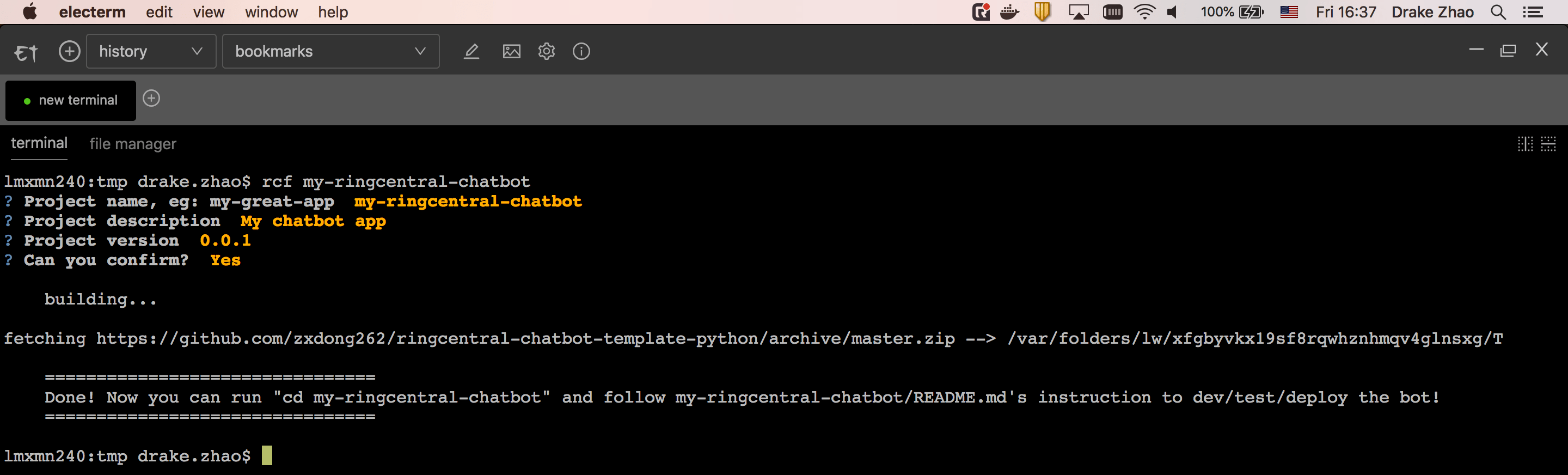
The ringcentral-chatbot-factory-py was created to help speed up the process of creating additional Glip bots. To use it, install it, then run the rcf command as shown below:
pip3 install ringcentral_chatbot_factory
rcf my-ringcentral-chat-bot
Then just answer the prompts. Then follow the directions in my-ringcentral-chat-bot/README.md to get up and running.
- Deploy to AWS Lambda
- Use or write extensions
- Direct Use
- Init bot project in one line script:
wget -qO- https://raw.githubusercontent.com/zxdong262/ringcentral-chatbot-factory-py/master/bin/init.sh | bash

# or with curl
curl -o- https://raw.githubusercontent.com/zxdong262/ringcentral-chatbot-factory-py/master/bin/init.sh | bash
Unit Test
bin/test
Todos
Visit https://github.com/zxdong262/ringcentral-chatbot-python/issues
Credits
The core bot framework logic is implanted from ringcentral-ai-bot written by @tylerlong
License
MIT
Release history Release notifications | RSS feed


Download files
Download the file for your platform. If you're not sure which to choose, learn more about installing packages.
Source Distribution
Built Distribution
Filter files by name, interpreter, ABI, and platform.
If you're not sure about the file name format, learn more about wheel file names.
Copy a direct link to the current filters
File details
Details for the file ringcentral_bot_framework-0.2.6b1.tar.gz.
File metadata
- Download URL: ringcentral_bot_framework-0.2.6b1.tar.gz
- Upload date:
- Size: 15.2 kB
- Tags: Source
- Uploaded using Trusted Publishing? No
- Uploaded via: twine/1.13.0 pkginfo/1.5.0.1 requests/2.21.0 setuptools/40.8.0 requests-toolbelt/0.9.1 tqdm/4.31.1 CPython/3.6.5
File hashes
| Algorithm | Hash digest | |
|---|---|---|
| SHA256 |
18e580247c3eb59134a516aa948df88abc953eca15606132e8b16f52400f449b
|
|
| MD5 |
5726a3d7727b4d94bc20ad5269c540c1
|
|
| BLAKE2b-256 |
1c0fcad8e066dbdd56a6a46f6ad526df609d47f3172a1935261d326120ecbccb
|
File details
Details for the file ringcentral_bot_framework-0.2.6b1-py3-none-any.whl.
File metadata
- Download URL: ringcentral_bot_framework-0.2.6b1-py3-none-any.whl
- Upload date:
- Size: 23.1 kB
- Tags: Python 3
- Uploaded using Trusted Publishing? No
- Uploaded via: twine/1.13.0 pkginfo/1.5.0.1 requests/2.21.0 setuptools/40.8.0 requests-toolbelt/0.9.1 tqdm/4.31.1 CPython/3.6.5
File hashes
| Algorithm | Hash digest | |
|---|---|---|
| SHA256 |
ad9e41f62fb2baea771b919c68080192eaa1106e74d1f57d4dda3c35967c978c
|
|
| MD5 |
a969f60303cae74fc4f18f114b774fe5
|
|
| BLAKE2b-256 |
20b7808c63a72a27d5c23c92e8d5440e4247739f4b16e98eb96457d7d72985d1
|






