
⚠️ Experimental Branch — RIVeR with STIV & IWave
This branch adds two new velocimetry techniques alongside RIVeR's original LSPIV:
- STIV — a CNN-based Space-Time Image Velocimetry model, trained in-house.
- IWave — a different velocimetry approach, developed by dataforwater. Included here with credit to its original authors; not developed by the RIVeR team.
This makes RIVeR the first software to offer all three techniques in one place.
Status: Experimental. Not yet peer-reviewed or formally validated. Interfaces, outputs, and model performance may change before a stable release. Feedback is welcome via Issues.
STIV model weights
This branch includes STIV's code but not its trained weights, to keep the repo lean. Weights are hosted on Zenodo and downloaded automatically during the build (see .github/scripts/download_stiv_weights.sh).
Manual download: https://zenodo.org/records/22050810 DOI: https://doi.org/10.5281/zenodo.22050810

License and usage terms for the weights (separate from RIVeR's AGPLv3 license) are on the Zenodo record — research/non-commercial use, no redistribution, cite the DOI if used in published work.
Without the weights file present, the STIV option will be unavailable (greyed out) in the app — see river.core.stiv_pipeline.stiv_weights_available().
Citing this release
- RIVeR software: use the DOI already referenced below (
10.1016/j.cageo.2017.07.009) - STIV weights: https://doi.org/10.5281/zenodo.22050810
- IWave: see dataforwater/iwave for their own citation guidance.
License
RIVeR source code is licensed under AGPLv3 (see LICENSE). STIV model weights are licensed separately — see the Zenodo record above.

Modern LSPIV toolkit for water-surface velocity analysis and flow discharge measurements



RIVeR: Rectification of Image Velocity Results
RIVeR (Rectification of Image Velocity Results) is a modern, open-source toolkit for Large Scale Particle Image Velocimetry (LSPIV) distributed by ORUS. Built with Python and React, it provides a user-friendly interface for water-surface velocity analysis and flow discharge measurements in rivers and large-scale hydraulic models.
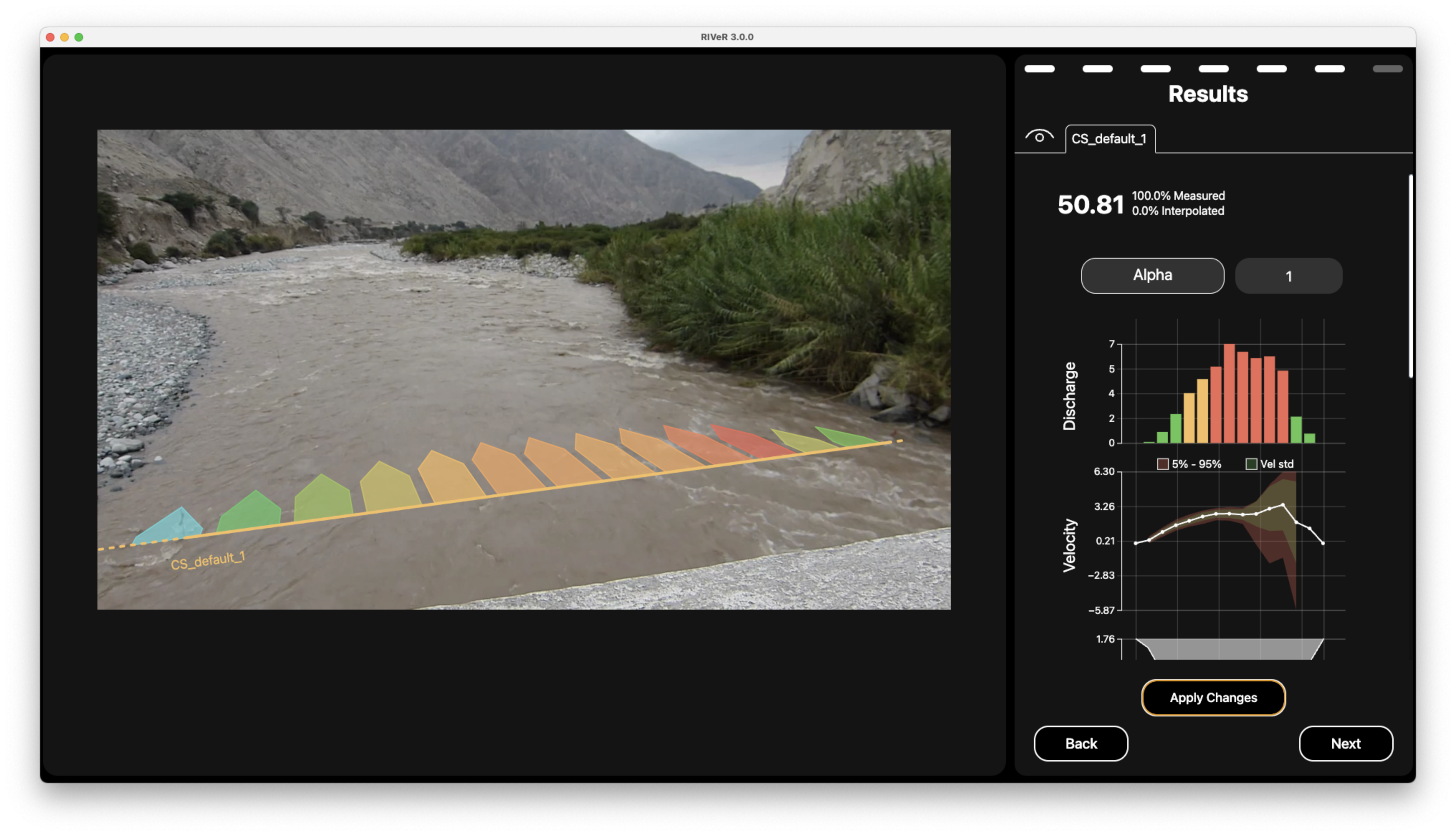
Example of RIVeR velocimetry analysis of river flow
💧 Overview
RIVeR is a specialized tool for applying Large Scale Particle Image Velocimetry (LSPIV) techniques as a non-contact method to estimate discharge in rivers and channels from video footage. The software guides the process through intuitive defaults and pre-configured settings, enabling users to generate discharge calculations without extensive prior knowledge of the technique. The workflow guides users through a series of straightforward steps culminating in comprehensive visual reports.
Originally developed in MATLAB in 2015 and well-received by the hydrology community, RIVeR has now been reimplemented in Python and JavaScript to improve accessibility, performance, and cross-platform compatibility.
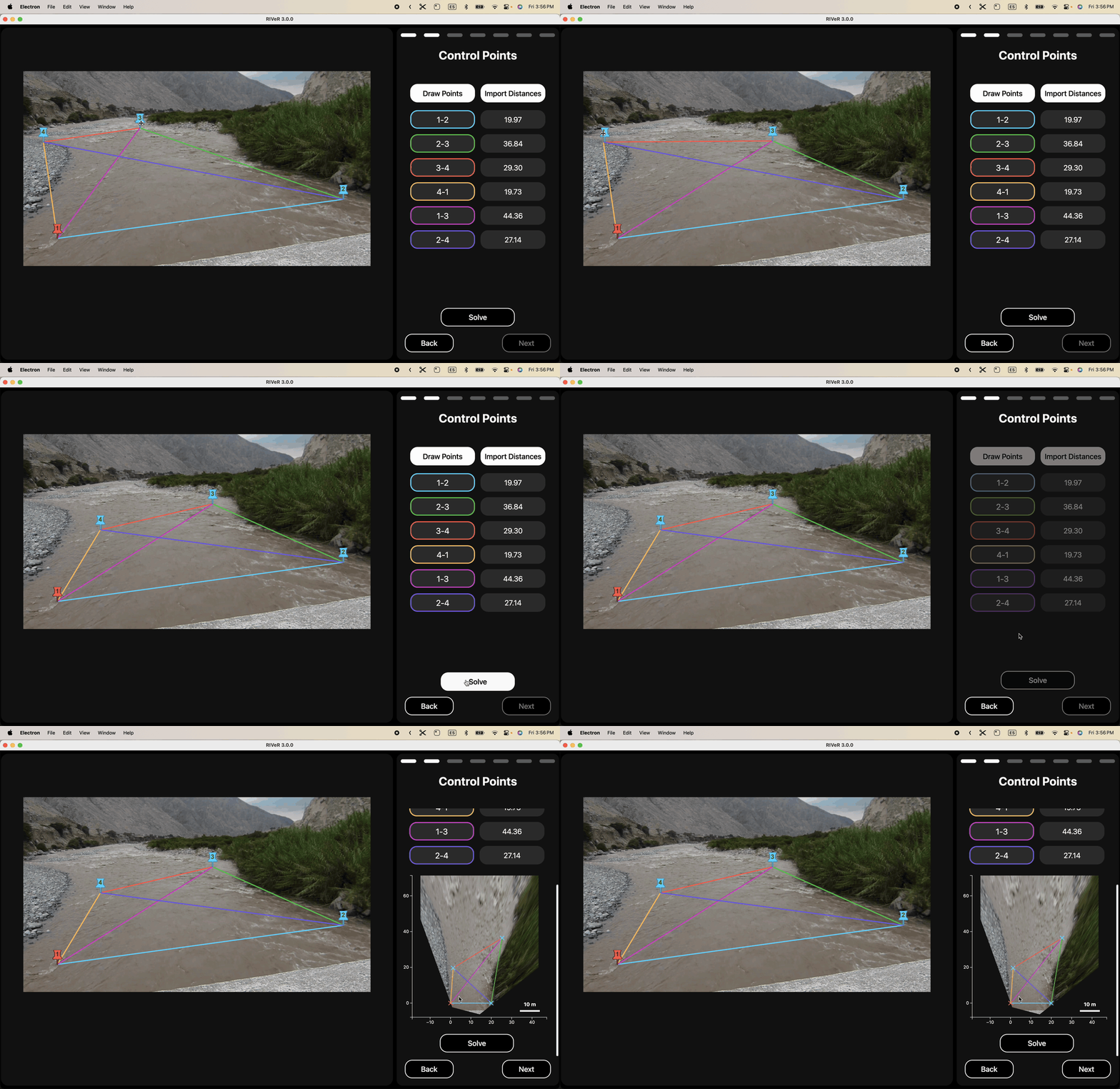
Demonstration of interactive oblique image rectification process in RIVeR
📖 User Manual
For a detailed step-by-step guide on using RIVeR's GUI (Graphical User Interface), please refer to the User Manual.
✨ Key Features
- Process footage from multiple sources:
- UAV/drone aerial imagery
- Oblique view camera (from riverbank)
- Fixed station cameras (continous monitoring)
- Drag-and-drop interface for quick video and data imports
- Frame extraction from videos with customizable parameters
- FFT-based PIV analysis with multi-pass support for increased accuracy
- Interactive result visualization with customizable vector fields
- Georeferencing and coordinate transformations
- Multi Cross-sectional flow analysis
- Camera calibration tool for lens distortion correction, with reusable camera/lens profiles
- UAV video stabilization to counter camera shake before analysis
- Automated beautiful report generation (like this one !)
- Multi-platform support (Windows, macOS, Linux)
- Multi-units support (SI, imperial)
🌍 Multi-Language Support
RIVeR is available in 12 languages, with technical terminology reviewed for hydrology, PIV and bathymetry domains:
| 🇬🇧 English | 🇯🇵 Japanese | 🇸🇦 Arabic | 🇷🇺 Russian |
| 🇦🇷 Spanish | 🇨🇳 Chinese | 🇰🇷 Korean | 🇮🇳 Hindi |
| 🇫🇷 French | 🇩🇪 German | 🇮🇹 Italian | 🇧🇷 Portuguese |
Want to contribute a new language? Translation files are located in gui/src/translations/ — add a new folder with a global.json file following the existing structure and open a Pull Request!
📥 Download Compiled Releases
If you don't want to bother with code at all (we get it, sometimes you just want things to work!), pre-compiled standalone versions are available:
| ⊞ Windows | ⌘ macOS | ◆ Linux |
|---|---|---|
| EXE | DMG | DEB |
These packages include both the GUI and CLI tools in a ready-to-use application. Simply download, extract (if needed), and run the application — no Python or JavaScript knowledge required!
macOS users: If Gatekeeper blocks the app after installing, open a terminal and run:
xattr -rd com.apple.quarantine /Applications/RIVeR.appOr right-click the app → Open → Open anyway.
🧑💻 Developer Installation & Usage
For those who prefer to work with the source code or contribute to RIVeR's development, here's how to get started:
Prerequisites
- Python 3.12+
- pip package manager
- Git (for cloning the repository)
Development Installation
git clone https://github.com/oruscam/RIVeR.git
cd RIVeR
pip install -e .
CLI Installation
RIVeR CLI provides a comprehensive set of commands for performing LSPIV analysis through the command line.
pip install river-cli
Basic Usage
river-cli [OPTIONS] COMMAND [ARGS]...
To see all available commands and options:
river-cli --help
Example Workflow
# 1. Extract frames from video
river-cli video-to-frames river_video.mp4 ./frames --every 2

# 2. Generate transformation matrix
river-cli get-uav-transformation-matrix 100 200 300 400 0 0 10 10 \
--image-path ./frames/frame_001.jpg

# 3. Create ROI mask from cross-sections
# This writes mask.npy, bbox.json and mask.png into --workdir
river-cli create-mask-and-bbox 3 \
./frames/frame_001.jpg \
./xsections.json \
./transformation_matrix.json \
--workdir ./workdir \
--save-png-mask

# 4. (Optional) Create one or more user masks from polygon coordinates
river-cli create-user-mask ./frames/frame_001.jpg \
--workdir ./workdir \
--index 1 \
--point 120 340 --point 220 500 --point 400 420

river-cli create-user-mask ./frames/frame_001.jpg \
--workdir ./workdir \
--index 2 \
--point 600 300 --point 750 600 --point 900 450

# 5. Compile ROI mask and user masks into a final mask
# 0 is dominant: final = ROI AND all user masks
river-cli compile-masks \
--workdir ./workdir \
--roi ./workdir/mask.npy \
--usr ./workdir/usr_mask_1.npy \
--usr ./workdir/usr_mask_2.npy \
--out final_mask.npy \
--save-png-mask

# 6. Run PIV analysis using the final mask
river-cli piv-analyze ./frames \
--mask ./workdir/final_mask.npy \
--workdir ./results

# 7. Calculate discharge
river-cli update-xsection \
./xsections.json \
./results/piv_results.json \
./transformation_matrix.json \
--step 2 --fps 30 --id-section 0

# 8. (Optional) Generate a ChArUco calibration board to print/display
river-cli write-charuco-board --output ./board.png --board 20x15

# 9. (Optional) Calibrate camera intrinsics from a folder of board photos,
# then reuse the profile to undistort frames during extraction
river-cli camera-calibration --dir ./calibration_photos --save ./profile.json

river-cli video-to-frames river_video.mp4 ./frames --every 2 \
--undistort --profile-path ./profile.json

# 10. (Optional, UAV footage only) Stabilize extracted frames against camera shake
river-cli video-to-frames river_video.mp4 ./frames --every 2 \
--stabilize --stabilization-regions ./stabilization_regions.json
Graphical User Interface (GUI)
RIVeR also provides a user-friendly graphical interface built with React. The GUI offers an intuitive way to perform LSPIV analysis without using command-line tools.
Key GUI features include:
- Interactive workflow interface
- Visual cross-section creation
- Real-time PIV analysis visualization
- Camera calibration tool with reusable camera/lens profiles
- UAV video stabilization with a sanity-check view
- Result export capabilities
For detailed information about installation, usage, and features of the GUI, please see the dedicated GUI documentation.
📂 Project Structure
river/
.
├── LICENSE
├── examples       # Jupyter examples
│   ├── 00_introduction.ipynb
│   ├── 01_video_to_frames.ipynb
│   ├── 02a_nadir_transformation.ipynb
│   ├── 02b_oblique_transformation.ipynb
│   ├── 02c_fixed_station_transformation.ipynb
│   ├── 03_cross_sections.ipynb
│   ├── 04_piv_analysis.ipynb
│   ├── 05_discharge_calculation.ipynb
│   ├── data
│   ├── results
│   └── utils
├── gui
├── pyproject.toml
├── readme.md
├── requirements.txt
└── river
    ├── cli
    ├── core
    │   ├── camera_calibration.py    # Intrinsic lens calibration from ChArUco images
    │   ├── compute_section.py       # Section computation utilities
    │   ├── coordinate_transform.py   # Coordinate system transformations
    │   ├── define_roi_masks.py      # ROI and mask definitions
    │   ├── exceptions.py            # Custom exceptions
    │   ├── image_preprocessing.py   # Image preparation tools
    │   ├── matlab_smoothn.py        # Smoothing algorithms
    │   ├── piv_fftmulti.py         # FFT-based PIV processing
    │   ├── piv_loop.py             # PIV processing loop
    │   ├── piv_pipeline.py         # Main PIV pipeline
    │   ├── stabilize_frames.py     # UAV frame stabilization via LK point tracking
    │   └── video_to_frames.py      # Video frame extraction
    └── docs
📚 Jupyter Examples
Browse through our collection of Jupyter Notebook examples to learn how to use RIVeR for various analyses (requires development installation with the examples extra):
pip install -e ".[examples]"
- Introduction to RIVeR
- Video Frame Extraction
- UAV/Drone Transformations
- Oblique View Transformations
- Fixed Station Transformations
- Cross Section Analysis
- PIV Analysis Workflow
- Discharge Calculation
These interactive examples provide step-by-step guidance for common RIVeR workflows. To run them, make sure you've completed the development installation with the examples extra shown above.
🔬 Citation
If you use RIVeR in your research, please cite:
@article{patalano2017river,
    title={Rectification of Image Velocity Results (RIVeR): A simple and user-friendly toolbox
           for large scale water surface Particle Image Velocimetry (PIV) and
           Particle Tracking Velocimetry (PTV)},
    author={Patalano, Antoine and García, Carlos Marcelo and Rodríguez, Andrés},
    journal={Computers \& Geosciences},
    volume={105},
    pages={103--114},
    year={2017},
    publisher={Elsevier}
}
RIVeR's iWave technique implements the image wave velocimetry method of Dolcetti et al., by way of the IWaVE package, which RIVeR bundles unmodified. If you use iWave results, please also cite:
@article{dolcetti2022noncontact,
    title={Using Noncontact Measurement of Water Surface Dynamics to Estimate River Discharge},
    author={Dolcetti, G. and Hortob{\'a}gyi, B. and Perks, M. and Tait, S. J. and Dervilis, N.},
    journal={Water Resources Research},
    volume={58},
    number={9},
    pages={e2022WR032829},
    year={2022},
    doi={10.1029/2022WR032829}
}
See THIRD-PARTY-LICENSES.md for the licences of IWaVE and everything else RIVeR redistributes.
👥 Authors
Core Team
- Antoine Patalano - Project Lead, Feature Development - [UNC/ORUS]
- Leandro Massó - Feature Development - [UNC/ORUS]
Development Team
- Nicolas Stefani - CLI & Backend Development
- Tomas Stefani - Frontend Development
- Agustín Patrito - Frontend Development
🤝 Contributing
Contributions are welcome! Please feel free to submit a Pull Request. For major changes, please open an issue first to discuss what you would like to change.
📜 License
RIVeR is licensed under the GNU Affero General Public License v3.0 (AGPL-3.0-or-later).
RIVeR redistributes third-party software inside its installers, including the IWaVE velocimetry package and static FFmpeg binaries. Their licences and copyright notices are listed in THIRD-PARTY-LICENSES.md.
The complete corresponding source for any released version is this repository, at the matching tag. For
the source of a bundled third-party component, or a copy on physical media, write to contact@orus.cam.
Data and models
- Sample data in
examples/data/(videos, frames, bathymetry) is © UNC / CONICET / ORUS and is released under CC BY 4.0. - Documentation images in
river/docs/_static/are © UNC / CONICET / ORUS, released under CC BY 4.0. - STIV model weights were trained on data from UNC / CONICET / ORUS and are hosted separately on Zenodo under a research/non-commercial use license — not RIVeR's AGPL-3.0-or-later. No redistribution; cite the DOI if used in published work. See the "STIV model weights" section above and the Zenodo record for the full terms.
💭Acknowledgments
-
Contributing organizations:
-
WMO HydroHub: For funding the development of RIVeR 3 (2024-2025)
-
PIVlab project: The pioneering PIV analysis tool that inspired aspects of RIVeR's development
-
IWaVE by Giulio Dolcetti (University of Trento), Salvador Peña-Haro and Hessel Winsemius, maintained under the DataForWater organisation: the image wave velocimetry engine behind RIVeR's iWave technique
1 maintainer

Metadata
1 maintainer
Release files for river-cli 3.7.0
For a detailed explanation of source distributions (sdists) and built distributions (wheels), please see the package formats documentation.
Source distribution (sdist)
| File | Size | Uploaded | Provenance | Actions |
|---|---|---|---|---|
| river_cli-3.7.0.tar.gz | 10.5 MB | Without provenance | Details for river_cli-3.7.0.tar.gz |
Built distribution (wheel)
| File | Interpreter | ABI | Platform | Actions Reset |
|---|---|---|---|---|
| river_cli-3.7.0-py3-none-any.whl | Python 3 | none | any | Details for river_cli-3.7.0-py3-none-any.whl |
Total release size: 20.9 MB
Release files / river_cli-3.7.0.tar.gz
| Download URL | river_cli-3.7.0.tar.gz |
|---|---|
| Size | 10.5 MB |
| Tags | Source |
|
SHA-256 checksum How to use checksums |
a189d3b076519faa7c6f350e57698bf2021678f65a6b2ff388e918ce419611b0
|
|
BLAKE2b-256 checksum How to use checksums |
5e17ff5002ef83ccb0190f7f40195c7e4570f799ade6a866eb7a660fdea1ac77
|
| Upload date | |
|
Uploaded using Trusted Publishing? What is trusted publishing? |
No |
| Uploaded via |
twine/7.0.0 CPython/3.12.13
|
Release files / river_cli-3.7.0-py3-none-any.whl
| Download URL | river_cli-3.7.0-py3-none-any.whl |
|---|---|
| Size | 10.5 MB |
| Tags | Python 3 |
|
SHA-256 checksum How to use checksums |
537fdce827b70768f20e50c9c923591d35c01895cd540ae2580b94d3d8152e51
|
|
BLAKE2b-256 checksum How to use checksums |
1f12e615930d3edef6f6e90d25d92e157e9d8744209c7bb98e4782ddda9761a9
|
| Upload date | |
|
Uploaded using Trusted Publishing? What is trusted publishing? |
No |
| Uploaded via |
twine/7.0.0 CPython/3.12.13
|
Security for river-cli 3.7.0
Provenance
Provenance describes where a file came from. On PyPI, provenance is shared via attestations, which provide a verifiable record of the build or publishing details. View details, limitations and caveats.
No provenance found
None of the files in this release were uploaded with provenance metadata.
A note on package security
PyPI is a repository for distributing packages, not a service for auditing them. While third-party security researchers and our staff do their best to detect and remove malicious packages, PyPI cannot guarantee the quality, security or suitability of any given package.
To learn more about protecting yourself from malicious actors, visit our package security documentation.














