
A CLI application for Large Scale Particle Image Velocimetry (LSPIV).

Project description

Modern LSPIV toolkit for water-surface velocity analysis and flow discharge measurements




RIVeR: Rectification of Image Velocity Results
RIVeR (Rectification of Image Velocity Results) is a modern, open-source toolkit for Large Scale Particle Image Velocimetry (LSPIV) distributed by ORUS. Built with Python and React, it provides a user-friendly interface for water-surface velocity analysis and flow discharge measurements in rivers and large-scale hydraulic models.
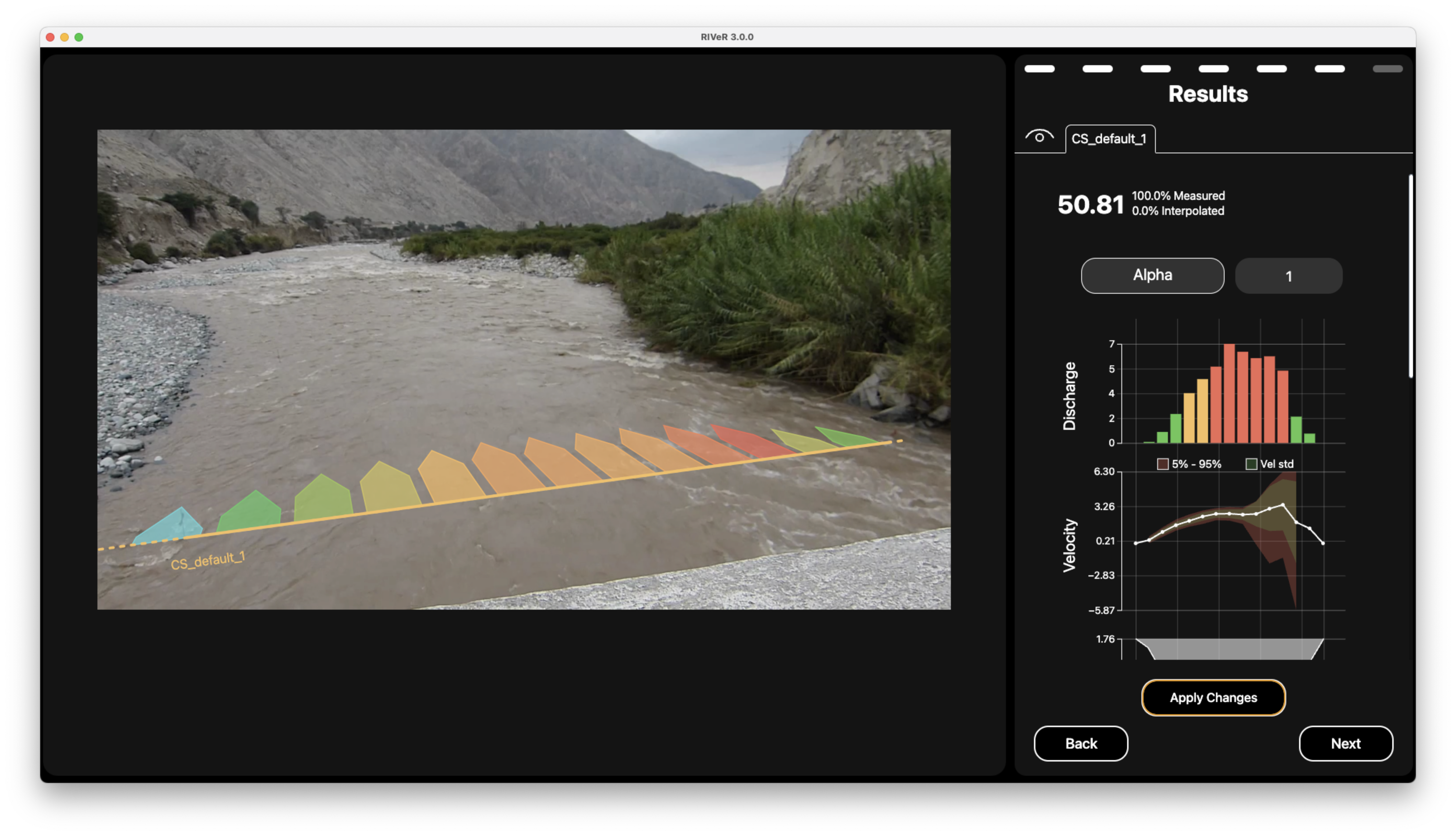
Example of RIVeR velocimetry analysis of river flow
💧 Overview
RIVeR is a specialized tool for applying Large Scale Particle Image Velocimetry (LSPIV) techniques as a non-contact method to estimate discharge in rivers and channels from video footage. The software guides the process through intuitive defaults and pre-configured settings, enabling users to generate discharge calculations without extensive prior knowledge of the technique. The workflow guides users through a series of straightforward steps culminating in comprehensive visual reports.
Originally developed in MATLAB in 2015 and well-received by the hydrology community, RIVeR has now been reimplemented in Python and JavaScript to improve accessibility, performance, and cross-platform compatibility.
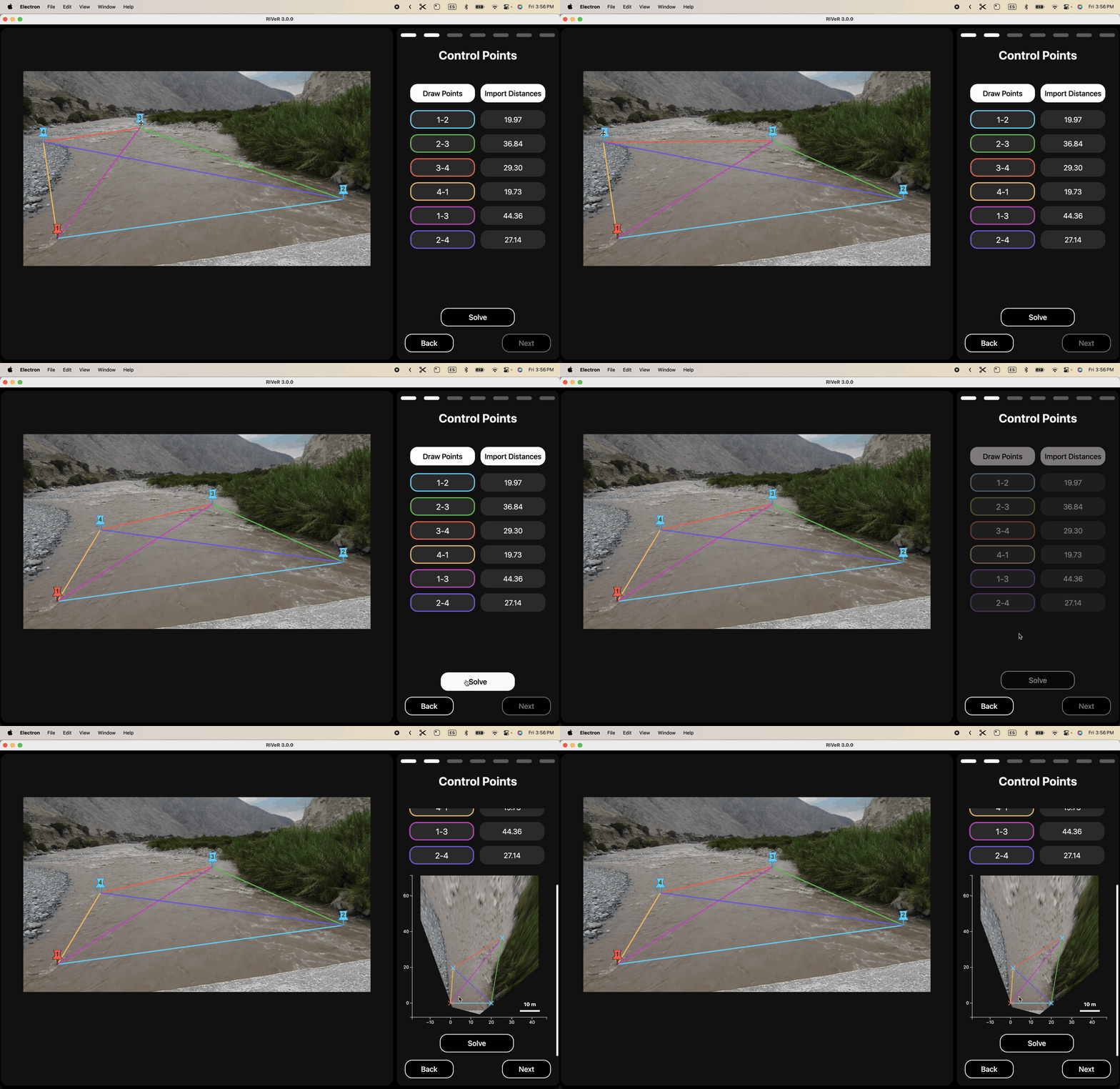
Demonstration of interactive oblique image rectification process in RIVeR
✨ Key Features
- Process footage from multiple sources:
- UAV/drone aerial imagery
- Oblique view camera (from riverbank)
- Fixed station cameras (contiunous monitoring)
- Frame extraction from videos with customizable parameters
- FFT-based PIV analysis with multi-pass support for increased accuracy
- Interactive result visualization with customizable vector fields
- Georeferencing and coordinate transformations
- Multi Cross-sectional flow analysis
- Automated beautiful report generation (like this one !)
- Multi-platform support (Windows, macOS, Linux)
🌍 Multi-Language Support
- RIVeR available in multiple languages!
- English 🇺🇸
- Spanish 🇦🇷
- French 🇫🇷
- [More coming soon!]
📥 Download Compiled Releases
If you don't want to bother with code at all (we get it, sometimes you just want things to work!), pre-compiled standalone versions are available:
| ⊞ Windows | ⌘ macOS | ◆ Linux |
|---|---|---|
| v3.0.0 | Download | Download |
These packages include both the GUI and CLI tools in a ready-to-use application. No Python or JavaScript knowledge required!
These packages include both the GUI and CLI tools in a ready-to-use application. Simply download, extract (if needed), and run the application - no Python or JavaScript knowledge required!
🧑💻 Developer Installation & Usage
For those who prefer to work with the source code or contribute to RIVeR's development, here's how to get started:
Prerequisites
- Python 3.12+
- pip package manager
- Git (for cloning the repository)
Development Installation
git clone https://github.com/oruscam/RIVeR.git
cd RIVeR
pip install -e .
CLI Installation
RIVeR CLI provides a comprehensive set of commands for performing LSPIV analysis through the command line.
pip install river-cli
Basic Usage
river-cli [OPTIONS] COMMAND [ARGS]...
To see all available commands and options:
river-cli --help
Example Workflow
# 1. Extract frames from video
river-cli video-to-frames river_video.mp4 ./frames --every 2

# 2. Generate transformation matrix
river-cli get-uav-transformation-matrix 100 200 300 400 0 0 10 10 --image-path ./frames/frame_001.jpg

# 3. Create masks for PIV analysis
river-cli create-mask-and-bbox 3 ./frames/frame_001.jpg ./xsections.json ./transformation_matrix.json --save-png-mask

# 4. Run PIV analysis
river-cli piv-analyze ./frames --mask ./mask.json --workdir ./results

# 5. Calculate discharge
river-cli update-xsection ./xsections.json ./results/piv_results.json ./transformation_matrix.json --step 2 --fps 30 --id-section 0
Graphical User Interface (GUI)
RIVeR also provides a user-friendly graphical interface built with React. The GUI offers an intuitive way to perform LSPIV analysis without using command-line tools.
Key GUI features include:
- Interactive workflow interface
- Visual cross-section creation
- Real-time PIV analysis visualization
- Result export capabilities
For detailed information about installation, usage, and features of the GUI, please see the dedicated GUI documentation.
📂 Project Structure
river/
.
├── LICENSE
├── examples       # Jupyter examples
│   ├── 00_introduction.ipynb
│   ├── 01_video_to_frames.ipynb
│   ├── 02a_nadir_transformation.ipynb
│   ├── 02b_oblique_transformation.ipynb
│   ├── 02c_fixed_station_transformation.ipynb
│   ├── 03_cross_sections.ipynb
│   ├── 04_piv_analysis.ipynb
│   ├── 05_discharge_calculation.ipynb
│   ├── data
│   ├── results
│   └── utils
├── gui
├── pyproject.toml
├── readme.md
├── requirements.txt
└── river
    ├── cli
    ├── core
    │   ├── compute_section.py       # Section computation utilities
    │   ├── coordinate_transform.py   # Coordinate system transformations
    │   ├── define_roi_masks.py      # ROI and mask definitions
    │   ├── exceptions.py            # Custom exceptions
    │   ├── image_preprocessing.py   # Image preparation tools
    │   ├── matlab_smoothn.py        # Smoothing algorithms
    │   ├── piv_fftmulti.py         # FFT-based PIV processing
    │   ├── piv_loop.py             # PIV processing loop
    │   ├── piv_pipeline.py         # Main PIV pipeline
    │   └── video_to_frames.py      # Video frame extraction
    └── docs
📚 Jupyter Examples
Browse through our collection of Jupyter Notebook examples to learn how to use RIVeR for various analyses (requires development installation):
- Introduction to RIVeR
- Video Frame Extraction
- UAV/Drone Transformations
- Oblique View Transformations
- Fixed Station Transformations
- Cross Section Analysis
- PIV Analysis Workflow
- Discharge Calculation
These interactive examples provide step-by-step guidance for common RIVeR workflows. To run them, make sure you've completed the development installation described above.
🔬 Citation
If you use RIVeR in your research, please cite:
@article{patalano2017river,
    title={Rectification of Image Velocity Results (RIVeR): A simple and user-friendly toolbox
           for large scale water surface Particle Image Velocimetry (PIV) and
           Particle Tracking Velocimetry (PTV)},
    author={Patalano, Antoine and García, Carlos Marcelo and Rodríguez, Andrés},
    journal={Computers \& Geosciences},
    volume={105},
    pages={103--114},
    year={2017},
    publisher={Elsevier}
}
👥 Authors
Core Team
- Antoine Patalano - Project Lead, Feature Development - [UNC/ORUS]
- Leandro Massó - Feature Development - [UNC/ORUS]
Development Team
- Nicolas Stefani - CLI & Backend Development
- Tomas Stefani - Frontend Development
🤝 Contributing
Contributions are welcome! Please feel free to submit a Pull Request. For major changes, please open an issue first to discuss what you would like to change.
📜 License
RIVeR is licensed under the GNU Affero General Public License v3.0 (AGPL-3.0).
💭Acknowledgments
-
Contributing organizations:
-
WMO HydroHub: For funding the development of RIVeR 3 (2024-2025)
-
PIVlab project: The pioneering PIV analysis tool that inspired aspects of RIVeR's development
Release history Release notifications | RSS feed


Download files
Download the file for your platform. If you're not sure which to choose, learn more about installing packages.
Source Distribution
Built Distribution
Filter files by name, interpreter, ABI, and platform.
If you're not sure about the file name format, learn more about wheel file names.
Copy a direct link to the current filters
File details
Details for the file river_cli-3.0.1.tar.gz.
File metadata
- Download URL: river_cli-3.0.1.tar.gz
- Upload date:
- Size: 69.4 kB
- Tags: Source
- Uploaded using Trusted Publishing? No
- Uploaded via: twine/6.1.0 CPython/3.12.2
File hashes
| Algorithm | Hash digest | |
|---|---|---|
| SHA256 |
df5421631000605e5e2dbc557ea4e67b5199b0ff061b80c5a49f2d6a630cdec0
|
|
| MD5 |
4b87ab966e3c1c4fe40e2f5ce1e9a935
|
|
| BLAKE2b-256 |
2a2b01210633eb3d871646d4384d6a0c7f1c72a49292ffc92a770ab9c4152d3d
|
File details
Details for the file river_cli-3.0.1-py3-none-any.whl.
File metadata
- Download URL: river_cli-3.0.1-py3-none-any.whl
- Upload date:
- Size: 71.7 kB
- Tags: Python 3
- Uploaded using Trusted Publishing? No
- Uploaded via: twine/6.1.0 CPython/3.12.2
File hashes
| Algorithm | Hash digest | |
|---|---|---|
| SHA256 |
d633d420ebd7025f069c9eb159514b947406a797b2e1f22fe58ded200daf2bd0
|
|
| MD5 |
7a2e72032740e1fb35ffa7fb671c1eb6
|
|
| BLAKE2b-256 |
21becfd5d155dc7288aecc23c10131a4f31e4d56a0dc16605468f53292208748
|






