





Create LLM agent for your robot. Connect movement tools, VLA policies and sensor scans just in a few lines of code.
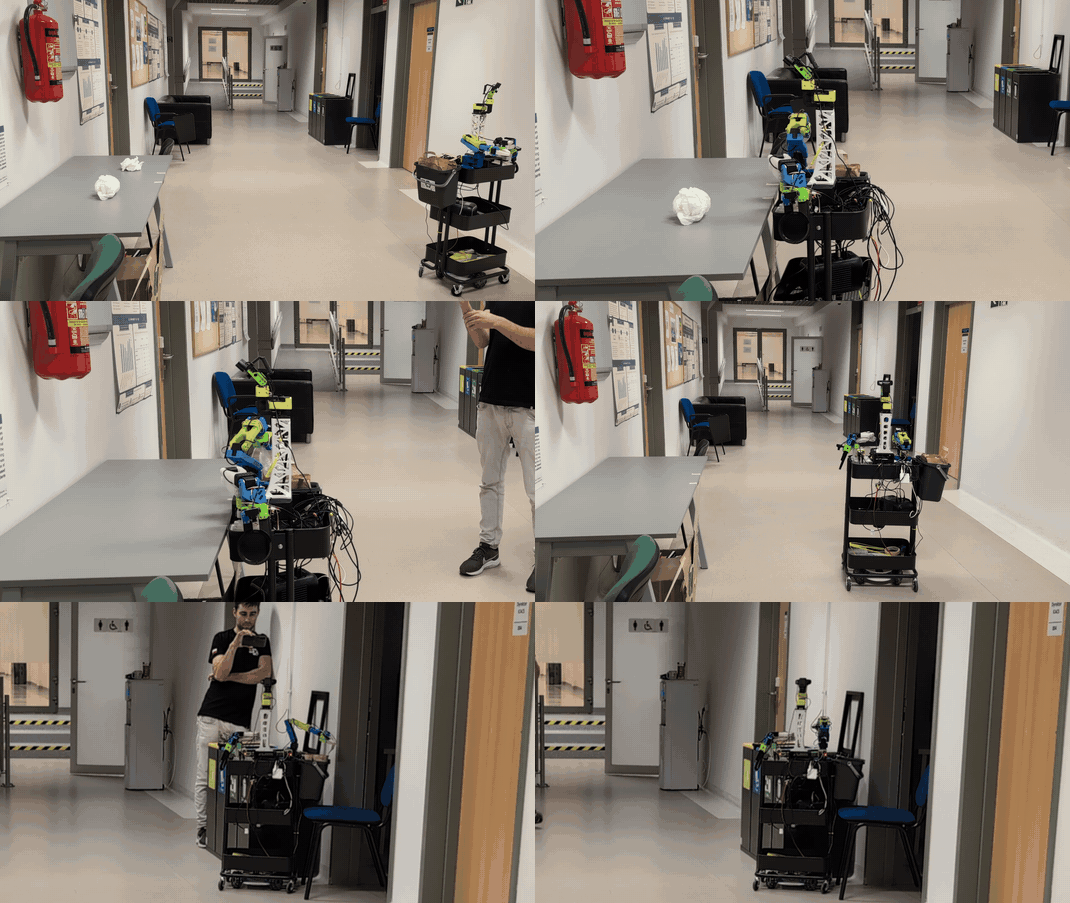
RoboCrew agent cleaning up a table.
🚀 Quick Start
Run on your robot:
pip install robocrew
For XLeRobot and the GUI, install the optional dependencies:
pip install "robocrew[xlerobot]"
Start GUI app with:
robocrew-gui
✨ Features
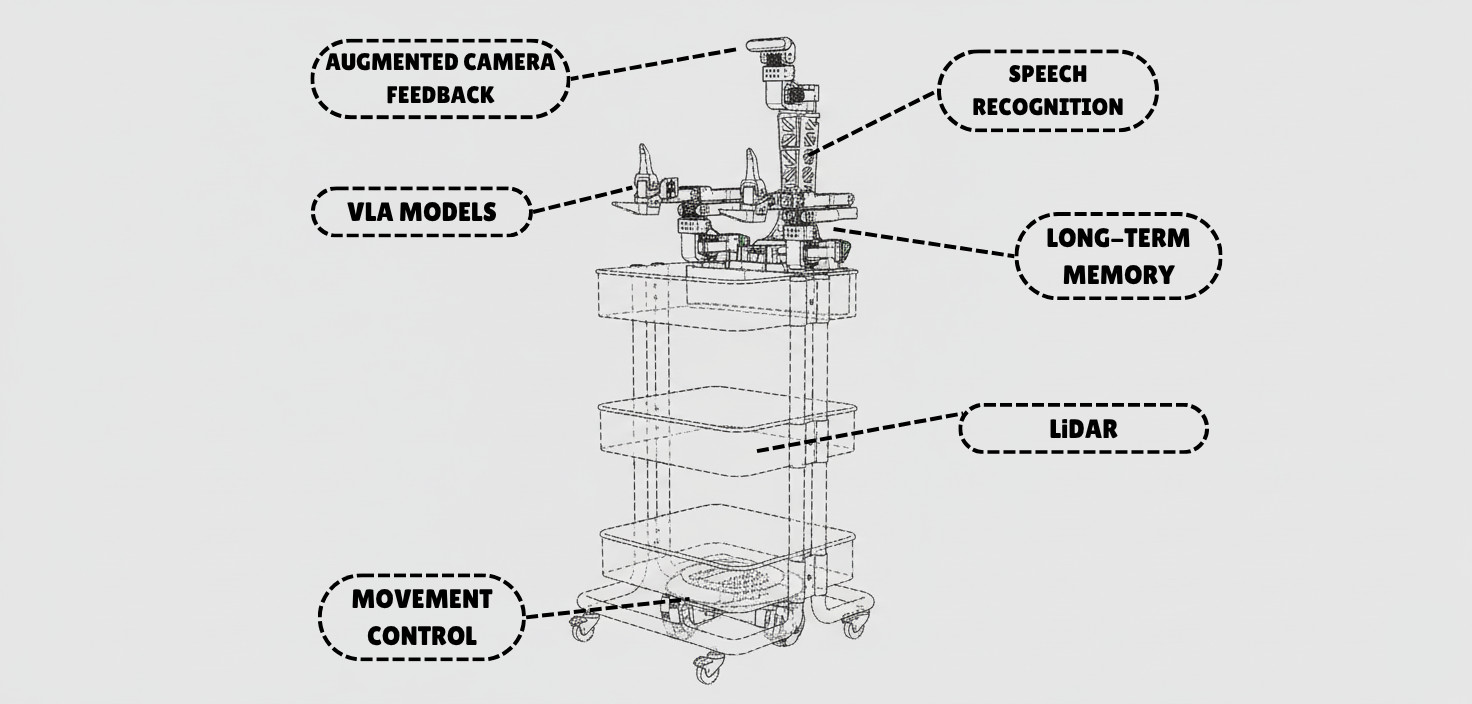
- 🚗 Movement - Pre-built wheel controls for mobile robots
- 🦾 Manipulation - VLA models as tools for arms control
- 👁️ Vision - Camera feed with image augmentation for better spatial understanding
- 🎤 Voice - Wake-word activated voice commands and TTS responses
- 🗺️ LiDAR - Top-down mapping with LiDAR sensor
- 🧠 Intelligence - Multi-agent control provides autonomy in decision making
🎨 Supported Robots
- ✅ XLeRobot - Full support for all features
- 🥝 LeKiwi - Use XLeRobot code (compatible platform)
- 🚙 Earth Rover mini plus - Full support
- 🐕 Unitree Go2 - Autonomous navigation with Nav2, camera, LiDAR, and Telegram control
- 🔜 More robot platforms coming soon! Request your platform →
🎯 How It Works
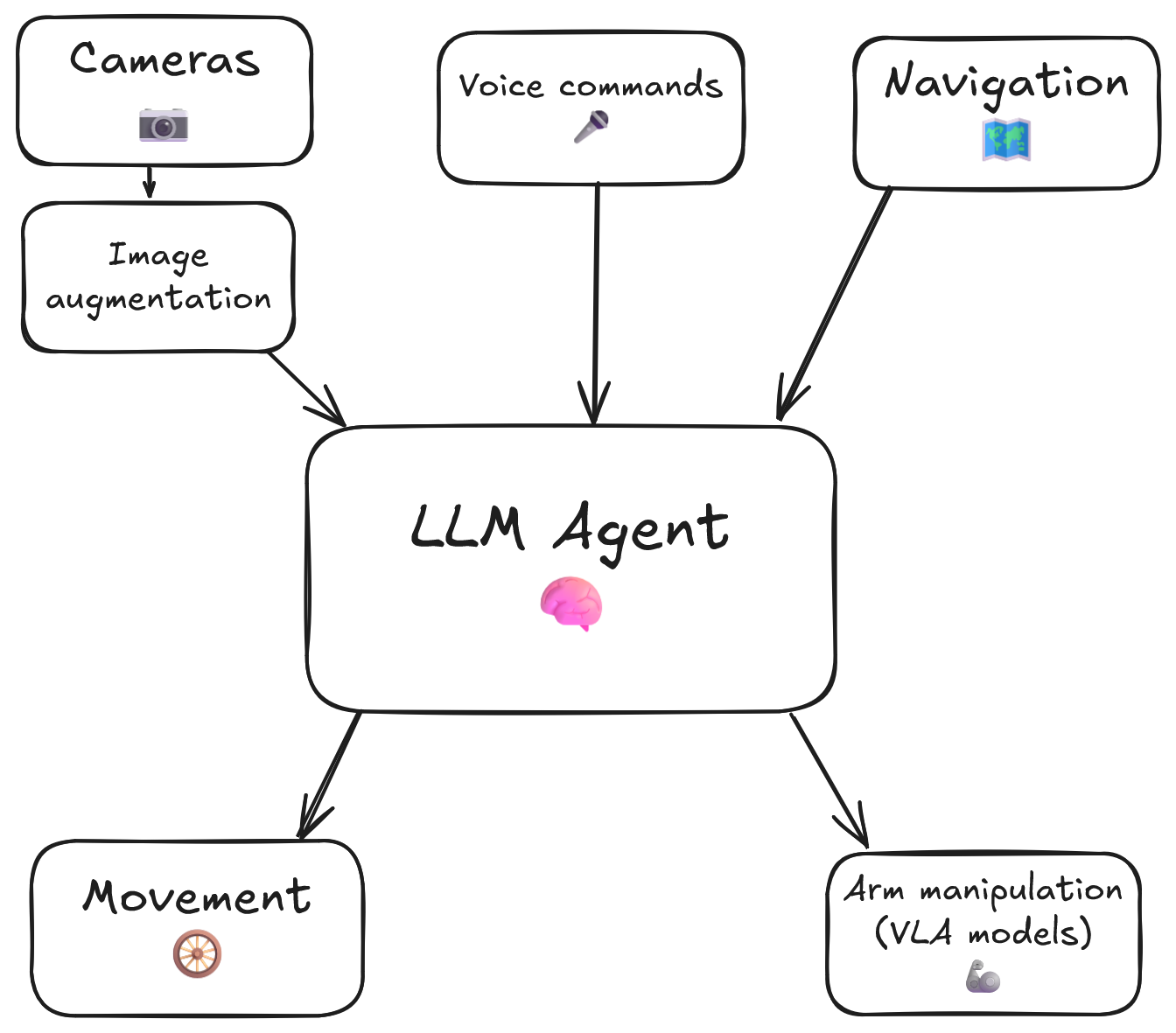
The RoboCrew Intelligence Loop:
- 👂 Input - Voice commands, text tasks, or autonomous operation
- 🧠 LLM Processing - LLM analyzes the task and environment...
- 🛠️ Tool Selection - ...and chooses appropriate tools (move, turn, grab an apple, etc.)
- 🤖 Robot Actions - Wheels and arms execute commands
- 📹 Visual Feedback - Cameras capture results with augmented overlay
- 🔄 Repeat - LLM evaluates results and adjusts strategy
📱 Scripts to Use:
To gain full control over RoboCrew features, you can create your own script. Simplest example:
from robocrew.robots.XLeRobot.camera import RobotCamera
from robocrew.core.LLMAgent import LLMAgent
from robocrew.robots.XLeRobot.tools import create_move_forward, create_turn_right, create_turn_left
from robocrew.robots.XLeRobot.servo_controls import ServoControler

# 📷 Set up main camera
main_camera = RobotCamera("/dev/camera_center")  # camera usb port Eg: /dev/video0

# 🎛️ Set up servo controller
right_arm_wheel_usb = "/dev/arm_right"  # provide your right arm usb port. Eg: /dev/ttyACM1
servo_controler = ServoControler(right_arm_wheel_usb=right_arm_wheel_usb)

# 🛠️ Set up tools
move_forward = create_move_forward(servo_controler)
turn_left = create_turn_left(servo_controler)
turn_right = create_turn_right(servo_controler)

# 🤖 Initialize agent
agent = LLMAgent(
    model="google_genai:gemini-3-flash-preview",
    tools=[move_forward, turn_left, turn_right],
    main_camera=main_camera,
    servo_controler=servo_controler,
)

# 🎯 Give it a task and go!
agent.task = "Approach a human."
agent.go()
🎤 Enable Listening and Speaking
Use voice to tell robot what to do.
📖 Docs: https://grigorij-dudnik.github.io/RoboCrew-docs/guides/examples/audio/
💻 Code example: examples/2_xlerobot_listening_and_speaking.py
🦾 Add VLA Policy as a Tool
Let's make our robot manipulate objects with its arms!
📖 Docs: https://grigorij-dudnik.github.io/RoboCrew-docs/guides/examples/vla-as-tools/
💻 Code example: examples/3_xlerobot_arm_manipulation.py
🧠 Increase intelligence with multiagent communication:
One agent plans mission, another controls robot.
📖 Docs: https://grigorij-dudnik.github.io/RoboCrew-docs/guides/examples/multiagent/
💻 Code example: examples/4_xlerobot_multiagent_cooperation.py
💬 Community & Support
- 💭 Join our Discord - Get help, share projects, discuss features
- 📖 Read the Docs - Comprehensive guides and API reference
- 🐛 Report Issues - Found a bug? Let us know!
- ⭐ Star on GitHub - Show your support!
❤️ Special thanks to all contributors and early adopters!
1 maintainer

Metadata
1 maintainer
Release files for robocrew 0.4.0
For a detailed explanation of source distributions (sdists) and built distributions (wheels), please see the package formats documentation.
Source distribution (sdist)
| File | Size | Uploaded | |
|---|---|---|---|
| robocrew-0.4.0.tar.gz | 104.1 kB | Details |
Built distribution (wheel)
| File | Interpreter | ABI | Platform | Reset |
|---|---|---|---|---|
| robocrew-0.4.0-py3-none-any.whl | Python 3 | none | any | Details |
Total release size: 216.1 kB
Release files / robocrew-0.4.0.tar.gz
| Download URL | robocrew-0.4.0.tar.gz |
|---|---|
| Size | 104.1 kB |
| Tags | Source |
|
SHA-256 checksum How to use checksums |
34718a4ea031ceb36ee6f370ed2e9d65f537e8cf503c20096941db8f9c14b85d
|
|
BLAKE2b-256 checksum How to use checksums |
30aa0c0d7b3fdb262f07390bd4042d0bf6cbf134fd0b870716a0bbf280f98b0f
|
| Upload date | |
|
Uploaded using Trusted Publishing? What is trusted publishing? |
Yes |
| Uploaded via |
twine/7.0.0 CPython/3.13.14
|
Provenance
Provenance describes where a file came from. On PyPI, provenance is shared via attestations, which provide a verifiable record of the build or publishing details. View details, limitations and caveats.


PyPI Publish Attestation
PyPI verified that this artifact, at this checksum, originated from the publisher listed below.
Signed by GitHub Actions, verified by PyPI on Sep 30, 2026.
Transparency logRelease files / robocrew-0.4.0-py3-none-any.whl
| Download URL | robocrew-0.4.0-py3-none-any.whl |
|---|---|
| Size | 111.9 kB |
| Tags | Python 3 |
|
SHA-256 checksum How to use checksums |
3245ec551318eec725a1a0530ccd88b4ef2bd86f874d6f1e3044ef43527e2d34
|
|
BLAKE2b-256 checksum How to use checksums |
c9545df3e0c6865b0177982ba5f5c6c7380804ab2a5c94fdb1bd47b79e57ff2c
|
| Upload date | |
|
Uploaded using Trusted Publishing? What is trusted publishing? |
Yes |
| Uploaded via |
twine/7.0.0 CPython/3.13.14
|
Provenance
Provenance describes where a file came from. On PyPI, provenance is shared via attestations, which provide a verifiable record of the build or publishing details. View details, limitations and caveats.
PyPI Publish Attestation
PyPI verified that this artifact, at this checksum, originated from the publisher listed below.
Signed by GitHub Actions, verified by PyPI on Sep 30, 2026.
Transparency log













