
python client for the Roboflow application


Reason this release was yanked:
Major regression
Project description
Roboflow Python Library

Website • Docs • Blog • Twitter • Linkedin • Universe
Roboflow makes managing, preprocessing, augmenting, and versioning datasets for computer vision seamless. This is the official Roboflow python package that interfaces with the Roboflow API. Key features of Roboflow:
- Import and Export image datasets into any supported formats
- Preprocess and augment data using Roboflow's dataset management tools
- Train computer vision models using Roboflow Train and deploy to production
- Use community curated projects to start building your own vision-powered products
Installation:
To install this package, please use Python 3.6 or higher. We provide three different ways to install the Roboflow
package to use within your own projects.
Install from PyPi (Recommended):
pip install roboflow
Install from Source:
git clone https://github.com/roboflow-ai/roboflow-python.git
cd roboflow-python
python3 -m venv env
source env/bin/activate
pip3 install -r requirements.txt
Quickstart
import roboflow

# Instantiate Roboflow object with your API key
rf = roboflow.Roboflow(api_key=YOUR_API_KEY_HERE)

# List all projects for your workspace
workspace = rf.workspace()

# Load a certain project, workspace url is optional
project = rf.project("PROJECT_ID")

# List all versions of a specific project
project.versions()

# Upload image to dataset
project.upload("UPLOAD_IMAGE.jpg")

# Retrieve the model of a specific project
project.version("1").model

# predict on a local image
prediction = model.predict("YOUR_IMAGE.jpg")

# Predict on a hosted image
prediction = model.predict("YOUR_IMAGE.jpg", hosted=True)

# Plot the prediction
prediction.plot()

# Convert predictions to JSON
prediction.json()

# Save the prediction as an image
prediction.save(output_path='predictions.jpg')
Using this package for a specifc project
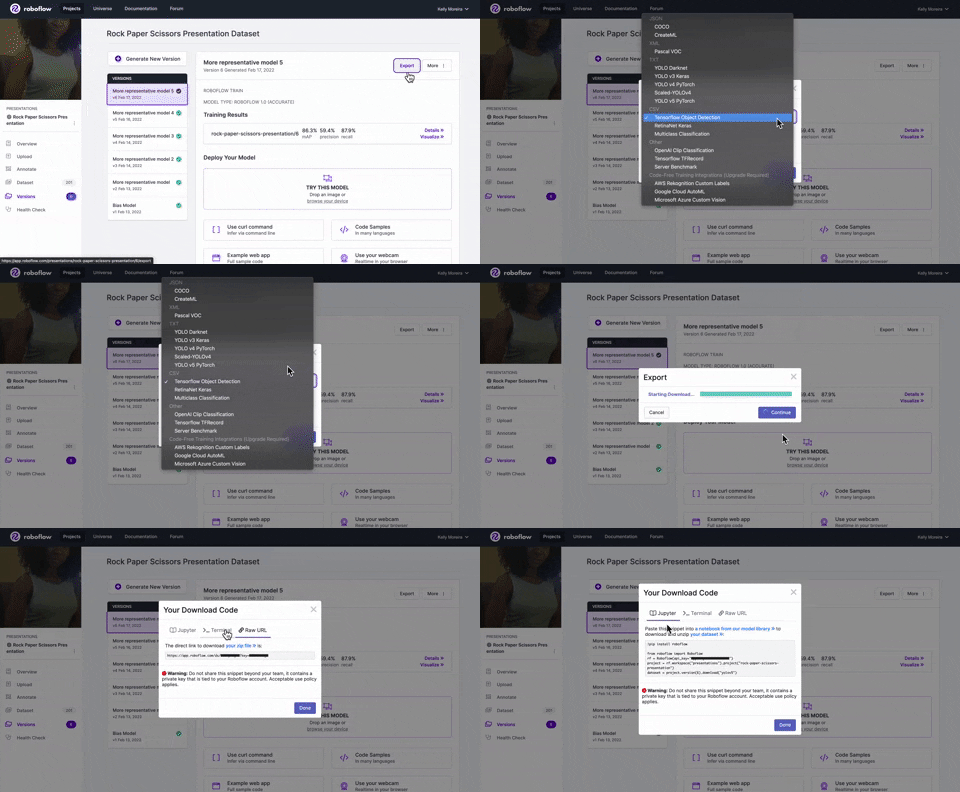
If you have a specific project from your workspace you'd like to run in a notebook follow along on this tutorial Downloading Datasets from Roboflow for Training (Python)
Selecting the format you'd like your project to be exported as while choosing the show download code option will display code snippets you can use in either Jupyter or your terminal. These code snippets will include your api_key, project, and workspace names.
Deving locally
- clone repo
- create a virtual env:
virtualenv local_dev - activate virtual env:
source local_dev/bin/activate - install packages from repo:
pip3 install -r requirements.txt - create script on top level of
ROBOFLOW-PYTHONand reference localroboflowdirectory:from roboflow import Roboflow - when done, uptick the pip package minor version number in
setup.py - manually add any new dependencies to the
requirements.txtand list of dependencies insetup.py(careful not to overwrite any packages that might screw up backwards dependencies for object detection, etc.)
Release history Release notifications | RSS feed


Download files
Download the file for your platform. If you're not sure which to choose, learn more about installing packages.
Source Distribution
Built Distribution
Filter files by name, interpreter, ABI, and platform.
If you're not sure about the file name format, learn more about wheel file names.
Copy a direct link to the current filters
File details
Details for the file roboflow-0.2.12.tar.gz.
File metadata
- Download URL: roboflow-0.2.12.tar.gz
- Upload date:
- Size: 17.9 kB
- Tags: Source
- Uploaded using Trusted Publishing? No
- Uploaded via: twine/3.4.2 importlib_metadata/4.8.1 pkginfo/1.7.1 requests/2.25.1 requests-toolbelt/0.9.1 tqdm/4.62.3 CPython/3.9.4
File hashes
| Algorithm | Hash digest | |
|---|---|---|
| SHA256 |
8e27d3766fea66897aea388eb6fcc9614bac46e2a65974a329b569049bb90be5
|
|
| MD5 |
1b761d5848feebd34aa7dbec27794b45
|
|
| BLAKE2b-256 |
f875d0b3098c6a5529a927b9bc2e5588c40bde9f2fe0b3fc5199e7344ed8fc37
|
File details
Details for the file roboflow-0.2.12-py2-none-any.whl.
File metadata
- Download URL: roboflow-0.2.12-py2-none-any.whl
- Upload date:
- Size: 28.2 kB
- Tags: Python 2
- Uploaded using Trusted Publishing? No
- Uploaded via: twine/3.4.2 importlib_metadata/4.8.1 pkginfo/1.7.1 requests/2.25.1 requests-toolbelt/0.9.1 tqdm/4.62.3 CPython/3.9.4
File hashes
| Algorithm | Hash digest | |
|---|---|---|
| SHA256 |
0d2016fafb8e766e6c7121a84830317287e477ac13c2cebd3e5542155b485132
|
|
| MD5 |
c0fadcb4c6d9d8c030e5c99f8561d8d0
|
|
| BLAKE2b-256 |
7645ca06b8d2241299a1c1ab79631e8a1d9e5464fb4da1a2e615b6b05f6bbb18
|






