
RoboPianist: Dexterous Piano Playing with Deep Reinforcement Learning




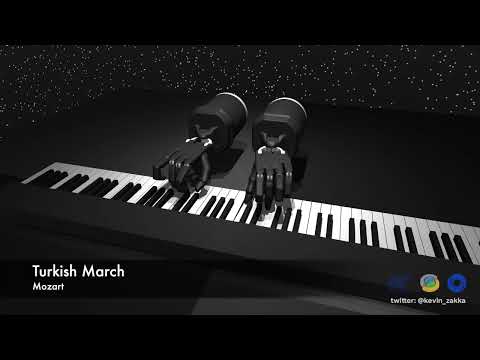
RoboPianist is a new benchmarking suite for high-dimensional control, targeted at testing high spatial and temporal precision, coordination, and planning, all with an underactuated system frequently making-and-breaking contacts. The proposed challenge is mastering the piano through bi-manual dexterity, using a pair of simulated anthropomorphic robot hands.
This codebase contains software and tasks for the benchmark, and is powered by MuJoCo.
- Latest Updates
- Getting Started
- Installation
- MIDI Dataset
- CLI
- Contributing
- FAQ
- Citing RoboPianist
- Acknowledgements
- License and Disclaimer
Latest Updates
- [24/12/2023] Updated install script so that it checks out the correct Menagerie commit. Please re-run
bash scripts/install_deps.shto update your installation. - [17/08/2023] Added a pixel wrapper for augmenting the observation space with RGB images.
- [11/08/2023] Code to train the model-free RL policies is now public, see robopianist-rl.
Getting Started
We've created an introductory Colab notebook that demonstrates how to use RoboPianist. It includes code for loading and customizing a piano playing task, and a demonstration of a pretrained policy playing a short snippet of Twinkle Twinkle Little Star. Click the button below to get started!

Installation
RoboPianist is supported on both Linux and macOS and can be installed with Python >= 3.8. We recommend using Miniconda to manage your Python environment.
Install from source
The recommended way to install this package is from source. Start by cloning the repository:
git clone https://github.com/google-research/robopianist.git && cd robopianist
Next, install the prerequisite dependencies:
git submodule init && git submodule update
bash scripts/install_deps.sh
Finally, create a new conda environment and install RoboPianist in editable mode:
conda create -n pianist python=3.10
conda activate pianist

pip install -e ".[dev]"
To test your installation, run make test and verify that all tests pass.
Install from PyPI
First, install the prerequisite dependencies:
bash <(curl -s https://raw.githubusercontent.com/google-research/robopianist/main/scripts/install_deps.sh) --no-soundfonts
Next, create a new conda environment and install RoboPianist:
conda create -n pianist python=3.10
conda activate pianist

pip install --upgrade robopianist
Optional: Download additional soundfonts
We recommend installing additional soundfonts to improve the quality of the synthesized audio. You can easily do this using the RoboPianist CLI:
robopianist soundfont --download
For more soundfont-related commands, see docs/soundfonts.md.
MIDI Dataset
The PIG dataset cannot be redistributed on GitHub due to licensing restrictions. See docs/dataset for instructions on where to download it and how to preprocess it.
CLI
RoboPianist comes with a command line interface (CLI) that can be used to download additional soundfonts, play MIDI files, preprocess the PIG dataset, and more. For more information, see docs/cli.md.
Contributing
We welcome contributions to RoboPianist. Please see docs/contributing.md for more information.
FAQ
See docs/faq.md for a list of frequently asked questions.
Citing RoboPianist
If you use RoboPianist in your work, please use the following citation:
@inproceedings{robopianist2023,
  author = {Zakka, Kevin and Wu, Philipp and Smith, Laura and Gileadi, Nimrod and Howell, Taylor and Peng, Xue Bin and Singh, Sumeet and Tassa, Yuval and Florence, Pete and Zeng, Andy and Abbeel, Pieter},
  title = {RoboPianist: Dexterous Piano Playing with Deep Reinforcement Learning},
  booktitle = {Conference on Robot Learning (CoRL)},
  year = {2023},
}
Acknowledgements
We would like to thank the following people for making this project possible:
- Philipp Wu and Mohit Shridhar for being a constant source of inspiration and support.
- Ilya Kostrikov for constantly raising the bar for RL engineering and for invaluable debugging help.
- The Magenta team for helpful pointers and feedback.
- The MuJoCo team for the development of the MuJoCo physics engine and their support throughout the project.
License and Disclaimer
MuJoco Menagerie's license can be found here. Soundfont licensing information can be found here. MIDI licensing information can be found here. All other code is licensed under an Apache-2.0 License.
This is not an officially supported Google product.
1 maintainer

Metadata
1 maintainer
Release files for robopianist 1.0.10
For a detailed explanation of source distributions (sdists) and built distributions (wheels), please see the package formats documentation.
Source distribution (sdist)
| File | Size | Uploaded | |
|---|---|---|---|
| robopianist-1.0.10.tar.gz | 7.8 MB | Details |
Built distribution (wheel)
| File | Interpreter | ABI | Platform | Reset |
|---|---|---|---|---|
| robopianist-1.0.10-py3-none-any.whl | Python 3 | none | any | Details |
Total release size: 15.6 MB
Release files / robopianist-1.0.10.tar.gz
| Download URL | robopianist-1.0.10.tar.gz |
|---|---|
| Size | 7.8 MB |
| Tags | Source |
|
SHA-256 checksum How to use checksums |
c60aa885ead3c8bf74f204d79694af19430ee7500bb2a8a75dc30e66b1bcf1c4
|
|
BLAKE2b-256 checksum How to use checksums |
ebd005ca4146debfd0df530b6f1ba78295ad2b61868caa2540b9965578b82d89
|
| Upload date | |
|
Uploaded using Trusted Publishing? What is trusted publishing? |
No |
| Uploaded via |
twine/4.0.2 CPython/3.12.1
|
Release files / robopianist-1.0.10-py3-none-any.whl
| Download URL | robopianist-1.0.10-py3-none-any.whl |
|---|---|
| Size | 7.8 MB |
| Tags | Python 3 |
|
SHA-256 checksum How to use checksums |
785bb78cc50a4a0e2215732ab0726dcf09ffccd24d09287a67d5cbd722750861
|
|
BLAKE2b-256 checksum How to use checksums |
0c87db3bbca95c335d52f0be39908f6b5b63aaf8ca35a468f530fd59ba7f7a99
|
| Upload date | |
|
Uploaded using Trusted Publishing? What is trusted publishing? |
No |
| Uploaded via |
twine/4.0.2 CPython/3.12.1
|














