
RoboMetrics
RoboMetrics is a Python library for measuring system resources. Specially focused on CPU, Memory and GPU usage. It is designed to be used in a wide range of applications, from monitoring system resources to testing and benchmarking.
Goals of RoboMetrics:
- Provide a simple way to measure resources without losing data in the process.
- Be able to measure resources in real-time.
- Interconnect workers in a network.
Installation
To install the client install it via pip:
pip install roborregos-metrics-client
To install the server:
pip install roborregos-metrics-server
Architecture
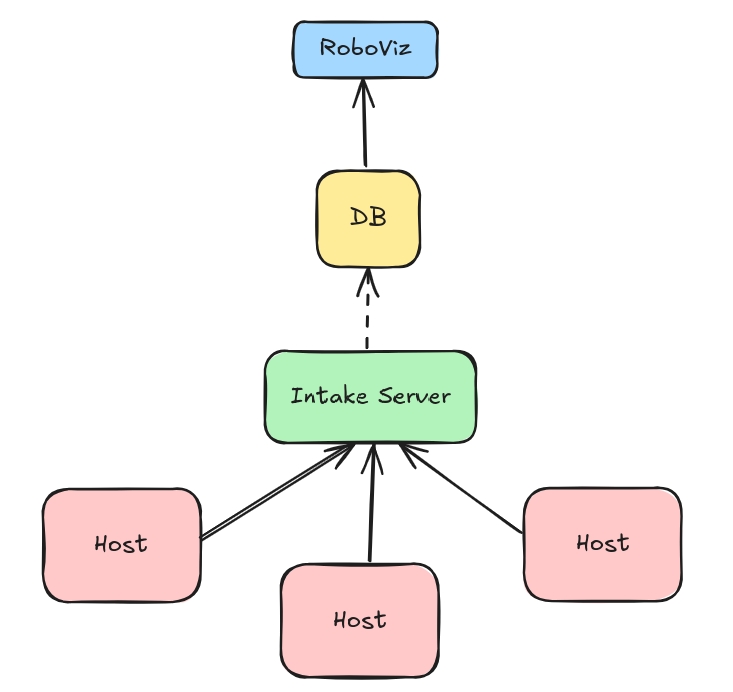
RoboMetrics is designed to be modular, extensible and distributed. It is composed of four main components:
- Process: This represent your normal Python/C++ process/application. Inn order to measure its resources, you only need to import the
robometrics.lib.registermodule and callregister.
from robometrics.lib.register import Register

Register.async_auto_register() # Recomended for non-blocking calls

Register.auto_unregister()
- Workers: The worker is a module made to run in the background in a host machine. The worker is responsible for collecting data from the registered processes and sending it to the intake server (or in its defect, save the data locally).
To start a worker, you only need to run the entry point robometrics.worker.worker.
robometrics-worker
- Intake Server: The intake server is a server that receives data from the workers and stores it in a database. The server is responsible for managing the data and providing an API to access it.
The current implementation relies on a mongo database, but can be worked towards a more general solution. There is a docker-compose file that can be used to start the db.
To start the server, you only need to run the entry point robometrics.server.server.
robometrics-server
- RoboMetrics-Viz: The visualization module is a web application that connects to the intake server and displays the data in a user-friendly way. The web application is built using Next.js and Vega-Lite.
Refer to the viz repo: RoboMetrics-Viz
Recomendations
The modules are pretend to used in a robotics enviroment or a distributed system. This way each host sould be responsible to run a worker and a process. The intake server can be run in a central server or in a server that is always on. (Other alternative is to run the worker and process without a central server and run robometrics-sync to sync the data to a central server)
1 maintainer

Release files for roborregos-metrics-client 2.2.0
For a detailed explanation of source distributions (sdists) and built distributions (wheels), please see the package formats documentation.
Source distribution (sdist)
| File | Size | Uploaded | |
|---|---|---|---|
| roborregos-metrics-client-2.2.0.tar.gz | 9.1 kB | Details |
Built distribution (wheel)
| File | Interpreter | ABI | Platform | Reset |
|---|---|---|---|---|
| roborregos_metrics_client-2.2.0-py3-none-any.whl | Python 3 | none | any | Details |
Total release size: 24.0 kB
Release files / roborregos-metrics-client-2.2.0.tar.gz
| Download URL | roborregos-metrics-client-2.2.0.tar.gz |
|---|---|
| Size | 9.1 kB |
| Tags | Source |
|
SHA-256 checksum How to use checksums |
5702bea0f668f25e01fc9476f3ae2a28a984b5937967e8317fc9f3069334c183
|
|
BLAKE2b-256 checksum How to use checksums |
31f37101ace2d96e531f55ac9896ed1e4c7d309df8ec4ff73ebcbec49e6eb31b
|
| Upload date | |
|
Uploaded using Trusted Publishing? What is trusted publishing? |
No |
| Uploaded via |
twine/5.1.1 CPython/3.10.12
|
Release files / roborregos_metrics_client-2.2.0-py3-none-any.whl
| Download URL | roborregos_metrics_client-2.2.0-py3-none-any.whl |
|---|---|
| Size | 14.9 kB |
| Tags | Python 3 |
|
SHA-256 checksum How to use checksums |
b6610878afbdce926f5692354caa4cd164e658f5141aac90890d17b05534d2fb
|
|
BLAKE2b-256 checksum How to use checksums |
eda1d1ed9b93e1a02595f7838e0e90f3004d08766faa17c817c2b911c0be8ff7
|
| Upload date | |
|
Uploaded using Trusted Publishing? What is trusted publishing? |
No |
| Uploaded via |
twine/5.1.1 CPython/3.10.12
|














