
No project description provided

Project description
RoboMetrics
RoboMetrics is a Python library for measuring system resources. Specially focused on CPU, Memory and GPU usage. It is designed to be used in a wide range of applications, from monitoring system resources to testing and benchmarking.
Goals of RoboMetrics:
- Provide a simple way to measure resources without losing data in the process.
- Be able to measure resources in real-time.
- Interconnect workers in a network.
Installation
To install the client install it via pip:
pip install roborregos-metrics-client
To install the server:
pip install roborregos-metrics-server
Architecture
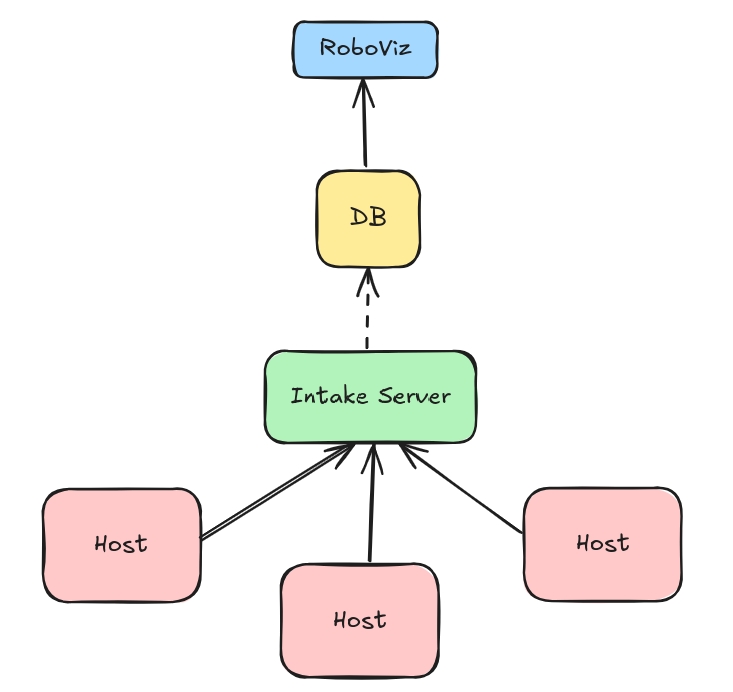
RoboMetrics is designed to be modular, extensible and distributed. It is composed of four main components:
- Process: This represent your normal Python/C++ process/application. Inn order to measure its resources, you only need to import the
robometrics.lib.registermodule and callregister.
from robometrics.lib.register import Register

Register.async_auto_register() # Recomended for non-blocking calls

Register.auto_unregister()
- Workers: The worker is a module made to run in the background in a host machine. The worker is responsible for collecting data from the registered processes and sending it to the intake server (or in its defect, save the data locally).
To start a worker, you only need to run the entry point robometrics.worker.worker.
robometrics-worker
- Intake Server: The intake server is a server that receives data from the workers and stores it in a database. The server is responsible for managing the data and providing an API to access it.
The current implementation relies on a mongo database, but can be worked towards a more general solution. There is a docker-compose file that can be used to start the db.
To start the server, you only need to run the entry point robometrics.server.server.
robometrics-server
- RoboMetrics-Viz: The visualization module is a web application that connects to the intake server and displays the data in a user-friendly way. The web application is built using Next.js and Vega-Lite.
Refer to the viz repo: RoboMetrics-Viz
Recomendations
The modules are pretend to used in a robotics enviroment or a distributed system. This way each host sould be responsible to run a worker and a process. The intake server can be run in a central server or in a server that is always on. (Other alternative is to run the worker and process without a central server and run robometrics-sync to sync the data to a central server)
Release history Release notifications | RSS feed


Download files
Download the file for your platform. If you're not sure which to choose, learn more about installing packages.
Source Distribution
Built Distribution
Filter files by name, interpreter, ABI, and platform.
If you're not sure about the file name format, learn more about wheel file names.
Copy a direct link to the current filters
File details
Details for the file roborregos-metrics-client-2.1.0.tar.gz.
File metadata
- Download URL: roborregos-metrics-client-2.1.0.tar.gz
- Upload date:
- Size: 9.0 kB
- Tags: Source
- Uploaded using Trusted Publishing? No
- Uploaded via: twine/5.1.1 CPython/3.10.12
File hashes
| Algorithm | Hash digest | |
|---|---|---|
| SHA256 |
b4b60ad1aff2f257b9ec60dc79cbdcaec39cfe204a49bb64be6e34c1d44d8302
|
|
| MD5 |
e8ad9732f19a3cdf28c5e23557a34391
|
|
| BLAKE2b-256 |
8c5a9a1eb19df9c58bb4f89da28fbf572f270437df088ef25b258ed168209e31
|
File details
Details for the file roborregos_metrics_client-2.1.0-py3-none-any.whl.
File metadata
- Download URL: roborregos_metrics_client-2.1.0-py3-none-any.whl
- Upload date:
- Size: 14.9 kB
- Tags: Python 3
- Uploaded using Trusted Publishing? No
- Uploaded via: twine/5.1.1 CPython/3.10.12
File hashes
| Algorithm | Hash digest | |
|---|---|---|
| SHA256 |
92ebcd5871cb95cf66630fc0999fd8e0dca8d47a7da18ca255bd09a94841bb04
|
|
| MD5 |
c0750e22eb421cf845c4e4d417080a19
|
|
| BLAKE2b-256 |
22181f641ef8d6b61d1c1d34b0fc9ea98c165830cb8f8c67a1c6287a1a0a6319
|






