
RoboVAST
Variation Automation and Scalable Testing for Robotic Systems.
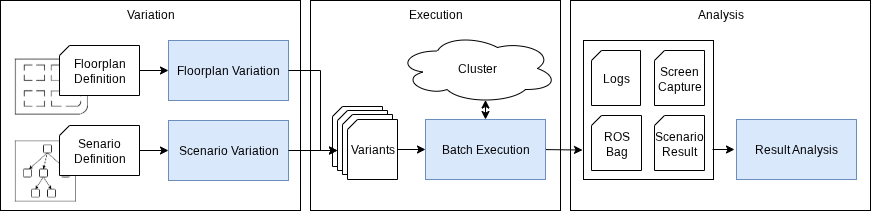
Robot software that passes one demo has not been tested. RoboVAST takes your robotics stack — a Nav2 navigation setup, a manipulation pipeline, whatever drives your robot — and runs it through hundreds of simulated runs that differ in the ways that matter: floorplans, start and goal poses, obstacles, sensor noise, the parameters of the stack itself. Every run is recorded with its provenance, every campaign lands in a queryable index, and the results come back as tables, plots and a web view of each run rather than a directory of bags.
What you get
- Say what to vary, not how. A campaign is one file: which scenario, which factors, how many levels, how many repetitions. RoboVAST does the expansion, the scheduling and the bookkeeping.
- One campaign, any cluster. The same file runs as jobs on a one-node cluster on your laptop or across a Kubernetes cluster. Nothing about the campaign changes; only where it runs and how fast it finishes.
- Reproducible by construction. Pinned container images, recorded seeds and configuration, a run's full provenance beside its data. A result can be traced, and a campaign re-run.
- A simulator by name.
backend: roqsimgives you roqsim, a MuJoCo simulator for mobile robots, arms and mobile manipulators. Another simulator is another package. - Results you can ask questions of. Campaign data goes into a database; explore it in the web UI, in a notebook, or through an AI agent that can author, launch and analyse campaigns through the same interface you use.
- Built on scenario-execution for the single run and the Floorplan-DSL for generated indoor environments. Mobile robot navigation is the reference use case, with a ready-made set of environments and scenarios to start from.
Install
pip install robovast-client              # drive a RoboVAST service someone runs for you
pip install "robovast[nav,roqsim]"       # the core: configuration, results, the MCP server
pip install robovast-cluster             # deploy and run the service on a Kubernetes cluster
Then vast cluster setup deploys the service — into minikube on your own machine, or a
cluster for a team — and vast workspace run launches a campaign.
Documentation, from the quickstart to writing your own variation type or simulator backend: cps-test-lab.github.io/robovast.
Licence
Apache-2.0.
3 maintainers


Release files for robovast 2.2.0
For a detailed explanation of source distributions (sdists) and built distributions (wheels), please see the package formats documentation.
Source distribution (sdist)
| File | Size | Uploaded | |
|---|---|---|---|
| robovast-2.2.0.tar.gz | 1.2 MB | Details |
Built distribution (wheel)
| File | Interpreter | ABI | Platform | Reset |
|---|---|---|---|---|
| robovast-2.2.0-py3-none-any.whl | Python 3 | none | any | Details |
Total release size: 4.9 MB
Release files / robovast-2.2.0.tar.gz
| Download URL | robovast-2.2.0.tar.gz |
|---|---|
| Size | 1.2 MB |
| Tags | Source |
|
SHA-256 checksum How to use checksums |
3fb06675f04e4bf754e125a4c98152b9f8449403c761534bdda8481dda5015a0
|
|
BLAKE2b-256 checksum How to use checksums |
2b733d85946f056b31939f7907215759454b4a85ad867674002ea3b0a2a7b61f
|
| Upload date | |
|
Uploaded using Trusted Publishing? What is trusted publishing? |
Yes |
| Uploaded via |
twine/7.0.0 CPython/3.13.14
|
Provenance
Provenance describes where a file came from. On PyPI, provenance is shared via attestations, which provide a verifiable record of the build or publishing details. View details, limitations and caveats.


PyPI Publish Attestation
PyPI verified that this artifact, at this checksum, originated from the publisher listed below.
Signed by GitHub Actions, verified by PyPI on Sep 24, 2026.
Transparency logRelease files / robovast-2.2.0-py3-none-any.whl
| Download URL | robovast-2.2.0-py3-none-any.whl |
|---|---|
| Size | 3.7 MB |
| Tags | Python 3 |
|
SHA-256 checksum How to use checksums |
7534bec2e4c30ae329039dd5eb8d1437550b8d9bf5fa4e4f50a7af64f8488c34
|
|
BLAKE2b-256 checksum How to use checksums |
9a7ca3f545073c345fcebdda6b72ef3273d7eee50824ea571e996b12095b8889
|
| Upload date | |
|
Uploaded using Trusted Publishing? What is trusted publishing? |
Yes |
| Uploaded via |
twine/7.0.0 CPython/3.13.14
|
Provenance
Provenance describes where a file came from. On PyPI, provenance is shared via attestations, which provide a verifiable record of the build or publishing details. View details, limitations and caveats.
PyPI Publish Attestation
PyPI verified that this artifact, at this checksum, originated from the publisher listed below.
Signed by GitHub Actions, verified by PyPI on Sep 24, 2026.
Transparency log













