
This release is a pre-release and may not be stable for production use.

Chain tools. Skip calls.
RoboZ is a framework for building llm powered agents. The main idea is that every tool may be chained conditionally to a subsequent tool thus allowing easy injection of deterministic flows into agentic processes.



Table of contents
- Basic idea
- Start here: Agent with a tool
- The central abstraction
- Why is this framework useful?
- Chains, factories, truncation and many endpoints
- Try it out
- Shed
- Endpoints and model catalogues
- API key encryption
- Module map
- Robozium
- Development
- License
Basic idea
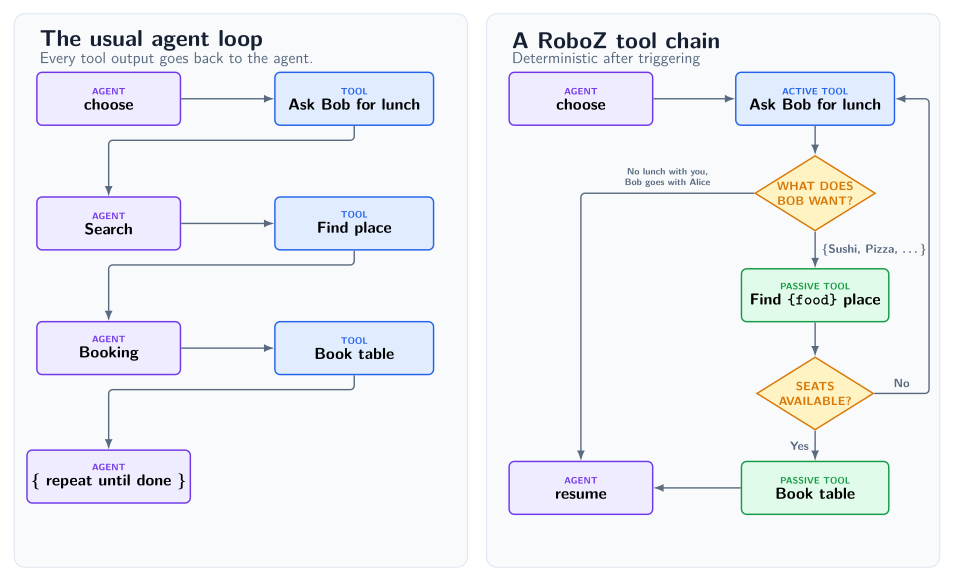
Problems to solve: Context bloat and too many llm calls
Suppose the task we want to achieve is ask our buddy Bob out to lunch and then book a table. For the sake of argument assume that our agent has access to the following tools presented as MCP servers (Note: this is an example, RoboZ has native Tool primitives):
- Ask Bob what they want
- Find a restaurant
- Book a table.
In the usual approach an agent is presented each tool separately in their system prompt and it must call them one-by-one to complete the task. When the agent is completing the task, at every turn it must choose the correct tool, formulate its output accordingly and absorb the reply into its context, which already must contain the specific instructions on how to use each tool. In addition, at each turn one has to wait for the llm to reply, each reply costs tokens and each reply risks a mistake from the llm.
Deterministic chains
The philosophy in RoboZ is that often workflows are mostly deterministic and only on occasion does one need to call an llm. For example in RoboZ an agent would trigger the "ask Bob if they want to have lunch" tool and all subsequent steps come by way of chaining: each tool can be chained to other tools upstream where their outputs are passed down the chain. Each link/edge may introduce a True/False condition, in our case the condition is if Bob is interested in having lunch with us at all. If he is not, RoboZ allows for the chain to break and returns back to the default tool, which for an agentic process is usually "ask the llm what to do next". The default mode is that chained tools are not presented to the agent, they are thus passive or in other words their role is strictly in forming deterministic workflows and they cannot be invoked.
Chaining also provides a permission guard for tool calls. CLI commands, patches, and email attachments share the same permission checks. A denied operation cannot execute; a CLI sequence can continue to an independently guarded fallback.
Start here: Agent with a tool
from random import choice

from roboz import Agent, tool
from roboz.examples.simpsons_quotes import QUOTES
from roboz.llm.endpoints import MockLLMEndpoint
from roboz.models import Empty, Message, Stop


@tool
def get_quote(input: Empty, messages: list[Message]) -> Stop:
    """Return a random Simpsons quote and then stop."""
    return Stop(value=choice(QUOTES))


mock = MockLLMEndpoint(
    responses=[{"action": "get_quote", "rationale": "Need Simpsons quote!"}]
)

agent = Agent(
    name="demo",
    system_prompt="You are a Simpsons quote generator",
    agent_endpoint=mock,
    tools=[get_quote],
)

output, messages_ = agent.invoke()
print(f'"{output.value}"')
The above simple example uses the accompanying quote file. First add RoboZ to your environment as shown in Try it out, then run it with
uv run python -m roboz.examples.simple
It creates an agent that returns a random Simpsons quote. The docstring in the tool is the instruction that the agent sees. It uses a mock endpoint, with pre-determined replies, so you can run it without API keys. The main contracts of RoboZ are already visible:
@toolcreates an instance of a usable tool for the agent- A tool's input and output are typed. Tools also receive the entire message stack as arguments. These are a fixed contract.
- Callable endpoints are single instances, as a hard rule
- Different output types impact the behavior, importantly
Stopbreaks out of the agentic loop agent.invoke()runs the agent and returns its outputStopand messages.
The above does not show the main idea of tool chaining, for that read the following sections.
The central abstraction
An agent is a loop that calls tools. Everything is defined as a tool: Skills, background agents, prompting the agent, prompting the user, running nested agents, start up hooks etc. Everything.
A tool can be triggered in three ways:
- Invoked by an agent: The
prompt_agenttool asks an LLM what to do next and itsInvokeoutput always calls another tool. It is constructed internally forAgentMode.STEERABLEandAgentMode.AUTONOMOUSagents, but it is still just a tool. - By chaining. After an invoked tool has fired RoboZ checks if a chained tool with a true chain condition exists (for more than one true condition for a fork you get a runtime error). If yes, the output is passed on and the process repeats until the first broken chain or all chained tools are exhausted
- As default tools. Defaults are called in order when no tools in a chain are left. A default cannot itself be chained to, so it cannot declare
chained_to. Theprompt_agentis then typically the last default tool for agentic processes.
The traditional agentic approach is then a special case of a RoboZ agent if one just has the prompt_agent as the default with no chaining. An AgentMode.DETERMINISTIC agent has no prompt_agent; its default tools perform tasks directly, allowing deterministic branching through chaining. This is useful for a background agent that performs periodic maintenance work. AgentMode.STEERABLE agents may ask the user for input, while AgentMode.AUTONOMOUS agents cannot.
Why is this framework useful?
Tool Chaining
This may be used to reduce the number of llm calls, leading to a speed increase, lower cost and fewer AI errors. It also provides a useful way of introducing a guard layer for tool calls, which can be used to restrict agentic actions.
Output Truncation
A tool’s output can be hidden from the llm, also partially, and this can start to apply after the message has been shown N times.
Tool outputs are typed
The contract in RoboZ is that every action in the agentic loop is a tool call and all outputs are typed classes. Raw strings or JSON is never exchanged (unless explicitly opted in) as is and typed classes and validation are present throughout, with designated classes for tasks such as Invoke and Stop.
LLM Endpoints are instances
As a fundamental design rule in Roboz, everything that depends on an LLM call must be trivially swappable to another provider or model. This makes changing an agent endpoint trivial and furthermore multi-endpoint functionality, where inside a single agent several endpoints are implemented, quite easy.
To see the above in practice see the complex example below.
Chains, factories, truncation and many endpoints
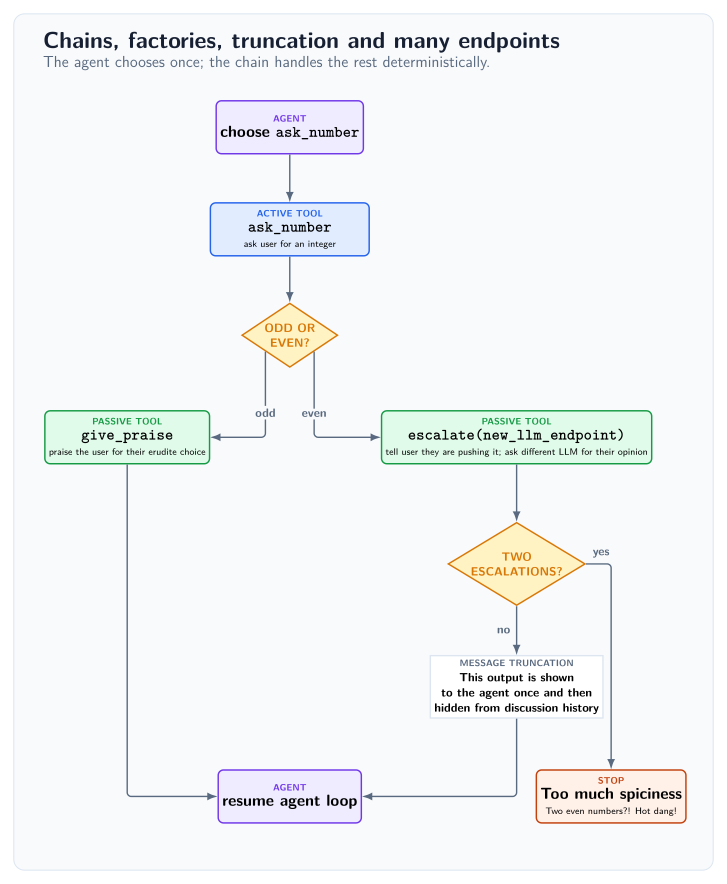
In the code example below we illustrate some of the features that make RoboZ different from other frameworks.
Tool chaining is usually introduced via the decorator argument chained_to, which points from a downstream tool to the upstream tool whose output becomes its input (tools also possess a .chain method). The input/output contract must respect the class inheritance structure, so the upstream output must be a subclass of the downstream input. A possible chain_condition can be passed in, which by definition has access to the tool's input argument and returns a boolean. The chain condition must evaluate to at most one true condition, but it can evaluate to false on all links, in which case scheduling resumes with the next configured default. Defaults may be referenced as upstream parents without also appearing in tools, but cannot declare chained_to themselves. AgentMode.STEERABLE and AgentMode.AUTONOMOUS construct a prompt_agent tool backed by the agent endpoint; AgentMode.DETERMINISTIC uses the configured default tools.
The escalate is an example of a tool factory, which accepts context parameter ctx which is added to the tool's closure and calling the factory with a context argument returns a tool. A very common use case is a tool with an endpoint as a context. In RoboZ all llm endpoints are instances, so it is easy to have a specific endpoint for a tool, that is different from that of the agent, below we construct deterministic mock endpoints so that no API keys are required for the examples. Factories have precisely the same chaining arguments in their decorator as a tool.
Also demonstrated in the escalate factory is message truncation. This parameter is present in all Tool output types and allows the tool to decide if the output should be visible in the conversation passed on to the agent. A message can be truncated partially (show only n chars or just a caller stub) or completely. Importantly, we can choose to start applying the truncation only after the complete message has been shown to the agent n times. Below, we choose to show the message once and then truncate it completely, a useful pattern for example for long tracebacks etc.
All RoboZ tools by definition include the full conversation messages as input. These are not intended to be altered in place (although they can be and this is how e.g. conversation compactification works), but can be used to alter the behavior of tools in a non-trivial way. For example, a start up hook intended to show the agent some information at the start or performing some initial maintenance can simply be one of the default tools that in its body checks if it has already been called and if it has, does nothing.
The tool instruction is its docstring. In addition, the system prompt includes a technical prompt by default that gives the specific tool calling instructions. This can of course be switched off. When in doubt, you can always use the method .show_agent_info() to check the complete agent configuration including the system prompt, tools, dependencies, persistence locations etc.
from builtins import input as read_input

from roboz import Agent, factory, tool
from roboz.llm import EndpointLike, MockLLMEndpoint, get_completion
from roboz.models import Empty, Int, Message, Role, Stop, Str, filter_messages
from roboz.models.truncation import Severity, Truncation
from roboz.runtime.io import interact_with_user
from roboz.runtime.sinks import CliSink
from roboz.tools import stop


@tool
def ask_number(input: Empty, messages: list[Message]) -> Int:
    """Ask the user for an integer, repeating until the response is valid."""
    while True:
        reply = read_input("Enter an integer: ")
        try:
            return Int(value=int(reply))
        except ValueError:
            print("Please enter an integer :)")


@factory(chained_to=ask_number, chain_condition=lambda x: x.value % 2 == 0)
def escalate(input: Int, messages: list[Message], ctx: EndpointLike) -> Stop | Str:
    """An even number?! Need to check this with HR!"""
    interact_with_user("Careful now, that is pretty spicy!", with_reply=False)
    prompt = f"The user chose {input.value}. Is this too hot to handle?! (y/n)?"
    verdict = get_completion(
        endpoint=ctx, messages=[Message(role=Role.SYSTEM, content=prompt)]
    )
    is_first_escalation = (
        len(filter_messages(caller="escalate", messages=messages)) == 0
    )
    if verdict == "y" and not is_first_escalation:
        return Stop(value="Too much spiciness, need to quit!")
    return Str(
        value="HR gave a pass, but still, let's show this to the agent only once.",
        truncation=Truncation(threshold=1, severity=Severity.REMOVE),
    )


@tool(chained_to=ask_number, chain_condition=lambda x: x.value % 2 != 0)
def give_praise(input: Int, messages: list[Message]) -> Str:
    """We need to give praise for such an erudite approach to the problem."""
    interact_with_user(f"{input.value} a fine and bold choice!", with_reply=False)
    return Str(value=f"{input.value} is good, no biggie.")


agent_endpoint = MockLLMEndpoint(
    responses=[
        *(10 * [{"action": "ask_number", "rationale": "This is my only job"}]),
        {"action": "stop", "rationale": "Enough numbers!", "value": ""},
    ]
)
guard_endpoint = MockLLMEndpoint(responses=10 * ["y"])

agent = Agent(
    name="demo",
    system_prompt=f"Without exception, use the {ask_number.name} tool.",
    event_sinks=[CliSink.default()],
    agent_endpoint=agent_endpoint,
    tools=[ask_number, escalate(guard_endpoint), give_praise, stop],
)
agent.invoke()
The above complex example is also bundled with RoboZ. First add the library to your environment as shown in Try it out, then run it with
uv run python -m roboz.examples.complex
Try it out
Add RoboZ to a uv project and run the same bundled example. The one dependency includes the core framework, Shed, Endpoints, and the OpenAI SDK:
uv add roboz
uv run python -m roboz.examples.simple
or with pip, install RoboZ into the active environment first:
python -m pip install roboz
python -m roboz.examples.simple
Shed
roboz.shed provides reusable components built on the core primitives. Use an
individual guarded file or email tool, add a capability to a
DeployableAgent, start from the orchestrator and Librarian definitions, or use
the Robozium recipe to assemble a persistent project agent. Applications own
the model endpoints, event sinks, lifecycle, and filesystem layout.
roboz.shed.agentscontains the orchestrator and Librarian definitions.roboz.shed.capabilitiesbinds reusable behavior to agent configuration.roboz.shed.toolscontains guarded file commands, patching, email contracts, conversation compaction, snapshots, memory consolidation, and retention.roboz.shed.skillssupplies the agent instructions for those tools.roboz.shed.sandboxdefines filesystem scopes and tool permission policies.roboz.shed.dependency_healthchecks configured external resources.
Shed permission policies guard Shed tools. They are not an operating-system sandbox.
roboz.shed.tools.email.proton_bridge provides ProtonBridgeEmailService
and ProtonBridgeSettings. Supply explicit IMAP settings and Bridge-generated
credentials, decrypted before construction. For a self-signed Bridge certificate,
configure certificate_sha256 or a trusted ca_file. Pass the service to
get_work_with_email(service=..., ...).
For Robozium, pass Email(service) and SafeScripts(scripts_dir=...) from
roboz.shed.capabilities through additional_capabilities. Keep the trusted
script directory outside agent-writable paths.
For Linux host execution, use SafeScripts(socket_path=...). See the
SafeScripts guide for helper setup and execution policy.
Guarded file CLI
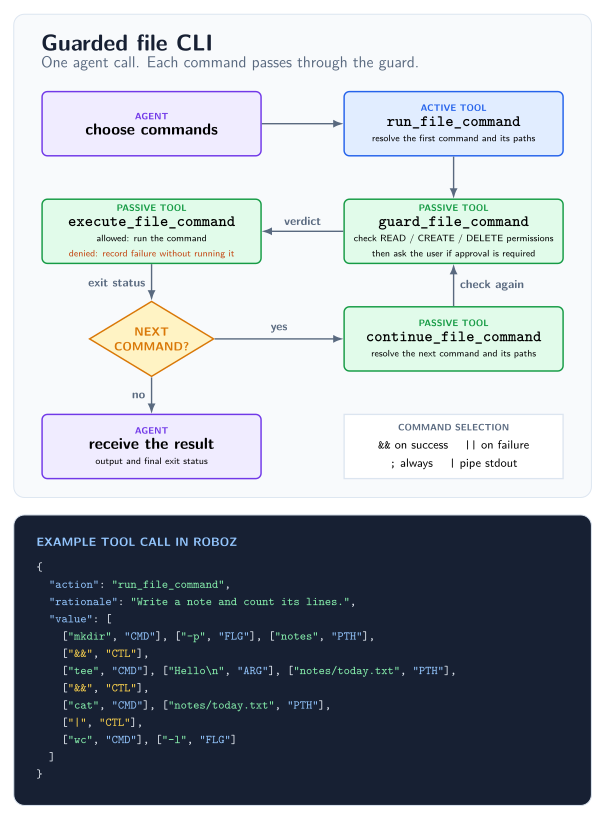
The file-command tool supports cp, mv, pwd, cat, head, tail, wc,
tee, touch, mkdir, grep, rg, ls, find, diff, gio trash, and
rm. The FileCommands capability adds the tool and its CLI skill to an
agent. You can also use the factory directly:
from pathlib import Path

from roboz.shed.models import ActionVerdict, Operation, PermissionRule
from roboz.shed.skills import cli_skill
from roboz.shed.tools import get_run_file_command

file_tools = get_run_file_command(
    base=Path.cwd(),
    default_verdict=ActionVerdict.deny,
    allow_rules=[
        PermissionRule(
            pattern="notes/**",
            operations={Operation.READ, Operation.CREATE, Operation.DELETE},
        ),
    ],
)
Pass file_tools in the agent's tools and cli_skill in auto_loaded_skills
or skills. FileCommands registers both automatically.
run_file_command takes one ordered value array of [value, tag] pairs:
CMD for commands, FLG for flags, ARG for argument values, PTH for paths,
and CTL for control operators. The diagram's example creates a note and
counts its lines.
Use && for dependent steps, || for a fallback, ; for independent commands,
and | to pipe stdout. Pipelines bind first; && and || run left to right.
Each reached command gets its own permission checks. Pipes are buffered, and
earlier file changes are not rolled back if a later command fails.
Command options are separate FLG tokens; options taking values use the next
ARG or PTH token. -- ends options. Source paths accept * within a path
component and one recursive **/ component; unmatched patterns fail. ? and
bracket patterns are unsupported, and destinations must be literal paths.
Relative paths are resolved from base. A rule for directory/** covers the
directory and its descendants.
| Commands | Options | Permission checks |
|---|---|---|
pwd, ls, find |
pwd -P; ls -l/-a/-h/-R; find -name/-type/-maxdepth/-print |
READ on the base or selected roots |
cat, head, tail, wc, diff |
cat -n/-b; head/tail -n/-c; wc -l/-w/-c; diff -u/-q |
READ on selected files |
grep, rg |
-n/-i/-F/-m; grep -r/-R; rg --hidden/--no-ignore |
READ on selected files or search trees |
cp, mv |
-t/-T/-v/-f; cp -r/-R |
READ on copied sources, CREATE on destinations, DELETE on moved sources or overwritten entries |
tee, touch, mkdir |
tee -a; touch -c/-d/-r; mkdir -p/-v |
CREATE on targets; existing file updates also need READ and DELETE |
gio trash, rm |
gio trash; rm -r/-f |
DELETE on targets and recursive descendants |
The CLI skill is the full option allowlist and describes command-specific operand ordering and restrictions.
Endpoints and model catalogues
roboz.endpoints builds concrete LLMEndpoint and TranscriptionEndpoint
objects, provides ready-made endpoint examples, and can generate a typed
catalogue for an application. Both forms expose provider and model names
to Pylance and other Python type checkers.
Only OpenAI-compatible API protocols are currently supported. Catalogue data contains provider URLs, credential environment-variable names, and model routes. It never contains credential values.
The OpenAI SDK is installed with RoboZ, but client construction and credential lookup remain deferred until an endpoint is materialized or used. Importing and inspecting the bundled catalogue needs no credentials.
Use the bundled examples
The installed catalogue includes example routes for OpenRouter, Cerebras, and Groq:
from roboz.endpoints.inventory import openrouter

endpoint = openrouter.z_ai__glm_5_3
print(endpoint.model_name)
print(endpoint.max_context_tokens)
The bundled declarations are shipped with RoboZ, so an editor can complete provider and model attributes without loading credentials or constructing SDK clients.
Create a project catalogue
Run these commands from the application project root:
uv run python -m roboz.endpoints inventory init
# Edit the generated models.json.
uv run python -m roboz.endpoints inventory generate
For a src-layout project named my-app, this creates:
src/my_app/model_catalogue/
├── __init__.py
├── models.json       # edit this
└── providers.py      # generated; do not edit
The default location follows the package layout: src/my_app/ or my_app/.
If neither package exists, the CLI uses model_catalogue/ in the project root.
Use --path if automatic detection chooses the wrong location.
Add providers and models to models.json, then run generate again. The
generated module contains explicit type declarations for every provider and
model, giving Pylance the same autocomplete and concrete endpoint types as the
bundled catalogue.
For example, a provider entry can contain:
"my_service": {
  "base_url": "https://models.example.com/v1",
  "api_key_env": "MY_SERVICE_API_KEY_SECRET",
  "models": {
    "my_chat_model": {
      "model_id": "my-chat-model",
      "endpoint_type": "llm",
      "max_context_tokens": 128000
    }
  }
}
Import the generated endpoint through the application package:
from my_app.model_catalogue.providers import my_service

endpoint = my_service.my_chat_model
Provider and model keys become Python attributes and must be valid public
Python identifiers. Chat models are typed as LLMEndpoint; transcription
models are typed as TranscriptionEndpoint. Regenerate after every JSON change
so runtime behavior and editor completion stay in sync. Chat models require
max_context_tokens; transcription models do not accept it.
Use --path to choose another JSON location. generate creates providers.py
beside that file unless --output selects another module:
uv run python -m roboz.endpoints inventory init --path src/my_app/endpoints/models.json
uv run python -m roboz.endpoints inventory generate --path src/my_app/endpoints/models.json
Create the parent Python package first, then reuse the same paths when
regenerating. generate replaces only a module carrying its generated-file
marker. Restart a running application after generation to import the new
snapshot.
Restore the bundled examples
To discard project customizations and start again from the examples in the installed RoboZ version:
- Delete the catalogue's
models.json. - Run
inventory initto recreate it. - Run
inventory generateto refresh the generated Python module.
init never overwrites JSON. generate replaces an existing Python file only
when it carries the RoboZ generated-file marker.
Run python -m roboz.endpoints inventory <command> --help for command options.
API key encryption
Credential integrations can import these public constants from
roboz.endpoints or roboz.endpoints.env:
from roboz.endpoints import (
    DEFAULT_ENCRYPTED_ENV_PATH,  # Final[Path]: Path(".env.encrypt")
    ENCRYPTED_NAMESPACE,  # Final[str]: "roboz:"
    SECRET_SUFFIX,  # Final[str]: "_SECRET"
)
SECRET_SUFFIX identifies secret variable names. ENCRYPTED_NAMESPACE
identifies RoboZ ciphertext, including unsupported versions; the current
format starts with roboz:v1:. DEFAULT_ENCRYPTED_ENV_PATH is the relative
encrypted file path used by default loading. These constants describe the
supported format and defaults; they are not configuration settings.
Keep using an ordinary .env file with entries such as
MY_SERVICE_API_KEY_SECRET=... or
PROTON_BRIDGE_PASSWORD_SECRET=.... Encrypt its nonempty _SECRET values from
the project directory:
uv run python -m roboz.endpoints env encrypt
# Use --path another.env for a different file.
The command asks for a hidden password twice, or consumes
ROBOZ_ENV_PASSWORD from its process environment. It writes .env.encrypt
beside the untouched .env source (or adds .encrypt to a custom path).
The new file contains the parsed assignments with nonempty _SECRET values
encrypted; comments and original formatting stay only in the source. You may
delete the plaintext source after checking the result. Both files use dotenv
syntax, so python-dotenv can parse the ciphertext but cannot decrypt it.
Plaintext .env files continue to load without a password.
An application can load secrets before starting an agent:
from getpass import getpass
from roboz.endpoints import load_secrets

load_secrets(password=getpass("Secret password: "))
With no path argument, load_secrets() prefers .env.encrypt and falls back
to .env. Pass path= to choose a file explicitly. Endpoints also load missing
keys when first used. For deferred loading, set
ROBOZ_ENV_PASSWORD in the application's process environment. The loader
consumes it only when encrypted secrets need decrypting; an explicit api_key=
on the adapter takes precedence. All pending secrets are validated before any
are added to os.environ. Existing usable environment keys take precedence
over file values.
Re-running encryption recreates .env.encrypt from the plaintext source. A
wrong password or damaged ciphertext fails during loading without injecting
pending keys. The command writes no password or private-key file. Keep the
password outside the repository and retain it for future decryption. Loaded
secrets remain available in the application's process environment. Consuming
a password removes only this process's environment entry; it cannot erase a
parent-shell copy or guarantee memory wiping.
Module map
| Module | Provides |
|---|---|
roboz |
Agent, tool, factory, and skill authoring facade. |
roboz.agent |
Agent implementations, subagents, and background agents. |
roboz.deployment |
Reusable agent definitions and capabilities. |
roboz.llm |
Endpoint contracts, selection, calls, and request policies. |
roboz.models |
Typed messages and tool input/output models. |
roboz.runtime |
Events, pipes, sinks, persistence, and observability. |
roboz.shed |
Reusable capabilities, guarded tools, agents, and recipes. |
roboz.endpoints |
OpenAI-compatible adapters and typed model catalogues. |
Robozium
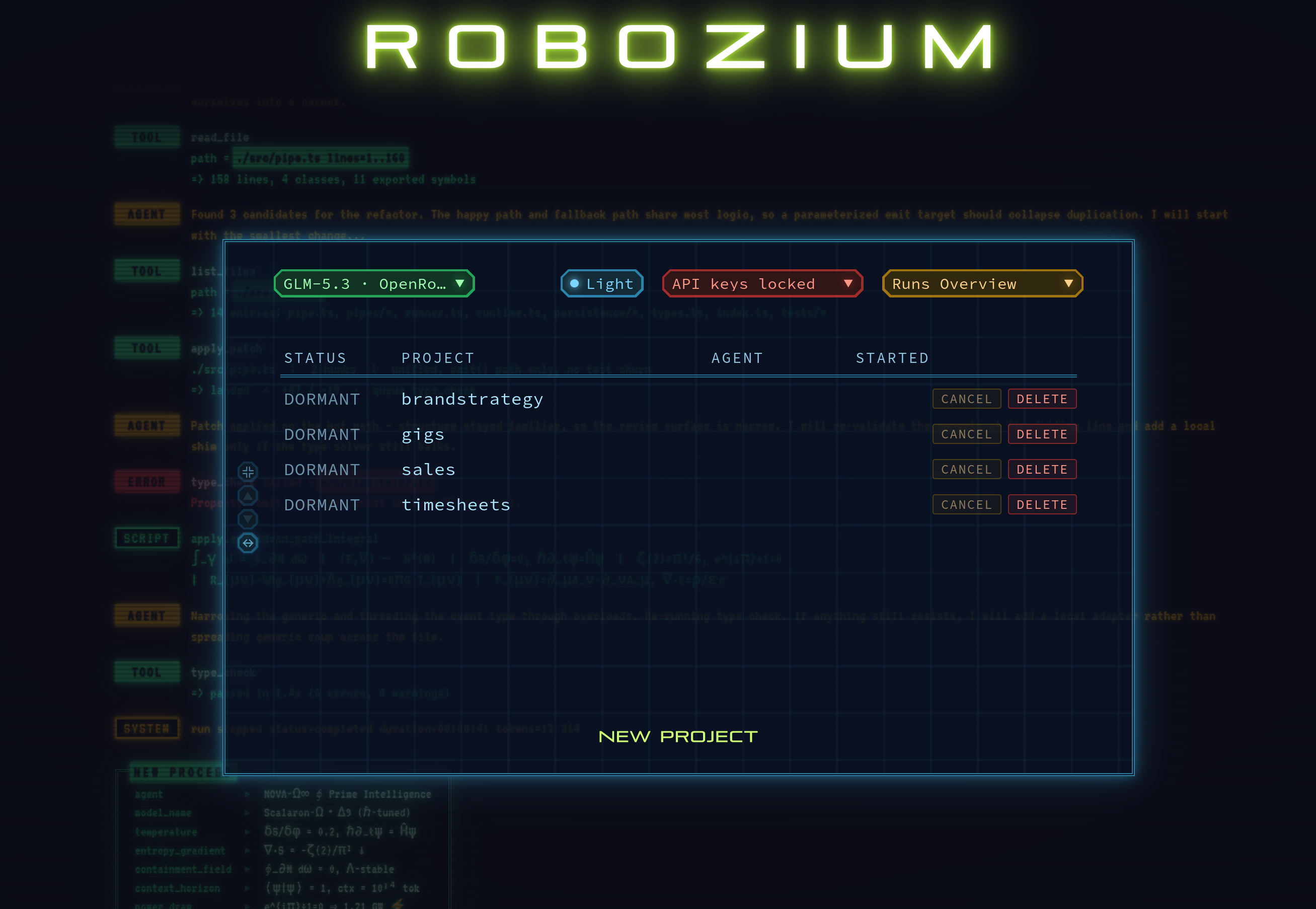
Robozium, a multi-agent app built on RoboZ, is now published as open source. See the Robozium README for more information and instructions for running it locally.
Development
uv sync --locked --dev
uv run pytest
uv run ruff check
uv run pyright
bash scripts/run_type_tests.sh
See CONTRIBUTING.md for development and testing guidance. The
verification workflow defines the complete CI
gate.
Roboz is typed and ships a PEP 561 py.typed marker.
License
Roboz is licensed under the Apache License 2.0. Copyright © 2026 Tachion Oy.
1 maintainer

Metadata
1 maintainer
Release files for roboz 0.5.0rc1
For a detailed explanation of source distributions (sdists) and built distributions (wheels), please see the package formats documentation.
Source distribution (sdist)
| File | Size | Uploaded | |
|---|---|---|---|
| roboz-0.5.0rc1.tar.gz | 228.3 kB | Details |
Built distribution (wheel)
| File | Interpreter | ABI | Platform | Reset |
|---|---|---|---|---|
| roboz-0.5.0rc1-py3-none-any.whl | Python 3 | none | any | Details |
Total release size: 519.7 kB
Release files / roboz-0.5.0rc1.tar.gz
| Download URL | roboz-0.5.0rc1.tar.gz |
|---|---|
| Size | 228.3 kB |
| Tags | Source |
|
SHA-256 checksum How to use checksums |
85972c88cb53c45cfe2de063ececbee3bab043aa67d9792bb2e7faffc8dd7893
|
|
BLAKE2b-256 checksum How to use checksums |
fb87a88187b100f68350532efcaeb3a8287717c487cdf00c29a3adfc5f5df55d
|
| Upload date | |
|
Uploaded using Trusted Publishing? What is trusted publishing? |
Yes |
| Uploaded via |
twine/7.0.0 CPython/3.13.14
|
Provenance
Provenance describes where a file came from. On PyPI, provenance is shared via attestations, which provide a verifiable record of the build or publishing details. View details, limitations and caveats.


PyPI Publish Attestation
PyPI verified that this artifact, at this checksum, originated from the publisher listed below.
Signed by GitHub Actions, verified by PyPI on Oct 4, 2026.
Transparency logRelease files / roboz-0.5.0rc1-py3-none-any.whl
| Download URL | roboz-0.5.0rc1-py3-none-any.whl |
|---|---|
| Size | 291.4 kB |
| Tags | Python 3 |
|
SHA-256 checksum How to use checksums |
351957897421a2bf75212b7411a25f4288bd71a59b02284d4905e3c191ca10f4
|
|
BLAKE2b-256 checksum How to use checksums |
ef89dbf4ee74a230e8d879bdb789caac46728f78f53183399f749fc5f3c31a3d
|
| Upload date | |
|
Uploaded using Trusted Publishing? What is trusted publishing? |
Yes |
| Uploaded via |
twine/7.0.0 CPython/3.13.14
|
Provenance
Provenance describes where a file came from. On PyPI, provenance is shared via attestations, which provide a verifiable record of the build or publishing details. View details, limitations and caveats.
PyPI Publish Attestation
PyPI verified that this artifact, at this checksum, originated from the publisher listed below.
Signed by GitHub Actions, verified by PyPI on Oct 4, 2026.
Transparency log













